MT5 backtesting spread
Historical data are used you can't change it.
Maybe it's doable with new feature to import custom data, but I didn't check yet.
Historical data are used you can't change it.
Maybe it's doable with new feature to import custom data, but I didn't check yet.
Thank you.
Historical data are used you can't change it.
Maybe it's doable with new feature to import custom data, but I didn't check yet.
Here are what I did:
1. Made a whole new custom symbol which was modified spread from floating into a fixed number.
2. Downloaded tick and M1 timeframe data from Tickstory.
3. Opened M1_bar file (in *.csv ) and manually edited 'spread' colume of over 5 million of rows to a fixed number.
4. Loaded tick and M1 bar file (after changing spread) into custom symbol which was created in 1st step.
And spread was still floating during backtest. Is there any ways else to fix this issue?
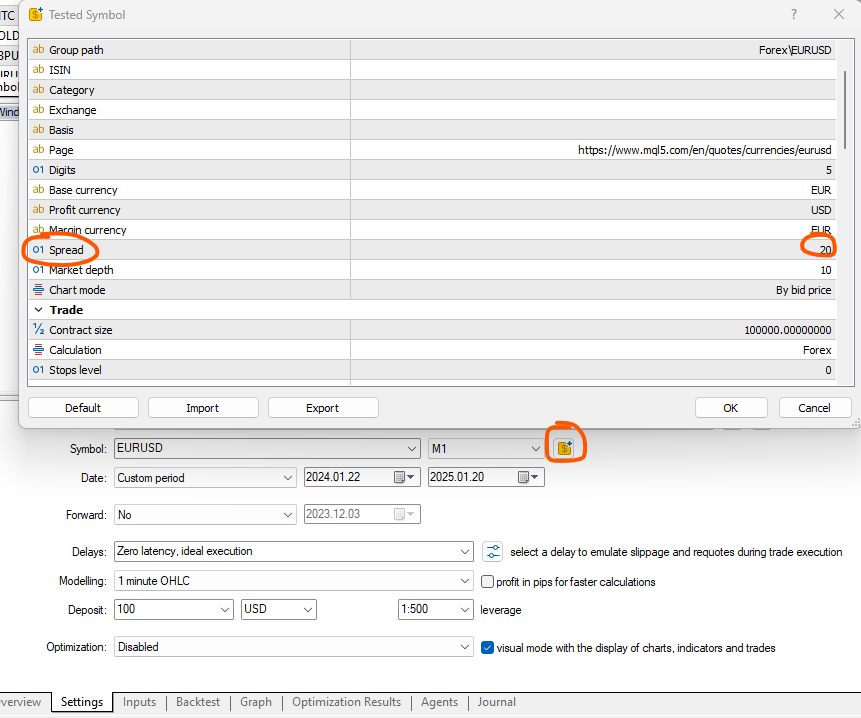
For example, in the capture I set the spread to 20, so I get a minimum of 20 on the chart, sometimes more. Or am I missing something?
Best Reguards,
ZeroCafeine.
Hi everyone,
For example, in the capture I set the spread to 20, so I get a minimum of 20 on the chart, sometimes more. Or am I missing something?
Best Reguards,
ZeroCafeine.
I do not think that you can change it. Unless you create your own custom made prices. see msg from moderator in first responses to the original ops question.
Hi everyone,
For example, in the capture I set the spread to 20, so I get a minimum of 20 on the chart, sometimes more. Or am I missing something?
Best Reguards,
ZeroCafeine.
This will be a fixed spread if you use ohlc backtests. I think most answers on this topic are outdated which is why I wanted to update.
If you use every ticks based on real ticks, you can not set a spread with this symbol modification panel, because spreads are essentially contained in the real ticks themselves. So every tick based on real ticks will always use the spread of the ticks you have.
Whereas for 1 min ohlc you can set the spread exactly like you have showed. Or at least that is the case for my broker. I've ran 2 ohlc tests one with 100 as spread and one with 1000 as spread and the difference in the results was wery significant.
This will be a fixed spread if you use ohlc backtests. I think most answers on this topic are outdated which is why I wanted to update.
If you use every ticks based on real ticks, you can not set a spread with this symbol modification panel, because spreads are essentially contained in the real ticks themselves. So every tick based on real ticks will always use the spread of the ticks you have.
Whereas for 1 min ohlc you can set the spread exactly like you have showed. Or at least that is the case for my broker. I've ran 2 ohlc tests one with 100 as spread and one with 1000 as spread and the difference in the results was wery significant.

- Free trading apps
- Over 8,000 signals for copying
- Economic news for exploring financial markets
You agree to website policy and terms of use
Hello,
How can I set fixed spreads in MT5 backtesting ? It's always floating?
Thank you.