Scripts: Switching charts
Good evening! Is it possible to loop the script? So that after the end of open charts it would start all over again, instead of finishing the work.
In principle, you can. How many cycles do you have to do? Or like a kaleidoscope - all day long?
Well, a whole day would be better.....
In that case, you need an EA in which to call the whole carousel in OnTimer(). I'll think about it.
Added. Fixed the text.
Anyway, here is the Expert Advisor. The main thing is to remember that it is a bit problematic to switch off/unload the Expert Advisor when infinitely showing charts :) . Therefore, let me remind you that this Expert Advisor is displayed in the "Navigator" window:
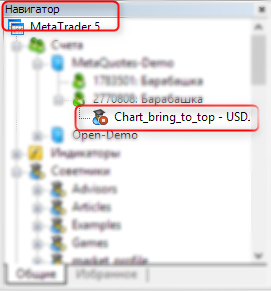
Ah, here is the Expert Advisor itself:
//+------------------------------------------------------------------+
//|Chart_bringing_to_top.mq5 |
//|Copyright © 2016, Vladimir Karputov |
//| http://wmua.ru/slesar/ |
//+------------------------------------------------------------------+
#property copyright "Copyright © 2016, Vladimir Karputov"
#property link      "http://wmua.ru/slesar/"
#property version   "1.00"
#property description "The indicator switches all open charts after a certain interval."
//--- input parameter
//--- input parameter
input uchar Seconds=3;              // interval // interval
//---
bool        IsCicle=false;          // true - in cicle // true - in cicle
//+------------------------------------------------------------------+
//| Expert initialisation function|
//+------------------------------------------------------------------+
int OnInit()
  {
//--- create timer
   if(Seconds<3)
     {
      MessageBox("Interval must be greater than 3 seconds");
      EventSetTimer(3);
     }
   else
      EventSetTimer(Seconds);
//---
   return(INIT_SUCCEEDED);
  }
//+------------------------------------------------------------------+
//| Expert deinitialisation function|
//+------------------------------------------------------------------+
void OnDeinit(const int reason)
  {
//--- destroy timer
   EventKillTimer();

  }
//+------------------------------------------------------------------+
//| Expert tick function|
//+------------------------------------------------------------------+
void OnTick()
  {
//---

  }
//+------------------------------------------------------------------+
//| Timer function|
//+------------------------------------------------------------------+
void OnTimer()
  {
//---
   if(IsCicle)
      return;
   IsCicle=true;
//---
   uchar temp_second;
   if(Seconds<3)
      temp_second=3;
// variables for chart ID
   long currChart,prevChart=ChartFirst();
//--- Show the first graph
//--- Show the first chart
   ChartBringToTop(prevChart);
   Sleep((int)MathAbs(temp_second*1000));
   int i=0,limit=100;
//Print("ChartFirst = ",ChartSymbol(prevChart)," ID = ",prevChart);
// We probably don't have more than 100 open graphs
// We have certainly not more than 100 open charts
   while(i<limit)//
     {
      // Based on the previous one, we get a new graph
      // Get the new chart ID by using the previous chart ID
      currChart=ChartNext(prevChart);
      if(currChart<0) break;  // Have reached the end of the chart list // Have reached the end of the chart list
                              //Print(i," ",ChartSymbol(currChart)," ID =",currChart);
      ChartBringToTop(currChart);
      Sleep((int)MathAbs(temp_second*1000));
      // Remember the ID of the current chart for ChartNext()
      // Let's save the current chart ID for the ChartNext()
      prevChart=currChart;
      // Let's not forget to increase the counter
      // Do not forget to increase the counter
      i++;
     }
   IsCicle=false;
  }
//+------------------------------------------------------------------+
//| Send a command to the terminal to show the graph on top of all other graphs. ||
//| Sends command to the terminal to display the chart above all others |
//+------------------------------------------------------------------+
bool ChartBringToTop(const long chart_ID=0)
  {
//--- reset the error value
   ResetLastError();
//--- show the graph on top of all others
   if(!ChartSetInteger(chart_ID,CHART_BRING_TO_TOP,0,true))
     {
      //--- output the error message to the "Experts" log.
      Print(__FUNCTION__+", Error Code = ",GetLastError());
      return(false);
     }
   ChartRedraw(chart_ID);
//--- successful execution
   return(true);
  }
//+------------------------------------------------------------------+
Thank you for your promptness. But the Expert Advisor does not work correctly. If more than two charts are open, the Expert Advisor jumps from the 1st chart to the last chart, skipping the rest between them. And there is no transition from the last to the 1st chart, i.e. the carousel does not work.
The terminal keeps its own internal accounting of the order of opening charts. And if you shuffle charts in the process of work, it will not change the internal accounting. Do an experiment: close all charts, open five new ones and attach the Expert Advisor to chart number 3.
I checked, everything is the same. It switches from the 3rd chart to the last one and then stops. It doesn't switch from the last to the 1st, there is no carousel.
I don't know if it affects it - I have mt4. I renamed the file to mt4 and made a compilation. The earlier script switches correctly....
EA version 1.01. Fixed a bug and replaced the variable name. Instead of
Seconds
now the variable has the name
Seconds_because in MQL4 the word Seconds cannot be used as a variable name. (Help on Seconds).
The Expert Advisor can be used both in MetaTrader 5 and MetaTrader 4 (for MT4 you just need to rename the file).
A video of the EA working - a kaleidoscope that switches all available charts in infinite mode:

- Free trading apps
- Over 8,000 signals for copying
- Economic news for exploring financial markets
You agree to website policy and terms of use
Switching charts:
Author: Vladimir Karputov