 MetaTrader 5
 Experts
 Indicators
 Scripts
 Libraries
 Storage
Join our fan page

OnChart Candle Countdown Clock - indicator for MetaTrader 5

- Views:
- 2096
- Rating:
- Published:
- Updated:
-
 You are missing trading opportunities:
- Free trading apps
- Over 8,000 signals for copying
- Economic news for exploring financial markets
Registration Log inYou agree to website policy and terms of use
If you do not have an account, please register -
 Need a robot or indicator based on this code? Order it on Freelance
Go to Freelance
Need a robot or indicator based on this code? Order it on Freelance
Go to Freelance
OnChart Candle Countdown Clock works on all the time frames.
Below are the parameters where you can choose your preferred settings on how it appears on your chart.
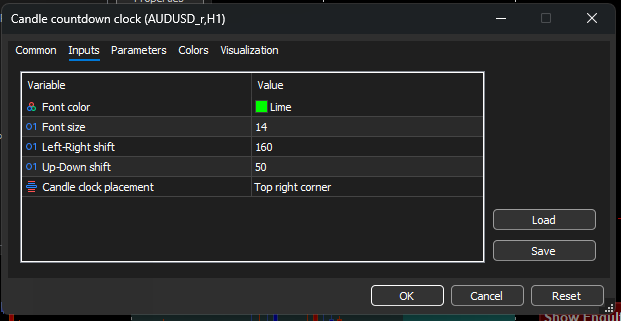
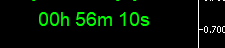
How it displays on the chart. Very handy and takes no significant space.
It is simple to install and use.
FEATURES
1. Font color: You can change the color of the clock text on the chart to your preferred color.
2. Font size: Here also, you can change the text size to your preferred size on your chart as you like. No stress.
3.Left-right Shift: This what you use to control the placement of the clock on your chart. This one helps to shift it to either left or right.
4. Up--Down Shift: You can use this one to shift the clock up and down the chart depends on your preference.
5. Candle clock placement: This will determine if you want it placed at any corner of the chart that you like.
That is all it includes.
Premium Discount Range Mapper
A lightweight educational MetaTrader 5 indicator that maps Premium, Equilibrium and Discount areas from a selected market range.
 RealCost XAU Session Cost Snapshot MT5
Open-source MT5 script that records XAUUSD/GOLD symbol settings, spread, tick value, contract size, volume step, stop/freeze levels, swap, and account context to the log and optional CSV.
Spread Calculator
Spread calculator is created to display the current spread on any currency pair on the chart.
ATR Ranked Support and Resistance Zones
An educational MT5 indicator that builds support and resistance as price zones from confirmed pivots. Nearby reactions are merged using ATR-based distance, then ranked by repeated tests, rejection strength and recency. Only the strongest zones are displayed to keep the chart readable.