 MetaTrader 5
 Experts
 Indicators
 Scripts
 Libraries
 Storage
Join our fan page

MQTTFive — MQTT 5.0 Client Library - library for MetaTrader 5

📊 My workday is a marathon of creating neural networks and algorithmic trading robots, which I make trade through MetaTrader. I teach them to play the market just like I taught my dog to balance a treat on his nose.
- Views:
- 954
- Rating:
- Published:
- Updated:
-
 You are missing trading opportunities:
- Free trading apps
- Over 8,000 signals for copying
- Economic news for exploring financial markets
Registration Log inYou agree to website policy and terms of use
If you do not have an account, please register -
 Need a robot or indicator based on this code? Order it on Freelance
Go to Freelance
Need a robot or indicator based on this code? Order it on Freelance
Go to Freelance
MQTTFive — an MQTT 5.0 client for MQL5
A library (#include) for connecting MetaTrader 5 expert advisors and scripts to MQTT brokers (Mosquitto, EMQX, HiveMQ). It allows you to publish prices and signals, receive commands from external systems and monitor the status of expert advisors.
No DLLs — pure MQL5, with its own socket API. MQTT v5.0 protocol.
Features
- QoS 0, 1, 2 with automatic retry of undelivered messages
- CONNECT/CONNACK properties: session duration, maximum number of packets accepted, maximum number of topic aliases.
- Delayed publication queues
- Topic aliases – reduces traffic on duplicate topics.
- Flow control – quota management for the maximum volume of data received.
- Subscription options: no_local, retain_as_published, retain_handling
- TLS/SSL, binary payload, UTF-8
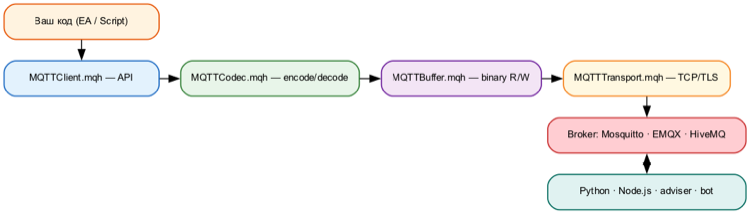
Installation
- Copy the 5 files from the archive into the MQL5/Include/MQTTFive/ folder
- In the code: #include <MQTTFive/MQTTClient.mqh>
Example – publishing a price
#include <MQTTFive/MQTTClient.mqh>

void OnStart ()
  {
   MQTTClient client;
   MQTTConnectParams params;
   params.Init();
   params.client_id = "price_pub" ;

   if (client.Connect( "127.0.0.1" , 1883 , params))
     {
       double bid = SymbolInfoDouble ( _Symbol , SYMBOL_BID );
      client.Publish( "mt5/price/" + _Symbol , DoubleToString (bid, _Digits ), 0 );
      client.Disconnect();
     }
  }
Example – Subscribing to signals
MQTTClient *mqtt;

void OnSignal( string &topic, uchar &payload[], uint payload_len)
  {
   string msg = CharArrayToString (payload, 0 , ( int )payload_len, CP_UTF8 );
   Print ( "Signal: " , topic, " = " , msg);
  }

void OnStart ()
  {
   mqtt = new MQTTClient();
   mqtt.SetCallback(OnSignal);
   MQTTConnectParams params;
   params.Init();
   params.client_id = "signal_sub" ;
   mqtt.Connect( "127.0.0.1" , 1883 , params);
   mqtt.Subscribe( "trade/signal/#" , 1 );
   while (! IsStopped ())
     {
      mqtt.Loop();
       Sleep ( 100 );
     }
   mqtt.Disconnect();
   delete mqtt;
  }
Main methods
| Connect(host, port, params, useTLS) | Connecting to the broker |
| Disconnect() | Properly terminating the session |
| ForceDisconnect() | Terminate the TCP connection (triggers Will) |
| Publish(topic, payload, qos, retain) | Publish a message |
| Subscribe(topic, qos) | Subscribe to this topic |
| Unsubscribe(topic) | Unsubscribe |
| Loop() | Packet processing, connection maintenance, retries |
| SetCallback(func) | Callback function for incoming messages |
Requirements
- MetaTrader 5 (build 3390+)
- MQTT 5.0 broker (Mosquitto >= 5.0, EMQX, HiveMQ)
Documentation: github.com/chekh/MQTTFive
Licence: MIT
Translated from Russian by MetaQuotes Ltd.
Original code: https://www.mql5.com/ru/code/73373
 Consecutive Bars (with history)
An oscillator that shows 4 line studies: 1 for consecutive up bars, 1 for consecutive down bars, 1 for the average consecutive up bars, and 1 for the average consecutive down bars.
Multi-Timeframe Candle Map
An educational MT5 panel that maps the live price vertically inside four developing candles and summarizes location alignment, dispersion, candle direction and time remaining.
Prop Firm Risk Dashboard - daily loss and drawdown monitor
A read-only on-chart panel that tracks your account against a daily-loss limit and a max-drawdown limit, with color-coded OK / WARNING / DANGER status. Monitoring only - it does not place, modify or close any orders.
Spread Monitor Panel - live spread with spike alerts
On-chart panel with the live spread of the chart symbol - current, minimum, average and maximum since attach - color-coded against your warning and danger thresholds, plus an optional alert when the spread stays at the danger level for N consecutive seconds (news and rollover spikes).