Trade Dashboard MT5

60 USD
Demo heruntergeladen:
2 386
Veröffentlicht:
27 September 2022
Aktuelle Version:
6.95
Keinen passenden Roboter gefunden?
Geben Sie Ihren Eigenen in Auftrag
auf Freelance!
Gehen Sie zu Freelance
Geben Sie Ihren Eigenen in Auftrag
auf Freelance!
Wie man einen Roboter oder Indikator kaufen kann
Starte Deinen EA im
Virtual Hosting
Virtual Hosting
Teste einen Indikator/Roboter vor dem Kauf
Möchtest Du Geld im Market verdienen?
Wie man Produkte richtig präsentiert

Sie verpassen Handelsmöglichkeiten:
- Freie Handelsapplikationen
- Über 8.000 Signale zum Kopieren
- Wirtschaftsnachrichten für die Lage an den Finanzmärkte
Registrierung
Einloggen
Sie stimmen der Website-Richtlinie und den Nutzungsbedingungen zu.
Wenn Sie kein Benutzerkonto haben, registrieren Sie sich
Hello to you and to all customers, your suggestion will consider for future updates, plz tell me what your broker is, do that I can test the new feature in the same environment.
Hi Fatemeh Ameri
I'd like to request 2 new features:
1 - set a standard offset from the right edge of the chart so the tool can be generated according to what position the trader like
2 - disable the button to open position in the other side when the tool is in use: if i'm looking for a long position with the tool, the sell button in the dashboard should not be active and vice-versa.
Hi Fatemeh Ameri
I'd like to request 2 new features:
1 - set a standard offset from the right edge of the chart so the tool can be generated according to what position the trader like
2 - disable the button to open position in the other side when the tool is in use: if i'm looking for a long position with the tool, the sell button in the dashboard should not be active and vice-versa.
Hello, thanks for your suggestions, I ll include this idea in the near future.
In the last version 2.8, a big modification has happened as follows.
1-In the setting tab, you can check "Manage All Symbols From one chart" and "Manage Other EA Trades"
--> if you check: "Mange All Symbols From one chart" then you can freely go from one chart to another with the same dashboard and take trades. you don't need to open multiple dashboards.
--> if you check: "Manage Other EA Trades" You can manage trades that are taken by other EAs, you can specify which other EA magic numbers the dashboard must verify and manage under "Other EA Magic Num" input setting, if you leave this setting blank the EA will manage all other magic numbers by checking this feature.
---> "Orders" tab: It is just like position tab but it shows pending orders not active orders.2-The "Close" tab has been removed and instead the "Basket" tab has been added. Basket tab has three sub tabs.
---> "Positions" tab: in this tab you can see all the trades that is currently under the management of dashboard. if you click on "Ticket" title it will show the symbols of trades instead of tickets. You can see whether PC or RF or TS feature are on for each trade. if you click on any trade, the modification panel will pop up and you can change that trade features.
---> "Rules" tab: It is very important tab, if you press on "Show Buy BE" the dashboard calculate the buy breakeven price and show it on the chart. if you press on "Show Buy SL/TP", the dashboard shows some imaginary SL/TP line on the chart that you can visually drag and change, if you check "Set TP" the EA change the TP for the whole buy trades and set all TPs to the specified value, you can set the TP/SL based on account currency or based on point distance. if you keep "Set TP" checked, the dashboard will modify TP for the whole buy trades after every new buy trade or any buy trade closure. Basically it will update buy breakeven price and following SL/TP size. So if you don't want it to update SL/TP, uncheck it.
The same story will happen for checking "Set SL" for buy and sell basket.
In this tab, you can set and aggregate TP and SL in account currency for the whole basket, for example if you set "Basket TP" to 100$, then if the total profit of whole basket comes to 100 it will close all trades, on the other hand if you set "Basket SL" to 100$, if the total profit of whole basket comes to -100$ lost it will close the whole basket.
The equity part I suppose is easy to understand.
These features has been added as per my customers demand, plz play with the new features and give me your feedbacks, Also I am not sure how much the old "Close" tab was helpful, but it is gone now, if you think it was helpful for you I can bring it back, Let me know your suggestions and preference under this very page.
Thank you all.
Hi Fatemeh Ameri
I'd like to request 2 new features:
1 - set a standard offset from the right edge of the chart so the tool can be generated according to what position the trader like
2 - disable the button to open position in the other side when the tool is in use: if i'm looking for a long position with the tool, the sell button in the dashboard should not be active and vice-versa.
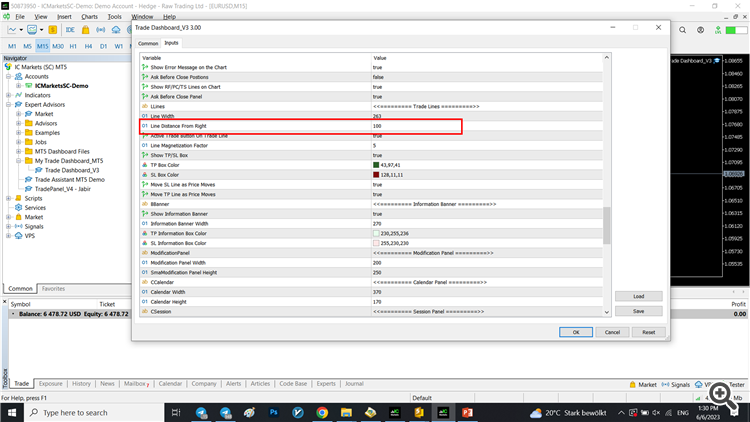
Hi, your first request has been fulfilled. now you can set the distance of trade lines from right. Regrads.
Hello to you and to all customers, your suggestion will consider for future updates, plz tell me what your broker is, do that I can test the new feature in the same environment.
Broker is Fusion Markets
Broker is Fusion Markets
It will be soon addressed.
Hi, your first request has been fulfilled. now you can set the distance of trade lines from right. Regrads.
Perfect!
Thanks.
Hi Fatemeh Ameri!
There's issue with the drop box where we can choose the asset, sometimes it changes the asset in the current chart window and sometimes it creates/open another chart window. Can you take a look into it if the purpose is to change de current asset?
Thanks.
Hi Fatemeh Ameri!
There's issue with the drop box where we can choose the asset, sometimes it changes the asset in the current chart window and sometimes it creates/open another chart window. Can you take a look into it if the purpose is to change de current asset?
Thanks.
It is supposed to open the new asset on the current chart, can you give me an example of when it opens another chart? whatever I try it opens the new asset on the current chart.
It is supposed to open the new asset on the current chart, can you give me an example of when it opens another chart? whatever I try it opens the new asset on the current chart.
Hi, your wish is fulfilled in the new update, now if you take trades more than max allowed lot, it divides it into multiple trades and take them all at once. Plz update your product.
We created a new design for the panel to make trading more easier, take notice that the Trade comment can be set in the settings tab of the dashboard.
plz let us know your opinion of the new design and if you have any comment about it.
Best regards.
Thanks in advance
This tool is excellent. Thank you,
Thanks in advance
Hello Sir,
Thanks for your compliment, we are trying to improve the product more and more, the answer for your question is no, at the time, it cannot connect to Telegram, we might add such feature later.
Best Regards.
Can you help me? When trying to open an order, ERROR 10026 appears.
Can you help me? When trying to open an order, ERROR 10026 appears.
Hello you, sure I can help.
This error means " Autotrading disabled by server" meaning your broker.
This EA is the most advanced in the Trade Management that I've ever seen.
A lot of features, basically everything you can do regarding to manual trades, it has.
2024 version even better.
Risk Calculation, split orders, hotkeys (Yes! And you can select what you want to enable), auto partial close and on demand, trail stop, spread protection, basket management (you can manage all your trades in any instrument), News calendar with cool features like auto close trades and alerts and recently the creator added overtrading protection.
Very good product.