Lock Recovery MT4

199 USD
Demo heruntergeladen:
253
Veröffentlicht:
21 Februar 2022
Aktuelle Version:
3.2
Keinen passenden Roboter gefunden?
Geben Sie Ihren Eigenen in Auftrag
auf Freelance!
Gehen Sie zu Freelance
Geben Sie Ihren Eigenen in Auftrag
auf Freelance!
Wie man einen Roboter oder Indikator kaufen kann
Starte Deinen EA im
Virtual Hosting
Virtual Hosting
Teste einen Indikator/Roboter vor dem Kauf
Möchtest Du Geld im Market verdienen?
Wie man Produkte richtig präsentiert

Sie verpassen Handelsmöglichkeiten:
- Freie Handelsapplikationen
- Über 8.000 Signale zum Kopieren
- Wirtschaftsnachrichten für die Lage an den Finanzmärkte
Registrierung
Einloggen
Sie stimmen der Website-Richtlinie und den Nutzungsbedingungen zu.
Wenn Sie kein Benutzerkonto haben, registrieren Sie sich
Hi Sugianto,I bought the Lock & Recovery and applied to my chart. I trade 1 lot os EURUSD and split the lot lock size to 10. The outcome please refer to the jpgs, it generated multi 0.01 lots instead of 10 0.1 lots in my account. Is there any bugs or setting that I missed?
Hi Simon,
Yes, you are right. There is indeed a bug and I have fixed it in update 1.2. I want to thank you for your information.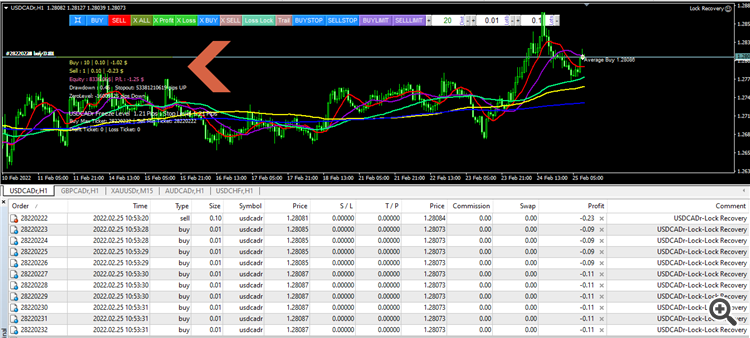
I found the EA is a bit weird. As noted in the jpg, I want to recover my lost position 134338392 (buy 1 lot), EA generate 10 x 0.1 lot sell position. Then the outcome is my buy position closed with big lost, and the 10 recover sell position just got a bit profit. Why would it be?? (I attached here with my set file)
I did a simulation with the problem you're having, but I didn't find any such oddity.
My guess is that due to the auto close partial setting, it is better to do a simulation on the backtester to find the appropriate parameters before applying it to live trades.
I found the EA is a bit weird. As noted in the jpg, I want to recover my lost position 134338392 (buy 1 lot), EA generate 10 x 0.1 lot sell position. Then the outcome is my buy position closed with big lost, and the 10 recover sell position just got a bit profit. Why would it be?? (I attached here with my set file)
Here are the complete simulation results, Lock recovery performs Lock and at the same time recovers a loss position with auto close partial
Please contact me for consultation on how to do the correct settings or if there are parameters that are not understood, I will be happy to help you until you understand.
Purchased.
Thank's
Hi Seller,
I just bought your EA, I have a few questions:
1) I saw a few set files - All about Gold and EURUSD, how about GBPUSD and other exotics pair like GBPJPY and etc?
2) I am using this EA mainly for manual entry. Normally i will use limit orders to execute my trade. Do this ea accept limit orders?
3) Do you have a Telegram chat for futher dicussion?
Hello
Say if i want to set a fixed TP to 30 pips , Is this (see below) the parameters i should change?
Hi Seller,
1) Say if my limit setting is TP 30 pips, what should i set?
2) If market is aginst me by 30pips i need this ea to help breakeven and exit safely what / how to set the ea properties?
Hello
Say if i want to set a fixed TP to 30 pips , Is this (see below) the parameters i should change?
yes correct
Hi Seller,
1) Say if my limit setting is TP 30 pips, what should i set?
2) If market is aginst me by 30pips i need this ea to help breakeven and exit safely what / how to set the ea properties?
1. Set virtual TP =30 pips
2. Set Hline Lock= 30 pips from your current open price, detail explanation can be read at this blog https://www.mql5.com/en/blogs/post/748046
1. Set virtual TP =30 pips
2. Set Hline Lock= 30 pips from your current open price, detail explanation can be read at this blog https://www.mql5.com/en/blogs/post/748046
Is this the one? Chainge it to 30 instead of 20 , say if i want the ea to help loss recovery after market hit 30pips loss against me?
Is this the one? Chainge it to 30 instead of 20 , say if i want the ea to help loss recovery after market hit 30pips loss against me?
no, this one
Hi Seller,
Another Questions below :
no, this one
no, this one
Hi Seller,
I tried to click the button and drag it but no line come out. Due to market closed ? Or do i need to try it out Monday?
Hi Seller,
Another Questions below :
I made an explanation on the blog along with the pictures for how to use the hline lock properly
Hi Seller,
I tried to click the button and drag it but no line come out. Due to market closed ? Or do i need to try it out Monday?
yes, market is close right now ( 22 july 2023), no ticks=no action
Hi Seller,
Another Questions below :
there are 2 ways to do it:
1. By pressing buystop manually
2. Set Add grid averaging buy only in the direction of the trend=true
Hi Seller,
I am trying to demo this EA on AUDUSD chart, wonder if this blue line is set correctly?
Will the ea able to recognise it as a SL trigger?