Easy Order Creator

9 999 USD
Dem Autor wurde das Recht entzogen, Produkte zu verkaufen
Demo heruntergeladen:
604
Veröffentlicht:
7 November 2014
Aktuelle Version:
4.0
Keinen passenden Roboter gefunden?
Geben Sie Ihren Eigenen in Auftrag
auf Freelance!
Gehen Sie zu Freelance
Geben Sie Ihren Eigenen in Auftrag
auf Freelance!
Wie man einen Roboter oder Indikator kaufen kann
Starte Deinen EA im
Virtual Hosting
Virtual Hosting
Teste einen Indikator/Roboter vor dem Kauf
Möchtest Du Geld im Market verdienen?
Wie man Produkte richtig präsentiert

Sie verpassen Handelsmöglichkeiten:
- Freie Handelsapplikationen
- Über 8.000 Signale zum Kopieren
- Wirtschaftsnachrichten für die Lage an den Finanzmärkte
Registrierung
Einloggen
Sie stimmen der Website-Richtlinie und den Nutzungsbedingungen zu.
Wenn Sie kein Benutzerkonto haben, registrieren Sie sich
I have windows 10, tons of free memory and the CPU load for mt4 is around 180mb -> 190mb. I do have a 4k screen, but successfully used the EA with a setting of 300 for the sizing. No errors in the journal and have also deleted / re-installed the software. I did actually manage to get it working on other currency pairs, this is currently only and issue on EUR/USD which unfortunately is the only one that I trade. All I have in the journal log is "loaded succesfully" for all the pairs I selected, including EUR/USD. I've also experimented with different window sizing. Unfortunately, still showing what I posted above. If window sizing is at 100, I see nothing other than the horizontal lines placed on the chart.
And this happens only on EURUSD?
Let's try to reset all parameters to the following values. Additionally try to set all "Choose what to display" to false.
Can you estimate how many ticks do you receive from your broker on EURUSD per second?
And this happens only on EURUSD?
Let's try to reset all parameters to the following values. Additionally try to set all "Choose what to display" to false.
Can you estimate how many ticks do you receive from your broker on EURUSD per second?
Yes, only on EUR/USD. Tried all of the above suggestions but still no luck. It's hard to estimate the ticks per second but I'm with Darwinex if that helps.
I just opened an demo account on darwinex. My tool is working fine... now it will be difficult to find the problem.
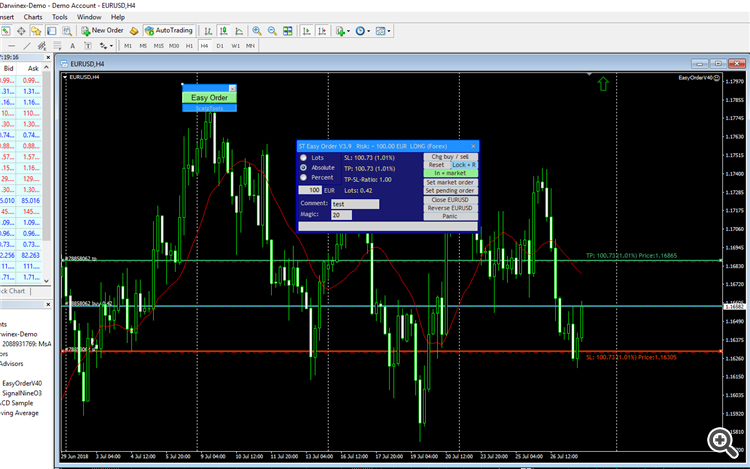
I will think about it, but at the moment I've no idea why you have problems with EURUSD...
Hello.
Is their an issue with the indicator. I purchased last week and now when I try to open from market drop down its not opening..??
Regards.
Donald
Hello
I just purchased this product but i can not seem to fine the download, or get it to my mt4. please advise how i can get this running
Thank you
Hello Martin,
I just purchased the EA and i cannot seem to find it in my MT4. Please help.
Hello Martin,
I just purchased the EA and i cannot seem to find it in my MT4. Please help.
Please have a look at the market-folder in the navigator wondow. Did you find the tool?
Hey, Martin!
Amazing tool you have created, helps a ton! So thanks! I have a question. I opened it on 1 pair, it works fine, I open it on another pair and it doesn't work and says "Trading now allowed. Market closed?"
Am I doing something wrong?
Thanks
Hey, Martin!
Amazing tool you have created, helps a ton! So thanks! I have a question. I opened it on 1 pair, it works fine, I open it on another pair and it doesn't work and says "Trading now allowed. Market closed?"
Am I doing something wrong?
Thanks
Hi Vladislav, thank you for purchasing my product. Please send me a screenshot of your terminal when this problem occurs. And please tell me the name of your broker. Thank you.
Please have a look at the market-folder in the navigator wondow. Did you find the tool?
yes, thank you
for some reason in some cases the "in=market" function wont execute and then goes back to normal is there something needs to be done on my end? thank you
yes, thank you
for some reason in some cases the "in=market" function wont execute and then goes back to normal is there something needs to be done on my end? thank you
Hi, please have a look at your private messages. I'm not sure, if I understand you correctly.
Is there any way I can change the default values for the order size without having to save it as a pre-set and having to reload it every time. For instance I might want to use 1% as my default risk. I use a symbol changer to flick between pairs and also do multiple accounts. If I change the reset values it doesn't work because first I have to remove the EA to go onto the next pair (takes too long and almost freezes the platform otherwise). Then I have to reload the EA and of course it comes back with default values which are no good to me. If you can allow this option that would be most appreciated
hey Martin,
I have this problem only on EUR USD ( it displays the window only when it has 300 /299 scale factor in the upper side of the chart and i can't move it) Tried new chart/diferent paraameters..restart, etc. Please advise.
Hello Martin
I wish your program was able to generate 2 TP instead of one (TP1 and TP2) , the first one when reached automatically exit half of lots and balance would be exited on the TP2, to enhance further it could be such that upon reaching TP! the SL would automatically adjusted to TP1 level for balance of trade . This would greatly improve functionality of your program in my opinion
Hi Martin,
I've been using your tool successfully for a while. For some reason, it recently started saying "Trading not allowed. Market closed?" That is the exact statement in red in the bottom right. This happens during the asian session only. I've probably hit a setting but I don't know which one. could you help?
Thanks,
drew
I download this again. I still have activation ready for my other accounts