
99 USD
Demo heruntergeladen:
12 066
Veröffentlicht:
31 Mai 2019
Aktuelle Version:
3.61
Keinen passenden Roboter gefunden?
Geben Sie Ihren Eigenen in Auftrag
auf Freelance!
Gehen Sie zu Freelance
Geben Sie Ihren Eigenen in Auftrag
auf Freelance!
Wie man einen Roboter oder Indikator kaufen kann
Starte Deinen EA im
Virtual Hosting
Virtual Hosting
Teste einen Indikator/Roboter vor dem Kauf
Möchtest Du Geld im Market verdienen?
Wie man Produkte richtig präsentiert

Sie verpassen Handelsmöglichkeiten:
- Freie Handelsapplikationen
- Über 8.000 Signale zum Kopieren
- Wirtschaftsnachrichten für die Lage an den Finanzmärkte
Registrierung
Einloggen
Sie stimmen der Website-Richtlinie und den Nutzungsbedingungen zu.
Wenn Sie kein Benutzerkonto haben, registrieren Sie sich
Hi,
Please go to the BE & TS tab and turn on Break Even function.
Set activate value (when break even should be activated) and Profit value (distance from open price e.g. to cover commission).
Oh, I did not know this was a customizable. I was reading your website and watching your videos on Youtube as well. I might have not seen this features or it has not been said on the video. This is really nice! You can choose between % RR or pips! THat is great! Thanks a mill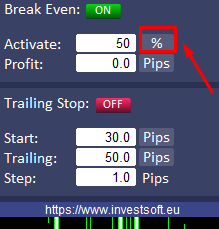
Oh, I did not know this was a customizable. I was reading your website and watching your videos on Youtube as well. I might have not seen this features or it has not been said on the video. This is really nice! You can choose between % RR or pips! THat is great! Thanks a mill
Detailed information about functions such as automatic Break Even or Trailing Stop can be seen on video # 2: https://youtu.be/KEnipYrt8rA
Also, descriptions of the new Trade Manager functions are available on our blog: https://www.investsoft.eu/blog
Detailed information about functions such as automatic Break Even or Trailing Stop can be seen on video # 2: https://youtu.be/KEnipYrt8rA
Also, descriptions of the new Trade Manager functions are available on our blog: https://www.investsoft.eu/blog
DO i have to change de ID number(magic) for different stocks?
DO i have to change de ID number(magic) for different stocks?
No need to change Magic Number unless you want different strategies for the same symbol.
Guys i need help, how do I place a pending orders and not market orders. I tried but dont know how to place pending orders at a different price.
To place a pending order, you must first draw the open, stop and target lines on the chart.
Use the pencil button for this.
When you click on the button, it will be light up, it means its function has been active and than click on any free space on the chart.
Double click on the line to activate the line and then click and drag the line to place it on the selected level.
If you want to place pending SELL order, just drag stop line over the open line.
When you will be reay, click PENDING BUY button on the panel
or PENDING SELL button
We have released a new version of the Trade Manager ver. 3.00.
What's new:
- reverse button at the open line to flipping long / short position
- pin button at the stop and target for pinning levels separately
- no need to double-click the line with the left mouse button before moving
Hi,
I have purchased the product for MT5. However when I click the buy or pending buy buttons nothing happens. No new orders appear. Please help
Hi,
I have purchased the product for MT5. However when I click the buy or pending buy buttons nothing happens. No new orders appear. Please help
Hi
Please check if you have AlgoTrading turned on in your Metatrader platform:
and allow live trading for EA Trade Manager:
1. press F7 to open EA properties
2. go to "Common" tab
3. check "allow live trading"
Hi
Please check if you have AlgoTrading turned on in your Metatrader platform:
and allow live trading for EA Trade Manager:
1. press F7 to open EA properties
2. go to "Common" tab
3. check "allow live trading"
Hi, with the MT5 when i press F7 nothing happens. I had to put Trade manager on and then press F7. Then the properties box popped out with this. By selecting allow algo trading that seemed to fix the problem. However, I discovered another problem when trying to modify existing trades. This error box always appears. Please help.
Disregard previous message I worked it out. Thankyou for your help.
Hi, with the MT5 when i press F7 nothing happens. I had to put Trade manager on and then press F7. Then the properties box popped out with this. By selecting allow algo trading that seemed to fix the problem. However, I discovered another problem when trying to modify existing trades. This error box always appears. Please help.
When you want to modify order you should set both values for stop loss and take profit:
Value 0 pips means that program try to set it to open price.
For example if you have order with sl = 30 pips and tp = 60 pips and you want to set SL= 20 you have to put values SL= 20 and TP = 30 and then click modify.
Disregard previous message I worked it out. Thankyou for your help.
ok, I replied before I saw your message :)
Hi, i had the EA working fine and i bought a new computer and when i try to open it in the charts nothing happens.
i tried closing the mt5 app and open it again and even restarting my computer and nothing, please help.
Hi, i had the EA working fine and i bought a new computer and when i try to open it in the charts nothing happens.
i tried closing the mt5 app and open it again and even restarting my computer and nothing, please help.
Hi,
The program license is linked to the computer ID. As you are installing on a new computer, you need to generate a new license for a new ID. To generate a new license for a new computer, install the program via the "Market" tab in the MT5 terminal. Here is a detailed instruction on how to do it: https://www.mql5.com/en/articles/498#migration
I forgot to mention that I do have enabled the "Events" sound alerts within the Platform (Like shown in the following link). This link also mentions why generally speaking an EA does not generate sound alerts, because this has to be programmed within the EA ("Play Sound"). Can you please follow up on this matter? And if deemed necessary could you please programmed the "Play Sound" Feature for the EA Trade Manager for the following instances (entering and closing a trade, partially closing a trade, activating trailing stop, etc).
This is the link that I was referring to https://www.mql5.com/en/forum/144849
This is the link that I was referring to https://www.mql5.com/en/forum/144849