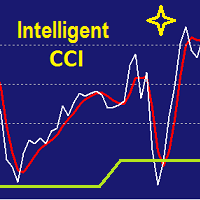
Intelligent CCI
49 USD
Demo heruntergeladen:
1 622
Veröffentlicht:
11 Juni 2015
Aktuelle Version:
2.6
Keinen passenden Roboter gefunden?
Geben Sie Ihren Eigenen in Auftrag
auf Freelance!
Gehen Sie zu Freelance
Geben Sie Ihren Eigenen in Auftrag
auf Freelance!
Wie man einen Roboter oder Indikator kaufen kann
Starte Deinen EA im
Virtual Hosting
Virtual Hosting
Teste einen Indikator/Roboter vor dem Kauf
Möchtest Du Geld im Market verdienen?
Wie man Produkte richtig präsentiert

Sie verpassen Handelsmöglichkeiten:
- Freie Handelsapplikationen
- Über 8.000 Signale zum Kopieren
- Wirtschaftsnachrichten für die Lage an den Finanzmärkte
Registrierung
Einloggen
Sie stimmen der Website-Richtlinie und den Nutzungsbedingungen zu.
Wenn Sie kein Benutzerkonto haben, registrieren Sie sich
I try to buy it, but it open my meta trade 4, I clik buy and chose payment, what ever payment method I chose it said error occured, so how to buy it actually..,
see that pct error , any solution ??
can I buy it using bitcoint, that's simple payment for me, by the way I'm from indonesia.,
See attached.... Why is the indicator doing this?
As you can see it stopped drawing the oversold and overbuy lines...
See attached.... Why is the indicator doing this?
As you can see it stopped drawing the oversold and overbuy lines...
Don't bother, it's fine now... just needed a restart.
Do not set Howmany > 2000
as it takes too long to have arithmetic and statistical calculation and actually you don't need to have calculated OB and OS for deep past.
Can I change the colour and the size of the "trendpoints"?
Unfortunately it is not possible at this version. Does it make you trouble to have good visual of trendpoints?
Hi Yasser, yes indeed, I´m colorblind and sometimes the trendpoints appear in my heiken ashi candles, so it´s not easy to recognize the points for a first and short overview. Regards, ulli
Hi,
And this why I need to do some thing helpful in next update. You will be informed by Metatrader when the updates get ready. I have a plan for update in next month.
Hi,
And this why I need to do some thing helpful in next update. You will be informed by Metatrader when the updates get ready. I have a plan for update in next month.
that´s great. I like your indicator.
Hi , how do I access it with with iCustom intelligent cci ?
I can see there are a lot of parameters inputs.
Hi , how do I access it with with iCustom intelligent cci ?
I can see there are a lot of parameters inputs.
hi,
I hop to find it useful.
-------------------------
double cci[100];
int howmany=-1;
int historydepth=10000; // Recommendation: 2000 (M5 TimeFrame) and 10000 (H1 TimeFrame) and 30000 (HighTimeFrame)
for (int i=0;i<ArraySize(cci);i++)
cci[i]=NormalizeDouble(iCustom(NULL,TimeFrame,"Intelligent CCI",CCI_Per,howmany,Smoothing,0,i),2); //howmany=-1 means do not calculate OverBought OverSold area
if (Calc_Dynamic_Osc==true) {
howmany=0;
OverBought=iCustom(NULL,TimeFrame,"Intelligent CCI",CCI_Per,howmany,Smoothing,historydepth,2,1);
OverSold =iCustom(NULL,TimeFrame,"Intelligent CCI",CCI_Per,howmany,Smoothing,historydepth,2,1);
}
To whom are going to write Experts:
Buffer 0 = Intelligent CCI
Buffer 1 = CCI
Buffer 2 = Over Bought level
Buffer 3 = Over Sold level
Buffer 4 = Signal (it is going to be in Version 1.8)
hi,
I hop to find it useful.
-------------------------
double cci[100];
int howmany=-1;
int historydepth=10000; // Recommendation: 2000 (M5 TimeFrame) and 10000 (H1 TimeFrame) and 30000 (HighTimeFrame)
for (int i=0;i<ArraySize(cci);i++)
cci[i]=NormalizeDouble(iCustom(NULL,TimeFrame,"Intelligent CCI",CCI_Per,howmany,Smoothing,0,i),2); //howmany=-1 means do not calculate OverBought OverSold area
if (Calc_Dynamic_Osc==true) {
howmany=0;
OverBought=iCustom(NULL,TimeFrame,"Intelligent CCI",CCI_Per,howmany,Smoothing,historydepth,2,1);
OverSold =iCustom(NULL,TimeFrame,"Intelligent CCI",CCI_Per,howmany,Smoothing,historydepth,2,1);
}
is historydepth an int or string and what are the values? OverBought just returns 0 or empty
Actually my last comment, just delete it.
When I write this :
// iCCI config
int CCI_Per = 14;
int howmany = 1; //howmany=-1 means do not calculate OverBought
int Smoothing = 5;
int historydepth = 10000;
double OverBought = iCustom(Symbol(),0,"Market/Intelligent CCI",CCI_Per,howmany,Smoothing,historydepth,2,numberofbars); // numberofbars where to start
double OverSold = iCustom(Symbol(),0,"Market/Intelligent CCI",CCI_Per,howmany,Smoothing,historydepth,3,numberofbars);
Print ("OB: ", OverBought);
And I get
"Message from Experts":
2017.02.15 12:18:13.953 Roar AUDCAD,M30: OB: 2147483647.0
Dear Yasser,
Dear Kumara,
It support all time frames including M1.
Dear Kumara,
It support all time frames including M1.
Hi,
Sample configuration for GBPUSD M1 and the result. Due to traders intending to use M1 for scalping, it is better to set IntelligenMode=Over_2K_Candles to use statistical candle value in max depth of 2000 candles.
Hi,
You can also set the SafeMode=Trend_Oriented
See the result for GBPUSD M1