Alle Aufträge
 Regeln
Auftrag beendet

Spezifikation
I am looking for an MT4 developer to create an Expert Advisor with a fixed, on-chart control panel.
1. Interface / placement
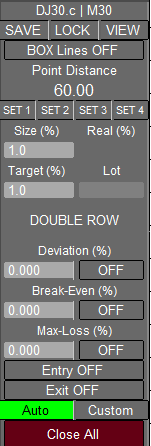
The EA should display a panel of about 150 x 450 pixels with 21 rows. This panel must stay docked in the top-right corner of the chart at all times. If the chart window is moved or resized, the panel has to reposition itself automatically to the same corner. Chart objects (candles, price) must stay behind the panel. I can provide a screenshot of the intended layout.
2. Basic trading idea (“box”)
When the EA is started, it should draw two horizontal lines around the current price: one line for a buy entry (above) and one line for a sell entry (below). The distance between those two lines is not fixed — it is set in the EA / GUI. Both lines must be movable together in the chart: if the user drags the lines, they move in parallel so the gap between them stays unchanged. I call this pair of lines the “box”.
If the current market price is inside this box, the user can “arm” it. As soon as the box is armed, the EA places a buy stop and a sell stop. Then it waits for the breakout.
-
If price breaks upward and reaches the buy entry line, the buy stop becomes a buy position.
-
If price breaks downward and reaches the sell entry line, the sell stop becomes a sell position.
If the breakout happens with slippage, the EA should still open the order immediately once a price beyond the trigger is detected.
After a buy is triggered, the opposite pending order (the sell stop) stays active until the price actually reaches the sell entry. When that happens, the EA must remove the old pending and place the counterpart again so that a re-entry on the other side is possible.
3. Position size logic (very important)
The lot size is not a fixed number. It is calculated from three inputs that the user enters in the GUI:
-
line distance (later: row 5),
-
Size (%) (later: row 8),
-
Target (%) (later: row 10).
The goal: after a certain market move (for example 60 points on Dow Jones), the profit of the open position should equal the chosen percentage.
Examples (same logic, different numbers):
-
Example 1:
-
Size (%) = 0.100
-
Target (%) = 0.100
-
Distance between lines = 60 points
-
Market = Dow Jones
→ the EA must choose a lot size so that a move of 60 points equals +0.1% on the account.
-
-
Example 2:
-
Size (%) = 0.050
-
Target (%) = 0.100
-
Distance = 60 points
→ here the size is half of the first example, so to get the same 0.1% result, the EA must either let price move further (120 points) or adapt the lot so that this condition is met. In your logic: after 120 points you still want +0.1%.
-
-
Example 3:
-
Size (%) = 0.050
-
Target (%) = 0.200
-
Distance = 60 points
→ to reach 0.2% with this size, the EA must calculate the position so that after 240 points the result is 0.2%.
-
-
Example 4 (different distance):
-
Size (%) = 0.100
-
Target (%) = 0.100
-
Distance = 30 points
→ now the same 0.1% should be reached already after 30 points, so the EA must increase the lot accordingly.
-
4. Alternating market / sequence of trades
The EA has to handle the case where price does not continue in one direction but jumps from one box edge to the other.
Assume: first trade is long, using the parameters from the first example above (size 0.100, target 0.100, 60 points distance, Dow).
-
Price then drops 60 points and hits the sell entry. The first trade is now down −0.1%.
-
The EA must open a second trade (short) with such a lot that, after the next 60-point move down, this second trade not only covers the −0.1% from the first long, but still gives +0.1% overall.
If price then goes back up again and hits the buy entry, the EA opens the third trade (long). After another 60 points up, trades 1 and 3 together must compensate the loss from trade 2 and again produce +0.1%.
If price turns again, a 4th trade is opened, so the set becomes:
-
long
-
short
-
long
-
short
The 4th trade’s lot has to be chosen so that, after the standard distance, the losses from the two longs can be balanced together with the existing short so that the target % is reached again.
Calculated example series (0.1% target, 60 points, Dow):
-
long 1.10 lot
-
short 3.30 lot
-
long 6.70 lot
-
short 13.70 lot
-
long 27.90 lot
-
short 56.80 lot
Opening a 6th trade would already hit margin limits. I also estimated the cumulative drawdown after each step (−0.1%, −0.31%, −0.72%, −1.58%, −3.32%). At around −3.32% the 5th long would be active, price would approach the sell entry again, but a 6th position could no longer be opened because of margin/equity.
The EA should be able to display this sequence in advance.
5. “VIEW” function
In the GUI there should be a button (3rd row) that opens a small popup at the top right of the chart. This popup shows three lines:
-
first line: trade number 1, 2, 3, …
-
second line: calculated lot for each step
-
third line: max loss % after opening that trade
This is just to preview the sequence before trading.
6. GUI layout (21 rows)
-
current symbol + timeframe (e.g. DJ30.c M15)
-
three buttons: SAVE, LOCK, VIEW
-
SAVE: store current size/target settings into one of 4 slots (row 6); MT4 should show “SET X saved!” after success; only allowed when no trades or box pending
-
LOCK: disables rows 18, 19, 21 to avoid accidental clicks, should auto-lock when box is armed
-
VIEW: opens the trade sequence popup
-
-
toggle “BOX Lines OFF/ON” → creates both entry lines around current price; distance comes from row 5; lines movable together
-
label “Line Distance”
-
input for the distance between buy/sell entry
-
4 buttons = 4 presets for position settings
-
two labels: “Size (%)” and “Real (%)”
-
two fields: left = editable size with 3 decimals, right = actual size according to broker’s lot step
-
two fields: left = “Target (%)”, right = “Lot”
-
two fields: left = desired TP in %, right = lot size of first trade (EA must read broker limits)
-
double row: show number of open trades and current total P/L in money and in %
-
label “Alternative TP”
-
left = alternative TP value (3 decimals), right = button to activate/deactivate it; TP line in chart should move
-
label “Break Even (%)”
-
left = BE value (3 decimals), right = on/off; only active when in profit; when profit shrinks to that level, close all
-
label “Max-Loss (%)”
-
left = global SL for all positions, right = on/off
-
button “Auto Entry OFF/ON” → activates the trading logic for automatic entries
-
button “Auto Exit OFF/ON” → allows the EA to close trades automatically at TP/BE/Alt TP/SL
-
two buttons “Auto” and “Custom” → automatic TP vs manually draggable TP
-
button “Close ALL” → closes all open positions
7. Extra stop-loss option
Besides % stop, there should be a distance-based exit: the user can define a factor of the box distance. Example:
-
box = 60 pts, factor = 2 → close all wrong-way positions after 120 pts
-
box = 60 pts, factor = 3.5 → close after 210 pts
-
box = 30 pts, factor = 1 → close after 30 pts
This level must be shown in the chart as a dashed, draggable line (e.g. drag while holding AltGr).
8. Multiple charts
The EA must support several instances on different charts. Magic Number in the inputs is required to separate them.