Francisco Gomes Da Silva / 个人资料
- 信息
|
8+ 年
经验
|
34
产品
|
49
演示版
|
|
36
工作
|
0
信号
|
0
订阅者
|
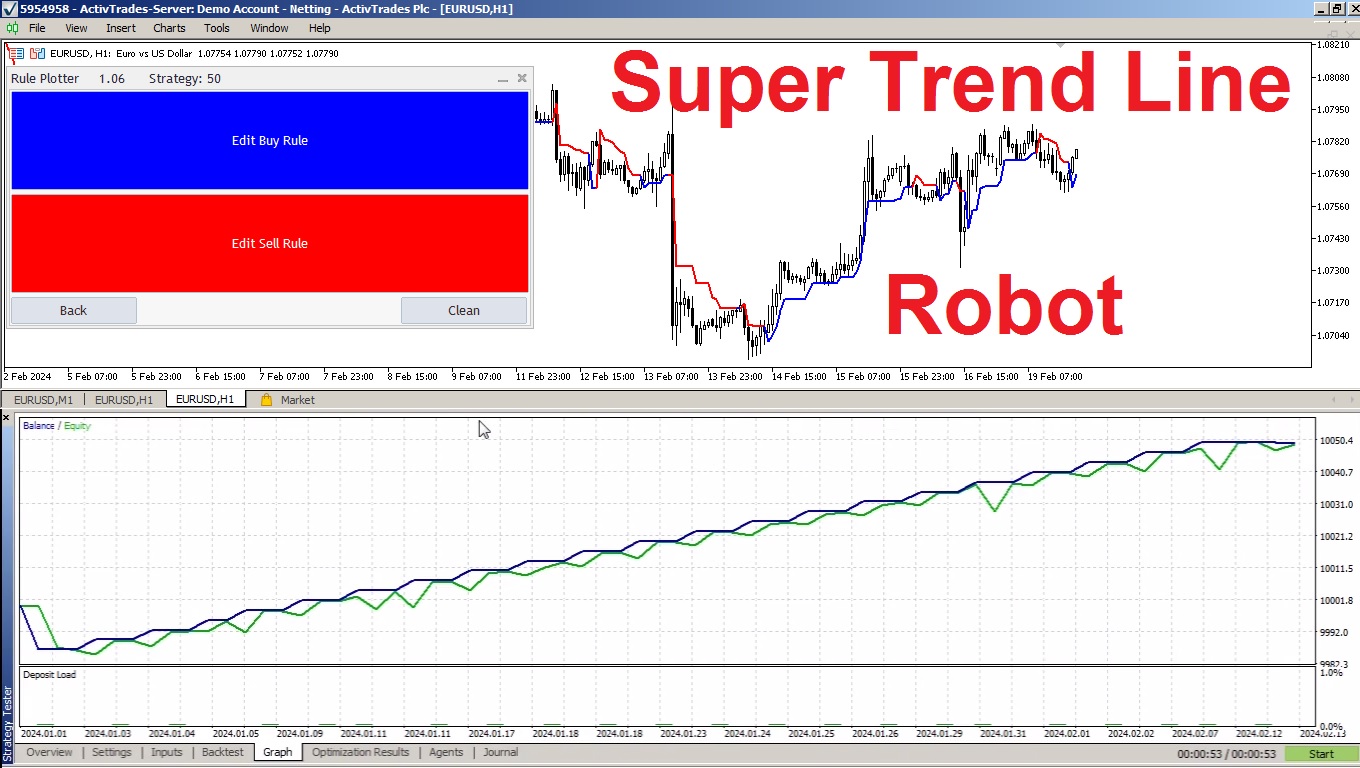
如何使用 Rule Plotter 创建自动化交易机器人 您是否曾想过如果您可以仅通过几次鼠标点击自动化您的交易策略会多么强大?想象一下,您可以在不需要深入研究复杂代码的情况下创建和测试不同的交易策略。有了 Rule Plotter,这个愿景变成了现实。在这里,我们将探讨如何使用 Rule Plotter 创建您自己的交易机器人,这是一个简化整个过程的交易系统创建工具。 什么是 Rule Plotter,它是如何工作的: Rule Plotter 是一个专为利用 MetaTrader 指标创建专家顾问(EAs)的程序。通过这个工具,您可以自动化您的交易策略,而不需要理解复杂的编程细节。整个过程很简单:只需在图表上插入所需的指标,定义入场和出场条件,然后让 Rule Plotter 完成剩下的工作。 无需编程知识自动化您的策略: Rule Plotter 的主要优势之一是其易用性。即使没有编程经验,您也可以为 MetaTrader 创建复杂的 EAs。这意味着所有级别的交易者都可以从这个强大的工具中受益,从初学者到经验丰富的专业人士。 快速测试您的策略: 使用 Rule
Patterns Wizard是一个用于创建蜡烛图形态的工具。通过它,您可以创建多种不同的图形形态,并在您的图表上添加任意数量的此指标的实例,每个实例都具有不同的形态。 为了更好地理解创建公式的方式,您可以使用名称为 My Candle的指标的示例,该指标包含70多个蜡烛图形态的示例 。 该指标的主要区别在于它具有 30个规则参数 ,这意味着您可以为前30根蜡烛分别设置不同的规则。 一旦出现图形形态,此工具可以执行以下操作: 播放自定义声音 在MetaTrader中发出警报 向您的手机发送通知 发送电子邮件 该指标不会重绘,只在蜡烛结束时执行,因此非常迅速。此外,它具有一个用于优化您想要分析的蜡烛的最大数量的参数。 在测试器中使用它,并随意使用它创建规则。当您准备迈出一步,拥有一款专业工具来帮助您分析交易时,就购买此工具吧。 蜡烛图形态的创建 您可以使用此工具创建任何您想要的蜡烛形态,以下是如何获取图表值的方法 数值 描述 O 开盘价 H 最高价 L 最低价 C 收盘价 因此,如果您希望蜡烛是 阳线 ,只需构建以下公式 C > O 负责 阴线 的公式相同 C < O
by using these two parameters, you can create your moving average cross.
MA(10) < MA(200)
MA(10) > MA(200)
Download Pattern Wizard for MT5:
https://www.mql5.com/en/market/product/112448
Download Pattern Wizard for MT4:
https://www.mql5.com/en/market/product/112449
Watch the video tutorial for this pattern:
https://youtu.be/mvzyMh643qY
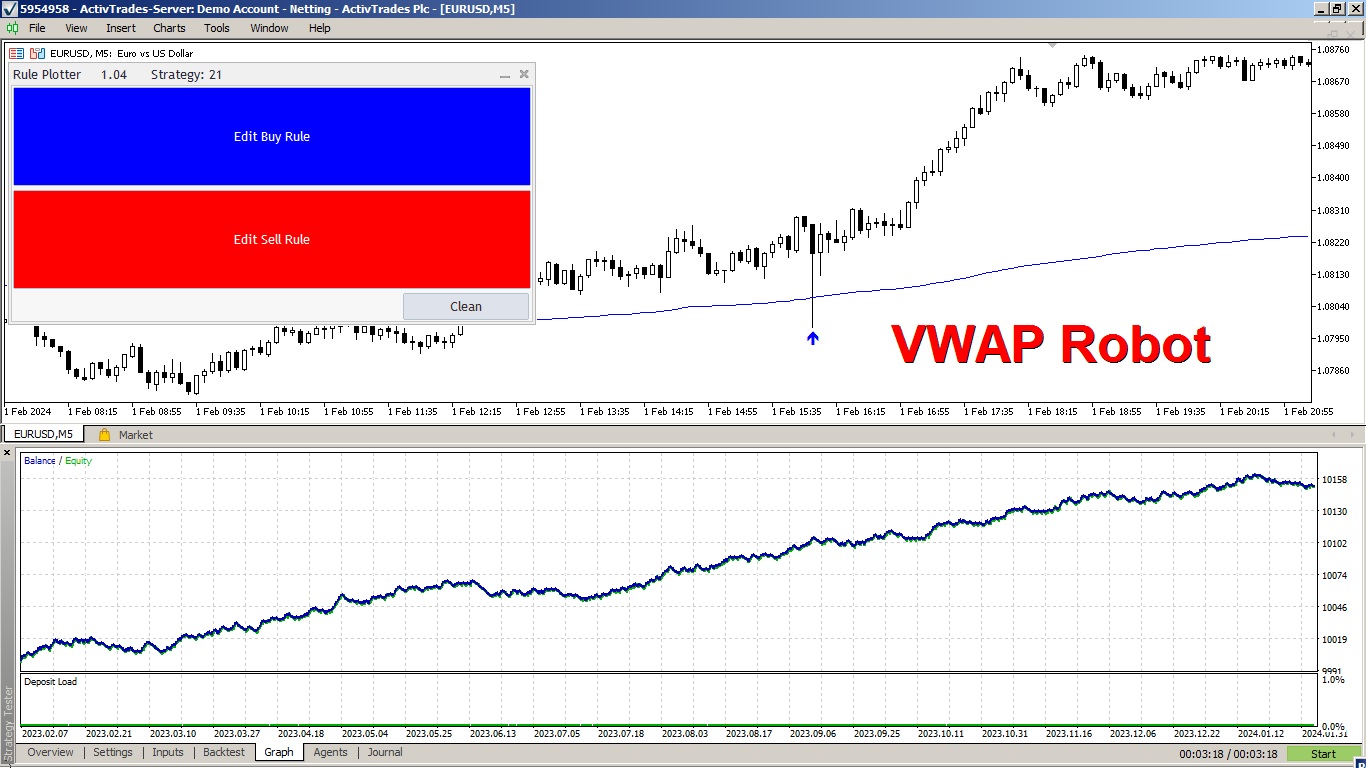
By implementing a risk management strategy with a 2-to-1 return ratio, the robot showed remarkable consistency, generating positive returns with a minimal drawdown.
Explore the creation process of this VWAP robot in the video and discover how straightforward it is to develop any trading system with Rule Plotter.
Moreover, Rule Plotter can create robots that operate on both VWAP touches and candle closes.
In this case, Rule Plotter developed an EA that trades VWAP touches and demonstrated significant consistency in its profits.
This is because the VWAP indicator is among the best, utilizing the calculation of the volume-weighted average price. These are the two most crucial pieces of information in any chart, emphasizing the importance of VWAP in technical analysis.
Try combining an interesting indicator with this VWAP strategy and see how your Expert Advisor can further enhance results.
Video Tutorial to Make the Robot:
https://youtu.be/exKVogFu7aI
Download Indicators Used:
VWAP Normal With Alerts
https://www.mql5.com/en/market/product/108463
Rule Plotter the program to build EAs
https://www.mql5.com/en/market/product/107361
it is useful for promammers that have no time to learn mql5 language
enjoy it
https://www.mql5.com/en/market/product/112448
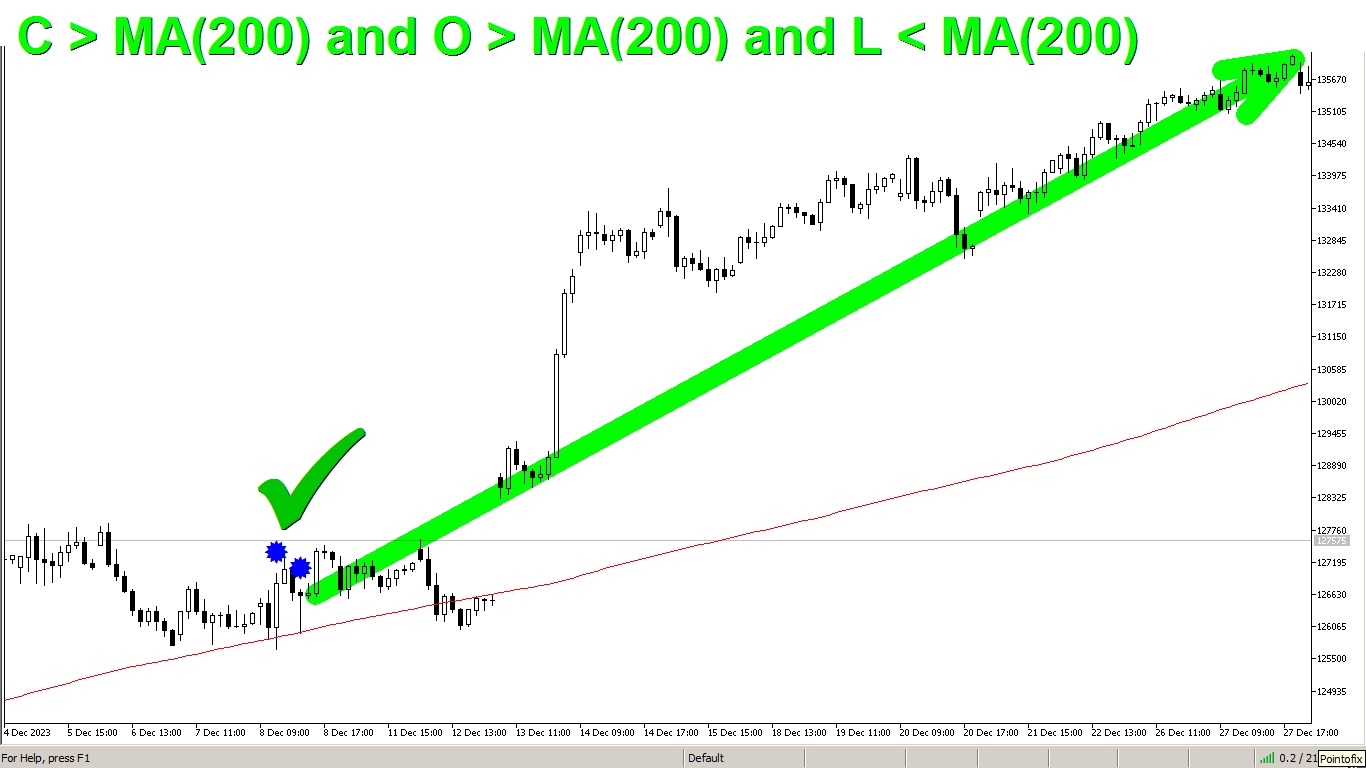
O > MA(200) and L < MA(200) and C > MA(200)
Pattern Wizard is an indicator that allows you to create and edit any rule for candle patterns.
This rule means that the candle opens above the moving average, touches it, and then closes above it.
you can use Pattern Wizard to create any rule of your strategy
Use Pattern Wizard tool to help you to find your own rules
Pattern Wizard:
https://www.mql5.com/en/market/product/112448
My Candle:
https://www.mql5.com/en/market/product/94436
Legend:
O = Open
L = Low
MA(200) = Moving Average of 200 candles
Rule Plotter is a program that allows you to create Expert Advisors without the need for programming knowledge. The Rule Plotter program is free and can be downloaded directly from your Metatrader.
With Rule Plotter, you can create as many strategies and expert advisors as you want. The best part is that you can use any market indicators with buffers, just by combining them within Rule Plotter with the logic of your strategy.
Rule Plotter also has the capability to export strategies, allowing traders to share strategies with each other and continually improve them.
Video Tutorial:
https://youtu.be/h3CudCKXowY
Rule Plotter:
https://www.mql5.com/en/market/product/107361
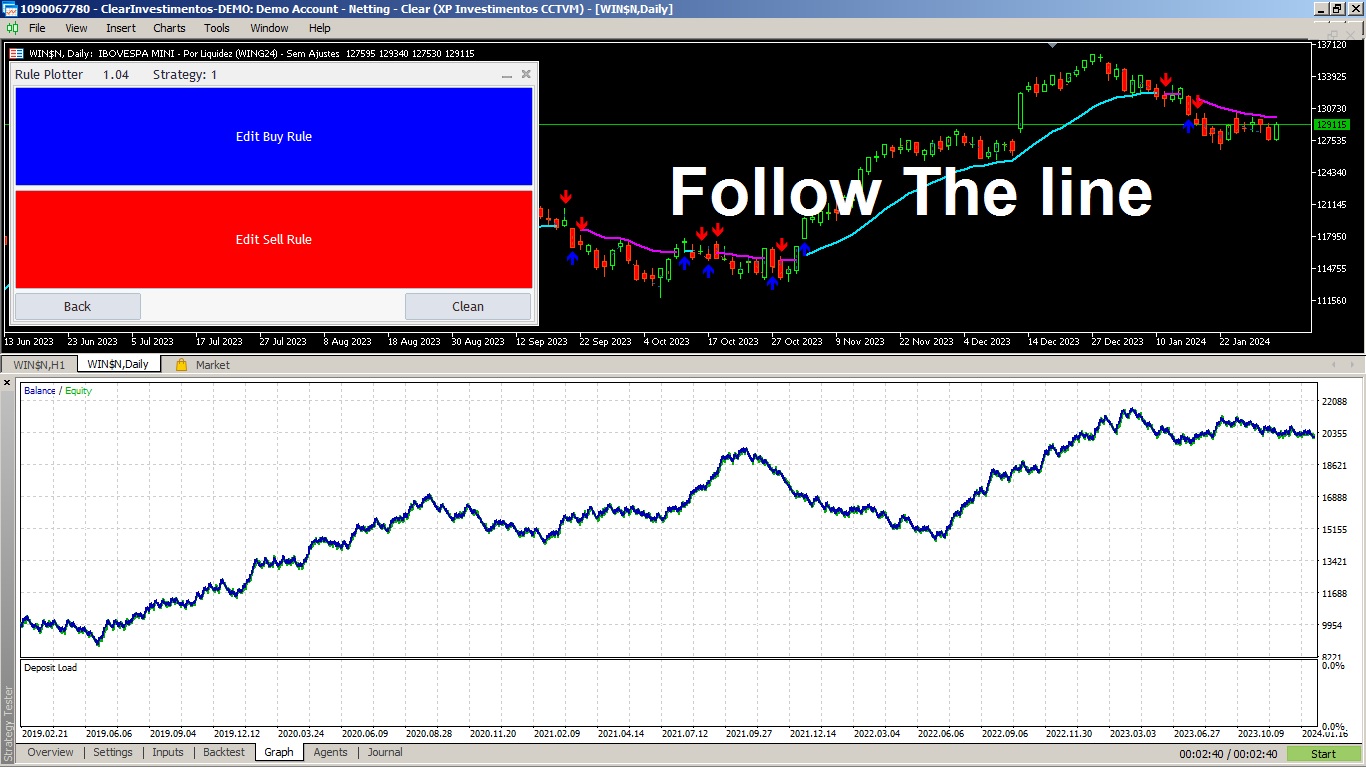
Follow the Line:
https://www.mql5.com/en/market/product/31561
Video Tutorial:
https://youtu.be/3OhXu_VaX8I
Download Rule Potter:
https://www.mql5.com/en/market/product/107361
| 规格质量 | 5.0 | |
| 结果检查质量 | 5.0 | |
| 可用性和沟通技巧 | 5.0 |
您是否曾经想过拥有一款能够扫描所有策略并同时显示该资产所有时间框架的买卖点的扫描仪? 这正是这款扫描仪所能做到的。该扫描仪旨在展示您在 Rule Plotter: 无需编程即可创建策略的策略生成器 中创建的买卖信号,并在此扫描仪中在不同的资产和时间框架上运行它们。 Rule Plotter的默认策略仅涉及牛市和熊市的蜡烛,这意味着如果您在Rule Plotter中没有绘制任何策略,该扫描仪将向您展示所选资产在所有时间框架上的蜡烛颜色,如果蜡烛为负则为红色,为正则为绿色。 创建您想要的任意策略 不要局限于默认策略,发挥您的创造力,构建传统策略,使用Metatrader中的所有可用指标。 或者,使用您喜欢的指标构建定制策略。 此扫描仪仅是Rule Plotter所提供的功能的冰山一角;它只是Rule Plotter的辅助工具。 然而,真正的魔力并不在这些工具上,因为它们只是为您 发挥创造力 的工具。 通过此扫描仪,您将全面了解您选择的所有资产的所有时间框架中您的策略的表现。
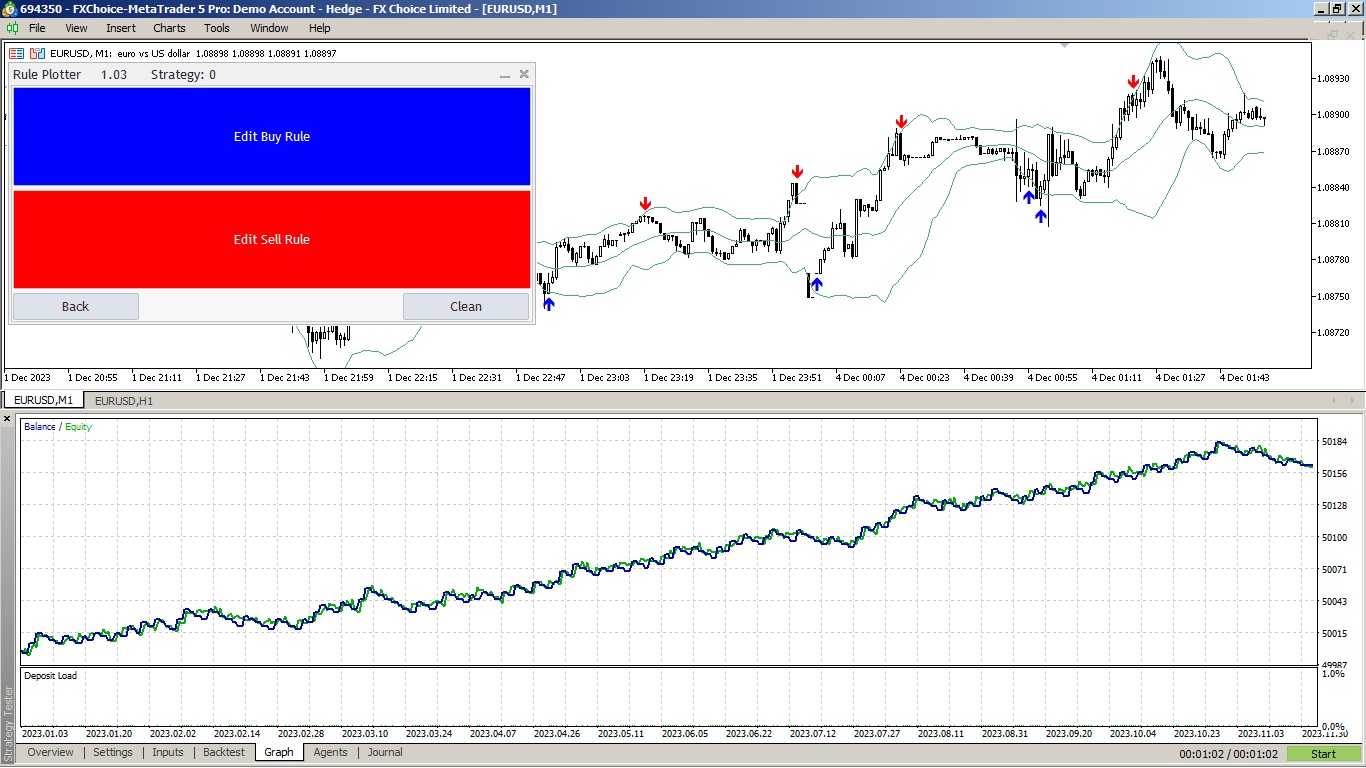
at EURUSD : H1 last year we have a interesting thing using Joe Ross bollinger bands strategy
这是一个简单的VWAP,但我们加入了通知功能,当价格触及或穿过VWAP线时进行通知。 这是MetaTrader 4(MT4)的传统VWAP指标。 默认参数与常规VWAP相同,但您可以修改VWAP的计算,最好的是: 当价格触及或穿越VWAP时,您将通过警报、手机通知、电子邮件或声音事件得知。 MetaTrader 4的锚定VWAP指标 。 参数: VWAP周期 VWAP在一定时间范围内进行计算。传统的VWAP每天开始一次新的分析,但在这个指标中,除了有这个选项作为默认设置外,您还可以选择要用于计算VWAP的所需周期。这意味着,即使在M1的时间框架上进行操作,也可以查看H1的VWAP计算,每次在H1时间框架上的新条形图后更新。该计算的重新启动取决于您选择的时间周期。 然而,目前无需担心,因为默认参数已根据传统VWAP进行设置。只需下载此VWAP指标并将其添加到您的MetaTrader 5(MT5)图表中。 价格类型 VWAP的默认计算使用收盘价格(Close),这对应于简单VWAP的传统方法。然而,您可以选择不同类型的价格来进行VWAP的计算。可选的类型包括: Close Open
这是一个简单的VWAP指标,但我们在其中设置了提醒,以便您知道当价格触及简单VWAP或价格穿过VWAP时。 这是MetaTrader 5(MT5)的传统VWAP指标。 默认参数与常规VWAP相同,但您可以选择使用新的计算方法: 当价格触及或穿过VWAP时,您将通过提醒、手机通知、电子邮件或声音事件得知。 免费的MetaTrader 5锚定VWAP指标 。 参数: VWAP周期 VWAP基于时间周期进行计算。常规VWAP每天都以新的计算开始。然而,我留下了这个参数,让您选择一个喜欢的时间周期来计算VWAP。也就是说,您可以在M1时间框架内,查看H1的VWAP计算,该计算始终在每个新的H1条上重新启动。计算每个选择的时间周期都会重新启动。 然而,您现在不需要担心这一点,因为默认参数与常规VWAP的参数相同。只需将此VWAP指标下载并插入到您的MetaTrader 5(MT5)图表中即可。 价格类型 计算VWAP的默认价格是收盘价(Close),这是简单VWAP的标准价格。但是,您还可以选择其他价格类型进行VWAP计算,如下所示: 收盘价 开盘价 最高价 最低价 中值 典型价 加权价
该专家顾问旨在测试和执行您在指标 规则绘图工具 中创建的策略。 使用方法: 免费下载指标 规则绘图工具 - 无需编程知识即可创建策略的工具 。 然后,开发在规则绘图工具中创建的策略。 最后,使用该专家顾问执行您创建的策略。 参数: Strategy : 在规则绘图工具中创建的交易系统。 Lot: 交易量;如果设置为0,该专家顾问将以最小交易量交易。 Take Profit: 止盈(以点数表示);如果设置为0,您的交易将没有止盈。 Stop Loss: 止损(以点数表示);如果设置为0,您的交易将没有止损。 Magic ID: 该参数允许您在同一资产上运行该专家顾问的多个版本,只需修改魔术编号。 请将我添加为朋友,以便在我发布新项目时得知, MQL5.com 。
自己构建您的策略 这个工具允许您使用MetaTrader本机提供的所有指标以及从互联网下载的使用缓冲区显示数据的指标来开发自己的策略。 这个工具是您考虑将MetaTrader用于自动化交易策略的另一个理由。借助它,您可以以简单直观的方式创建自己的策略信号,使用任何MetaTrader指标。 我如何知道我的互联网下载的指标使用缓冲区? 很简单,只需运行此工具,它会自动发现您的指标拥有的所有缓冲区,并使它们可用于基于它们创建您的策略。 此工具可以自动识别您的指标是否具有缓冲区以及它们拥有多少数据缓冲区。您需要做的就是将缓冲区与正确的值关联起来。 MetaTrader本机指标如移动平均线、相对强弱指数(RSI)、随机指标(Stochastic)和移动平均收敛差离指标(MACD)等都非常容易使用,因为它们已经具有集成的缓冲区。但是,当涉及到从互联网下载的自定义指标时,了解哪个缓冲区与哪个数据相关是很重要的。让我们从头开始吧。 学习使用MetaTrader本机键盘快捷键: 快捷键 描述 CTRL+F 激活鼠标上的十字线,准确识别您正在引用的蜡烛图。 CTRL+D 显示指标缓冲区的数据窗口。
the instruction on this imagem is
C > MA(10) and C[1] < MA(10)[1]
this means if current close is higher than Moving Average and
previous close is lower than previous Moving Average so it is a
crossing Moving Average Up by logic
create your own rules with "My Candle"
check the instructions of create Moving Average at "What is New" tab of this page:
https://www.mql5.com/en/market/product/94436?source=Site+Profile+Seller#!tab=updates
| 规格质量 | 5.0 | |
| 结果检查质量 | 5.0 | |
| 可用性和沟通技巧 | 5.0 |
Parameter to stop the counting after the count reaches the limit. Previously, it was only resetting the count. Now, we have the option to halt the counting to isolate the numbers in the middle of the graph. This makes it easier to identify the group of numbers when zooming out of the graph.
link to MT4 version: https://www.mql5.com/pt/market/product/83825
link to MT5 version: https://www.mql5.com/pt/market/product/83489