StarseedFX Smart Trading Tool

4.9

What Exactly Is A Smart Trading Tool?

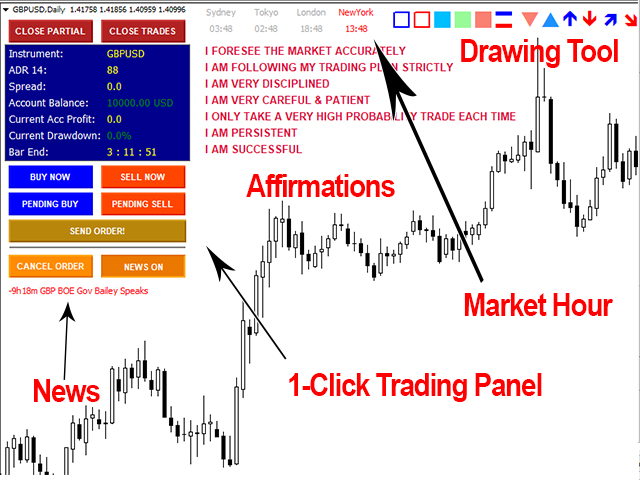
Smart Trading Tool was developed for fast and comfortable trading of the financial markets especially for ORDER BLOCKS TRADERS. It provides traders functionalities, such as:

  • A Drawing Tool
  • One-Click Trading Panel
  • Automated Lot Sizes Calculation based on your risk appetite & Money Management (Watch this video, how this tool can help manage your risk per trade better!)
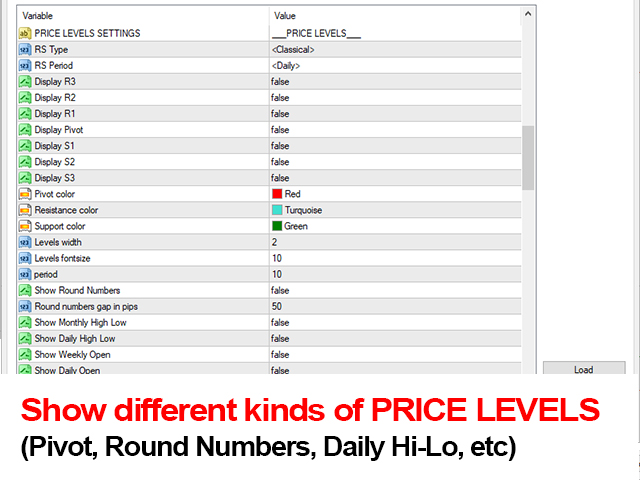
  • Built in PRICE LEVELS (Fibonacci, Round Numbers, Daily hi-low, etc)
  • Shows Trading Information on chart
  • Market News & Market Hour
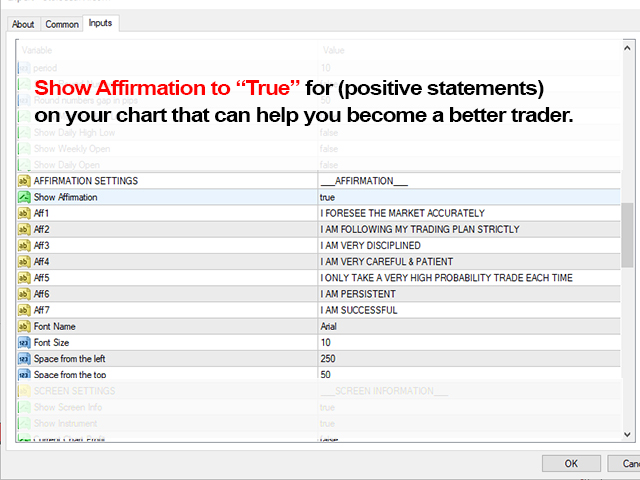
  • Trading Affirmations - Program your mind to become a better trader!
  • Auto Trade & Alerts on YOUR Order Blocks

All in one place! A very exciting addition to make a trader’s job a whole lot easier. Just a single click and everything you need is right there at your fingertips. What could be more simple?!

So, what can this Smart Trading Tool do for you?


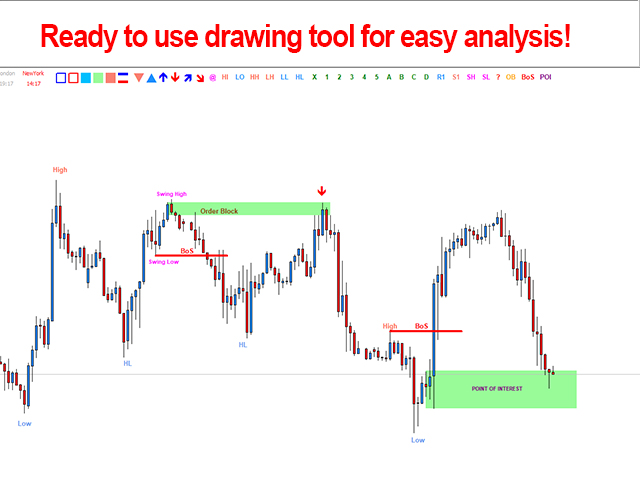
The Drawing Tool Feature Will Make Your Analysis Easy!

As a Trader, you often need to draw on your chart as part of analysis, such as trendlines, mark highs & lows of the market, Break of Structure, etc.  With our Smart Trading Tool, you won’t have to type all those ever again. Click! Easy Analysis!


The Trading Panel Makes Your Trading Easy!


Entering a trade has never been easier than with our Smart Trading Tool. With a click of a button on your chart, you can place a Market Order or Pending Order.  Just adjust your stop loss or pending order level before entering the market. To activate your order click SEND ORDER button. Click! Simple! 


Automated Lot Sizes Calculation

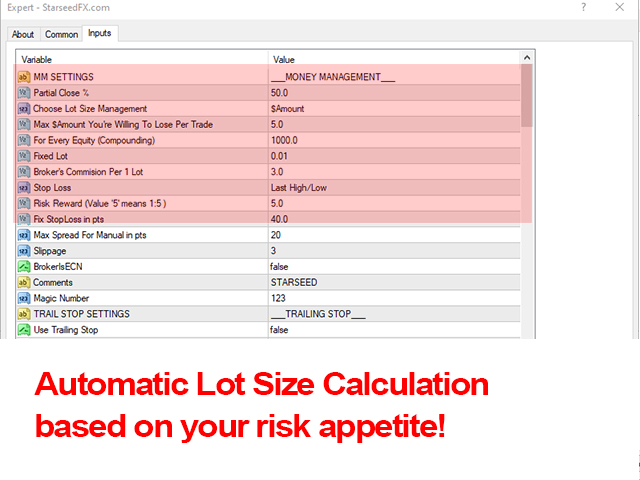
You already know how very important it is to have the right lot sizes for every single trade based on your risk appetite.  Now you can have the right lot sizes for every single trade without having to calculate manually and the hard way. Simply adjust your risk in the settings and Smart Trading Tool will calculate your lot size automatically every time you enter a trade using the trading panel! And now include 'CLOSE PARTIAL' with just a click on a button for your winning trades!

Choose Different Kinds of PRICE Levels

For those who trade based on Pivot Points, Daily High Low, Weekly Open, Round Numbers, etc. You can now have those your charts. You decide what kind of price levels you want to see on chart. You can have different kind of Pivot Points automatically on your chart from Classic, Camarilla, Woodie, and Fibonacci. 

Trading Information On Your Chart


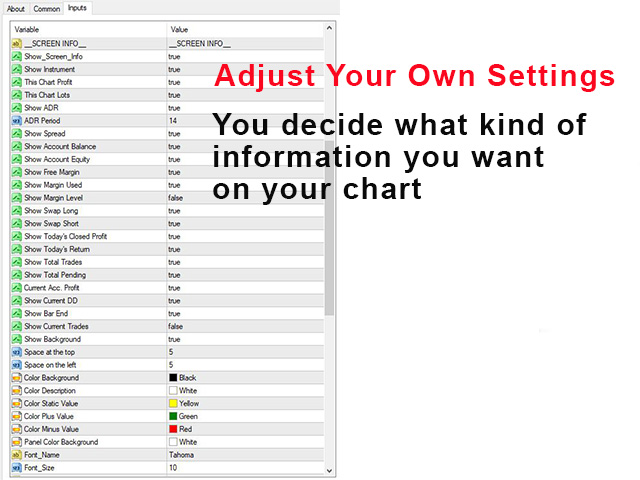
Wouldn’t it be great to have all the information you need right there on your screen? From balance, swaps, spread, drawdown, etc. You decide what kind of information you want to see on your chart by adjusting the settings. Forget about clicking your terminal window. Now, all the information you need will be on your screen!


Market News & Market Hours

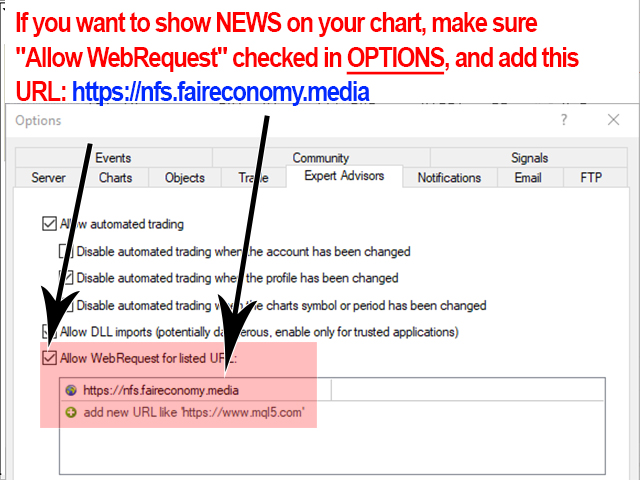
The market can be very volatile during high impact news. To make sure you always aware when these news cycles happen, you can display market news on your chart. If you want to show NEWS on your chart, make sure "ALLOW WEB REQUEST" checked in OPTIONS. Add this URL: https://nfs.faireconomy.media

Auto Trade & Alerts on YOUR Order Blocks

Mark out your order block(s). The moment the price hit your order block(s) the tool will send you alerts to notify you and you can also set "Auto-Trade" ON, which means the tool will open order when price hit your order block.

评分 36
DesCheung
73
DesCheung 2022.01.25 05:55 
 

is excellent tools, did your analysis and Mark your order block once price hit the order block alert came wait for low tf entry and the tools money management work as charm no need to worry DD if everything set only focused in the strategy 😉😉😉

kshaw_fx
76
kshaw_fx 2022.01.19 19:03 
 

If you have had any problem figuring out your risk and reward (R:R) or take profits (TP) and stop-loss (SL), this is the answer to your prayers. Never over risk. This is simply the easiest app to use with tons of extra bonuses. I love this indicator. I use it multiple times daily. Remove all your confusion when placing orders and taking trades. Draw your order blocks and receive alerts when they are hit. Set and forget tools are available as well with this indicator. This indicator over-delivers in every way possible. You should check out the StarseedFX YouTube Channel for tutorials and join the team if you need a special group of people that over-deliver on everything they do. Happy Trading ALL.


MACIEJ SZYMON SAPIERZYNSKI
582
MACIEJ SZYMON SAPIERZYNSKI 2022.01.19 15:22 
 

A great tool. I am a fresh user but I already fell in love with EA :-) Good job!!! I recommend.......

推荐产品
Hello friends. I wrote this utility specifically for use in my profile with a large number of Expert Advisors and sets ("Joint_profiles_from_grid_sets" https://www.mql5.com/en/blogs/post/747929 ). Now, in order to limit losses on the account, there is no need to change the "Close_positions_at_percentage_of_loss" parameter on each chart. Just open one additional chart, attach this utility and set the desired percentage for closing all trades on the account. The utility has the following function
Auto Fibo Pro m
DMITRII GRIDASOV
“Auto FIBO Pro” Crypto_Forex 指标 - 是交易中的绝佳辅助工具! - 指标自动计算并放置在图表斐波那契水平和局部趋势线(红色)上。 - 斐波那契水平指示价格可能反转的关键区域。 - 最重要的水平是 23.6%、38.2%、50% 和 61.8%。 - 您可以将其用于反转剥头皮或区域网格交易。 - 还有很多机会可以使用 Auto FIBO Pro 指标来改进您当前的系统。 - 它具有信息价差掉期显示 - 它显示所连接的外汇对的当前价差和掉期。 - 显示屏还显示账户余额、净值和保证金。 - 可以将信息价差掉期显示定位在图表的任何角落: 0 - 左上角,1 - 右上角,2 - 左下角,3 - 右下角。 点击这里查看高质量的交易机器人和指标! 这是仅在此 MQL5 网站上提供的原创产品。
VR Cub
Vladimir Pastushak
VR Cub 这是获得高质量切入点的指标。该指标的开发是为了促进数学计算并简化对仓位入场点的搜索。多年来,该指标所针对的交易策略已被证明其有效性。交易策略的简单性是其巨大的优势,即使是新手交易者也能成功进行交易。 VR Cub 计算开仓点以及获利和止损目标水平,这显着提高了效率和易用性。查看使用以下策略进行交易的屏幕截图,了解简单的交易规则。 设置、设置文件、演示版本、说明、问题解决,可以从以下位置获取 [博客] 您可以在以下位置阅读或撰写评论 [关联] 版本为 [MetaTrader 5] 计算入场点的规则 开仓 要计算入场点,您需要将 VR Cub 工具从最后一个高点拉伸到最后一个低点。 如果第一个点在时间上早于第二个点,交易者等待柱线收于中线上方。 如果第一个点在时间上晚于第二个点,交易者等待柱线收于中线下方。 根据上述条件,严格在 柱线收盘 后建仓。 换句话说,如果我们在小时图上进行交易,那么从最高点到最低点的时间距离必须超过24小时,最高点和最低点之间的点数必须大于或等于平均价格变动每天。 维持和改变市场地位 可以有多个未平仓头寸;每个头寸都可以单独修改。 VR Cub
什么是SmcDrawTools? SmcDrawTools 是为金融市场的快速和舒适的交易而开发的,特别是为SMC交易者。它为交易者提供了快捷的画图功能。 都在一个地方!一个非常令人兴奋的补充,使交易者的工作更容易。只需点击一下,你需要的一切都在你的指尖。还有什么比这更简单的呢? 那么,这个SmcDrawTools能为您做什么呢? 绘图工具将使您的分析更容易! 作为一名交易员,你经常需要绘制图表作为分析的一部分,比如市场结构,标记市场的高点和低点,结构断裂(BoS), CHoCH,LQ,IDM等。有了我们的SmcDrawTools,你就不必再输入所有这些了。点击!易于分析和快速绘制。 1. 市场用户箭头和POI矩形区域的高点和低点在所有时间框架中显示。 2. CHoCH,BoS,LQ,IDM线和供应区/需求区矩形显示在当前时间帧。 3.可以批量删除某一个类型的画图对象或者全部删除。 4.快速图表设置。
ExPad
Igor Semyonov
ExPad  - a trade panel for comfortable trading on financial markets. Suitable for trading any financial instruments. In general, the panel is able to perform the following functions: Open and reverse of deals Operation with visible and hidden StopLoss and TakeProfit Independent management of visible and hidden StopLosses Profit protection due to Breakeven and Trailing Stop  Choice of technique for Trailing Stop Distance from market price Moving Average Bolinger Bands Middle Line High and Low pri
News Scalping Executor is an utility which helps to trade high impact and huge volatility   news . This utility helps to create two opposite orders with risk management and profit protection. It moves automatically stop loss level to avoid losses as much as possible by using many different algorithms. It helps to avoid trading the news if spread suddenly becomes very huge. It can lock profit by moving stop loss or partially closing of orders. To be profitable with this type of trading you shou
Expert candle finder for forex in MetaTrader 4 Expert candle finder is one of the practical trader assistant experts that is used in the forex financial market, this expert accurately identifies the candlestick patterns on the price chart as a signal, all the found candles. informs you. This expert is run on your Meta trader platform and in a very precise way, it examines all the currency pairs that are in your watch list and every currency pair that had a professional and good candlestick patt
MACD Divergence Finder
Segundo Calvo Munoz
MACD Divergence Finder Indicator will help you to find Divergences between your typical MACD values and the Chart Prices as potential points of actual Trend Reversion or Pull Backs to increase your positions as per the current Trend. Indicator Windows draws MACD value and Divergence arrows but not MACD Signal as it is not considered relevant to detect this kind of Classic Divergences. In some computer/VPS with old microprocessors or low RAM size, when you launch this Indicator (attach it, change
自动盈亏平衡水平 使用   此   工具 ,   您 可以 激活 自动 止损 移动, 当 交易 达到 预期 利润时.  对于   短期   交易者   尤其   重要.   偏移选项也可用: 可以保护部分利润. 多功能工具 : 66+ 功能, 包括此工具  |   联系我  如有任何问题  |   MT5版本 激活自动盈亏平衡功能的过程: 1.   选择符号或交易   将为其激活自动盈亏平衡功能: 对于当前   [Symbol]   / 对于   [ALL]   所有交易 / 或特定交易   [Ticket] . 除了[Symbol]或[ALL]规则外 - 您可以为特定交易设置单独规则, 通过其票号: 单独[Ticket]的规则将优先. 2. 选择您要激活自动盈亏平衡的   交易类型   : [ALL]: 所有活跃交易; [Longs]: 仅买入交易; [Shorts]: 仅卖出交易; 3.   [When profit] : 只有当   交易达到指定利润金额时 , SL才会被移动. 4.   [+ Offset] : 您可以设置   额外的SL偏移 , 向 TP水平方向. 因此,
Price Magnets
Ivan Simonika
Price Magnet — Price Density and Attraction Levels Indicator Price Magnet is a professional analytical tool designed to identify key support and resistance levels based on statistical Price Density. The indicator analyzes a specified historical period and detects price levels where the market spent the most time. These zones act as “magnets,” attracting price action or forming a structural base for potential reversals. Unlike traditional Volume Profile tools, Price Magnet focuses on price-time d
One Click Trader is a tool designed for MetaTrader 4 platform, which enables you to take your trading to the next level. It enables you to open, manage and close your trades in simple an efficient way by just one click of your mouse button. Up arrow minimizes the OCT panel Down arrow maximizes the OCT panel Right arrow displays the next panel with additional features Left arrow hides the panel with additional features Red SELL button enables you to open short market orders Red SELL STOP button e
Crypto_Forex 指标 HTF Ichimoku 适用于 MT4。 - Ichimoku 指标是最强大的趋势指标之一。HTF 表示 - 更高时间框架。 - 此指标非常适合趋势交易者以及与价格行动条目的组合。 - HTF Ichimoku 指标允许您将更高时间框架的 Ichimoku 附加到当前图表。 - 上升趋势 - 红线高于蓝线(并且两条线都在云层上方)/ 下降趋势 - 红线低于蓝线(并且两条线都在云层下方)。 - 仅当价格突破 Ichimoku 云层顶部边界时才打开买入订单。 - 仅当价格突破 Ichimoku 云层底部边界时才打开卖出订单。 - HTF Ichimoku 指标提供了捕捉大趋势的机会。 点击这里查看高质量的交易机器人和指标! 它是仅在此 MQL5 网站上提供的原创产品。
HFT Fast Scalping EA
Sami George Saba Zeidan
HFT FAST SCALPING EA the High Frequency Trading which use stop orders to enter the trades when market is trending. best use for 1- Low slippage brokers for us30 and DE40 . 2- LOW OR ZERO COMMISSION BROKERS FOR EUR AND GOLD. 3-Prop firms like ftmo ,tff,.......etc This EA UNLIKE Other HFT EAs , You can see that in the parameters ,, CHOOSE LOT SIZE , MAX LOT , CHOOSE TIME , COMMENT AND OTHERS . IT STOPS 3 MINUTES AUTOMATICALLY EVERY 15 MINUTES TO PROTECT THE EQUITY FROM A BIG UNWANTED SLIPPAGE .
隐藏止盈止损管理器 – 高级隐形交易管理 隐藏止盈止损管理器 是一款强大且创新的智能交易系统,旨在以全新直观的方式管理 可见和隐形的止盈与止损水平 。 与需要在EA设置中不断手动输入订单号的传统解决方案不同,此重新设计的版本引入了 完全基于图表的交互式工作流程 。 每个已建仓或挂单均可 直接从图表上进行管理 ,使得交易控制更快、更安全、更直观。 通过图表线进行交互式订单管理 对于每个未平仓头寸,EA会在 开仓价 处自动绘制一条线。 点击此线即可打开一个 可自定义的管理面板 ,允许您即时控制 该特定订单 。 无需再切换设置或重新加载EA。 一切操作均可视化并按订单进行。 灵活的止盈止损定义模式 通过管理面板,您可以使用多种计算方式定义止盈和止损: 点差 点 金额(账户货币) 绝对价格 (例如 1.12345) 同时支持 可见和隐形的止盈/止损 ,并且可以针对每个订单独立启用或禁用。 用于隐形水平的可选视觉参考线 尽管止盈和止损可以完全对经纪商隐藏,但EA可以选择性地在图表上显示 指示隐形止盈和止损水平的参考线 ,让交易者完全了解这些水平的设置位置。 这些线条 仅供视觉参考 ,不会向经纪商
Currency EURUSD . Timeframe H1 The minimum deposit is $ 200 when trading 1% per trade.  Classic trend advisor.  The Expert Advisor is based on classic, time-tested indicators . Also, some strategies use Price Action . Every trade is protected by a stop loss  No martingale, no grid, no high risk strategies. All strategies used here are trend following and reversal. Compliance with MM = 4% for each trade is recommended. Question: - Why is testing so slow? Answer: - Be patient, 15 very diff
Harvest GOLD
Sayan Vandenhout
Harvest GOLD USES THE TREND WAVE INDICATOR AND IT CAN IDENTIFY THE BEGINNING AND THE END OF A NEW WAVE TREND MOVEMENT. AS AN OSCILLATOR, THE INDICATOR IDENTIFIES THE OVERBOUGHT AND OVERSOLD ZONES. IT WORKS GREAT TO CATCH THE SHORT TERM PRICE REVERSALS AND USES A MARTINGALE STRATEGY TO CLOSE ALL TRADES IN PROFIT. USE DEFAULT SETTINGS ON H1 OR HIGHER TIME FRAME ON ANY PAIR FOR MORE ACCURATE TRADES WHY THIS EA : Smart entries calculated by 3 great strategies The EA can be run on even a $30000
Forex Jeweler
Artem Iartsev
The Forex Jeweler EA opens a locked position and sets a take profit for a buy and sell transaction. After closing one trade, the EA modifies the remaining trade according to the user's strategy. By default, the EA has a delivery setting not for trading. Setting "Forex Jeweler EURUSD" for safe and profitable EURUSD trading is attached in comment #1 of the Comments. The strategy test is presented in the screenshots. Profit for the last 6 months: 1000% (or average profit per month: 166%). The minim
News Scalping Executor Pro is an utility which helps to trade high impact and huge volatility   news . This utility helps to create two opposite orders with risk management and profit protection. It moves automatically stop loss level to avoid losses as much as possible by using many different algorithms. It helps to avoid trading the news if spread suddenly becomes very huge. It can lock profit by moving stop loss or partially closing of orders. To be profitable with this type of trading you
“一次设置,自动运行”的多品种风控管家 ️   永远不要让您的交易裸奔。 Auto Stop Loss (MT5 Manager)   是注重资金安全的交易者的终极后台工具。与普通的交易面板不同,该工具在后台不知疲倦地运行,即时保护您的每一笔交易。无论您是手动开仓还是通过其他 EA 交易,该管家都能确保每个头寸立即附带硬止损 (Stop Loss)、止盈 (Take Profit) 和动态追踪止损 (Trailing Stop)。 颠覆性功能:   仅需在 一个图表 上即可管理您的整个投资组合。 无需打开 10 个不同的窗口拖慢电脑速度。只需列出您喜欢的货币对,该管家将同时监控所有货币对。 [   Get the MT5 Version Here   ]   核心功能 多品种控制 (节省 CPU 资源) :从一个图表管理 EURUSD, GBPJPY, US30 和黄金 (Gold) 的所有交易。 工作原理:   在逗号分隔的列表中输入代码(例如:EURUSD, GBPUSD, XAUUSD)。EA 将即时扫描并管理所有这些品种。 即时注入止损和止盈 :消除“胖手指”错误
Project Infinity
Sergey Yarmish
The Infinity Expert Advisor is a scalper. When the resistance and support levels are broken, trades are opened in the direction of the price movement. Open positions are managed by several algorithms based on the current market situation (fixed stop loss and take profit, trailing stop, holding positions in case of trend indication, etc.). Requirements for the broker The EA is sensitive to spread, slippages and execution quality. It is strongly recommended not to use the EA for currencies with s
Script CloseAll SELL
Raudhah Hayatun Nufus
Close All SELL Orders for MT4 script   - closes absolutely all orders, whether pending or market ones. Orders are closed at the current profit/loss indicators at the time of closing. The script is suitable for moments when you need to quickly close all orders at the current indicators. The script is very easy to use, just drag the script onto the chart and it will do its job. Add me as a friend, I have many other useful products.
FREE
| Fully-automated Smart Money Concept (ICT) inspired trading solution with multi-strategy capabilities | Built by a grid trader >> for grid traders.  This is MT4 version, click  here  for  Blue CARA MT5  (settings and logics are same in both versions)     Real monitoring signal  -->  Cara Gold Intro Blue CARA EA   ('CARA') - short for  C omprehensive  A lgorithmic R esponsive A dvisor is a next-gen  multi-currency    multi-timeframe  EA base on the widely known (and perhapse most popular) Inn
Apex Fibo Tracer — Smart Auto-Fibonacci Tool Apex Fibo Tracer is a professional analytical indicator that automates one of the most powerful methods in technical analysis — Fibonacci retracement levels. By combining a high-precision ZigZag algorithm with dynamic Fibonacci plotting, the tool delivers instant and accurate visualization of market structure directly on your chart. Most traders lose valuable seconds manually adjusting Fibonacci grids during high volatility. Apex Fibo Tracer eliminate
Simple panel EA plus
Fedor Arkhipov
4.76 (17)
This is a panel EA for one-click trading. Demo version   |   User manual    |  Contact me for any questions  / ideas for improvement / in case of a bug found List of main functions Risk management Calculate the lot size by X dollars(currency of deposit) and stop loss. Calculate the lot size by percent of equity and stop loss. Calculate lot size by equity percent (free margin percent). Calculate lot size by specified lot for each X dollars(currency of deposit) of balance. Positions and orders
A trader's assistant that closes positions in parts with a simple trail to take the optimal profit size when the price of the symbol moves towards the position (s). Initially, the stop loss is moved to breakeven + (the so-called breakeven greed level) - this is when the price closes the stop-loss position during the reverse movement and as a result some profit will still be received. Further, while maintaining the movement in the direction of the position, it is closed in parts on price rollback
H4 GBPUSD Trend Scalper is a trend signal scalper The EA trades according to the trend strategy using original built-in indicator for opening and closing orders. The external inputs for limiting trading on Fridays and Mondays are available. The purpose of the strategy is to use the current trend with the most benefit. According to the results of testing and working on demo and real accounts, the best results achieved by using the Н4 timeframe on the GBP/USD pair Works on MetaTrader 4 Build 971+
VN Trade Panel II
Vyacheslav Nekipelov
4 (1)
The new version of the trading panel, which now has the ability to separately close Buy and Sell orders, display targets for all orders on the chart, as well as the ability to use the panel to trade with brokers working on the FIFO rule. Also, the new version adds option buttons for separate management of open orders. It has a convenient visualized interface and intuitive control without a lot of additional tabs to which traders have to be distracted and switch their attention. Thanks to this,
Rainbow Price Visualizer
Vincent Jose Proenca
Rainbow Price Visualizer v1.21 See where the market really breathes. Turns your MT4 chart into an ultra-precise heatmap that highlights price zones favored by big players. Why it matters 300 price levels at 0.2‑pip resolution — microscopic detail. 8 visual themes (Rainbow, Fire, Ocean…) for instant readibility. Smart opacity: low noise fades, real zones pop. Lightweight rendering with automatic cleanup. Fully customizable: saturation, opacity, resolution, history depth. Bands project into the f
Night Trader EURUSD
Ugur Oezcan
4.21 (29)
The EA can trade multiple currencies. Please check our signals ( https://www.mql5.com/en/users/ugur-edin/seller ) for detailed information. No grid or martingale! No manual configuration or adjustment needed! Every trade is protected by stop loss. This Expert Advisor only trades for a short time frame at night, during the ending of the New York session. It uses low volatility moments and enters trades based on indicators. It then manages those trades with dynamic stop losses and take profits als
该产品的买家也购买
ManHedger MT4
Peter Mueller
5 (1)
THIS EA IS A SEMI-AUTO EA, IT NEEDS USER INPUT. Manual & Test Version Please TEST this product before   BUYING  and watch my video about it. Contact me for user support or bug reports, or if you want the MT5 version! MT5 Version I do not guarantee any profits or financial success using this EA. With this Expert Advisor, you can: Implement your own   Zone Recovery   strategy to capitalize on trending markets. Create   Grid   trading strategies, to profit from ranging markets. Place orders easil
The product will copy all telegram signal to MT4   ( which you are member  ) , also it can work as remote copier.  Easy to set up, copy order instant, can work with almost signal formats, image signal, s upport to translate other language to English Work with all type of channel or group, even channel have "Restrict Saving Content", work with  multi channel, multi MT5 Work as remote copier: with signal have ticket number, it will copy exactly via ticket number. Support to backtest signal. How to
Crystal Trade Manager PRO – 高级 MT4 风险与交易控制系统 免费版: https://www.mql5.com/en/market/product/150632 概述 Crystal Trade Manager PRO(CTM)是一款为 MetaTrader 4 打造的完整专业级风险管理与交易控制工具。 它专为需要严格执行、稳定风险保护和智能自动化的交易者而设计。 系统可全面管理风险、保护账户权益、执行每日限制、自动设置 SL/TP,并提供专业级的一键式快速交易面板。 非常适合参与 prop firm 挑战、日内交易、剥头皮交易以及专业资金管理的交易者。 同时提供完整的 MT5 版本。 核心亮点功能 1. 高级风险与回撤保护 支持每日回撤限制 1%–70% 。 一旦达到回撤上限,系统将立即平掉 所有仓位 。 可选:突破后自动删除 所有挂单 。 每日锁仓模式:当天达到限制后阻止新下单,次日自动恢复。 完全符合各大 prop firm 的规则与要求。 2. 日内盈利与亏损目标自动化 可设置每日 盈利目标 与 亏损限制 (账户货币,例如 USD)。 达到任何目
The product will copy all  Discord  signal   to MT4   ( which you are member  ) , also it can work as remote copier.  Easy to set up. Work with almost signal formats, support to translate other language to English Work with multi channel, multi MT4. Work with Image signal. Copy order instant, auto detect symbol. Work as remote copier: with signal have ticket number, it will copy exactly via ticket number. How to setup and guide: Let read all details about setup and download Discord To MetaTrader
Live Forex Signals 专为现场信号交易而设计   https://live-forex-signals.com/en   和  https://foresignal.com/en . Live Forex Signals for MetaTrader 5  https://www.mql5.com/ru/market/product/81448 参数 如果您已订阅网站,则用户名和密码live-forex-signals.com/foresignal.com ,然后您应该使用您的凭据填写这些参数;如果没有订阅,则将字段留空; 评论对正在开启的交易的评论 风险风险作为交易存款的百分比,如果风险=0,则使用价值地段 固定交易量 使用获利使用从网站获利 UseStopLoss从网站使用止损 FrequencySignalUpdateInMinute顾问访问网站的频率 交易的最大点差交易的最大允许点差,如果点差较高,则设置的挂单被取消 使用追踪止损 TrailingStop跟踪止损的值以点为单位 为了使实时外汇信号正常工作,您需要放置网站地址 https://live-fore
Averaging Helper
Sergey Batudayev
5 (2)
平均助手——这种交易辅助工具将使用两种技术帮助您平均之前无利可图的头寸: 标准平均 对冲,随后根据趋势开仓 该实用程序能够 一次性筛选出多个不同方向的未平仓头寸,包括买入和卖出头寸。例如,您建了一个卖出仓位和一个买入仓位,但两个仓位均未盈利,或者一个仓位亏损,一个仓位盈利但盈利不足,您想对这两个仓位进行平均,以便平仓——我的“平均助手”实用程序可以帮助您。 平均助手实用程序 - 允许您自动计算下一个仓位的规模、下单价格、平均仓位和平仓的方向以及您指定的获利规模。 该实用程序还允许您使用“买入”和“卖出”按钮开仓。您只需指定所需的止盈大小和起始手数即可。实用程序本身将以最初指定的止盈价或平均价平仓,并会尝试以平均价平仓,同时考虑您为平均系列设置的止盈。 事实上,对于那些接受并理解平均线逻辑,同时又了解其风险的人来说,这款工具将是一个非常实用的助手。在 95% 的情况下,这项技术将帮助您全自动平仓并获利。 要开始工作,只需将实用程序拖到图表上,设置平均的 TP 大小并单击“开始平均”按钮,实用程序将尝试通过单个获利来关闭图表上所有未平仓交易。 使用此实用程序时,您初始开仓的交易量不应过大
Custom Alerts AIO:多市场智能监控,一键启动,无需设置 概述 Custom Alerts AIO 是一款“开箱即用”的高级市场扫描工具,无需额外安装任何其他指标或进行复杂设置。它内置了 Stein Investments 的所有核心指标(FX Power、FX Volume、FX Dynamic、FX Levels 和 IX Power),可帮助您轻松监控所有主要资产类别,如外汇、黄金、指数和加密货币。如果您的经纪商支持股票,您也可以手动添加个股进行监控。 1. 为什么选择 Custom Alerts AIO? 无需额外购买任何指标 • 所有关键指标均已内置,开箱即用。 • 专注于实时预警,不包含任何图形元素,性能高效,界面简洁。 全面覆盖所有主要市场 • 支持监控外汇、金属、加密货币和指数市场。 • 无需手动输入任何交易品种,只需在设置中勾选资产类别即可启用。 • 股票并不属于默认类别,如有需要可手动通过参数输入添加。 高效、专业、便捷 • 无需图表模板和手动加载,适合自动化或远程交易环境。 • 非常适合 VPS 上长期运行,或作为后台市场预警工具使用。 2
With this Expert Advisor, you can seamlessly integrate various channel, arrow, and reversal indicators. It offers the flexibility to use all popular channel trading strategies, while also providing powerful tools to customize your trading conditions and risk management system.   The Expert Advisor opens orders when the price crosses the channel boundaries. Multiple crossing conditions are available for customization: Price touches boundary on re-entry into the channel Price touches boundary on
Unlimited Trade Copier Pro is a tool to copy trade remotely to multiple MT4, MT5 and cTrader accounts at different computers/locations over internet. This is an ideal solution for you if you are a signal provider and want to copy your trades to other receivers globally on your own rules. One provider can copy trades to multiple receivers and one receiver can get trade from multiple providers as well. The provider can even set the subscription expiry for each receiver, so that receiver will not b
欢迎使用 信号分析大师  使用教程视频 功能介绍:  本工具可以将MT4信号或者MT5信号的交易记录复盘到MT4图表上,方便直接观察信号的交易状况,从而了解信号的策略,比如可以比较容易看出是马丁策略,还是网格策略,还是早盘头皮策略,是否一次一单,或者带加仓等。 从而更好分析账号的安全性,稳定性等。 使用方法: 1.下载工具后,将它拖入MT4图表中(当成专家来使用,也就是方Experts目录里)。 2.到MQL5信号里面去下载信号 历史记录。 3.将下载好的历史记录文件粘贴到 MT4 文件->打开数据文件夹->MQL4->Files文件夹里面,并复制下文件的名字。 4.点击MT4上工具的笑脸图标,将复制文件名复制到  FIleName那一栏。 5.选择SignalType,默认MT4 信号复盘,如果是MT5信号复盘,请选择MT5_Signal. 6.点击确定,即可看到相应品种的交易记录状况。 7.如果需要切换查看品种的交易记录,可以直接将新的品种拖入已经加载了工具的图表上。
EasyInsight AIO MT4
Alain Verleyen
4 (2)
EASY Insight AIO – 全能智能交易一站式解决方案 概述 想象一下,您可以在几秒钟内扫描整个市场——外汇、黄金、加密货币、指数,甚至股票——无需手动筛选图表、繁琐安装或配置指标。 EASY Insight AIO 是您专为 AI 交易打造的即装即用数据导出工具。它将整个市场快照一次性输出为简洁的 CSV 文件,直接支持 ChatGPT、Claude、Gemini、Perplexity 等各类 AI 平台的即时分析。 无需窗口切换,无需图表叠加,也没有任何杂乱。只需纯净、结构化的数据自动导出,让您专注于基于数据的高效决策,无需再盯盘耗时。 为什么选择 EASY Insight AIO? 真正的一体化 • 无需设置,无需安装指标,无图表叠加。只需安装、运行并导出——就是这么简单。 多资产全覆盖 • 扫描分析外汇、金属、加密货币、指数、股票——您的券商所能提供的一切市场。 AI 专属数据导出 • 高度结构化、针对 AI 优化的 CSV 文件,直接适配主流智能工具和平台。 完整导出内容: • 三个可选周期的货币强度分析 • 净多头头寸变化体现市场情绪 • 成交量变化、
Strategy Builder offers an incredible amount of functionality. It combines a trade panel with configurable automation (covert indicators into an EA), real-time statistics (profit & draw down) plus automatic optimization of SL, TP/exit, trading hours, indicator inputs. Multiple indicators can be combined into an single alert/trade signal and can include custom indicators, even if just have ex4 file or purchased from Market. The system is easily configured via a CONFIG button and associated pop-up
This is an Expert Adviser use for manual trading as a background EA or combine with external EA to open orders. Loss Recovery Trading is one of your options to handle the lose positions instead of using stop loss by setting a zone recovery area and target to exit the turn rounds sequence. How It Work? If the market goes against your first positions direction at the specific of losing points, the EA will open an opposite direction position with calculated larger lot size and also keep the first
Trade Copier for MT4   Supports multiple master and slave terminals   Local operation without DLL usage   Optional slow monitoring mode   Compatible with prop firm and personal accounts Trade Copier MT4 To MT4 Advanced Multi-Account Trade Copier for MT4/MT5 – Master & Slave Synchronization This Expert Advisor is a fully automated multi-account trade copying system designed for professional traders who require fast, stable, and flexible synchronization between MT4/MT5 accounts. It supports
面板 FFx 隐藏管理 轻松帮助您在图表上直接管理您的订单。下面描述所有特征: 止盈, 止损和尾随停止均隐藏 每笔交易在图表上都有自己的指示线 可按您的需要拖拽任何线来改变止盈/止损 当止盈 #1 到达,自动将止损位移到盈亏平衡位置的选项 选择止盈/止损类型的选项 (通过点数或价格) 选择尾随停止类型的选项 (通过点数, MA, 分形, PSAR 或 ATR) 定义哪些订单您希望在当前图表上进行管理 (所有订单或特定单号) 最大化 / 最小化面板按钮 在图表上将面板拖拽到任意位置 显示交易信息的选项 如何使用它? (参看以下截图) 选择您希望管理的订单 (所有或特定的) 设置您的目标, 止损和尾随停止 … 之后点击 “放置”。它们都独立工作,这样您就只需设置一次。 如果您希望删除一个止盈, 止损或尾随停止, 选择正确的订单 … 然后点击 “删除” 当您选择设置 “所有当前符号”, 则 “当前设置”显示在面板里。这些设置将自动用于所有新开订单。若要重置/删除这些设置, 点击 “重置所有”。 如果 “显示交易信息”被选中, 一个新的小表格显示在面板之下, 包括每笔订单及其当前的目标和尾随停
FFx Risk Calculator panel will help you to calculate very easily your trades size, SL or the risk directly on the chart. All features are described below: Option to select which parameter to calculate: Risk, Stop Loss or Lot Size The panel will show if the lot size is allowed according to the current account free margin Button to maximize/minimize the panel Drag and Drop the panel anywhere on the chart How to use it? Select the parameter you want to be calculated. It will be based on the 2 other
News Trader Pro
Vu Trung Kien
4.38 (16)
新闻操盘手专业版 是一个独特的机器人,让您使用您预先定义的策略进行消息交易。它从几个流行的外汇网站加载的每条消息的片断。您可以选择任何消息和预设的策略进行交易,之后新闻操盘手专业版根据选定的策略,在新闻来临时自动进行交易。 新闻发布给出了赚点数的机会,因为在那个时刻,价格通常有大动作。现在,利用这款工具,新闻交易变得比以往任何时候更容易,更灵活,更令人兴奋。不要等待,不要错失,不要再迷惑了。每周只需针对重要新闻设置一次,这个工具将完全按照您的计划进行精准交易。 演示版: 由于这不是一个自动交易机器人 (它是半自动), 您需要下载单独的演示版本: https://www.mql5.com/zh/market/product/5931 参考: 如果您只需要加载新闻 (无需交易), 您可以购买新闻加载机专业版: https://www.mql5.com/zh/market/product/5463 功能 包括所有 新闻加载机专业版 的功能 (查看详情)。 针对每条新闻构建您自己的策略,具有非常灵活的参数。 支持五种高级策略,带有大量控制参数 (止损, 止盈, 尾随, 网格间隔, 手数缩放,
FFx Watcher PRO
Eric Venturi-Bloxs
The FFx Watcher PRO is a dashboard displaying on a single chart the current direction of up to 15 standard indicators and up to 9 timeframes. It has 2 different modes: 1. Watcher mode: Multi Indicators User is able to select up to 15 indicators to be displayed User is able to select up to 9 timeframes to be displayed 2. Watcher mode: Multi Pairs User is able to select any number of pairs/symbols User is able to select up to 9 timeframes to be displayed This mode uses one of the standard indicat
Transaction Repeater Full
Alexandr Bryzgalov
5 (4)
Copies transactions between MT4 terminals. Possibilities: quick copy start minimum processor load direct and reverse (reverse) copying. copying Take Profit and Stop Loss levels copying deferred and their changes copy transactions one to many copy trades many to one local copy only Attention: The product is designed for copying trades only within a single computer or VPS with access to the desktop. The product will not work on the built-in Virtual Hosting of the terminal. We will help you set up
The product combines a manual trade panel with the ability to perform actions automatically in a highly configurable way. Actions include capturing indicator values and then based on those values raising alerts, open/close or partially close trades, scale-in, setting up pending orders, adjusting stop loss, take profit and more. On-chart controls can be configured, such as tick boxes and buttons, so can be fully interactive. The EA also handles money management, news events, hidden stop loss, tak
Elliott Wave Counter 是一个面板,用于快速和用户友好地手动标记 Elliott 波浪。可以选择一种颜色和一个级别的标记。还有用于删除最后一个标记和工具制作的整个标记的功能。一键制作标记。点击五次 - 有五波!艾略特波浪计数器对于艾略特波浪的初学者和专业分析师来说都是一个很好的工具。 艾略特波浪计数器安装和输入指南 如果你想得到   关于 EA 添加 URL (   http://autofxhub.com   ) MT5 终端的 通知 (见截图)。 MT4版本 https://www.mql5.com/en/market/product/14016 MT5版本 https://www.mql5.com/en/market/product/15081 一般输入: 波形类型按钮: 此按钮允许用户选择他们想要在图表上突出显示的波形类型。可用的选项包括推动波、调整波和其他自定义波模式。 波级按钮: 这个按钮   允许用户选择他们想要在图表上突出显示的波形级别。可用的选项包括初级、中级和次级波级别。 波浪颜色: 这个   按钮   允许用户选择他们想要在图表上突出显示的波浪图
If you wish to draw Support and Resistance lines, view: daily market opening, classical pivot levels, Fibonacci pivot levels, trend lines, Fibonacci levels, the remaining time to candle closing, and current spread. If you seek to place your orders with the exact lot that meets your desired stop loss risk. If you wish to do all this and more with just one click, then this is the perfect tool to use. This tool will allow you to feel more relaxed when deciding to open orders, as well as predicting
Unlimited Binary Options Copier Remote is a powerful tool to copy binary options trades remotely between multiple accounts at different locations over internet. This is an ideal solution for signal provider, who want to share his binary options trades with the others globally on his own rules. One provider can copy trades to unlimited receivers and one receiver can get trade from unlimited providers as well. The provider can set the subscription expiry for each receiver, so that receiver will no
Professional and highly customizable utility for automated trading. It can become an indispensable to any trader regardless of the skills. It will help to save the time that would be required for daily routine activities and it will allow to develop custom strategies. The utility can also work manually opened orders and orders opened by any other EAs. This can be applied to attempt to recover the losing trades or even save the trader form losing the deposit. The utility allows to automate the tr
Telegram Publisher Agent 是一个附加组件,允许交易者实时向他们的 Telegram 频道和群组发送信号。通过可定制的消息、图表截图和其他功能,该工具可以帮助交易者与他们的追随者分享他们的交易见解和策略。该工具还具有亮暗主题切换的精美设计,为用户提供美观和功能性的交易体验。 Telegram Publisher Agent 旨在将您的所有交易作为信号发布在您的频道和群组中。您所要做的就是提供交易,然后 Telegram 发布商代理将为您完成所有繁重的工作,只需单击一个按钮即可将交易信号发送到您的交易渠道或群组。 电报发布代理   安装和输入指南 如果您想获得有关 EA 添加 URL ( http://autofxhub.com ) MT4/MT5 终端的通知(见屏幕截图)。 MT4版本 https://www.mql5.com/en/market/product/18985 MT5版本 https://www.mql5.com/en/market/product/23946 主要特点: 信号发送 - 将信号发送到用户的 Telegram 频道和组,带有可自定义的
如果产品有任何问题或者您需要在此产品上添加功能,请联系我 Contact/message me if you encounter any issue using the product or need extra feature to add on the base version. There is Demo version of this panel Dashboard Babon Scalping System Demo in my product list, please try it out to get familiar with all functionalities for free, LINK . This system basically utilizes TDI, Heiken Ashi Trend, Price Trend on H1 time-frame and TMA on H1&H4 time-frame to generate the trend (big picture). Then the system will zoom in to genera
Pairs Trade
Oleg Pechenezhskiy
The Pairs Trade indicator is a utility for semi-automatic pair trading. It allows combining the charts of two arbitrary instruments, even if the schedules of their trading sessions are different. It displays a spread chart in the form of a histogram with an overlaying moving average. It calculates the swap that will be charged for the synthetic position (in the deposit currency). It is possible to set a level for automatic opening of a synthetic position on the spread chart (analogous to the 'se
Corporate Report
Pavel Verveyko
5 (1)
The script displays info about the share's corporate reports and dividends. The data is downloaded from   investing.com : Report date Profit per share (EPS) Revenue Market capitalization Amount of dividends Date of payment of dividends Dividend income The product cannot be tested in the tester (since it is not possible to receive data from the Internet). Before launching:  Add 2   URL   https://ru.investing.com/earnings-calendar/Service/getCalendarFilteredData  and   https://ru.investing.com/di
This Stacker EA will: Automatically set Stop loss on a new order Automatically set Take profit on a new order Stack (or open up to 4 additional orders at the same time) when a new order is placed, the SL/TP can be preset individually for each order. Provides a transparent replacement for the standard 1-click trading buttons in MetaTrader 4 (1 click still works and SL/TP will automatically be set as well as Stacking). Automatically calculate lot order size according to preset risk management perc
This small tool takes over the manually opened positions and treats them according to the predefined settings with the dynamic stop loss and Money Management, which predicts which position size should be used for the trade. The program dynamically tracks the stop loss as soon as the position comes into the plus. Possible commissions and swaps are taken into calculation. It should only be installed on one chart window per symbol. Settings LotRiskPercent = 25 - Percentage of the item size. Calcul
作者的更多信息
What Exactly Is A Smart Trading Tool? Smart Trading Tool   was developed for fast and comfortable trading of the financial markets especially for   ORDER BLOCKS TRADERS .   It provides traders functionalities, such as: A Drawing Tool One-Click Trading Panel Automated Lot Sizes Calculation   based on your risk appetite & Money Management ( Watch this video , how this tool can help manage your risk per trade better!) Built in PRICE LEVELS (Fibonacci, Round Numbers, Daily hi-low, etc) Shows Trading
筛选:
flexiblegroup1
128
flexiblegroup1 2023.04.20 12:02 
 

dear All, How can l reset my downloads? I changed computer so l dont have 4 licences/ or downloads out 5?

Mohamed Elsayed
4339
来自开发人员的回复 Mohamed Elsayed 2023.05.05 17:45
Hi, unfortunately, MQL5 does not have a reset feature. Each purchase is limited by 'licenses' for five machines (computers)
Composers
102
Composers 2022.07.19 06:52 
 

The indicator has some issues. Many times it doesnt take the trades after taking some trades or the TP is set wrongly. I am waiting since 03.06. for a solution. I have contacted Anne but Anne can't reach the programmer. I lost many times money in my FTMO challenge because the indicator didnt open the trade or sometimes it took wrong tp (rr). I will update my rating here once the program bugs have been solved.

Mohamed Elsayed
4339
来自开发人员的回复 Mohamed Elsayed 2023.01.02 21:29
Hey.. how are you? Kindly check the updated version. Bugs has been fixed. Please update to new version.
244627
20
244627 2022.05.07 09:16 
 

Hello-I purchased this indicator on 3.5.22 via the MT4 platform but am yet to receive the same-the message displayed on my MQL dashboard says that i will have access after 7 days- am disappointed to note that there was no mention that i will receive it 7 days later

Mohamed Elsayed
4339
来自开发人员的回复 Mohamed Elsayed 2022.05.11 11:26
Please contact MQL5 support, you should be able to use the tool instantly.
DesCheung
73
DesCheung 2022.01.25 05:55 
 

is excellent tools, did your analysis and Mark your order block once price hit the order block alert came wait for low tf entry and the tools money management work as charm no need to worry DD if everything set only focused in the strategy 😉😉😉

kshaw_fx
76
kshaw_fx 2022.01.19 19:03 
 

If you have had any problem figuring out your risk and reward (R:R) or take profits (TP) and stop-loss (SL), this is the answer to your prayers. Never over risk. This is simply the easiest app to use with tons of extra bonuses. I love this indicator. I use it multiple times daily. Remove all your confusion when placing orders and taking trades. Draw your order blocks and receive alerts when they are hit. Set and forget tools are available as well with this indicator. This indicator over-delivers in every way possible. You should check out the StarseedFX YouTube Channel for tutorials and join the team if you need a special group of people that over-deliver on everything they do. Happy Trading ALL.

MACIEJ SZYMON SAPIERZYNSKI
582
MACIEJ SZYMON SAPIERZYNSKI 2022.01.19 15:22 
 

A great tool. I am a fresh user but I already fell in love with EA :-) Good job!!! I recommend.......

Blue Wolverine
240
Blue Wolverine 2022.01.19 01:30 
 

This product is a very powerful trade manager, allowing to pre-define stop loss and profit target criteria as well as set multiple targets, break evens, partial closes, set lot sizes based on risk and so on. From all the rubbish I've bought on this site, this is the only product I've rated highly enough to deserve more than 5 stars. Every serious trader will find this tool of great benefit.

CON
76
CON 2021.12.10 12:23 
 

One of the best Trading Tools i have used for MANUAL TRADING; especially the risk and money management function is so simple (the way it should be in all tools). Fully configurable to suit your needs - all bases covered. To add even more value there is also a community that is really helpful... This tool is a 'no brainer' if you're looking for a first class trade management tool! Well done guys - great product!

Anrujoseph
19
Anrujoseph 2021.12.09 17:29 
 

StarSeedFx Smart Trading Tool is an excellent tool that helps manage your R:R extremely and has many other useful features. Even if you're new to Forex, this tool will be easy to use - and if you're struggling with the settings, there is a video on how to use StarSeedFx Smart Trading Tool where Anne walks you through the settings. Would definitely recommend this tool!

Wyman Hawkins
48
Wyman Hawkins 2021.12.09 14:37 
 

I love this ER very much . Its very easy to use and worth the money. I was NOT a MT4 user very much before getting this ER . Its a plus for for trading(setting up your) OB orders for sure.

wazzinoz
39
wazzinoz 2021.11.10 01:55 
 

Best money you'll ever spend. Regardless of how you trade or what strategy you use, this tool is an exceptional addition to your toolbox. Fantastic for ICT and Wyckoff too ! Easy to use, flexible and wonderful for trade and money management.

Abdul Samad
23
Abdul Samad 2021.10.15 15:22 
 

One of the best investments I've made. This has made my Risk Management so easy. The developer is very responsive and eager to help; goes way beyond the technical support......this team of husband and wife REALLY wants me to succeed in trading. The cost of this tool was recovered in just one trade. No brainer for me. Highly recommended.

derknade
51
derknade 2021.10.08 17:36 
 

用户没有留下任何评级信息

clj016
34
clj016 2021.09.25 16:29 
 

This tool is a must have for all traders. In trading risk management is key so with this tool it takes the guess work out of trading so you know exactly what you’re risking per trade. I highly recommend this tool for any trader! I also would like to mention the the customer service support is awesome!

tume28
59
tume28 2021.09.06 22:44 
 

When it comes to analyses before making a trade, this tool is the best. It makes it very easy to access lines and squares with ease. When it comes to placing a trade, the lines placed on the screen gives you a visual of where your stop and entry are located. This helps a lot before entering a trade. If you are a trader that plans to do this for life, you should have this tool!

djavalo
91
djavalo 2021.08.15 19:08 
 

Very handy tool to use.

UnclRann
23
UnclRann 2021.08.15 14:57 
 

This is a must have indicator if you like to trade OB's. It allows you to easily mark up your charts, and you're able to set up alert notifications to your cellphone. If can't leave your desk or laptop on and running. I recommend you sign up for Starseed's alert service as to when OB's are reached. you can find those details on their Youtube channel. I drive trucks for a living so the alerts are very helpful, to me . As I'm continuing to grow as a trader, this indicator will always be apart of my trading strategy set up.

jptrading66
42
jptrading66 2021.08.13 14:07 
 

The best tool on the market for Order blocks. So simple to use. Forget about all the indicators and all the other stuff that just complicate your charts. I use this tool exclusively for my trading and it was the best decision ever. It's not only a drawing tool for order blocks but also provides loads of trading info that you can choose to display or not. You can also use the tool to enter and manage your trades once you draw your order blocks. Since using the tool, I have become a much-relaxed trader. No more staring at charts the whole day. The service and backup from the provider are also great.

Charlie Holt
23
Charlie Holt 2021.08.10 19:10 
 

If you are using order blocks for your trading then this is a must have tool, it makes everything so much easier. No more guessing what your SL and TP should be plus it also auto calculates risk per trade which i have been struggling to calculate in the past. Brilliant.

asunil2000
34
asunil2000 2021.08.10 08:43 
 

update after 3 weeks

This smart trading tool had been flawless and glitch-free so far. Love the way breakevens and trailing stops can be customizable as per trading style. I did use other free tools & paid tools for risk management & order entry, but this has been the best in terms of ease of use, and the looks of the GUI. So many parameters are well organized and can be easily modified to see what you want, how you want & where you want to see them on the screen. Combined with Order block alerts, critical news & handy drawing tools, trading life can't be more stress-free and easier. Money well spent.

The trading panel is so cute, with minimal buttons and a ton of options to customize and user-friendly. Drawing tools are handy with the best-utilized screen space. Easy to trade and avoids mistakes with manual trade entry for new traders especially with lot sizes for different markets. Automation of order block strategy like 50% level, & automatic re-entry seems amazing, I am yet to explore this feature. Thank you for the amazing work, that makes entering and monitoring, and exiting the trades almost effortless.

12
回复评论