MSRLab Strategy Engine
- 专家
- 版本: 2.105
- 激活: 10

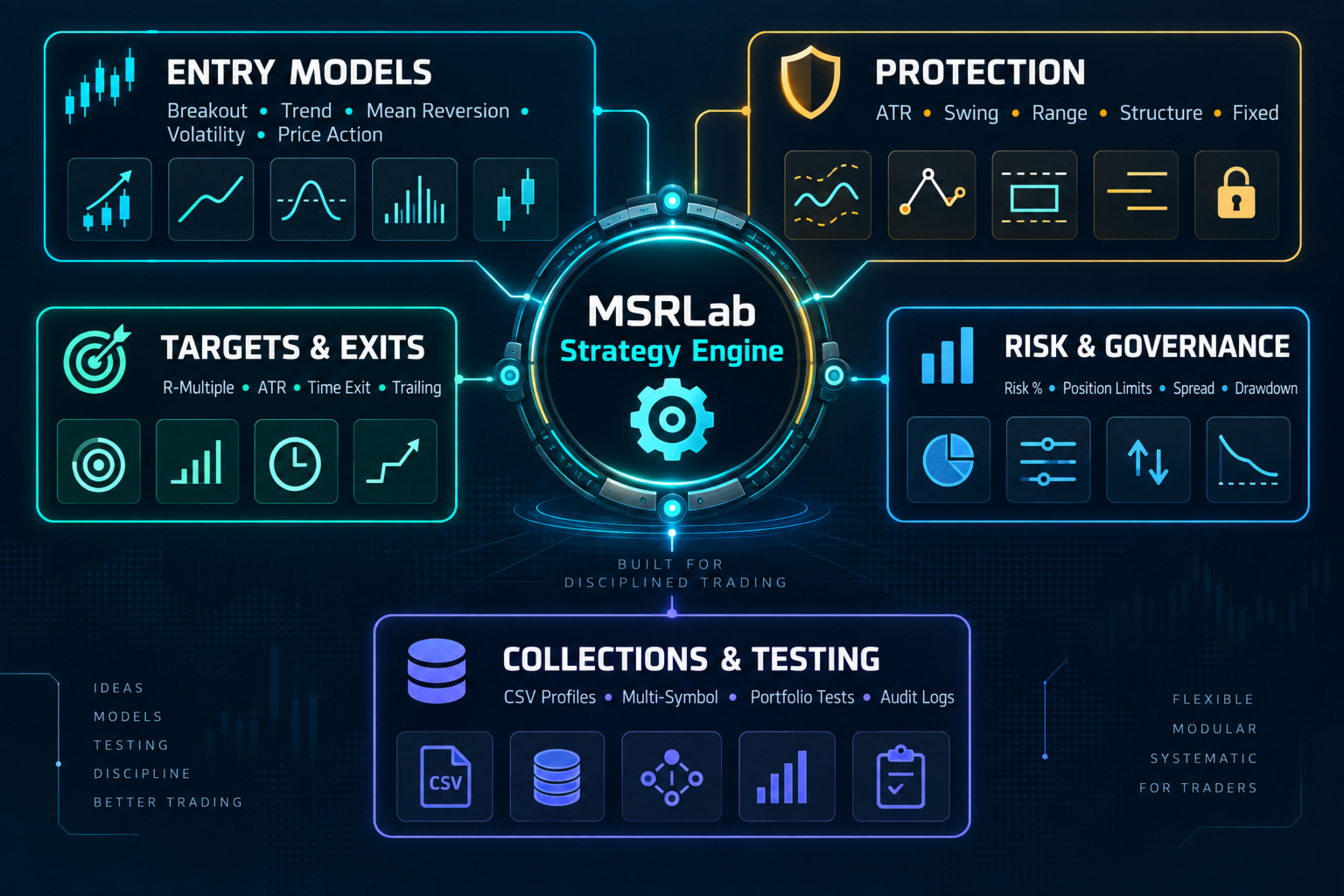
MSRLab Strategy Engine is a strategy-development and testing EA not one robot/EA. Build, test and combine your own MT5 strategies from a modular library of breakout, trend, mean-reversion, volatility, structural and price-action mechanisms.
The engine allows users to:
- Load individual strategy profiles through CSV. It is shipped with some examples.
- Test different entry modules, risk models, stops, targets and management rules.
- Enable or disable profiles.
- Combine multiple profiles into one collection.
- Run backtests and inspect results.
- Start with supplied examples, then create their own variations.
The customer workflow should be:
- Buy or rent the EA through MQL5 Market.
- Install the EX5 into the customer’s MT5 MQL5\Experts directory.
- Attach it to a chart.
- Start with no-order/Discovery mode.
- Copy a supplied CSV profile into the documented MT5 files location.
- Select the CSV/profile input in the EA. Example CSVs are available.
- Run a Strategy Tester backtest.
- Review trades, drawdown, costs and sample size.
- Test on demo before enabling trading.
- Only then consider live use.
What the engine contains
The engine currently accepts 23 entry models.
Breakout and structure
- DONCHIAN_BREAKOUT
- RANGE_BREAKOUT_BUILDER
- SESSION_RANGE_BREAKOUT
- VOLATILITY_EXPANSION_BREAKOUT
- NR7_REGIME_BREAKOUT
- SR_BREAKOUT
- SR_RETEST
- TURTLE_SOUP
- WEEKLY_DIRECTION_BREAKOUT
These cover:
- Donchian/channel breaks.
- Asian/session range breaks.
- Volatility contraction and expansion.
- Narrow-range/NR7 breakouts.
- Structural support/resistance pivot breaks.
- Retest and stop-limit concepts.
- Turtle-style breakout logic.
- Weekly directional breakouts.
- Stateful range-builder logic.
The range builder itself supports different breakout behaviours such as:
- STOP_TOUCH
- CLOSE_BEYOND
- RETEST
- FADE_EDGE
- FAKEOUT
- QUALITY_CLOSE
- FOLLOW
- STATEFUL_RETEST
Trend-following and continuation
- DONCHIAN_TREND
- DONCHIAN_HOLD_TREND
- MA_CROSS
- MA_PULLBACK
- MACD_REGIME_CONTINUATION
- DECYCLER_TREND_TRANSITION
- QSTICK_REGIME_CROSS
- RSI2_TREND_FADE
- WEEKLY_RECOVERY
These can express:
- Moving-average trend transitions.
- Pullbacks within a trend.
- MACD regime continuation.
- Qstick/candle-pressure continuation.
- Donchian trend following and hold logic.
- Recovery or directional weekly conditions.
- RSI2 trend fade behaviour.
Mean reversion and exhaustion
- BOLLINGER_RSI_FADE
- ZSCORE_FADE
- KALMAN_RANGE_REJECT
- UPPER_CLOSE_EXHAUSTION_FADE
These support ideas based on:
- Bollinger-band extension plus RSI re-entry.
- Z-score extremes.
- Kalman range rejection.
- Exhaustion after strong closes.
Price-action patterns
- ENGULFING
- PIN_BAR
- INSIDE_BAR_BREAK
These are candle-structure examples for:
- Engulfing reversals or continuation.
- Pin-bar rejection.
- Inside-bar contraction and breakout.
Entry timing and order types
The engine is not limited to “enter at market.”
It supports:
- Market entries.
- Stop entries.
- Stop-limit entries for the retest model.
- Entry expiry.
- Setup-gap requirements.
- Breakout confirmation.
- Retest offsets.
- Session and event-time restrictions.
- One-event-per-day controls for session/range models.
- Weekday and clock filters.
The engine deliberately uses completed-bar logic. The forming candle is not treated as a confirmed signal.
Stop-loss models
Available protection models include:
- ATR-based stops.
- Fixed-point stops.
- Previous-day/H1 ATR stops.
- Price-percentage stops.
- Session-range stops.
- Swing-based stops.
- ATR-plus-structure stops.
- Opposite-range stops.
- Range-width stops.
- Mid-range stops.
This allows the same entry idea to be tested with different definitions of invalidation.
Target and exit models
Targets include:
- Risk/reward multiple.
- ATR multiple.
- Fixed points.
- Price percentage.
- Range-based target.
- No fixed target.
Exit and management options include:
- Stop-loss and take-profit.
- Maximum holding bars.
- Exit-on-signal.
- Break-even.
- ATR trailing.
- Bar-based trailing.
- Chandelier-style trailing.
- Target trailing/step logic.
- Pending-order expiry.
- Automatic cancellation.
- Risk-breach cancellation.
Partial exits are not part of the current public candidate.
Risk controls
The risk layer supports:
- Risk-percentage sizing.
- ATR-budget sizing.
- Fixed-lot mode where permitted by the profile contract.
- Maximum lots.
- Maximum positions.
- Family risk caps.
- Portfolio/bundle risk caps.
- Tranche weights.
- Staged entries.
- Profit guards for staged tranches.
- Daily drawdown block.
- Peak drawdown block.
- Optional close-on-breach.
- Spread limits.
- Cooldown bars.
- Minimum and maximum range filters.
- Minimum breakout strength.
- Structural stop maximums.
- Symbol-specific minimum-volume fail-closed handling.
The engine calculates volume from stop distance and symbol contract information rather than assuming every broker uses the same lot geometry.
Portfolio and collection controls
A user can:
- Run one profile.
- Enable several profiles.
- Assign each profile a unique magic number.
- Combine profiles into one collection.
- Set profile-level risk.
- Set family-level risk.
- Set bundle-level risk.
- Assign staged tranche roles and weights.
- Disable individual profiles.
- Use one enabled profile per symbol for safer account-neutral operation.
The supplied Collection B is an example of how two individual profiles can be combined:
- Bollinger EURUSD H1.
- Bollinger AUDCAD H1.
CSV profile system
The profile format is deliberately extensive. The current collection schema has approximately 99 columns covering:
- Identity and labels.
- Symbol and timeframe.
- Entry model.
- Long/short permissions.
- Indicator periods.
- Regime filters.
- Stop and target models.
- Trailing settings.
- Breakout settings.
- Session/event times.
- Risk settings.
- Position limits.
- Portfolio/bundle metadata.
- Entry order type.
- Expiry and retest settings.
- Structural S/R parameters.
- Range-builder parameters.
- Kalman parameters.
- Weekday and clock filters.
- Magic number and comments.
This means a user is not buying a fixed robot with one hardcoded strategy. They are buying a configurable research engine.
Example profiles and backtests
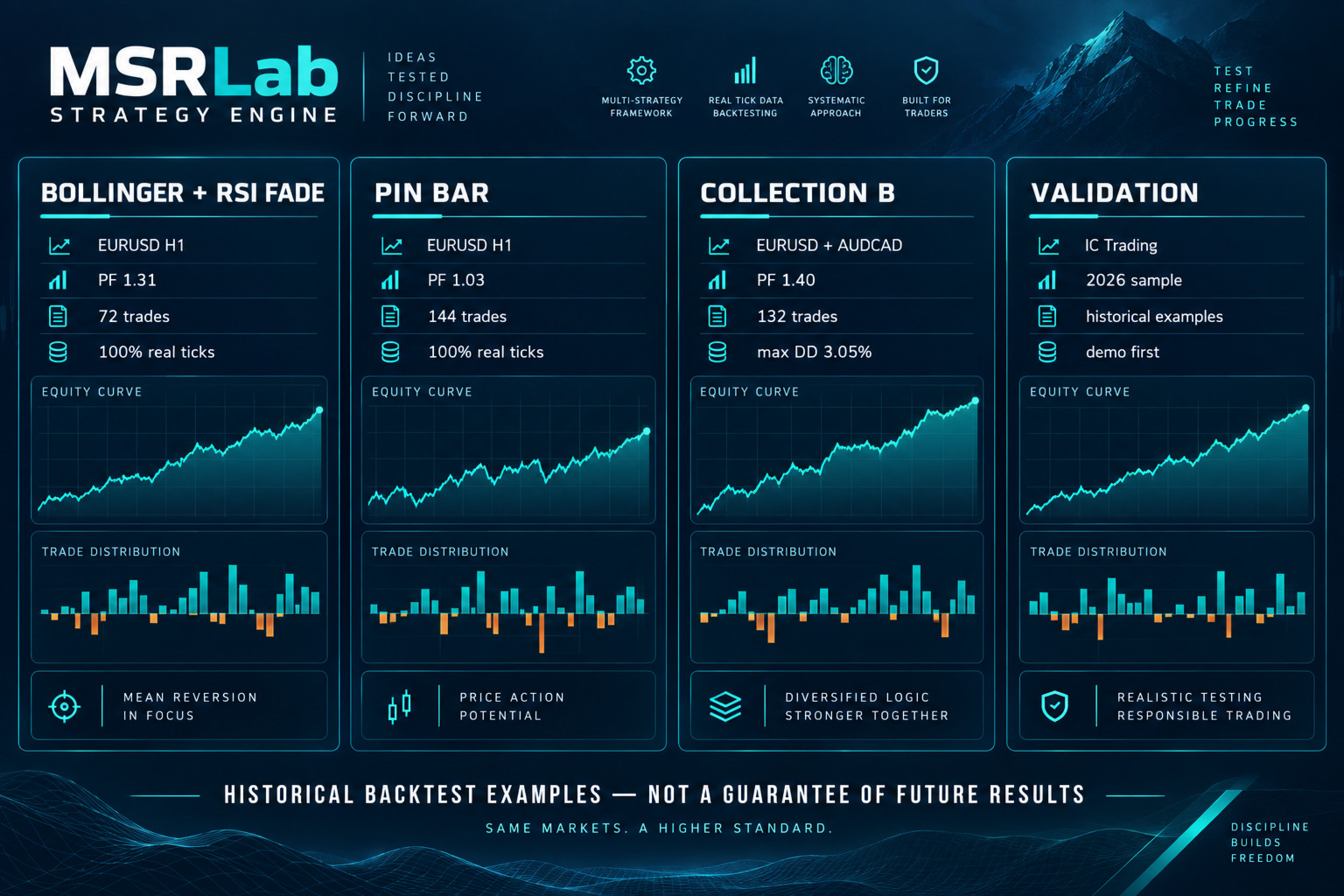
These are historical examples, not promises of future performance.
BOLLINGER_RSI_FADE — EURUSD H1
- Broker: IC Trading
- Period: 2026-04-01 to 2026-08-31
- Model: 100% real ticks
- Net profit: +$300.11
- Profit factor: 1.31
- Trades: 72
BOLLINGER_RSI_FADE — AUDCAD H1
- Broker: IC Trading
- Same period and model
- Net profit: +$78.89
- Profit factor: 1.09
- Trades: 60
PIN_BAR — EURUSD H1
- Broker: IC Trading
- Same period and model
- Net profit: +$71.68
- Profit factor: 1.03
- Trades: 144
Collection B — EURUSD + AUDCAD
- Broker: IC Trading
- Same period and model
- Net profit: +$787.40
- Profit factor: 1.40
- Trades: 132
- Maximum equity drawdown: approximately 3.05%
These are supplied example portfolio to start with back testing and understanding the product, not a recommended live portfolio.