文章 "包含图形用户界面 (GUI) 的 EA 交易: 创建面板 (第一部分)"
你好。如何修复编译错误?
ON_END_CREATE_GUI' - 未声明标识符 Programme.mqh 307 29
你好。如何修复编译错误?
ON_END_CREATE_GUI' - 未声明标识符 Programme.mqh 307 29
更新库:
EasyAndFastGUI - 用于创建图形界面的库
以及文章所附的库文件。
| 文件名 | 注释 |
|---|---|
| MQL5\Include\EasyAndFastGUI\Controls\Table.mqh | 更新的 CTable 类 |
| MQL5\Include\EasyAndFastGUI\Keys.mqh | 更新的 CKeys 类 |
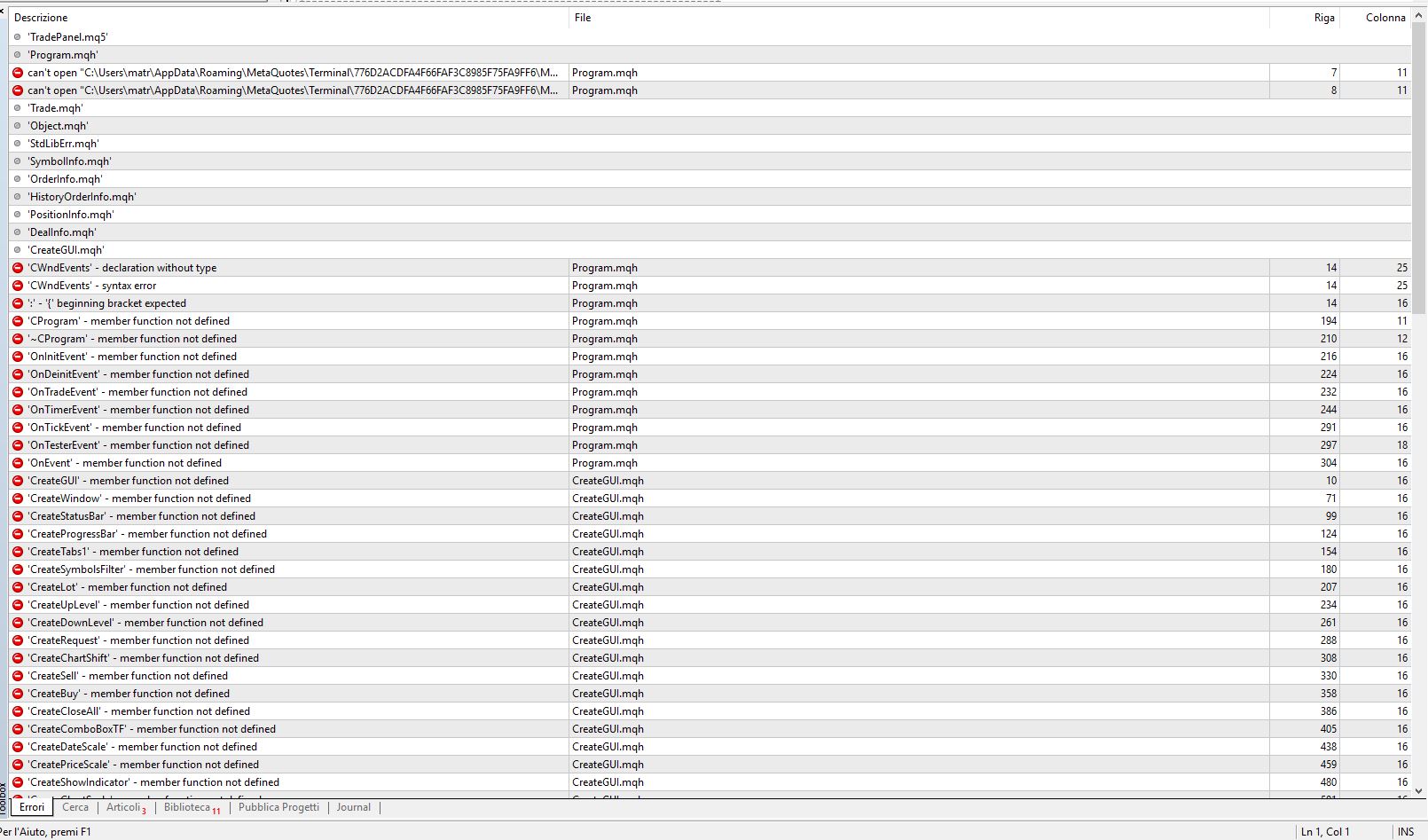
为什么会出现这种错误?
如何纠正?
谢谢
你好,阿纳托利、
首先,祝贺您的伟大工作。
我试着编译你的文件,但可能缺少一个常量,尤其是这个:Program.h 文件中的 "ON_END_CREATE_GUI"。
是否需要添加到 defines.h 文件中?
非常感谢
Manuele
你好,阿纳托利、
首先,祝贺你的伟大工作。
我试着编译你的文件,但可能缺少一个常量,尤其是这个:Program.h 中的 "ON_END_CREATE_GUI"。
是否需要在 defines.h 文件中添加?
在此先表示感谢
Manuele
#define ON_END_CREATE_GUI (42)
对我很有效。
我下载了附件,但无法解决以下内容
#include <EasyAndFastGUI\WndEvents.mqh> 包括
#include <EasyAndFastGUI\TimeCounter.mqh>
我已确认它们没有与附件一起下载
我正在努力消化这个庞大而复杂的图形用户界面,非常感谢作者,但也产生了一些问题。
为什么在创建一个元素时要多次调用 AddToElementsArray?例如,如果一个标签页是窗口的一部分,那么调用 m_tabs1.AddToElementsArray(0,m_date_scale) 难道不应该自动从父元素调用CWndContainer::AddToElementsArray(根据我对术语的理解,父元素被称为主元素,所有元素都应该有父元素,而且所有元素都应该在 CWndContainer 中,即自动调用的所有连接都在)?
原则上,在创建元素时调用两个 "计数器 "意义上的方法(child.MainPointer(parent) 和 AddToElementsArray(child))看起来不是最佳选择。为什么不反其道而行之,将父级和子级之间的关系合并为一个调用,比如 parent.Add(child),如果有必要,它将在内部调用 AddToElementsArray 和 child.MainPointer(parent)?
为什么我们要在创建对象 之前为标签页调用 AddToElementsArray,而在创建对象 之后才为 CWndContainer 调用 AddToElementsArray?
为什么不在创建元素之前设置所有选项呢?事实证明,属性被人为地分为两部分:需要在调用 "创建 "之前设置的属性和需要在之后调用的属性。那么是什么阻止了在指定大小、选项等的同一组操作符中设置标志和文本状态呢?
为什么 CWndContainer::AddToElementsArray 的第一个参数为 0,如果在绝大多数情况下使用的是一个窗口,索引可以作为第二个可选参数。
不是有人想用一个虚拟创建方法统一创建不同类型的元素吗?现在每种类型的元素都有自己的 CreateBlaBlaBlaBla 函数--这是为什么?
为什么在辅助方法(如 CreateComboBoxTF 等)中只通过参数设置元素的位置,而在内部指定元素的大小?考虑到对齐问题,大小和位置应该在程序的一个地方 "同步 "改变,也就是说,如果坐标被认为值得从外部作为参数传递,那么大小也应该在那里。
在 https://www.mql5.com/zh/articles/3366 一文中,有一个包含所有控件的智能交易系统示例,但它与最新版本不兼容。有更新的示例吗?
在 Win 10 64bit 的 VS 代码中,在尝试编译面板时,我收到了 "deprecated "警告和一个错误:
Compiling........: TradePanel.mq5

C:\Users\x\AppData\Roaming\MetaQuotes\Terminal\xxx\MQL5\Include\EasyAndFastGUI\Element.mqh(379,24) : warning 91: deprecated behavior, hidden method calling will be disabled in a future MQL compiler version
C:\Users\x\AppData\Roaming\MetaQuotes\Terminal\xxx\MQL5\Include\EasyAndFastGUI\Controls\Scrolls.mqh(625,15) : warning 91: deprecated behavior, hidden method calling will be disabled in a future MQL compiler version
C:\Users\x\AppData\Roaming\MetaQuotes\Terminal\xxx\MQL5\Include\EasyAndFastGUI\Controls\Scrolls.mqh(927,15) : warning 91: deprecated behavior, hidden method calling will be disabled in a future MQL compiler version
C:\Users\x\AppData\Roaming\MetaQuotes\Terminal\xxx\MQL5\Include\EasyAndFastGUI\Controls\TextBox.mqh(1844,14) : warning 91: deprecated behavior, hidden method calling will be disabled in a future MQL compiler version
C:\Users\x\AppData\Roaming\MetaQuotes\Terminal\xxx\MQL5\Include\EasyAndFastGUI\Controls\ListView.mqh(704,45) : warning 91: deprecated behavior, hidden method calling will be disabled in a future MQL compiler version
C:\Users\x\AppData\Roaming\MetaQuotes\Terminal\xxx\MQL5\Include\EasyAndFastGUI\Controls\ListView.mqh(1468,71) : warning 91: deprecated behavior, hidden method calling will be disabled in a future MQL compiler version
C:\Users\x\AppData\Roaming\MetaQuotes\Terminal\xxx\MQL5\Include\EasyAndFastGUI\Controls\TreeItem.mqh(85,15) : warning 91: deprecated behavior, hidden method calling will be disabled in a future MQL compiler version
C:\Users\x\AppData\Roaming\MetaQuotes\Terminal\xxx\MQL5\Include\EasyAndFastGUI\Controls\ProgressBar.mqh(156,4) : warning 91: deprecated behavior, hidden
method calling will be disabled in a future MQL compiler version
C:\Users\x\AppData\Roaming\MetaQuotes\Terminal\xxx\MQL5\Include\EasyAndFastGUI\Controls\ProgressBar.mqh(260,4) : warning 91: deprecated behavior, hidden
method calling will be disabled in a future MQL compiler version
C:\Users\x\AppData\Roaming\MetaQuotes\Terminal\xxx\MQL5\Include\EasyAndFastGUI\Controls\Table.mqh(3416,109) : warning 91: deprecated behavior, hidden method calling will be disabled in a future MQL compiler version
C:\Users\x\AppData\Roaming\MetaQuotes\Terminal\xxx\MQL5\Include\EasyAndFastGUI\Controls\Tabs.mqh(588,47) : warning 91: deprecated behavior, hidden method calling will be disabled in a future MQL compiler version
C:\Users\x\AppData\Roaming\MetaQuotes\Terminal\xxx\MQL5\Include\EasyAndFastGUI\Controls\Tooltip.mqh(82,17) : warning 91: deprecated behavior, hidden method calling will be disabled in a future MQL compiler version
C:\Users\x\AppData\Roaming\MetaQuotes\Terminal\xxx\MQL5\Include\EasyAndFastGUI\Controls\Window.mqh(1289,8) : warning 91: deprecated behavior, hidden method calling will be disabled in a future MQL compiler version
C:\Users\x\AppData\Roaming\MetaQuotes\Terminal\xxx\MQL5\Include\EasyAndFastGUI\WndEvents.mqh(302,36) : warning 91: deprecated behavior, hidden method calling will be disabled in a future MQL compiler version
C:\Users\x\AppData\Roaming\MetaQuotes\Terminal\xxx\MQL5\Include\EasyAndFastGUI\WndEvents.mqh(302,56) : warning 91: deprecated behavior, hidden method calling will be disabled in a future MQL compiler version
C:\Users\x\AppData\Roaming\MetaQuotes\Terminal\xxx\MQL5\Include\EasyAndFastGUI\WndEvents.mqh(1426,20) : warning 91: deprecated behavior, hidden method calling will be disabled in a future MQL compiler version
C:\Users\x\AppData\Roaming\MetaQuotes\Terminal\xxx\MQL5\Include\EasyAndFastGUI\WndEvents.mqh(1761,33) : warning 91: deprecated behavior, hidden method calling will be disabled in a future MQL compiler version
C:\Users\x\AppData\Roaming\MetaQuotes\Terminal\xxx\MQL5\Include\EasyAndFastGUI\WndEvents.mqh(1761,53) : warning 91: deprecated behavior, hidden method calling will be disabled in a future MQL compiler version
C:\Users\x\AppData\Roaming\MetaQuotes\Terminal\xxx\MQL5\Experts\TradePanel\CreateGUI.mqh(111,20) : error 199: 'AddItem' - wrong parameters count
C:\Users\x\AppData\Roaming\MetaQuotes\Terminal\xxx\MQL5\Experts\TradePanel\CreateGUI.mqh(111,28) : warning 181: implicit conversion from 'number' to 'string'
Result: 1 errors, 19 warnings
谢谢您的分享、
s love nia
TradePanel.mq5 文件未编译!

新文章 包含图形用户界面 (GUI) 的 EA 交易: 创建面板 (第一部分)已发布:
尽管很多交易者还是倾向于人工交易,但是很难完全避免一些重复性操作的自动化。这篇文章展示了一个实例,为人工交易开发一个多交易品种信号的 EA 交易。
CStandardChart 类型的元件是用于根据交易品种可视化数据的。默认显示 EURUSD D1它含有下面的特性:
如有必要,可以创建一个水平方向上的图表数组,为此, 要使用 CStandardChart::AddSubChart() 方法,并且传递交易品种和时段作为参数。但是,在本例中,我们只需要一个图表,而交易品种和时段的切换是使用其它控件切换的。
作者:Anatoli Kazharski