Turbo Scalper PRO

100 USD
Demo indirildi:
221
Yayınlandı:
26 Ekim 2020
Mevcut sürüm:
6.0
Uygun bir robot bulamadınız mı?
Freelance üzerinden kendi
robotunuzu sipariş edin
Freelance'e git
Freelance üzerinden kendi
robotunuzu sipariş edin
Bir alım-satım robotu veya gösterge nasıl satın alınır?
Uzman Danışmanınızı
sanal sunucuda çalıştırın
sanal sunucuda çalıştırın
Satın almadan önce göstergeyi/alım-satım robotunu test edin
Mağazada kazanç sağlamak ister misiniz?
Satış için bir ürün nasıl sunulur?

Alım-satım fırsatlarını kaçırıyorsunuz:
- Ücretsiz alım-satım uygulamaları
- İşlem kopyalama için 8.000'den fazla sinyal
- Finansal piyasaları keşfetmek için ekonomik haberler
Kayıt
Giriş yap
Web sitesi politikasını ve kullanım şartlarını kabul edersiniz
Hesabınız yoksa, lütfen kaydolun
INFO FOR EURCHF PARAMETER
Firstly sorry for bad english,
I want you to learn some strategies how we can use them. I share some parameters, actually i just use only Default Setting, but these parameters are not for trading, they are just an example, to understand what the robot is capable of doing.
1. Default Setting - This is my favorite parameter, i don't need many adventures
2. Moving Average is 28 (Default Setting use 32)
3. Moving Average ise 42 (Default Setting use 32)
4. TURBO SCALPER PRO opens sametime 5 positions for each signal, if you want possible change ----> Additional Trades At First Bar
5. TURBO SCALPER PRO use "GAP BAR STRATEGY", actully this is grid trade, robot open foeac bar one position, but this requires great risk, to reduce the risk, possible you can use this strategy. Robot for open one position, it is expected that 40 bars will close, if you want possible change this number, example 20 or 60 -----> Gap Bar1 Number
6. TURBO SCALPER PRO use "TOTAL PIPS TARGET STRATEGY", for each signal EA opens 8 positions, and when "total pips target" realized so 90 pips, EA close all positions together.
7. TURBO SCALPER PRO use "PENDING ORDER STRATEGY", if you want possible change distance or lot size -----> Buy Limit/Sell Limit
INFO FOR EURUSD PARAMETER
TURBO SCALPER PRO opens positions in D1 chart. EA open positions gor each bar. First 9 positions not have target, EA close these 9 positions when have new signal. Second 9 positions have 150 pips target. And all other positions have 30 pips target.
This parameter not use stop loss, because not need. Because EA use TRUE TREND. If have bad signal (indicator signal), in this case EA close all positions, and started opens new positions along with the trend.
If you want, possible change some numbers for search different results.
INFO FOR GBPJPY PARAMETER
TURBO SCALPER PRO opens positions in H1 chart. EA use "grid" and "gap bar" strategies. Plus EA use auto lot (Risk), i write 0.05 if you want possible not use.
This may not be in mql5.com.
Occasionally, i think share the backtest result in comments page, and I show you the same positions in my live signal trading history.
To see that there is no difference.
I forget to say,
EURCHF parameter work very good between 2000-2021
EURUSD parameter work very good between 1996-2021
GBPJPY parameter work very good between 2002-2021
So these 3 parameters work very good very long years in different market conditions, this is very importante. I think share other parmaters after a few months.
Please see my signal "Trading History"
and after see backtest result,
YES, not have different,
chart is M1, small time frame, so danger time frame for make comparison ( backtest and real account result )
but for my EA not have problem,
MQL5 Signal (REAL)
Baktest Results
INFO FOR EURCHF PARAMETER
Firstly sorry for bad english,
I want you to learn some strategies how we can use them. I share some parameters, actually i just use only Default Setting, but these parameters are not for trading, they are just an example, to understand what the robot is capable of doing.
1. Default Setting - This is my favorite parameter, i don't need many adventures
2. Moving Average is 28 (Default Setting use 32)
3. Moving Average ise 42 (Default Setting use 32)
4. TURBO SCALPER PRO opens sametime 5 positions for each signal, if you want possible change ----> Additional Trades At First Bar
5. TURBO SCALPER PRO use "GAP BAR STRATEGY", actully this is grid trade, robot open foeac bar one position, but this requires great risk, to reduce the risk, possible you can use this strategy. Robot for open one position, it is expected that 40 bars will close, if you want possible change this number, example 20 or 60 -----> Gap Bar1 Number
6. TURBO SCALPER PRO use "TOTAL PIPS TARGET STRATEGY", for each signal EA opens 8 positions, and when "total pips target" realized so 90 pips, EA close all positions together.
7. TURBO SCALPER PRO use "PENDING ORDER STRATEGY", if you want possible change distance or lot size -----> Buy Limit/Sell Limit
For different market conditions best parameter is this, so number 42 ---> "Moving Average"
if you increase this number robot opens less positions, because indicator sensitivity decrease
if you decrease this number robot opens more positions, because indicator sensitivity increase
Please see my signal "Trading History"
and after see backtest result,
after see backtest graph, after live signal growth graph
YES, not have different,
chart is M1, small time frame, so danger time frame for make comparison ( backtest and real account result )
but for my EA not have problem,
THIS IS LAST EXAMPLE FOR COMPARISON BETWEEN BACKTEST RESULT AND REAL ACCOUNT RESULTS,..........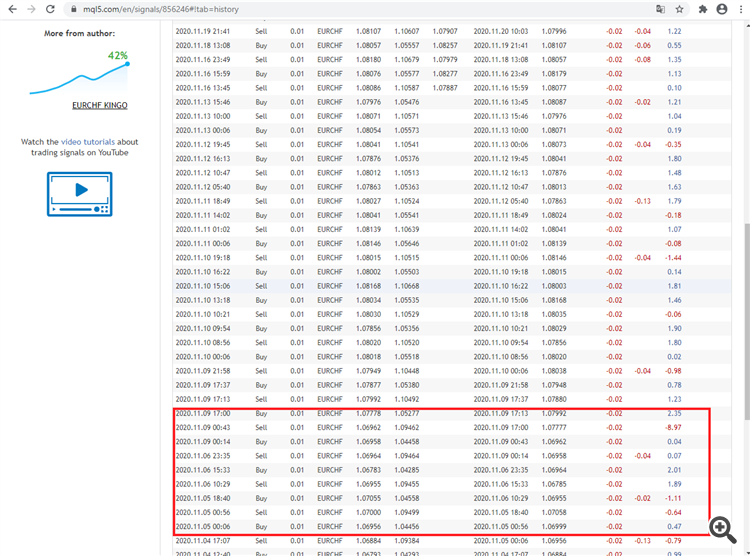
i want said only one important info,
when i make comparison betwwen backtest results and my real account results (trading history) i noticed something,
example when i make backtest i not see this position :
fifteenth position --> SELL ---> the time when it is ----> 00:56,
so when i make backtest im my home computer i see sell in 00:18, not in 00:56,
after i see my VPS server, so i see indicator signal level, and i see everything is right, so indictor signal level is 00:56
adn i open sell position in 00:56, so rigt, but in my backtest i not see this position in 00:56, i see a little further back so in 00:18
after my friend ( reall this man is big trader, and developer ) said : you windows is 10, but in your vps server windows is 7,
so this is reason, if you make backtest in your VPS server (because here have windows 7) you need see this position,
so 00:56,
and yes when i make backtest in my server i see this positions 00:56, so everything is normal,
only my indicator signal change a little early in windows 10 so when time is a 00:18,
I would start to doubt my robot. so same time backtest is not perfect for reliability,
but now i want not have problem, my robot is best again gfor me .
on different info,
some people say : your robot make good trading but last 7/8 months is not very good,
my answer is this : this is a temporary situation, this is normal, reason is different market conditions,
so perfect parameter is not possible,
plus my EA last 7/8 months ( between 01.04.2020-23.11.2020 ) not very bad if you use number 42 in Moving Average,
firstly i said i use number 32, yes, because this parameter open more positions, but if you want good parameter for different market conditions,
number 42 is better than number 32 (Moving Average number )
but number 55 is better than 42,
when this number increase, in this case indicator sensitivity decrease, and indicator signal not change very easy,
but if this number is small,( so if you decrease this number) in this case, indicator signal very easy change,
for result : if you use number 55 this is good parameter, but EA make money slow, not very slow but slow
because indicator signal does not change very often