Saint Volume Trader EA Free
FREE
Yayınlandı:
22 Haziran 2017
Mevcut sürüm:
1.8
Uygun bir robot bulamadınız mı?
Freelance üzerinden kendi
robotunuzu sipariş edin
Freelance'e git
Freelance üzerinden kendi
robotunuzu sipariş edin
Bir alım-satım robotu veya gösterge nasıl satın alınır?
Uzman Danışmanınızı
sanal sunucuda çalıştırın
sanal sunucuda çalıştırın
Satın almadan önce göstergeyi/alım-satım robotunu test edin
Mağazada kazanç sağlamak ister misiniz?
Satış için bir ürün nasıl sunulur?

Alım-satım fırsatlarını kaçırıyorsunuz:
- Ücretsiz alım-satım uygulamaları
- İşlem kopyalama için 8.000'den fazla sinyal
- Finansal piyasaları keşfetmek için ekonomik haberler
Kayıt
Giriş yap
Web sitesi politikasını ve kullanım şartlarını kabul edersiniz
Hesabınız yoksa, lütfen kaydolun
Hi, What are the limiatations in this free version?
Hi, What are the limiatations in this free version?
Hi,
Thanks for your inquiry. The limitations are as following :-
Timeframe = H1
Tradable pairs = USD/DKK, USD/CHF and CAD/CHF.
Lot size = 0.01 only
Hi,
Thanks for your inquiry. The limitations are as following :-
Timeframe = H1
Tradable pairs = USD/DKK, USD/CHF and CAD/CHF.
Lot size = 0.01 only
Live performance refer to https://www.forexfactory.com/subheadseven. Selected broker's demo have only minor different with real live account due to their latency.
A brief report of current performance : -
Pairs - GBP/USD
Traded for 29 days
Pips gained = 11,270
Live performance refer to https://www.forexfactory.com/subheadseven. Selected broker's demo have only minor different with real live account due to their latency.
A brief report of current performance : -
Pairs - GBP/USD
Traded for 29 days
Pips gained = 11,270
Hi,
Can you please attach set file that should be used for USD/CHF and indicate Renko Bar size (in pips)
What data provider needs to be added to settings in order for the EA to get data when "read volume" parameter is on, or it does it automatically?
Thank you in advance !!
Hi,
Can you please attach set file that should be used for USD/CHF and indicate Renko Bar size (in pips)
What data provider needs to be added to settings in order for the EA to get data when "read volume" parameter is on, or it does it automatically?
Thank you in advance !!
Hi,
Thanks for your interest. Attached here a set file and renko indicator. Renko bar in pips is 8.
Attached here instruction picture for read real time volume data from service provider.
Hello, green pips to all.
Brief report for today.
Pairs - GBP/USD
Trading days - 30 days
Pips gained refer to screenshot.
Hi,
Thanks for your interest. Attached here a set file and renko indicator. Renko bar in pips is 8.
Attached here instruction picture for read real time volume data from service provider.
Thanks for your reply, will definitely give it a try !!
Thanks for your reply, will definitely give it a try !!
Welcome my friend.
Dear Users,
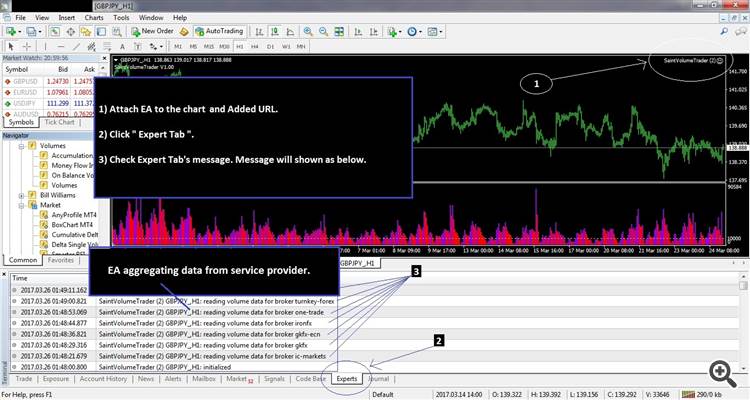
Please follow attached guideline pictures.
Hello, may I know how to do back test on your EA ? Are there any special procedures needed to be done?
Welcome my friend.
Hello,
Is it possible to remove restriction of H1 timeframe from demo version,
because it won't be possible to test it with Renko charts, Renko indicators won't allow to emulate H1, M1, M5, M15, M30, H4, D, W timeframes :(
Thank you in advance !!
Hello,
Is it possible to remove restriction of H1 timeframe from demo version,
because it won't be possible to test it with Renko charts, Renko indicators won't allow to emulate H1, M1, M5, M15, M30, H4, D, W timeframes :(
Thank you in advance !!
Actually renko chart is for see clearer picture of trend direction. so it doesn't matter what chart you are using and it won't affect open trade's position whether with H1 or renko chart. The main concern of the EA is to trace big orders engage to the market. When this happen, prices will always move and form a " trend ". Not knowing Up or Down, EA therefore place buy sell pending order to catch the trend.
It is hard to say without proper forward testing, but on backtests results look quite different:
Renko:
It is hard to say without proper forward testing, but on backtests results look quite different:
Renko:
Yes. If for back testing purposes by set " read volume " = False, EA will trade based on standard Meta Trader 4's volume indicator and this is what i get ( attached picture ).
Forward testing on the use of standard Meta Trader 4's volume indicator may not able to produce good signal due to indicator read only own platform data. Each platform data can be differ very obvious.
So this is an extra function ( read volume = False ) for the benefit of user. Personally i did not use this. My concern is on aggregated volume data from service provider. Live performance you can refer to my link website.
Dear Users,
" Read volume = True " please follow this guideline.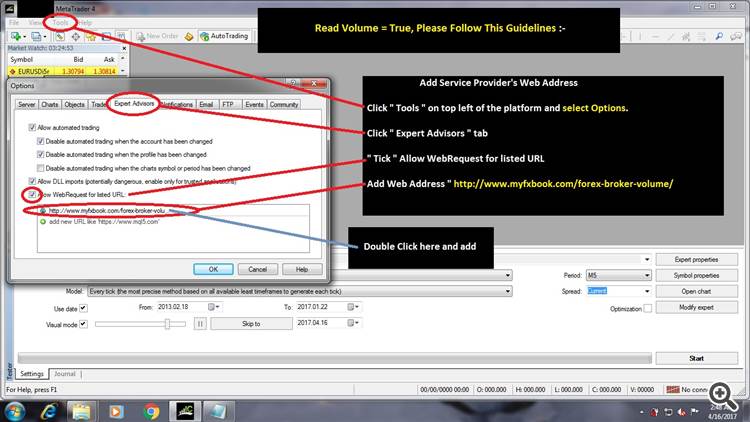
What timeframe chart does this EA is attached to? Renko M2 or H1?
What timeframe chart does this EA is attached to? Renko M2 or H1?
H1.
How can I use it on a Ranko chart
How can I use it on a Ranko chart
If you know how to generate a renko chart then you can use it on renko chart. you can google latest renko file on the net.