Sigma7 ScalpGold
- Uzmanlar
- Sürüm: 1.0
- Etkinleştirmeler: 10

A gold (XAUUSD) scalper on resting stop orders. It rests one buy stop and one sell stop at recent price extremes and manages every filled trade with a hard stop, a take profit and a tight trailing stop. No grid, no martingale, no averaging. Fully self-contained — it needs no external indicator and no outside connection.
What it does
Sigma7 ScalpGold reads the recent highs and lows of the gold chart and rests one buy stop above and one sell stop below, refreshed once per bar. It offers a level only while price has not already run through it, and it keeps the easiest-to-fill order it has rather than chasing price.
Every filled trade is managed in code: a hard stop and a take profit are set from the start, the stop moves to break-even once the trade is in profit, and a tight trailing stop follows the best price reached. When a level is hit the position is closed at market. The trailing stop does most of the work — a typical trade lasts only a few minutes.
Every position is sized on its own hard stop. There is no grid, no martingale and no averaging.
How to use it
- Symbol: XAUUSD (gold). The EA also runs on other symbols with the same distances as a fraction of price, but it is designed and tested on gold only.
- Chart timeframe: M10 or M15 is recommended.
- Broker account: an ECN / Raw spread account with tight spreads is a must. The EA scalps small price moves, so a wide spread or a standard account with the cost built into the spread takes most of each trade.
- Account: a hedging account is recommended, so a long and a short can be held at once. On a netting account the two sides merge into one position.
- Run one chart per account. The EA refuses to start next to another copy of itself in the same terminal.
- Keep the terminal running on trading days, ideally on a VPS. Resting orders and positions are read back from the account after a restart. The levels kept by "Max spread at entry" and the peak balance used by "Peak-balance sizing" are saved to a small file in the terminal's own Files folder, so a restart does not lose or duplicate a trade. A kept level that price passed while the EA was not running is dropped.
- Test it in the Strategy Tester on XAUUSD first, and run it on a demo account before a live one.
Inputs
Spread filter
- Spread filter: when on, no new order is placed while the average spread is above the ceiling.
- Max average spread: the ceiling, in pips (one pip is 0.01 USD of the gold price).
- Cancel on wide spread: when above zero, resting orders are removed while the spread is too high.
- Spread window: the timeframe over which the average spread is measured.
- Max spread at entry: when above zero, the EA keeps its buy and sell levels itself instead of resting stop orders at the broker, and opens at market when price reaches a level only if the spread at that moment is at most this many pips; otherwise that level is skipped. This protects against fills caused by a sudden spread spike alone. Zero (the default) uses resting stop orders.
Position sizing
- Lot sizing mode: "Risk percent of balance" sizes each order so its hard stop risks the Risk percent of balance; "Fixed lots" uses a fixed volume.
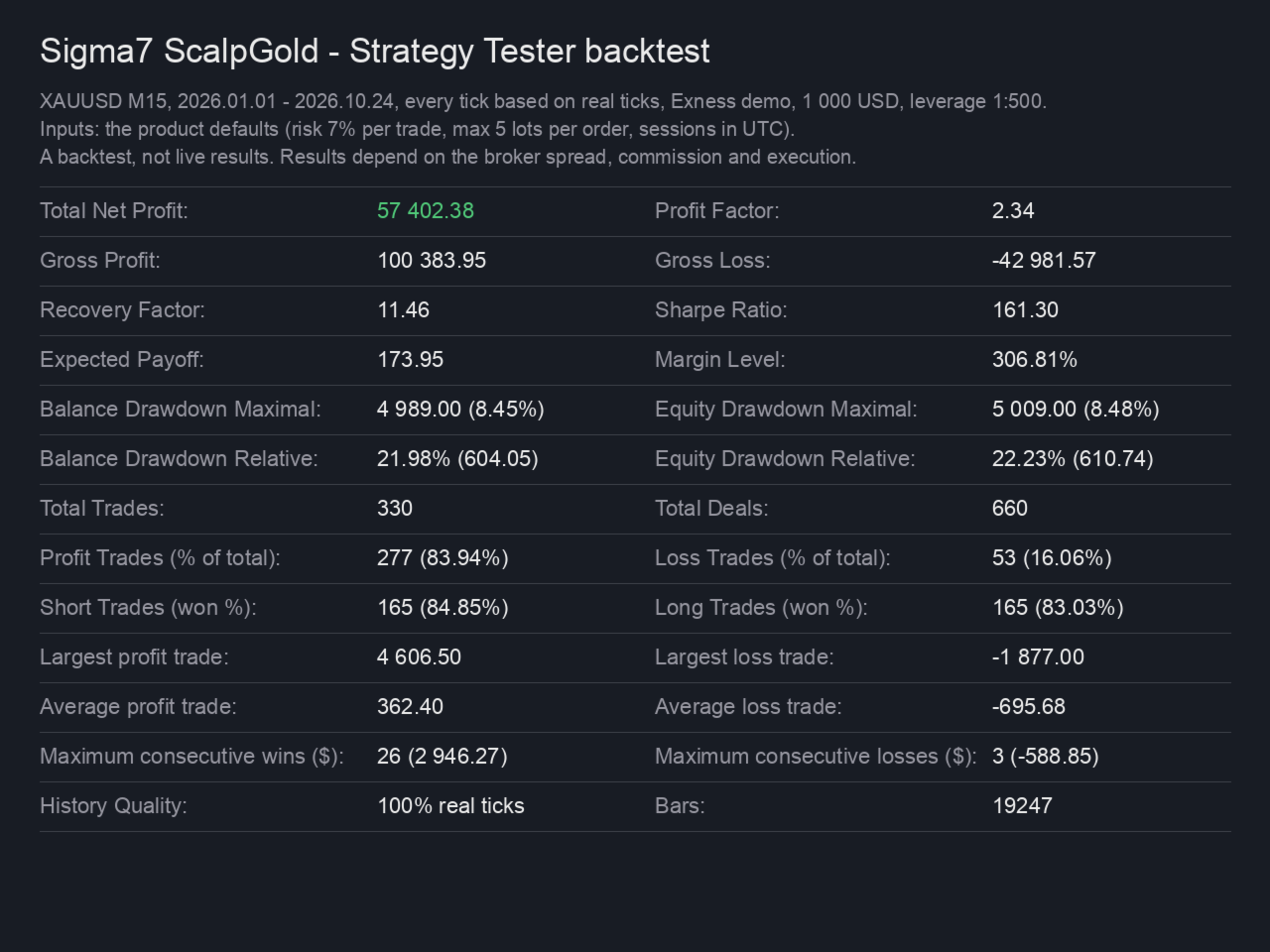
- Risk percent: the percentage of balance risked per trade in the risk mode. Default 7.0.
- Fixed lots: the volume used in the fixed mode.
- Max lots per order: a ceiling on every order, in both modes. Default 5; zero means no ceiling.
- Peak-balance sizing: when on, lots are sized off the highest balance seen, so they do not shrink during a drawdown. Deposits and withdrawals move that peak by the same amount.
Exits
- Use trailing stop, Trailing stop (pips): the trailing distance behind the best price.
- ATR trail period, ATR trail multiplier, ATR trail timeframe: when the period is above zero, the trailing distance is the multiplier times the ATR of that timeframe instead of the fixed pips. Zero turns it off.
- Entry offset (pips): moves the resting order away from the level. Zero is the tested system.
- Use break-even, Break-even trigger (pips), Break-even lock (pips): move the stop to just beyond the entry once the trade is far enough in profit.
- Stop loss (pips), Take profit (pips): the hard stop and target on every trade.
- Real server stop: when on, a real stop is also parked on the server at the disaster level, as a safety net behind the managed stop.
- Trade life (minutes): a trade still open after this many minutes is closed at market, in profit or not. Zero turns it off.
Sessions (UTC)
- Monday to Sunday: the days new orders may be placed, as UTC days (Saturday and Sunday off by default).
- Session start, Session end, Friday end: the daily window for new orders, in UTC (not the broker's server time).
News filter
- Cancel orders around news: when on, resting orders are removed, and no new ones are placed, from Minutes before news until Minutes after news around high-impact calendar events for the symbol's currencies. Open trades are not touched. Off by default. It uses MetaTrader's economic calendar, which is not available in the Strategy Tester, so it has no effect on backtests.
- Minutes before news, Minutes after news: the window around each event (30 and 15 by default).
Identity
- Magic number: the id the EA uses to recognise its own orders.
- Show chart panel: a status panel on the chart with the account, spread, status, orders and closed results.
What it does not do
It does not use a grid, martingale or averaging. It does not connect to anything outside the terminal; the optional news filter uses MetaTrader's built-in economic calendar. It places no order outside its session window or the symbol's own trading sessions.
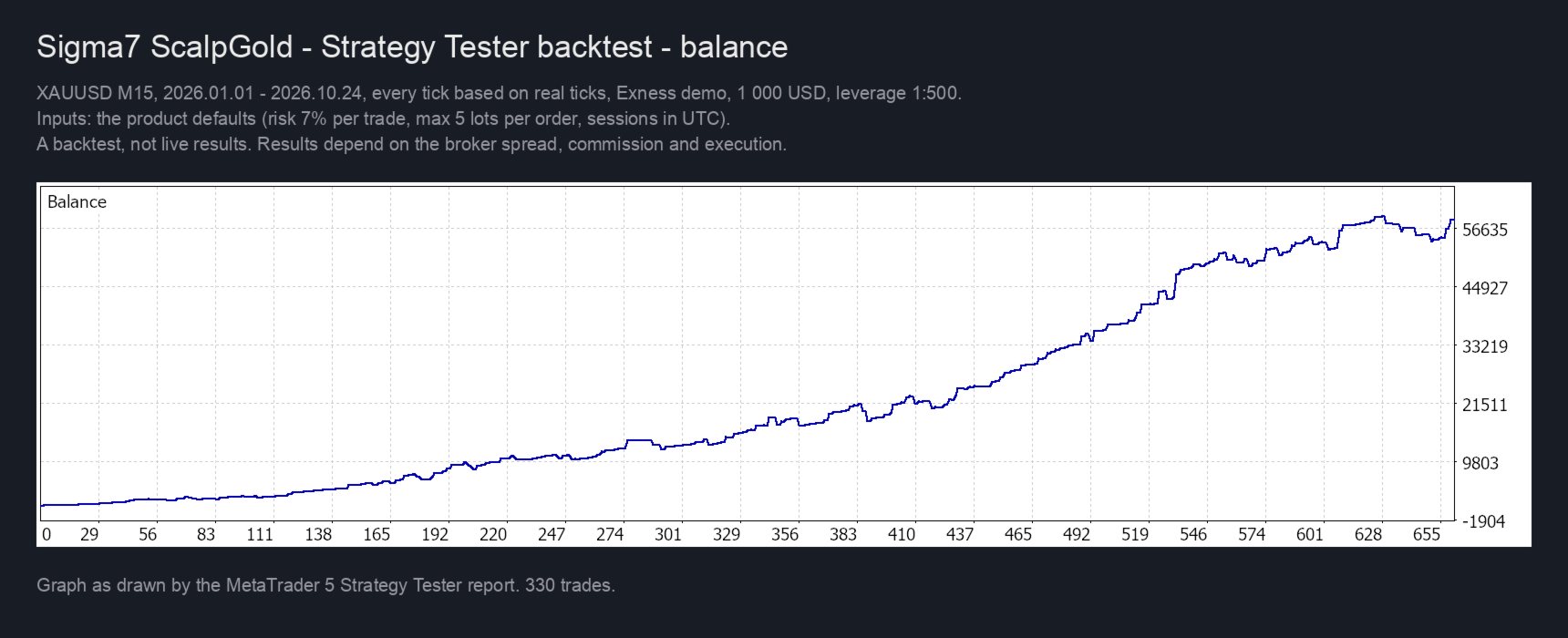
Results depend on the broker's spread, commission and execution. Results in the Strategy Tester or on a signal do not guarantee future results.
Live monitoring
https://www.mql5.com/en/signals/2396997