Grid ADX EA
- Uzmanlar
- Sürüm: 3.12
- Etkinleştirmeler: 5

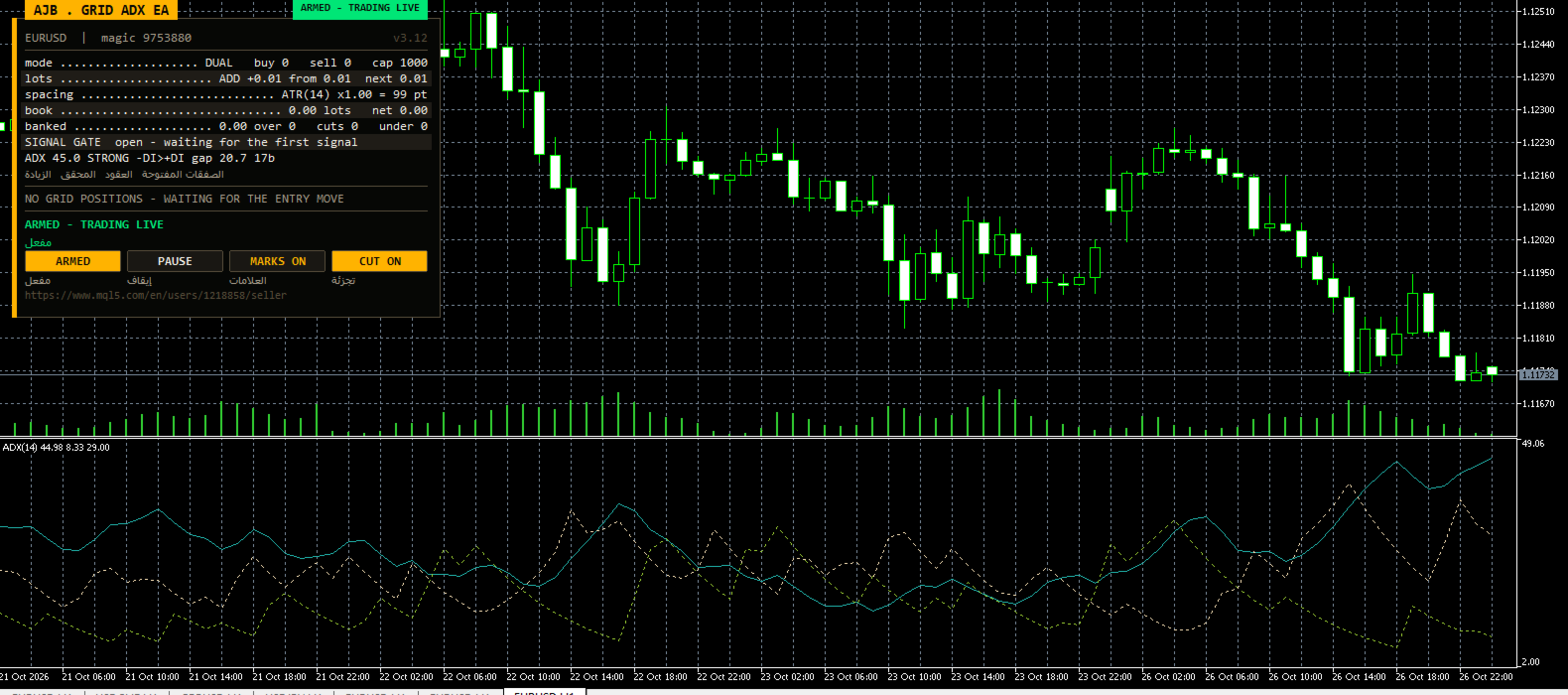
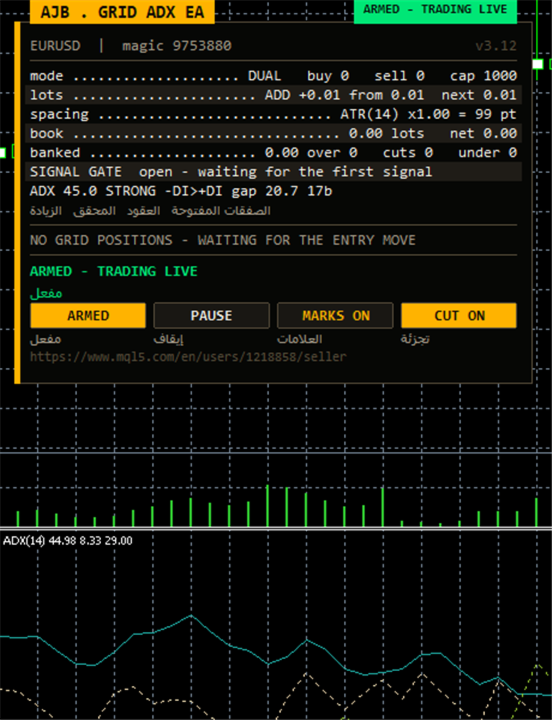
- New ADX panel row: live ADX value, a WEAK / TRENDING / STRONG label, which directional line leads (+DI or -DI), the gap between them and bars since the last crossover
- ADX, +DI and -DI drawn in their own subwindow, with arrows on the candles where a cycle was armed
- Each copy keeps private state per symbol and magic number, and a magic lock blocks duplicate numbers across charts
- Fixed margin test: a new level is compared with the real free margin of the account
- Careful shipped defaults: bounded ladder, lot cap and protective limits
- Try every setting free in the Strategy Tester before you buy
See it work before you pay anything. Open the MetaTrader 5 Strategy Tester, choose Grid ADX EA, tick visual mode and press Start. The ADX subwindow, the new strength row, the arrows on the candles and the growing ladder all play out on your broker's own price history, so you judge the behaviour with your own eyes.
Grid Ladder trading has one weak spot that everyone knows: it starts at random moments, often right in the middle of a fight between buyers and sellers. Grid ADX EA fixes the timing side of that problem. It lets J. Welles Wilder's Average Directional Index decide whether a trend is present at all, and which side is in control, before the first order of a cycle is placed. Once a cycle exists, a mature management engine takes over: volatility-based spacing, small net closures, and partial trimming of the oldest exposure so that a ladder can unwind gradually instead of waiting for one large reversal.
WHY ADX FOR A GRID
The ADX family answers two separate questions. The ADX line measures how strong the current move is, regardless of direction. The +DI and -DI lines show whether upward or downward pressure dominates. Most indicators mix those two ideas together; ADX keeps them apart, which is exactly what a grid needs. A crossover of the directional lines is only accepted when ADX already sits at or above your threshold, so quiet, choppy hours where the lines cross back and forth are ignored. The reading comes from completed bars only and serves as a gate for starting a cycle; what happens after the first level belongs to the grid engine, not to the indicator.
WHAT IS NEW IN 3.12
Trend strength on the panel. A dedicated row shows the present ADX value, labels it WEAK (below the threshold), TRENDING (at or above it) or STRONG (at or above the strong level), tells you which directional line is on top, prints the distance between +DI and -DI, and counts the bars since they last swapped places. In one glance you know whether the EA is waiting because the market is flat, or because the leading side has not changed yet.
The indicator stays on screen. ADX with both directional lines is attached to the chart in its own subwindow when the EA starts and removed again when it stops, so what you read on the panel matches what you see under the candles.
Isolated memory for every chart. Counters, anchors, retry lists and closing plans are stored under a key made from the account, the symbol and both magic numbers. A lock refuses to start a second chart on a magic number that a running copy already owns, so two instances never feed on the same data.
An honest margin check. Before a level is added, its margin requirement is calculated by the terminal and compared, with a safety buffer, against the free margin you really have. Large accounts are no longer refused valid orders.
Defaults built around stop-out risk. The opening lot, the largest permitted lot, the netting margin cap and the ladder limits come with modest values, so a first run stays inside reasonable bounds without any tuning.
THE LIFE OF ONE CYCLE
Stage 1 - Trend check. On the signal timeframe the EA waits for the directional lines to swap leadership while ADX confirms enough strength. You may additionally demand that ADX is rising on that bar. A spacing of 30 bars between accepted signals (default) keeps a hectic session from launching cycle after cycle, and an accepted signal remains usable for a few bars while the other filters line up.
Stage 2 - Ladder growth. New levels appear as price moves away from the anchor. Buying and selling ladders can run at the same time, each with its own anchor and counter, or you can trade one side only. The distance between levels follows ATR between a lower and an upper bound, or stays fixed in points, and can be locked at the first value of the cycle.
Stage 3 - Taking profit. A scanner examines groups made of the oldest and the newest orders per side, then closes a group as soon as its net result, including swap and commission, beats your target. If an old order is too heavy to close in full, slicing removes a portion of it using profit that younger orders already carry. Every pullback therefore reduces the largest risk a little more.
Stage 4 - Guarding the account. A reopen guard rejects closures that would simply be replaced by a new order at the same price moments later, a common way for grids to give their balance away in commission. Closing deals are confirmed in history, failed legs wait in a retry list, and a plan is thrown away if positions changed between the scan and the send.
Stage 5 - Hedge cycle (optional, disabled by default). Holds a matched buy and sell pair on a chosen symbol and retires both sides in equal slices, financed by a capped surcharge on closures the ladder performs anyway. A timer compares both legs and fixes the situation if only one survives.
WHAT THE PANEL TELLS YOU
Shown are the symbol and magic number, the current state (ARMED, SCAN ONLY or PAUSED), the ladder mode, current ATR spacing, lot step, banked profit, open volume and floating result, the upcoming closure for buys and for sells (each closable with one click), the list of open orders, and the new ADX strength row. Buttons arm the EA or switch it to scan only, pause and resume it, show or hide chart marks and turn slicing on or off. The panel can be dragged, minimised and docked to any corner, and an Arabic line can be shown under each label. Optimisation passes without visual mode skip all drawing to keep testing fast.
LIMITS THAT YOU CONTROL
The EA uses no stop loss and never closes everything automatically. Protection means refusing additional levels once a limit is reached, rather than liquidating at the worst moment. Every limit is a visible input: levels per ladder, orders per side, largest single lot, minimum margin level, highest floating loss relative to balance, a spread ceiling and, on netting accounts, the merged position margin as a percent of equity. Once the level limit is hit, lots grow no further, and slicing cannot exceed your chosen size. Scan only mode shows every decision while sending no orders.
HOW TO USE IT, STEP BY STEP
1. In MetaTrader 5 open Tools, Options, Expert Advisors and allow algorithmic trading.
2. Test first: run a visual Strategy Tester pass on your intended symbol with real broker spreads and follow the ADX row and the ladder over several weeks of data.
3. Open a demo or live chart; EURUSD H1 and XAUUSD H1 are comfortable starting points.
4. Pull Grid ADX EA out of the Navigator, drop it on the chart and switch on Allow Algo Trading in the Common tab.
5. Under Inputs pick scan only for RunMode, leave InitialLotSize at 0.01 using lot addition, and keep EnableHedgeCycle switched off.
6. Give every chart its own EAMagicNumber and HedgeMagicNumber; the lock warns you if one is taken.
7. Decide on values for MinMarginLevelPercent and MaxAccountRiskPercent that fit your own risk comfort.
8. If your symbol trends rarely, lower InpAdxThreshold a little; if it whipsaws, raise it or enable InpAdxRequireRising.
9. Observe the planned closures for one session, then press the arm button once the behaviour makes sense to you.
10. Check the panel each day: a WEAK label for long periods simply means no new cycle is being opened.
EVERY INPUT EXPLAINED
Grid - opening levels
TradeMode: trade buying and selling ladders together, or just one direction.
GridSpacePoints: distance between levels in points when fixed spacing is used (25).
GridSpaceMultiplier: widens each next gap by this factor; 1.0 keeps all gaps equal.
MaxGridLevels: highest number of levels per ladder.
UpDirectionIsBuy: if true, an upward signal arms the buying ladder.
EAMagicNumber: tag of the ladder orders, also part of the private state key and guarded by the lock.
GridOrderComment: comment placed on ladder orders.
OneOrderPerBar: at most one new level per candle.
Lot progression
InitialLotSize: volume of the first level (0.01).
LotSizingMode: later levels grow by adding a fixed step or by multiplying.
LotMultiplier: factor per level in multiply mode (1.25).
LotAddStep: volume added per level in add mode; 0 repeats the first lot.
MaxOrderVolume: largest volume one order may carry (1.0).
UseAutoLot: scales the first lot with the account balance.
AutoLotBaseBalance: balance at which the first lot equals InitialLotSize.
AutoLotAllowDecrease: permits the lot to drop under the start value after losses.
Volatility spacing
GridSpacingMode: fixed points or ATR-driven distance (ATR by default).
ATRTimeframe: period on which ATR is measured.
ATRPeriod: bars averaged by ATR.
ATRSpacingFactor: level distance equals ATR times this value.
ATRBarShift: bar that provides ATR; 1 is the last closed candle.
ATRMinSpacingPts: lowest permitted distance in points; 0 turns it off.
ATRMaxSpacingPts: highest permitted distance in points; 0 turns it off.
ATRFreezeOnStart: keeps the first distance unchanged until the cycle is finished.
Closure target
DesiredProfitPerClosure: base money amount one closure aims to bank.
ProfitMultiplier: last factor between 1.00 and 2.00 applied on the target.
ProfitTargetMode: a flat amount, or one that grows with volume and depth.
ProfitVolumePower: weight of closing volume in a scaled target; 0 ignores volume.
ProfitDepthBonus: additional target for each extra open level.
ProfitMaxMultiple: cap on a scaled target compared with the base.
ProfitMaxReachFraction: keeps the target reachable inside a fraction of one level distance.
Group scanner
UseMultiLegScan: tries groups of several orders before the plain pair.
MaxOldestLegs: limit on old orders inside one group.
MaxNewestLegs: limit on young orders inside one group.
ScanPriority: how the EA chooses between several qualifying groups.
NeverBankLessThanPair: a group must also exceed the plain pair target.
RequireCloseVolumeExceedsTarget: young volume has to be bigger than the old volume it closes.
MinCloseVolumeRatio: lowest accepted ratio of closing volume to targeted volume.
Slicing - partial closes
EnableTargetSlicing: cuts part of an old order when closing it in full is not yet possible.
FragProfitWeightPower: how fast the needed profit rises with the size of the cutting lot.
FragMinSlicePercent: minimum cut, in percent of the order being reduced.
FragAllowMultiCloser: lets several young orders pay for one cut together.
FragPreferFullClosure: picks a full closure whenever both kinds qualify.
Reopen guard
ReopenGuard: rejects closures that would at once reopen the same level.
ReopenGuardCushion: needed distance as a share of one level gap.
Account safety
MinMarginLevelPercent: no new levels under this margin level; 0 turns it off.
MaxAccountRiskPercent: no new levels when floating loss passes this percent of balance; 0 turns it off.
NetMaxMarginPercent: for netting accounts, limits the merged position's margin to this percent of equity (5).
MaxTotalOrders: absolute cap on ladder orders per side.
Execution and checks
RunMode: start armed or in scan only.
CloseSequence: sending order of closing legs.
MaxSlippagePoints: accepted slippage in points.
MaxSpreadPoints: trading waits while the spread is above this.
MinSecondsBetweenClosures: pause between two closures on the same side.
CloseAttemptsPerLeg: attempts per leg before it joins the retry list.
VerifyTimeoutSeconds: seconds spent re-checking a leg that did not confirm.
DeferWhenMarketClosed: waits for the session to open instead of stopping when there are no quotes.
MarketClosedRetrySeconds: retry interval while the market rejects orders.
AutoResumeAfterSeconds: clears a halt by itself after this time; with 0 only the panel button resumes.
AbortIfBookChanged: drops a plan when positions changed after scanning.
UseFullCommission: includes commission for opening and closing.
CommissionPerLot: fallback commission when history shows none.
CloseOrderComment: comment placed on closing deals.
Hedge cycle
EnableHedgeCycle: turns the hedge cycle on.
HedgeSymbols: comma separated hedge symbols; repeating one gives it more turns.
HedgeSymbolRotation: rule for choosing the symbol of the next cycle.
HedgeMaxSymbolsInTester: restricts the rotation only while testing.
HedgeCycleLots: volume of each side of the matched pair.
HedgeSliceLots: volume taken off both sides in every slice.
HedgeFragmentBonus: extra charged on top of the slice cost.
HedgeBonusIsPercent: true means the extra is a percentage of slice cost; false means a money amount.
HedgeMaxSurcharge: money cap on the surcharge per closure; 0 means none.
HedgeMaxSurchargePercent: upper percent by which the hedge can lift any closure target.
HedgeMagicNumber: tag of hedge legs; it must be different from EAMagicNumber.
HedgeReopenOnFinish: opens a fresh cycle when one completes.
HedgeStartRequiresTrade: waits for a ladder position before the first cycle.
HedgeIntegritySeconds: how often both legs are compared.
HedgeAutoRepair: repairs a lone leg automatically.
HedgeNakedAction: what that repair does.
HedgeMaxSpreadPoints: hedge orders wait above this spread; 0 disables the check.
HedgeSlippagePoints: accepted slippage on hedge orders.
HedgeAttemptsPerLeg: attempts per hedge leg.
HedgeVerifyTimeout: verification time for a stuck hedge leg.
HedgeCommissionPerLot: fallback commission for hedge costs.
HedgeOrderComment: comment placed on hedge deals.
Weekly cash day
WeeklyCashDay: pauses fresh cycles and slices near the day you withdraw.
CashDayOfWeek: day of withdrawal, 0 for Sunday, 1 for Monday and so on.
CashCutoffHour: server hour after which no slice fires on that day.
Panel and chart
ShowPanel: shows the panel.
PanelX: horizontal offset from the chart edge.
PanelY: vertical offset from the chart edge.
PanelFontSize: basic font size.
ShowArabic: prints an Arabic line under every English label.
ShowChartMarks: marks grid levels and planned closures directly on price.
MaxTableRows: rows of orders listed per ladder.
PanelCorner: corner of the chart the panel docks to.
Entry trigger
EntryTriggerMode: wait for the ADX signal, or open the first level immediately.
SignalBarShift: bar read for the signal; 1 is the last closed candle.
SignalBarsDelay: bars required between accepted signals (30).
SignalValidBars: how many bars a signal stays usable.
SignalAllowBuy: allows the signal to arm buying cycles.
SignalAllowSell: allows the signal to arm selling cycles.
SignalReverse: inverts the signal direction.
ADX signal
InpAdxTF: timeframe the ADX is calculated on.
InpAdxPeriod: ADX smoothing length (14).
InpAdxThreshold: lowest ADX value at which a +DI/-DI crossover is accepted; it also separates WEAK from TRENDING on the panel (25).
InpAdxStrong: ADX value from which the panel shows STRONG (40).
InpAdxRequireRising: when true, ADX must also be higher than on the bar before.
InpShowAdxWindow: attaches ADX, +DI and -DI to the chart in a subwindow.
InpShowSignalArrows: puts an arrow on every candle whose signal started a cycle.
Debug
DebugMode: prints extended messages to the journal for troubleshooting.
AN HONEST WORD ON RISK
A grid manages a position; it does not predict the market. Grid ADX EA is strict about when a cycle may begin and afterwards aims for brief cycles and steadily smaller old orders, yet a long trend against an open ladder can still create a deep book. Choose lot sizes for the harshest move you can picture on your symbol, test with your own broker's history, and watch the Strategy Tester results before any real money is involved. It runs on any symbol and timeframe and needs no DLLs or additional files.
Once you have used Grid ADX EA for a while, please consider leaving a review that describes your real experience, positive or negative. Honest feedback helps other traders decide and shows me which part to improve next.