Gold SMC Mover EA
- Uzmanlar
- Sürüm: 1.9
- Güncellendi: 2 Haziran 2026
- Etkinleştirmeler: 10

Gold SMC Mover is a single-symbol, single-strategy expert advisor engineered for one job: trading Gold (XAUUSD) on M5 using Smart Money Concepts (SMC) market-structure logic.
The EA identifies shifts in market structure and places pending stop orders at validated swing levels, so entries are taken on confirmed structural breaks rather than on lagging indicators. Every position is opened with a predefined stop loss and take profit, and is actively managed with breakeven, partial close, and trailing logic.
Live Signal Vantage Markets: https://www.mql5.com/en/signals/2376153 First milestone for price increase start at 100% growth then evey 50% growth.
It was developed and validated on real-tick history across multiple brokers, including out-of-sample testing over multiple years, to favour a stable, repeatable approach over curve-fitted backtest spikes. Results vary by broker execution quality, spread, and account size — past performance does not guarantee future results.
What it does NOT do: no martingale, no grid, no averaging down, no hedging, no high-frequency tick-scalping. Risk per trade is bounded, and a drawdown circuit-breaker halts new entries if a maximum drawdown threshold is reached.
Key features
- Built and optimised exclusively for XAUUSD M5 (the EA runs on Gold symbols only).
- Smart Money Concepts structure engine with confirmed break-of-structure entries.
- Three one-click risk profiles — Conservative, Balanced, Aggressive — or set a custom risk %.
- Drawdown circuit-breaker: automatically halts new trades at your chosen max-drawdown limit (ideal for prop-firm and funded accounts).
- Adaptive position sizing that reduces risk after consecutive losses.
- Built-in filters: volatility (ATR), trading session, spread, and high-impact news.
- Partial take-profit, automatic breakeven, and trailing stop management.
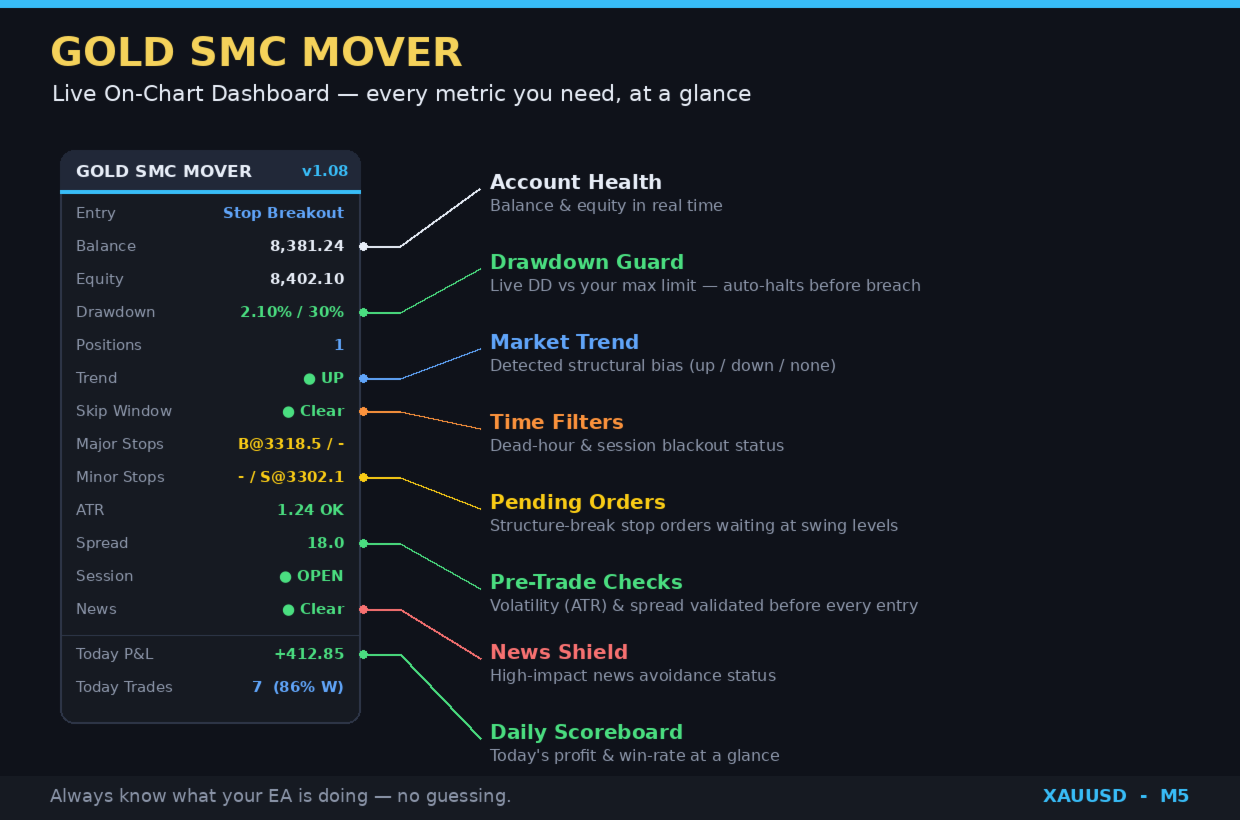
- Modern on-chart dashboard showing balance, equity, drawdown, open positions, trend, session/news status, and today's P&L.
- Prop-firm friendly: percentage-based risk and a configurable drawdown halt make it straightforward to respect funded-account rules.
Recommended use
- Symbol: XAUUSD (Gold). Timeframe: M5.
- Account: ECN/raw-spread account with low Gold spreads; VPS strongly recommended for 24/5 operation.
- Minimum balance: works from small balances (recommend 50 USD up), but larger balances allow the risk model to size properly (see the settings guide).
Important risk disclaimer Trading leveraged products carries a high level of risk and can result in the loss of your capital. This EA does not guarantee profit. Backtest and historical results are not indicative of future performance. Only trade with money you can afford to lose, and test on a demo account first.
Quick start (3 steps)
- Open a XAUUSD M5 chart with a low-spread (ECN/raw) account.
- Drag Gold SMC Mover onto the chart and enable Algo Trading.
- Set your Risk profile and Max drawdown halt % (below), then click OK. The dashboard appears top-left.
If the EA refuses to load, check that the chart symbol is Gold — it only runs on XAUUSD/Gold symbols by design.
Inputs explained
Risk
- Risk profile — one-click aggression level:
- Conservative — lowest risk per trade. Best for funded/prop accounts and capital preservation.
- Balanced — moderate risk. A reasonable default for most live accounts.
- Aggressive — highest risk per trade. For small personal accounts where you accept larger swings.
- Custom risk % — leave at 0 to use the profile above. Enter a value (e.g. 1.5 ) to override the profile with your own exact risk-per-trade percentage.
- Max drawdown halt % — the EA stops opening new trades once equity drawdown from the peak reaches this percentage. Set this to match your account or prop-firm limit, with a safety buffer. Example: for a 7% prop limit, set this to 5%. Trading resumes the next day.
- Maximum lot size — a hard ceiling on position size, regardless of risk %.
Execution
- Max spread (points) — entries are skipped when the spread is wider than this. Raise it on brokers with wider Gold spreads; lower it to be stricter.
- News filter — avoids trading around economic news. NEWS_HIGH (high-impact only) is the usual choice; NEWS_OFF disables it.
Identification
- Magic number — unique ID for this EA's trades. Give each chart/account a different magic if you run more than one instance.
- Trade comment — label attached to orders, visible in your trade history.
Display
- Show dashboard — turn the on-chart panel on/off.
- Panel corner — 0 top-left, 1 top-right, 2 bottom-left, 3 bottom-right.
Recommended starting settings
| Account type | Risk profile | Custom risk % | Max DD halt % |
|---|---|---|---|
| Funded / prop firm | Conservative | 0 (or 1.0) | 1–2% below your firm's limit |
| Standard live account | Balanced | 0 | 10% |
| Small personal account | Aggressive | 0 | 25–30% |
Always begin on a demo account for at least one to two weeks to confirm behaviour on your broker's feed before going live.
Prop-firm checklist
- Set Max drawdown halt % a couple of points below your firm's hard limit (the EA halts before you breach).
- Use the Conservative profile, or a custom risk of around 1%.
- Confirm whether your firm's drawdown is static or trailing — trailing limits are stricter and may require lower risk.
- Verify your broker's server time matches the EA's session expectations; an offset shifts the trading windows. Need broker with GMT+2 server timezone (often shifting to GMT+3 during Daylight Saving Time).
- Give the prop account its own magic number.
FAQ
- Which symbol/timeframe? XAUUSD only, M5 only. It will not run on other symbols.
- Do I need a VPS? Strongly recommended, so the EA runs 24/5 without your PC.
- Can I run multiple accounts? Yes — use a different magic number per instance.
- Why did it skip a setup? A filter (spread, session, news, volatility, or the drawdown halt) blocked it. Check the dashboard status rows.
- Why is my lot size at the broker minimum? On very small balances the minimum lot already exceeds the target risk %; sizing scales up as the balance grows.
Support
For questions or issues, contact via the MQL5 Market product page messaging. Please include your broker, account type, symbol, and a screenshot of the dashboard and your inputs.
Disclaimer: This EA does not guarantee profits. Trading carries substantial risk. Test on demo before live use.