 MetaTrader 5
 Uzmanlar
 Göstergeler
 Komut dosyaları
 Kütüphaneler
 Depo
Depo
Fan sayfamıza katılın

Any Indicator Alert - alerts, push notifications and multi-timeframe for any custom indicator, no source code needed - MetaTrader 5 için gösterge

- Görüntülemeler:
- 35
- Derecelendirme:
- Yayınlandı:
-
 Alım-satım fırsatlarını kaçırıyorsunuz:
- Ücretsiz alım-satım uygulamaları
- İşlem kopyalama için 8.000'den fazla sinyal
- Finansal piyasaları keşfetmek için ekonomik haberler
Kayıt Giriş yapWeb sitesi politikasını ve kullanım şartlarını kabul edersiniz
Hesabınız yoksa, lütfen kaydolun -
 Bu koda dayalı bir robota veya göstergeye mi ihtiyacınız var? Freelance üzerinden sipariş edin
Freelance'e git
Bu koda dayalı bir robota veya göstergeye mi ihtiyacınız var? Freelance üzerinden sipariş edin
Freelance'e git

Bu forumdaki en büyük iki konu başlığı “Uyarı/sinyal içeren göstergeler” ve “Çoklu Zaman Dilimi Göstergeleri”dir. Yıllar geçmesine rağmen bu konular hâlâ açık çünkü cevap her zaman aynı olmuştur: kaynak kodunu alın, düzenleyin, yeniden derleyin. Elinizde bir .ex5 dosyası varsa ve kaynak kodu yoksa bu yöntem işe yaramaz; ayrıca birden fazla gösterge kullanıyorsanız bu yöntem pratik değildir.
Bu araç, işi dışarıdan halleder. iCustom, herhangi bir göstergeyi adına göre yükleyebilir ve kaynak kodu olmadan tamponlarını okuyabilir; böylece tek bir araç hepsine hizmet edebilir.
EXPLORE modunda başlayın
Kullanıcıların iCustom'dan kaçınmasının nedeni, programın bir tampon numarası istemesi ve grafikte gördüğünüz öğenin hangi numarada bulunduğunun hiçbir yerde belirtilmemesidir. Bu nedenle varsayılan mod öncelikle bu soruyu yanıtlar. Tamponları tarar, her birinde ne olduğunu sayar ve bunları son birkaç çubuğun yanına yazdırır.
Neredeyse her çubukta bir değer bulunan bir tampon bir çizgidir; bu nedenle, seviye kesişimi veya ikinci bir tampona karşı bir kesişim kullanın. Göstergenin bir şey çizdiği yerler dışında boş olan bir tampon ise sinyaldir; bu nedenle, "bir değer belirir" ifadesini kullanın. Tablodan numarayı okuyun, WATCH moduna geçin ve bir tetikleyici seçin.
EXPLORE'un yazdırdığı örnek
Bu, standart RSI'yı izleyen canlı bir XAUUSDm H1 grafiğinde gerçekleştirilen gerçek bir çalışmadır. Göstergenin sahip olduğu her tampon, örneklem alınan çubuklardan kaç tanesinin gerçek bir değer taşıdığı, kaç tanesinin tam olarak sıfır olduğu ve kaç tanesinin boş olduğu bilgileriyle birlikte listelenir; ardından çubuk bazında değerler gösterilir.
Buffers found: 3   (checked up to 16, on XAUUSDm PERIOD_H1)
------------------------------------------------------------------
  buffer  values  zeros  blank  what it looks like                     range of the values
       0      12      0      0  a line - a value on almost every bar   31.47608 .. 55.28984
       1      12      0      0  a line - a value on almost every bar   4.11585 .. 6.11288
       2      12      0      0  a line - a value on almost every bar   3.86003 .. 8.96028
------------------------------------------------------------------
  bar  time               buf0         buf1         buf2
    0  2026.09.04 20:00     45.61107     5.40493     6.44511
    1  2026.09.04 19:00     46.88624     5.82069     6.59381
    2  2026.09.04 18:00     43.33095     5.42967     7.10102
    3  2026.09.04 17:00     40.80179     5.27080     7.64725
------------------------------------------------------------------
Read it like this: the buffer that is empty on most bars and carries a value
only where the indicator drew its signal is the one to watch. Put its number
in 'Buffer to watch', set Mode to WATCH, and pick a trigger.
A buffer that has a value on every bar is a line - use a level or buffer cross. 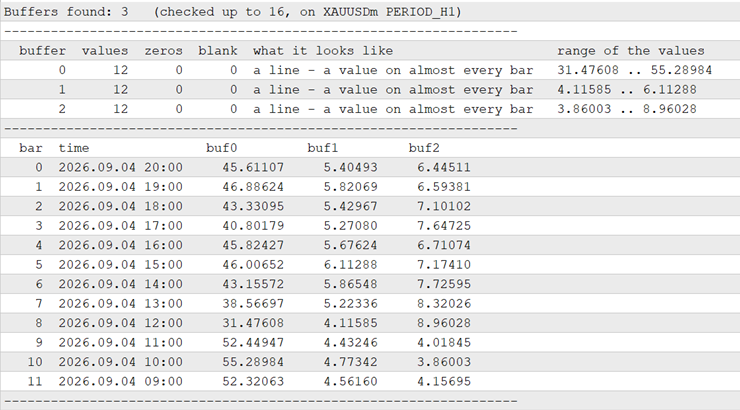
Burada üç tampon da çizgi şeklindedir; zira RSI de budur. Bir ok veya sinyal göstergesinde tablo farklı görünür ve asıl mesele de bu farktadır:
  buffer  values  zeros  blank  what it looks like                     range of the values
       0       0      0      8  nothing here on these bars             -
      11       8      0      0  a line - a value on almost every bar   16.08798 .. 16.25192
      14       7      1      0  sparse - looks like a signal           4166.06000 .. 4166.06000
Burada dikkat edilmesi gereken tampon 14'tür. Çoğu çubukta boştur ve yalnızca göstergenin bir şey işaretlediği yerlerde fiyat değerini taşır; dolayısıyla "bir değer görünmesi" bu tampon için tetikleyicidir. Tampon 11 dahili bir çizgidir ve tampon 0 bu çubuklarda hiçbir şey içermez.
Geç gelen değerler ile yeniden çizimler aynı şey değildir, bu nedenle ayrı ayrı sayılırlar
Kapanan her çubuğun değeri saklanır ve her yeni çubukta yeniden okunur. Kapanan bir çubukta değişiklik olduğunda, bunun iki çok farklı nedeni olabilir.
Geç gelen değer. Çubuk boştu ve şimdi bir değer içeriyor. Gösterge, bu çubuğu işaretleyebilmek için sonraki çubuklara ihtiyaç duydu. Fraktallar tasarım gereği bu şekilde çalışır; çoğu salınım ve yapı işaretleyicisi de öyle. Bu bir aldatmaca değildir, ancak sinyalin işaret ettiği çubukta hiçbir zaman görünür olmamış olduğu anlamına gelir ve bir stratejiyi gözle değerlendiriyorsanız bu önemlidir.
Yeniden çizim. Orada bulunan bir değer yer değiştirmiş veya kaybolmuştur. Harekete geçebileceğiniz bir şey artık yoktur.
Her ikisi de çubuğun zamanıyla, eski değer ve yeni değerle birlikte raporlanır ve grafik yorumu her birinin sayısını tutar. Oluşan çubuktan hiçbir şey çıkarılmaz, çünkü oluşan çubuğun değişmesi normaldir.
Bu ayrım, iddia edilmek yerine test edildi. XAUUSD H1 grafiğinde, 1-20 Ağustos 2026 tarihleri arasındaki 299 çubukta, her bir göstergenin 0 tampon değeri izlendi:
| İzlenen gösterge | Geç değerler | Yeniden çizim |
|---|---|---|
| Örnekler\Fraktallar, bir çubuğun kapanmasından iki çubuk sonra işaretler | 40 | 0 |
| Örnekler\ZigZag, tasarım gereği son bacağını yeniden çizer | 0 | 83, her biri kaybolan bir değer |
| Örnekler\RSI, bir çubuk kapandığında sabitlenir | 0 | 0 |
Yani, gecikmeli bir gösterge için "late", yeniden çizilen bir gösterge için "repaint" yazıyor, ancak ikisini de yapmayan bir gösterge hakkında hiçbir şey yazmıyor. Aynı çalışmada, RSI 30'un altına düştüğünde seviye tetikleyicisi iki kez devreye girdi: 28,38 ve 29,21'de; MACD'nin ana çizgisi, sinyal çizgisinin üzerine dokuz kez, altına ise dokuz kez geçti; ve H1 grafiğinde H4'ten okunan RSI, her H4 çubuğu için bir uyarı üretti; bunların sayısı 77 idi ve her birine PERIOD_H4 damgası vuruldu. Ayrıca, 157 KB boyutundaki üçüncü taraf Smart Money Concepts göstergesiyle karşılaştırmalı olarak çalıştırıldığında, 16 tampon tespit etti ve iki seyrek sinyal tamponundan üç iç çizgiyi ayırdı.
Tetikleyiciler
Bir değer, ister yeni kapanan çubukta ister gecikmeli bir gösterge için ancak şimdi işaretlediği daha önceki bir çubukta olsun, bir seviyenin üstüne veya altına geçiş; bir tamponun diğerini herhangi bir yönde kesmesi; ya da basitçe değerin değişmesi şeklinde ortaya çıkar. Uyarılar, her çubuk için bir kez olmak üzere bir açılır pencere, ses, push bildirimi veya e-posta yoluyla gönderilir. Varsayılan olarak yalnızca kapanan çubuklar değerlendirilir. Bu özelliği kapatırsanız, oluşmakta olan çubuk her tikte değerlendirilir; bu da daha erken uyarı verir ve tersine dönebilir, ancak her iki durumda da her çubuk için yine bir uyarı gönderilir.
Daha yüksek zaman dilimi
"Bu zaman diliminde oku" seçeneğini ayarladığınızda, izlenen gösterge grafiğin zaman dilimi yerine bu zaman diliminde yüklenir. Çubuklar, tetikleyiciler ve yeniden çizim kontrolü de buna göre ayarlanır.
İki uygulamalı örnek
Örnek 1 - RSI 70'in üzerine çıktığında bana haber ver. Bu göstergeyi biliyorsunuz, bu yüzden EXPLORE sadece bir kontrol amaçlıdır.
| Giriş | Değer |
|---|---|
| Gösterge dosyası | Örnekler\RSI |
| Girişleri | 14 |
| Bu zaman diliminde oku | Mevcut zaman aralığı |
| Mod | İZLE |
| İzlenecek tampon | 0 |
| Tetikleyici | tampon, Seviye'nin |
| Seviye | 70 |
| Açılır uyarı | true |
Dört uyarı üreten test verilerinde, değerler sırasıyla 75,04, 76,31, 70,38 ve 74,83'tür. Bir saatlik grafikteyken dört saatlik grafikten de aynı sonucu elde etmek için, "Bu zaman diliminde oku" seçeneğini H4 olarak ayarlayın ve diğer ayarları değiştirmeyin.
Örnek 2 - İndirdiğiniz ancak kaynağı olmayan bir ok göstergesi. Burada asıl işi EXPLORE yapıyor.
- Modu EXPLORE olarak ayarlayın ve "Gösterge dosyası"nı o göstergenin adına göre ayarlayın. Kendi varsayılan ayarlarını kullanmak için "Girişleri" alanını boş bırakın.
- Araç Kutusu'nu açın, Uzmanlar sekmesine gidin ve seyrek olan tamponu bulun - çoğu çubukta boş olan, grafikte bir ok görebileceğiniz bir değer. Diyelim ki bu tampon 2.
- Modu WATCH olarak ayarlayın, İzlenecek tampon olarak 2'yi seçin, Tetikleyiciyi "bir değer görünür" olarak ayarlayın ve Push bildirimini etkinleştirin.
- EXPLORE, bir tamponun çoğunlukla tam sıfırlardan oluştuğuna dair bir not yazdırdıysa, "Bu gösterge anlamsız olduğu yerlere 0 yazar" seçeneğini etkinleştirin ve seçim yapmadan önce tabloyu tekrar okuyun.
Her bir girişin işlevi
| Giriş | Ne yapar |
|---|---|
| Gösterge dosyası | MQL5\Indicators altındaki yol, uzantı hariç. Tek bir ters eğik çizgi, örneğin Examples\RSI veya MyFolder\MyArrows. Bilerek boş bırakılmıştır — her terminalde mutlaka bulunan bir gösterge yoktur — ve siz bu alanı doldurana kadar hiçbir şey olmaz. |
| Girişleri | İzlenen göstergenin kendi girişleri, virgülle ayrılmış olarak, bildirildikleri sırayla. Boş bırakılırsa varsayılan değerler kullanılır. Tam sayılar int olarak, nokta içeren sayılar double olarak, true ve false bool olarak, diğer her şey metin olarak aktarılır. Günlük, kararını geri yazdırır, böylece kontrol edebilirsiniz. |
| Bu zaman diliminde oku | İzlenen göstergeyi grafiğin zaman dilimi yerine bu zaman diliminde yükleyin. Mevcut zaman dilimi, grafiğin kendi zaman dilimini ifade eder. |
| Bu gösterge, "hiçbir şey" anlamına gelen yerlere 0 yazar | Tam 0 değerini boş olarak değerlendirin. ZigZag gibi göstergeler için gereklidir. EXPLORE, ne zaman etkinleştirilmesinin uygun olduğunu size bildirir. |
| Mod | EXPLORE, tamponları listeler ve uyarı vermez. WATCH, seçtiğiniz tamponla ilgili uyarı verir. |
| Kaç tampon taranacak | EXPLORE burada durur. Notta sınıra ulaşıldığı belirtiliyorsa bu değeri artırın. |
| Kaç tane son çubuk yazdırılmalı | EXPLORE'un kaç ölçü gösterip sayacağı. |
| İzlenecek tampon | EXPLORE tablosundan okuduğunuz tampon numarası. |
| İkinci tampon | Yalnızca iki tampon geçiş tetikleyicisi tarafından kullanılır. |
| Tetikleyici | Bir değer belirir, Seviye'nin üstünde veya altında bir geçiş olur, tampon A'nın tampon B'yi herhangi bir yönde geçmesi veya değerin basitçe değişmesi. |
| Seviye | Yalnızca iki seviye geçiş tetikleyicisi tarafından kullanılır. |
| Yalnızca kapanan çubukları değerlendir | Varsayılan olarak açıktır: bir çubuk kapandığında tek bir değerlendirme yapılır ve bu değerlendirme geri alınamaz. Kapalı olması, oluşmakta olan çubuğun her tikte değerlendirileceği anlamına gelir; bu, daha erken uyarı verir ancak kendi kendini geçersiz kılabilir. |
| Açılır pencere, ses, push bildirimi, e-posta | Nasıl bilgilendirileceğiniz. Herhangi bir kombinasyon. Push bildirimi için Araçlar, Seçenekler, Bildirimler bölümünde MetaQuotes ID'nizin ayarlanmış olması gerekir. |
| Kapanan çubukları yeniden oku ve değişiklikleri bildir | Geç değer ve yeniden çizim raporlamasını etkinleştirir. |
| Kaç adet kapalı çubuk izlenecek | Kontrolün ne kadar geriye kadar yapılacağı. Bundan daha eski bir değişiklik görülmez. |
| Bundan daha küçük değişiklikleri yok say | Her değişikliği yakalamak için 0 olarak bırakın. Bir gösterge son ondalık basamakta dalgalanıyorsa bu değeri artırın. |
İnsanları yanıltan ve ele alınan üç husus
Bazı göstergeler, "burada bir şey yok" demek istediklerinde EMPTY_VALUE yerinedüz bir 0 yazar. ZigZag bunlardan biridir. İlk bakışta böyle bir tampon, kesintisiz bir sıfır dizisi gibi görünür. Bunun için bir girdi vardır ve EXPLORE, bir tamponun çoğunlukla tam sıfırlardan oluşup içinde birkaç gerçek değer bulunduğunda bir not yazdırır; böylece karar verebilirsiniz. Bu durum kasıtlı olarak tahmin edilmez: gerçekten sıfırda duran bir osilatör, dışarıdan bakıldığında aynı görünür.
Göstergenin henüz yazmadığı bir çubuk tam olarak 0,0 olarak okunur. Terminal, yeni oluşturulan bir tampona bunu yazdırır ve gecikmeli bir gösterge, ihtiyaç duyduğu sonraki çubuklara sahip olana kadar en yeni çubuklarını kasıtlı olarak bu şekilde bırakır. Fractals, son üç çubuğuna asla dokunmaz. Basitçe okunduğunda, bu çubukların her biri daha sonra "değişir" ve bu aracın ilk sürümü, hiç yeniden çizim içermeyen bir göstergede üç yüz yeniden çizim bildirmişti. 0,0 değerinden boşluğa giden bir çubuk artık başlatma olarak, 0,0 değerinden bir değere giden çubuk ise geç gelen olarak değerlendirilir.
Giriş grubu, bir konumsal parametre yuvasını işgal eder. Bu göstergeyi kendi kodunuzdan iCustom veya IndicatorCreate ile çağırırsanız, altı grup etiketi gerçek girişlerle birlikte dize olarak sayılmalıdır; aksi takdirde işleme 4002 hatasıyla başarısız olur. Bu varsayım değil, ölçüm sonucudur. Tampon 0, izlenen tamponun değerini taşır; böylece EA'nız, altyapıyı tekrarlamak yerine bu değeri okuyabilir; bu durum, 299 çubuğun 299'unda izlenen RSI ile karşılaştırılarak kontrol edilmiştir.
Adını verdiğiniz gösterge yüklenemiyorsa (yazım hatası veya henüz derlenmemiş bir dosya gibi), gösterge kendiliğinden ayrılmaz. Bu durum grafikte ve Uzmanlar günlüğünde belirtilir ve gösterge birkaç saniye aralıklarla denemeye devam eder; bu nedenle adı düzeltmeniz yeterlidir.
Neler yapmaz
Gösterge tamponlarını okur. Yalnızca grafik nesneleriyle çizim yapan bir gösterge tamponlarını açığa çıkarmaz ve bu aracın okuyabileceği hiçbir şey yoktur. Göstergenin dışındaki hiçbir şey bunu değiştiremez.
"200 çubuk boyunca yeniden çizim görülmedi" ifadesi, söz konusu çubuklarla ilgili bir gözlemdir; gelecekte oluşacak her çubuk için bir garanti değildir. Bu bir kanıttır ve çoğu göstergenin sunduğu iddialardan daha iyidir, ancak kesin bir kanıt değildir. Kontrol, "Kaç adet kapanmış çubuğu izlemeye devam edeceksin?" bölümünde belirlediğiniz kapanmış çubuk sayısını kapsar; bundan daha eski bir değişiklik görülmez.
Taraç ne anlama geldiğini size söyleyemez. Taraç 3’ün on dört çubukta 1,0 değerinde olduğunu gösterir; bunun bir alım sinyali olup olmadığına karar vermek size kalmıştır.
Tam olarak 0,0 değeriyle sinyal veren bir gösterge, "bir değer görünüyor" uyarısını tetiklemez; çünkü bu, henüz yazılmamış bir çubuğun okumasıdır. Sinyal tamponları bir fiyat veya bir bayrak taşır, asla 0,0 değildir; bu nedenle pratikte bunun bir maliyeti yoktur, ancak bu bir kuraldır ve bunu bilmeniz gerekir.
Tampon 0, yalnızca izlenen zaman dilimi grafiğin kendi zaman dilimi olduğunda izlenen tamponu yansıtır. Her grafik çubuğuna daha yüksek bir zaman dilimini eşleştirmek farklı bir iştir ve bu işlem yapılmaz.
Uyarı kanalları (açılır pencere, ses, push bildirimi ve e-posta) her biri tek bir çağrıdır ve bunları sunmayan Strateji Testçisi’nde uygulanmamıştır. Bu çağrıdan önce aracın aldığı tüm kararlar uygulanmıştır.
Nasıl kurulur?
- AnyIndicatorAlert.mq5 dosyasını terminalinizin veri klasöründeki MQL5\Indicators klasörüne kopyalayın. MetaTrader'da Dosya menüsünden Veri Klasörünü Aç seçeneğini kullanarak bu klasöre ulaşabilirsiniz.
- MetaEditor'da dosyayı açın ve F7 tuşuna basın. 0 hata ve 0 uyarı bildirilmelidir.
- Terminale geri dönün, Ctrl+N tuşlarına basarak Navigator'ı açın, Indicators'ı seçin ve AnyIndicatorAlert'i bir grafiğe sürükleyin. Listede yoksa, Navigator'da sağ tıklayın ve Refresh'i seçin.
- "Gösterge dosyası" alanını doldurun (başlangıçta boştur), Mod'u EXPLORE olarak bırakın ve Tamam'a basın. İlk olarak Examples\RSI dosyasını deneyin.
- Ctrl+T tuşlarına basarak Toolbox'ı açın ve Experts sekmesini seçin. Tampon tablosu burada bulunur.
MetaTrader 5 sürüm 6140'da yazılmış ve doğrulanmıştır. Hiçbir emir vermez ve hiçbir şeyi değiştirmez.
MetaQuotes Ltd tarafından İngilizceden çevrilmiştir.
Orijinal kod: https://www.mql5.com/en/code/77003
 SuperTrend TV EA
Yalnızca kapanmış çubuklarda iCustom aracılığıyla SuperTrend TV göstergesini kullanarak işlem yapan bir Uzman Danışman; her işlemin bir sinyalle eşleştiğini ve hiçbir sinyalin kaçırılmadığını kanıtlayan denetim raporu ile birlikte sunulur
 ATS Trade Management Library - break-even, trailing stop and partial closes for any EA
Look after open positions in an Expert Advisor: break-even, trailing stop, two partial closes, and a stop and target for positions that have none. It never opens a trade.
CajasTF – Integrated Multi-Timeframe Side Panel for MT5
Real-time multi-timeframe side panel mini-chart with smart color matching, independent price scale, and candle countdown timer.
Session Levels - Asian range, PDH/PDL, VWAP, swings and round numbers
Session Levels draws the reference levels intraday traders watch most: Asian range, London and New York sessions, previous day and week high/low, daily VWAP, swing points and round numbers. Hover any level to read what it is and why it matters. Optional alerts when price breaks the Asian range or the previous day high/low.