 MetaTrader 5
 Uzmanlar
 Göstergeler
 Komut dosyaları
 Kütüphaneler
 Depo
Depo
Fan sayfamıza katılın

Session Opening Range Breakout EA - MetaTrader 5 için uzman

- Görüntülemeler:
- 13
- Derecelendirme:
- Yayınlandı:
- Güncellendi:
-
 Alım-satım fırsatlarını kaçırıyorsunuz:
- Ücretsiz alım-satım uygulamaları
- İşlem kopyalama için 8.000'den fazla sinyal
- Finansal piyasaları keşfetmek için ekonomik haberler
Kayıt Giriş yapWeb sitesi politikasını ve kullanım şartlarını kabul edersiniz
Hesabınız yoksa, lütfen kaydolun -
 Bu koda dayalı bir robota veya göstergeye mi ihtiyacınız var? Freelance üzerinden sipariş edin
Freelance'e git
Bu koda dayalı bir robota veya göstergeye mi ihtiyacınız var? Freelance üzerinden sipariş edin
Freelance'e git

Seans Açılış Aralığı Kırılma EA’sı
SessionORB_EA, klasik bir açılış aralığı kırılmasını otomatikleştirir: seçilen seansın açılışından sonraki ilk N dakikayı izler, bu süre zarfında kaydedilen en yüksek ve en düşük seviyeleri kaydeder ve ardından iki kırılma tetikleyicisini devreye sokar. Her iki tetikleyiciden birinin ötesinde teyit edilen bir kapanış, o seans için risk büyüklüğünde tek bir piyasa pozisyonu açar ve stop loss, aralığın karşı tarafına sabitlenir.
Bunun arkasındaki fikir
Önemli bir seansın (Londra, New York veya broker saatinde tanımladığınız herhangi bir özel zaman) açılış dakikaları genellikle günün geri kalanı için tonu belirler: gece boyunca biriken emir akışı emilir ve ortaya çıkan aralık genellikle rotasyon ile trend arasındaki sınırı belirler. Bu aralığın kırılmasını kullanarak işlem yapmak, potansiyel bir yönlü hareketin erken aşamalarında pozisyon almak için basit ve mekanik bir yöntemdir; aralığın kendisi ise doğal bir stop-loss referansı görevi de görür.
Bu EA, kırılma teyidi için zaman diliminden bağımsızdır — aralığın kendisi, EA’nın hangi grafik zaman dilimine bağlı olduğuna bakılmaksızın, hassasiyet için her zaman M1 verilerinden ölçülür; kırılma sinyali ise grafiğin kendi periyodundaki kapanış çubuğunda teyit edilir. Bu, aralığın dakikaya kadar doğru olmasını sağlarken, sadece grafik periyodunu değiştirerek sinyal hassasiyetini (scalping ritmi için M1, daha az sayıda ancak daha belirleyici sinyaller için M15/H1) kontrol etmenize olanak tanır.
Nasıl yorumlanır
- Kesikli dikdörtgen — açılış aralığının kendisi: üst ve alt sınırları, açılış penceresi sırasında kaydedilen seansın en yüksek ve en düşük değerleridir.
- İleriye doğru uzanan kesikli yatay çizgiler — canlı kırılma tetikleme seviyeleri (aralık en yüksek / aralık en düşük artı tampon), girişlerin hala izin verildiği işlem penceresi boyunca uzanır.
- Noktalı dikey çizgi — aralığı sabitlemek için kullanılan kesin seans başlangıç saatini gösterir.
- Bir çubuk, tetikleme çizgisinin ötesinde kapandığında (sadece bu çizgiden geçmekle kalmadığında), EA o yönde tek bir piyasa emri gönderir; stop loss, aralığın karşı sınırının hemen ötesine yerleştirilir ve kar alma seviyesi, bu risk mesafesinin bir katı olarak belirlenir.
- İşlem penceresi süresi dolduğunda veya seans başına işlem kotası dolduğunda yeni sinyaller çizilmez veya işlem yapılmaz; grafik silinir ve bir sonraki seansın başlangıcında otomatik olarak yeniden oluşturulur.
Dış değişkenler (girişler)
| Giriş | Varsayılan | Amaç |
|---|---|---|
| InpSessionStartHour | 8 | İzlenen oturumun açıldığı saat (broker/sunucu saati) |
| InpSessionStartMinute | 0 | Oturumun açılma saatinin dakika bileşeni |
| InpOpeningRangeMinutes | 30 | Yüksek/düşük aralığını ölçmek için kullanılan açılış penceresinin uzunluğu |
| InpTradingWindowMinutes | 120 | Aralığın kapanmasından sonra, kırılma hareketinin hala işlem görmeye devam edebileceği süre (dakika cinsinden) |
| InpMagicNumber | 20260815 | Bu EA'nın verdiği her emre eklenen benzersiz tanımlayıcı |
| InpMaxTradesPerSession | 1 | Oturum başına izin verilen maksimum breakout işlem sayısı |
| InpAllowLongTrades | true | Aralığın en yüksek seviyesinin üzerindeki uzun (alış) kırılma işlemlerini etkinleştirir |
| InpAllowShortTrades | true | Aralığın en düşük seviyesinin altındaki kısa (satış) kırılmalarını etkinleştirir |
| InpBreakoutBufferPoints | 20 | Kapanışın, geçerli bir kırılma olarak kabul edilebilmesi için aralık sınırının ötesine kaç puan geçmesi gerektiğini belirtir |
| InpRiskPercent | 1,0 | Her işlemde riske atılan hesap bakiyesinin yüzdesi |
| InpStopLossBufferPoints | 30 | Stop loss emri verilirken ters aralık sınırının ötesine eklenen ekstra puanlar |
| InpRewardToRiskRatio | 2,0 | Risk (stop) mesafesinin katı olarak ifade edilen kar alma mesafesi |
| InpUseFixedLot | false | "true" olduğunda, riske dayalı lot büyüklüğü hesaplamasını atlar ve bunun yerine sabit bir lot kullanır |
| InpFixedLotSize | 0,10 | InpUseFixedLot değeri true olduğunda kullanılır |
| InpDrawObjects | true | Grafikte aralık kutusu ve tetikleme çizgilerinin çizilmesini açar veya kapatır |
| InpRangeBoxColor | clrSilver | Açılış aralığı dikdörtgeninin kenarlık rengi |
| InpTriggerColor | clrWhite | İleriye doğru kırılma tetikleme çizgilerinin ve seans başlangıç işaretinin rengi |
| InpObjectPrefix | SORB_ | Her grafik nesnesine uygulanan, net tanımlama ve kaldırma amacıyla kullanılan önek |
Önerilen kullanım
- Gerçek bir gün içi açılış/kapanış ritmine sahip herhangi bir sembolde çalışır — forex majörleri, endeksler ve metaller en doğal uyum sağlar; aralık sınırlı, düşük volatiliteli semboller daha az sayıda ve daha gürültülü sinyaller üretir.
- Herhangi bir grafik zaman dilimine eklenebilir: aralık, grafik döneminden bağımsız olarak her zaman M1 verilerinden ölçüldüğünden, bu önek yalnızca kırılma koşulunun ne sıklıkla yeniden kontrol edileceğini belirler.
- Seans saatleri yerel saat değil, broker/sunucu saatine göredir — InpSessionStartHour ayarını yapmadan önce, özellikle yaz saati uygulaması geçişleri sırasında brokerınızın GMT ofsetini kontrol edin.
- ECN/ham spread hesaplarında, haber yoğunluğu yüksek açılışlar sırasında spread kaynaklı yanlış kırılmaları filtrelemek için InpBreakoutBufferPoints ve InpStopLossBufferPoints değerlerini biraz artırmayı düşünün.
- EA, çubuk kapanışlarına tepki verdiği ve riske dayalı lot büyüklüğü canlı tick/puan değerlerine bağlı olduğu için, gerçekçi doldurmalar elde etmek amacıyla "Gerçek tick'lere dayalı her tick" modunda geriye dönük test yapın.
- Terminalinizde sembol için M1 geçmişinin mevcut olduğundan emin olun; EA, grafiğin kendi zaman diliminden bağımsız olarak M1 çubuklarından açılış aralığını ölçer.
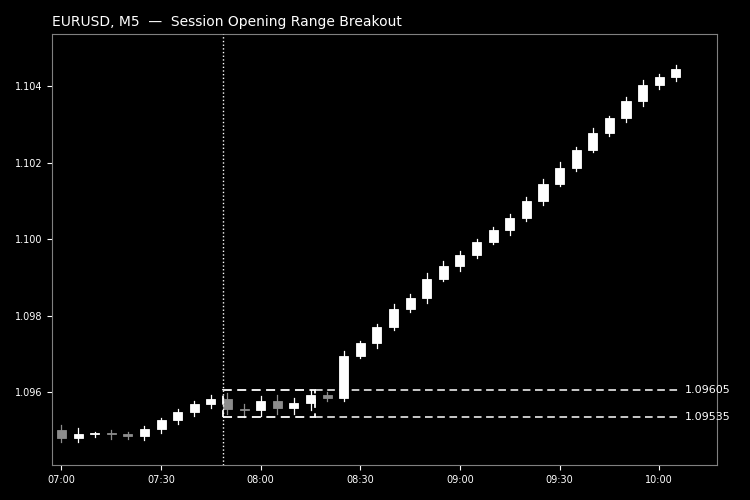
Şekil 1. Seans kırılmasında açılış aralığı kutusu ve ileriye dönük kırılma tetikleme çizgileri (siyah-beyaz, Kod Tabanı görüntü yönergelerine göre).
MetaQuotes Ltd tarafından İngilizceden çevrilmiştir.
Orijinal kod: https://www.mql5.com/en/code/76153
 Reverse RSI Bands
Ters RSI Bantları, RSI formülünü matematiksel olarak tersine analiz eden bir öncü göstergedir. Ana grafiğin üzerine doğrudan kesin hedef fiyat bantlarını çizer ve RSI’nın belirlediğiniz aşırı alım veya aşırı satım seviyelerine tam olarak hangi fiyattan ulaşacağını gerçek zamanlı olarak gösterir.
Round Trip Cost Reconciler MT5
Kısmi işlemlerin yerine getirilmelerini pozisyon kimliğine göre gruplandıran ve brüt sonucu komisyon, swap, ücret ve net sonuçtan ayıran, salt okunur bir MT5 geçmişi yardımcı programı.
Prop-Firm Equity Guard - daily and max drawdown protection (FTMO-style)
Strict risk management utility for prop-firm challenges. Automatically monitors your entire account to prevent daily and max drawdown failures. It acts as a safety buffer against spread spikes and revenge trading by instantly closing all positions and pending orders before your evaluation is terminated.
Risk Guard — risk-based lot size, daily loss lock, max positions, oversized-trade trim, forced stop-loss
Enforces your own risk rules on every position, whether opened by hand or by another EA: shows the lot size that matches your risk, locks the account for the day after a set loss, caps open positions, trims positions that risk more than allowed, and adds a stop-loss to any position opened without one.