Daniel Stein
Daniel Stein
  • Информация
12+ лет
опыт работы
29
продуктов
2349
демо-версий
9
работ
0
сигналов
0
подписчиков
Your rules. Our tools.

Since 2013 I have built tools for the gaps I saw. And I use them myself. That toolkit has grown to over 20 products, and around it an ecosystem that answers the questions tools alone leave open: What is the market doing right now? Which EA deserves your trust? Does your trade plan hold up? And who builds the tool you have in mind?

TRADING TOOLS
Currency strength (FX Power, IX Power), momentum (Power Candles and Scanner), levels, volume, smart stops, the Yukon gold EA, and the Premium Trade Manager for professional execution. Built for professionals, improved continuously.

BUILDYOURTOOLS
Your own idea, built as an indicator, script, utility or expert advisor for MetaTrader 5. Describe the rules in your own words, check the prototype on the chart, order at a fixed price. Clarification and three prototype rounds are free. Indicators and expert advisors are tested in the Strategy Tester.
https://buildyourtools.net

REVDEN
Reads the trading day across forex, gold, indices, crypto and stocks and gives every symbol a state word with its meaning and its boundary.
https://revden.io

ALGOCHECK
Reviews MQL5 expert advisors and public signals against measured facts.
https://algocheck.net

MAX
Knows every tool, every setting and every strategy we publish. Ask him about your setup before you take it.

Every purchase opens the door to our customer group on Telegram. Everything comes together at stein.investments.

https://stein.investments
https://youtube.com/@SteinInvestments
Daniel Stein
Daniel Stein
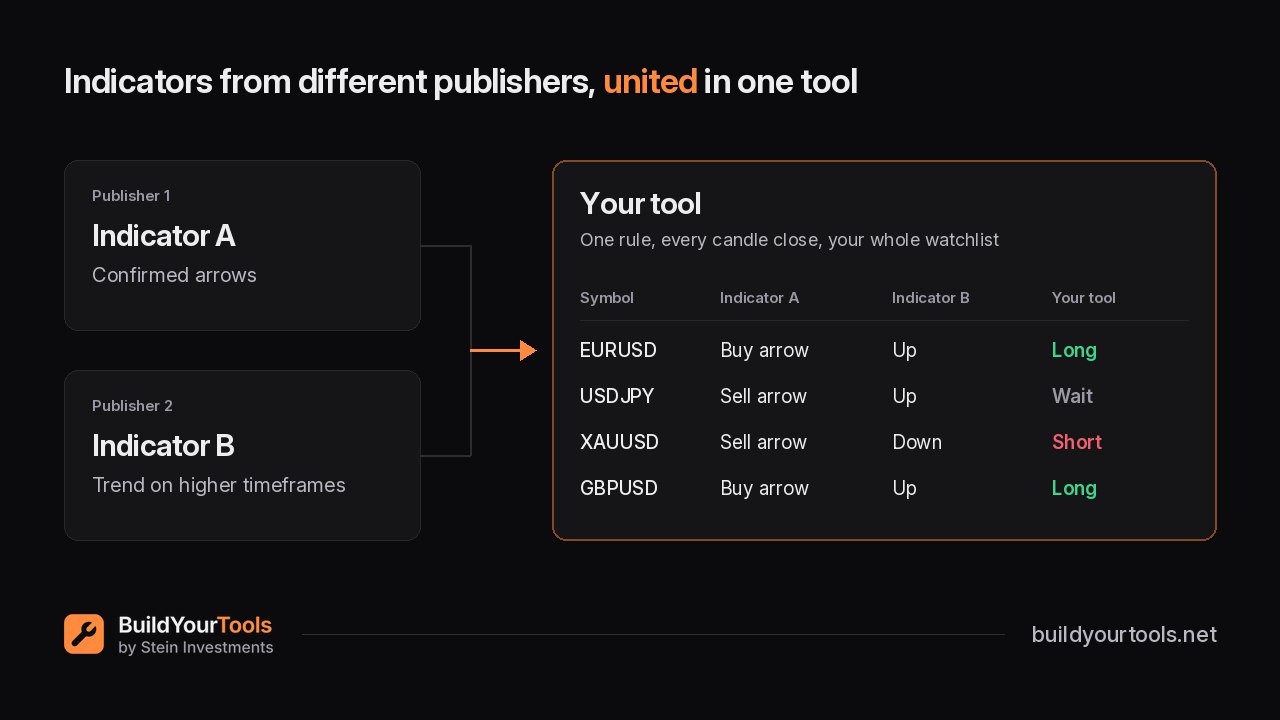
🛠 Indicators from different publishers, united in one tool

Many of you run indicators from other MQL5 publishers next to ours. Each shows its own part of the picture. Putting it together still happens in your head, chart by chart.

On BuildYourTools you bring them together in one tool. What it becomes is up to you:
✅ A scanner that checks them on every candle close across your watchlist and shows where your setup stands

✅ A confirmed arrow that only counts when another publisher's trend view agrees on the higher timeframes

✅ A notification the moment zones from one indicator and signals from another match your rule

And your own strategy? Have an Expert Advisor built that trades it exactly the way you have it in your head, then check in the Strategy Tester whether it holds up.

Your licences stay yours. Reply here with the indicator you use, and we check whether it can be brought in.

👉 Start your own project now: https://buildyourtools.net/
Daniel Stein
Die meisten Trader, mit denen ich spreche, haben mehrere Indikatoren nebeneinander laufen. Einer zeigt die Stärke, einer den Trend, einer die Zonen. Jeder zeigt seinen Teil des Bildes, und zusammengesetzt wird es noch immer im Kopf, Chart für Chart...
Daniel Stein
Most traders I talk to run several indicators side by side. One shows strength, one the trend, one the levels. Each shows its own part of the picture, and putting it together still happens in your head, chart by chart. On BuildYourTools you bring them together in one tool of your own...
Daniel Stein
Daniel Stein
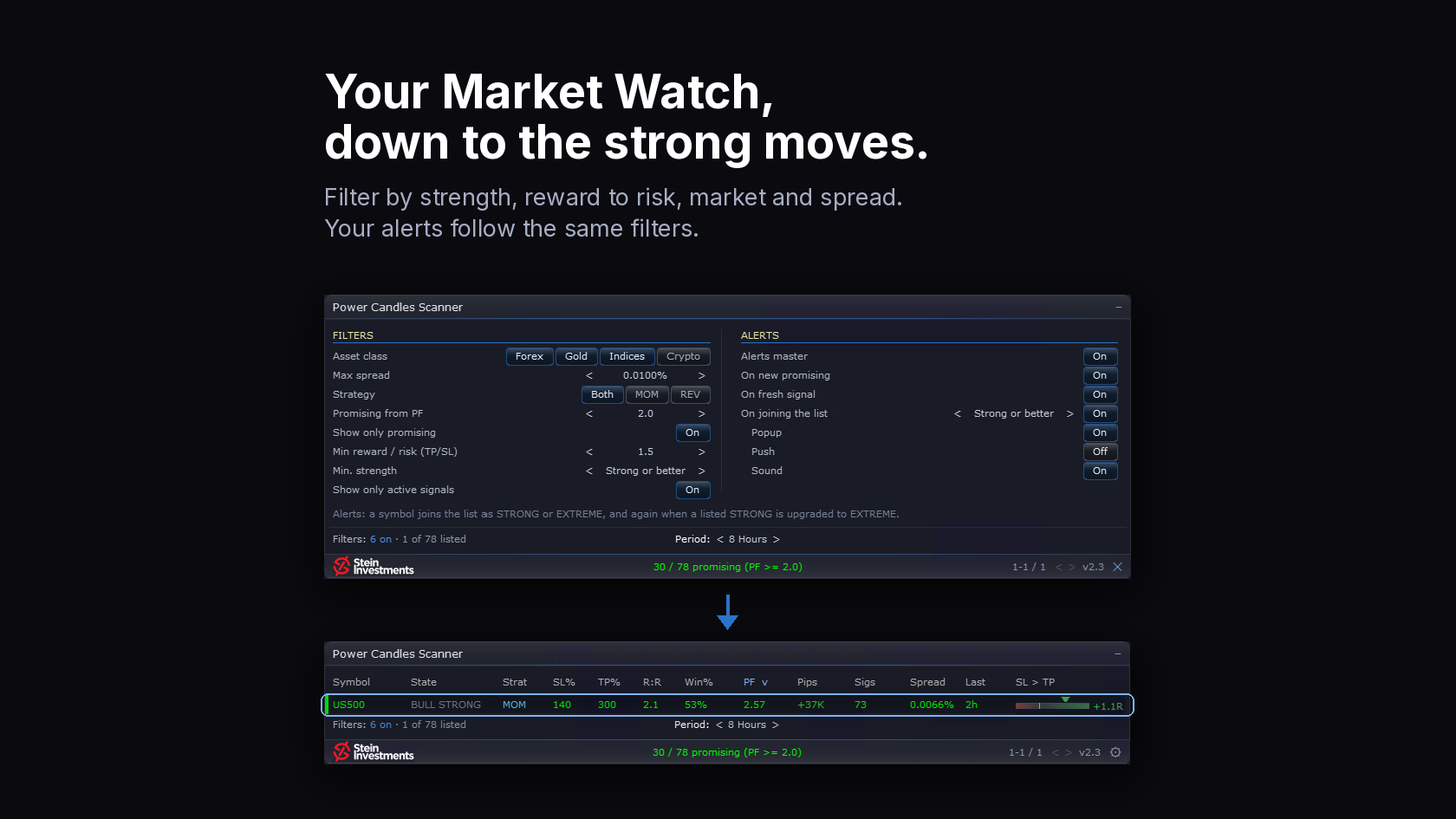
🚀 Power Candles Scanner 2.3: only the setups you would take

A full Market Watch is a long list. Mine has 78 symbols, and with my filters set, one is left: the setup worth a look. You asked me for strong candles next to the extreme ones. So I built that filter, and a few more around it.

✅ Min. strength: Strong or better, or Extreme only. The new State column shows each symbol's last closed candle, extreme in bold green and red.

✅ A new R:R column next to SL% and TP%, with a minimum of 1.2, 1.5 or 2.

✅ Forex, Gold, Indices and Crypto switch on one by one. Max spread keeps the symbols that are cheap to trade right now.

✅ "On joining the list": your alerts follow your list, newcomers and new extremes right at the candle close.

✅ Every setup, SL and TP stays as the optimizer calculated it. Your filters decide what you see.

If you own or rent the scanner, 2.3 is a free update in the MQL5 Market. New to it? Have a look.

Daniel

👉 https://stein.investments/products/power-candles-scanner
Daniel Stein
Daniel Stein
🛠 Built exactly as the prototype showed it

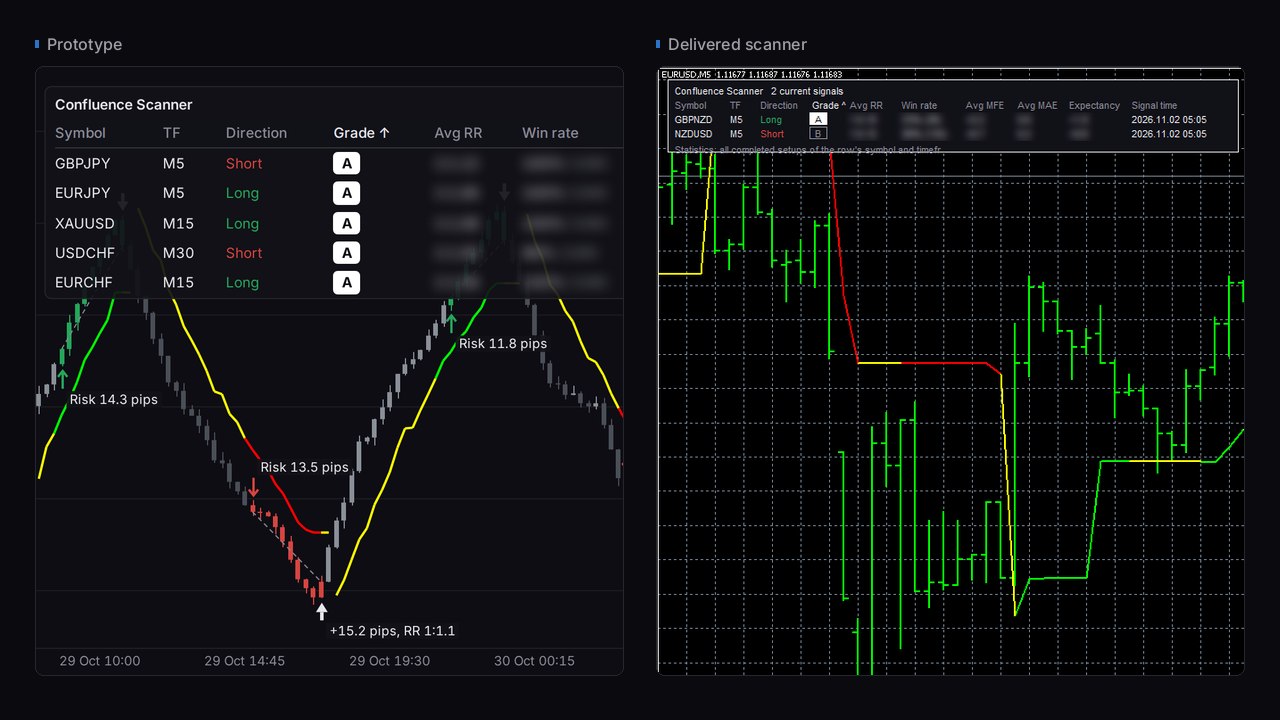
The first customer projects on BuildYourTools are underway. On Sunday we delivered one of them: a scanner a trader shaped round by round in the prototype.

What it does:
✅ Reads FX Power, IX Power and FX Trend together on every candle close, across all forex pairs and gold (XAUUSD)

✅ Lists every current setup in one sortable panel, graded A or B

✅ Marks where each setup starts and ends on the chart, with risk and result in pips

✅ Keeps statistics of past setups for every pair and timeframe

That is what made it demanding: three indicators, several timeframes and every pair, read at the same time and brought together in one view. On the left is the prototype the trader approved, on the right the delivered scanner on the chart. Same panel, same columns, same grading.

He agreed to let us show it here. We wish him every success with it.

Have an idea that brings your indicators together?
👉 Start your own project now: https://buildyourtools.net/
Daniel Stein
Daniel Stein
Your strategy as an EA in minutes.

You have a strategy in your head, maybe you already trade it by hand, and one question stays open: is it profitable? Since 31 October you can find out yourself. You describe it, BuildYourTools builds it into your EA in minutes, and you run it through the MetaTrader 5 Strategy Tester. If it falls short, you change a rule and test the next version.

That is the lead story of this week’s Innovation Report, our weekly letter at Stein Investments. A film shows the whole way in 88 seconds, from the first description to the checked .ex5 file.

Also in this issue: Yukon on gold, which traded the moves around the US election cleanly, short on the way down and long on the way up, and AI agents that query our market data more every week.

Question of the week: has AI improved your trading? Think of every way AI enters your trading: a chat for analysis, an agent on your market data, a tool that AI built for you. I would like to read how developers and traders here see it.

The full issue: https://stein.investments/innovation-report/2026-w45?utm_source=mql5forum&utm_medium=forum&utm_campaign=innovation-report-2026-w45

Daniel, Stein Investments
Daniel Stein
Daniel Stein
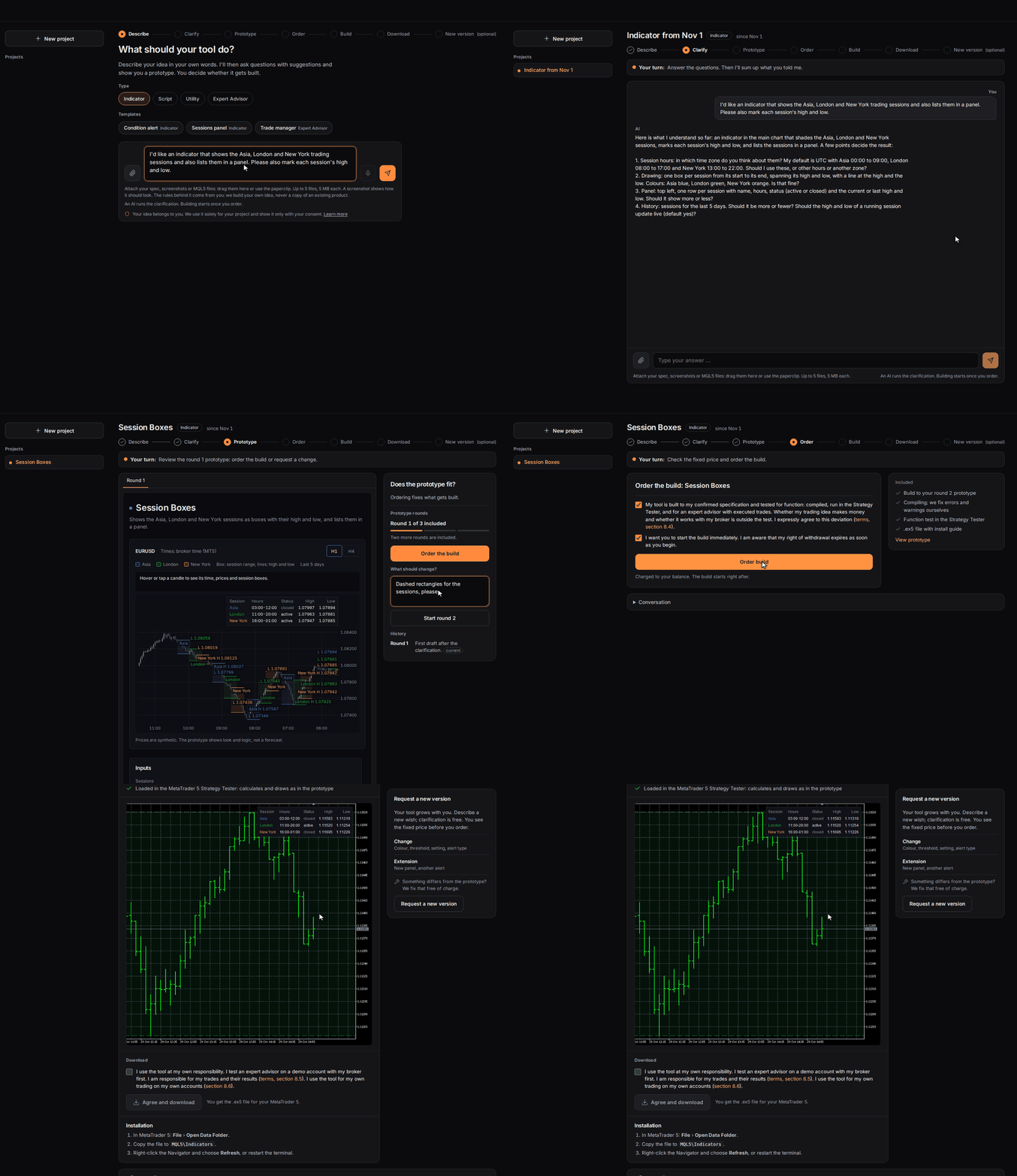
🛠 From your idea to a finished tool in minutes

Almost every trader has an idea they would love to try. RSI overbought, MACD agrees, price above the EMA 200. Or FX Power combined with FX Trend.

On BuildYourTools you describe it as precisely as you can, and you are guided to the finished .ex5 file. Load it into the MetaTrader 5 Strategy Tester and see how your rules would have played out on past prices.

See it first. Questions with suggested answers, then a prototype on the chart. Clarification and three rounds are free.

Then order the build. One fixed price per project, with indicators and expert advisors checked in the Strategy Tester before delivery.

Bring in our tools. Your idea can use FX Power, IX Power, FX Dynamic, FX Levels or FX Trend, once the product is installed in your MetaTrader 5.

Your idea belongs to you: we use it solely for your project.

👉 Start with your idea @ https://buildyourtools.net/
Daniel Stein Выставил продукт

799.00 USD

REVDEN AI Desk: ведите свою торговлю в одном разговоре с собственным ИИ на рыночном контексте REVDEN Представьте, что вся ваша торговля ведётся в одном разговоре. REVDEN AI Desk переносит это в MetaTrader 5: вы спрашиваете собственный ИИ, как он читает рынок, и он отвечает на основе полного контекста REVDEN по символам, которыми вы торгуете, с их состоянием, картиной риска и предстоящими релизами. Его предложения приходят с входом, стопом, целью и риском, и вы одобряете те, что вам подходят

Daniel Stein
Daniel Stein
📰 The Innovation Report for week 43 is online. This time with a question for you.

Do you build your own trading tools with AI? I mean EAs, indicators, scripts and analyses you develop yourself with an AI assistant.

One click is your vote:
✅ Yes: https://stein.investments/innovation-report/2026-w43?vote=yes#frage
❌ No: https://stein.investments/innovation-report/2026-w43?vote=no#frage

I'd like to know where the community stands on this. It helps us decide which tools we offer. The result is in the next report on Saturday 31 October.

Also in this issue:
• Two days at the chart with the Power Candles Suite
• Smart Stop Manager 3.1 at 59 USD until Sunday 25 October
• The REVDEN AI Desk on the home stretch
• An EA with one losing month since 2021 and open losses of up to 66 percent

Daniel

👉 https://stein.investments/innovation-report/2026-w43
Daniel Stein
Daniel Stein
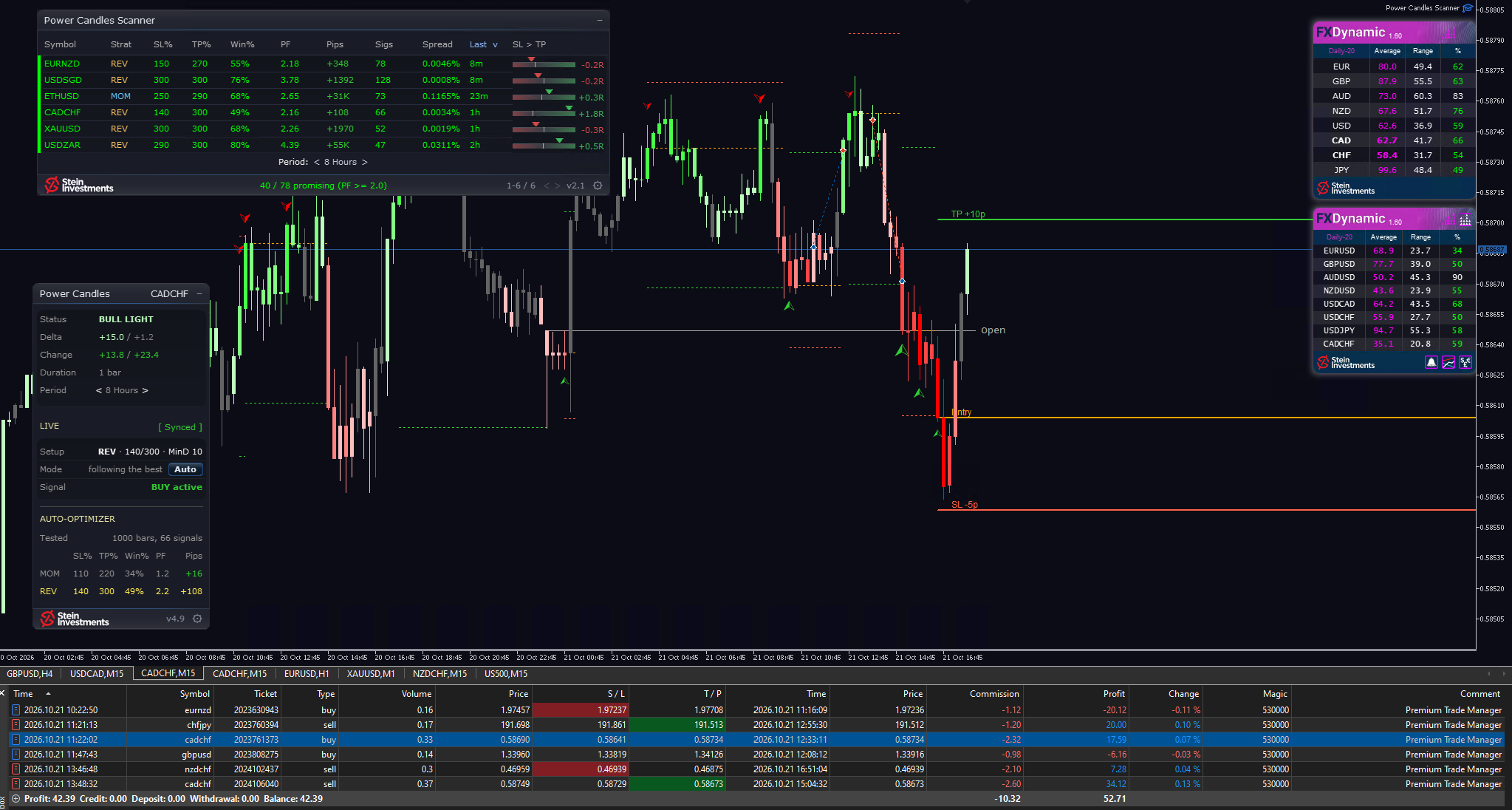
🔥The market is extremely quiet today. I still came out ahead.

I noticed it because the signals got fewer as the day went on. FX Dynamic, top right in the picture, confirmed my hunch: EURUSD is at 34 percent of its average daily range, most other majors between 50 and 68 percent.

The searching was left to the tools. The Power Candles Strategy Scanner reported the signals. Power Candles put the tested setup on the chart. Premium Trade Manager executed at a fixed risk.

✅ Six trades on my demo account, four of them in profit. The result is in the picture.

Profit booked, I'm calling it a day.

One day shows the workflow. What a setup is worth shows over many trades.

Daniel

👉 https://stein.investments/products/power-candles-scanner
👉 https://stein.investments/products/power-candles
👉 https://stein.investments/products/premium-trade-manager
👉 https://stein.investments/products/fx-dynamic
Daniel Stein
Daniel Stein
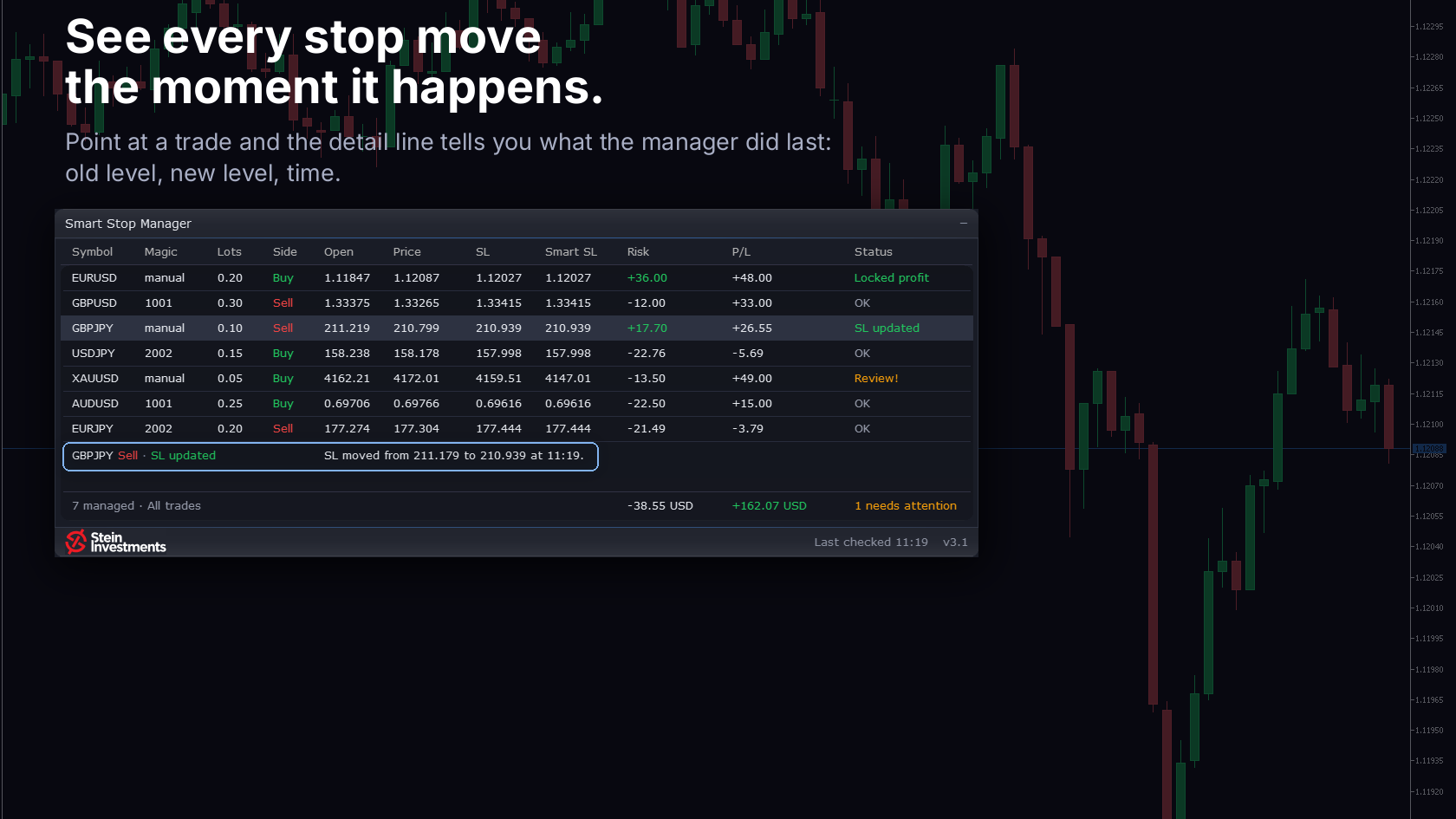
🚀Smart Stop Manager 3.1 tells you what it did with your stop.

A stop manager works in the background. So what did it do, and when? In 3.1 the row tells you: after a stop change it shows "SL updated" for a minute, and the detail line names the old stop, the new stop and the time.

✅ The glass panel of the Smart Stop Scanner 4.0. Status in colour, and point at any row that needs a look: it explains itself in plain words.

✅ Short stops include the spread. Indicator, scanner and manager now follow one Bid/Ask logic.

✅ A magic filter with a list: only the listed numbers, or all except them. Every position it covers is managed, also on later pages of the panel.

The core stays: the manager only ever tightens a stop. While the structure runs against your trade, your own stop does the work.

If you own the manager, 3.1 is a free update in the MQL5 Market. New to it? Until Sunday 25 October it is 59 USD instead of 79. Have a look.

Daniel

👉 https://stein.investments/products/smart-stop-manager
Daniel Stein
Daniel Stein
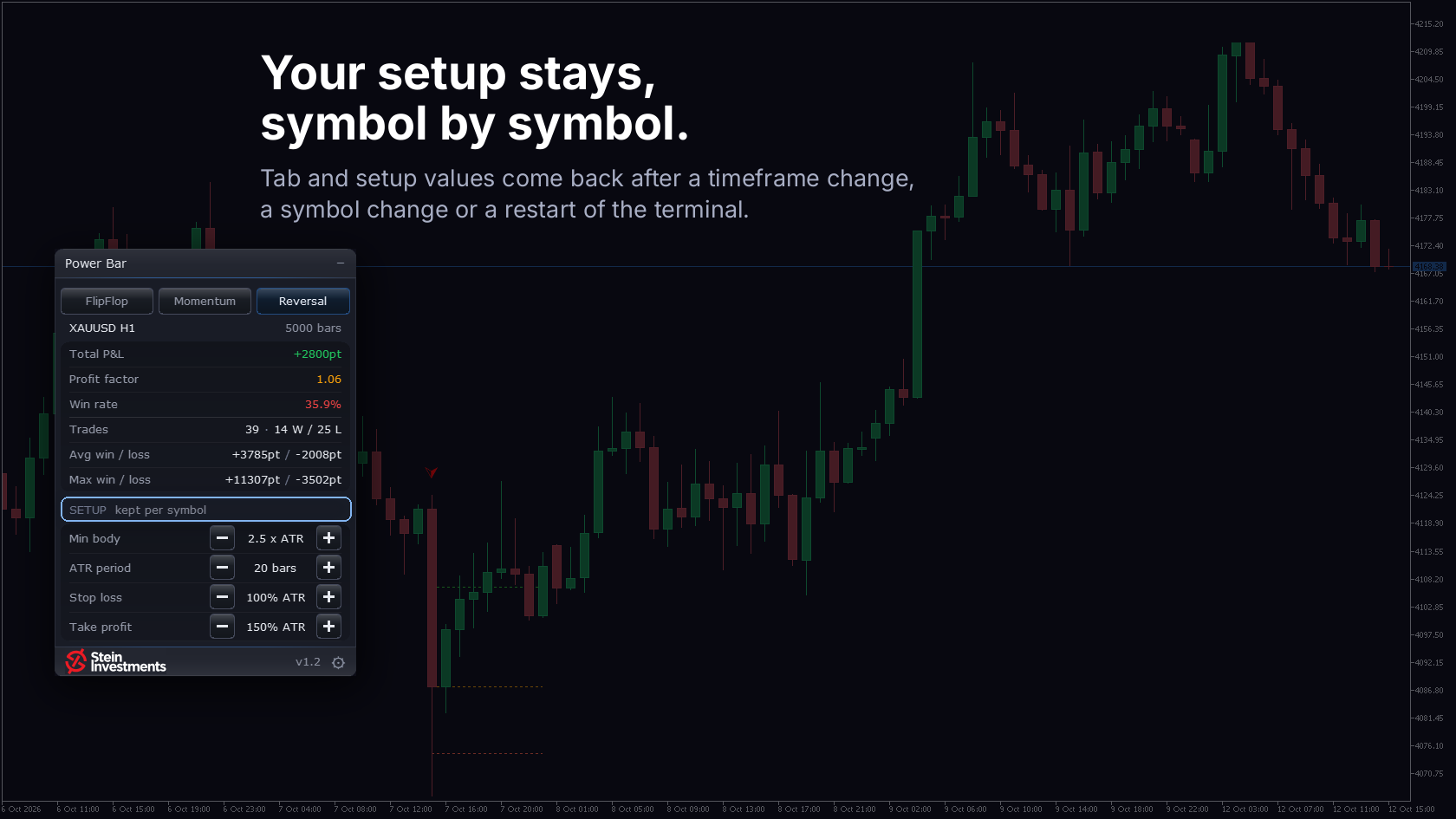
🚀Power Bar 1.2 keeps your settings, in a new glass panel.

You tuned Power Bar to a symbol, switched the timeframe and started all over again. Traders asked me to change that, and they are right: what you worked out for a symbol should stay.

✅ Your tab and setup values return after a timeframe change, a symbol change or a terminal restart, the values kept per symbol.

✅ The glass panel keeps one height in every tab, and its gear opens switches for arrows, lines and alerts right on the chart.

✅ Arrows sit behind the candles and past signal lines are fine and dotted, so the candles stay readable.

The core stays: three readings of the extreme candle, tested against the history of your chart. The panel counts raw moves before spread and costs, so read it as a pre-selection. The entry stays your call.

If you own Power Bar, 1.2 is a free update in the MQL5 Market. New to it? Until Sunday 18 October it is 59 USD instead of 79. Have a look.

Daniel

👉 https://stein.investments/products/power-bar
Daniel Stein
Daniel Stein
Is this a moment to trade? Which direction? Where do stop and target go?

🎬Power Candles answers all three on the chart, and its film shows how. Every setup is tested on the last 1,000 candles of that market, and Power Candles keeps what held up best. Tested, not guessed.

✅ Entry, stop loss and take profit at exact prices
✅ Every past trade of the setup drawn in, with its outcome
✅ Candles coloured by strength, a Signal line in plain words
✅ Auto-apply keeps the plan current after every closed bar
✅ The Power Candles Strategy Scanner alerts you to fresh signals across your Market Watch, and one click switches your chart

🚀Indicator 4.7 is in the MQL5 Market: LIVE shows at a glance what your chart is doing. A free update for owners.

The decision stays yours.

Daniel

👉 https://stein.investments/products/power-candles
👉 https://stein.investments/products/power-candles-scanner

Trading involves risk.
Daniel Stein
Daniel Stein
One ordinary week in gold was enough to wipe out accounts

Between October 7 and 9, nine buyers of Quantum Queen X reported on the product page that the EA wiped out their account or came close. The accounts they named ranged from 700 EUR to 4,500 USD.

An ordinary market was enough: from the last closed trade on the vendor's signal on September 30 to the day's low on October 7, gold fell 110 USD. Across a whole week, that is only slightly more than gold moves on an average day (about 98 USD).

The EA sits at rank 2 on the MT5 bestseller list and sells for 1,199.99 USD. As of October 10, one of the nine reviews shows neither text nor stars. Our archive kept it.

The MQL5 Market Report, week 41, with the full analysis:
https://algocheck.net/report/2026-w41
Daniel Stein
Daniel Stein
🎬Premium Trade Manager has its film. Sixty seconds, one gold trade, from the plan to the trailing stop.

Every other trade manager executes your click. This one weighs it first.

✅ Drag the stop, the lot size follows, and your risk stays exactly what you set.

✅ Max reads this exact setup against your live account. The decision stays yours.

✅ One click on Execute, and the panel takes over. The trailing stop carries the rest.

🚀Version 3.3 is in the MQL5 Market too: Break-Even runs alongside every trailing method, Max answers while the manager keeps working, and Smart Stop works for sells, spread included. If you own it, 3.3 is a free update.

New to it? One-time purchase, lifetime updates, and every purchase comes with two months of Max as your coach.

Daniel

👉 https://stein.investments/products/premium-trade-manager
Daniel Stein
Daniel Stein
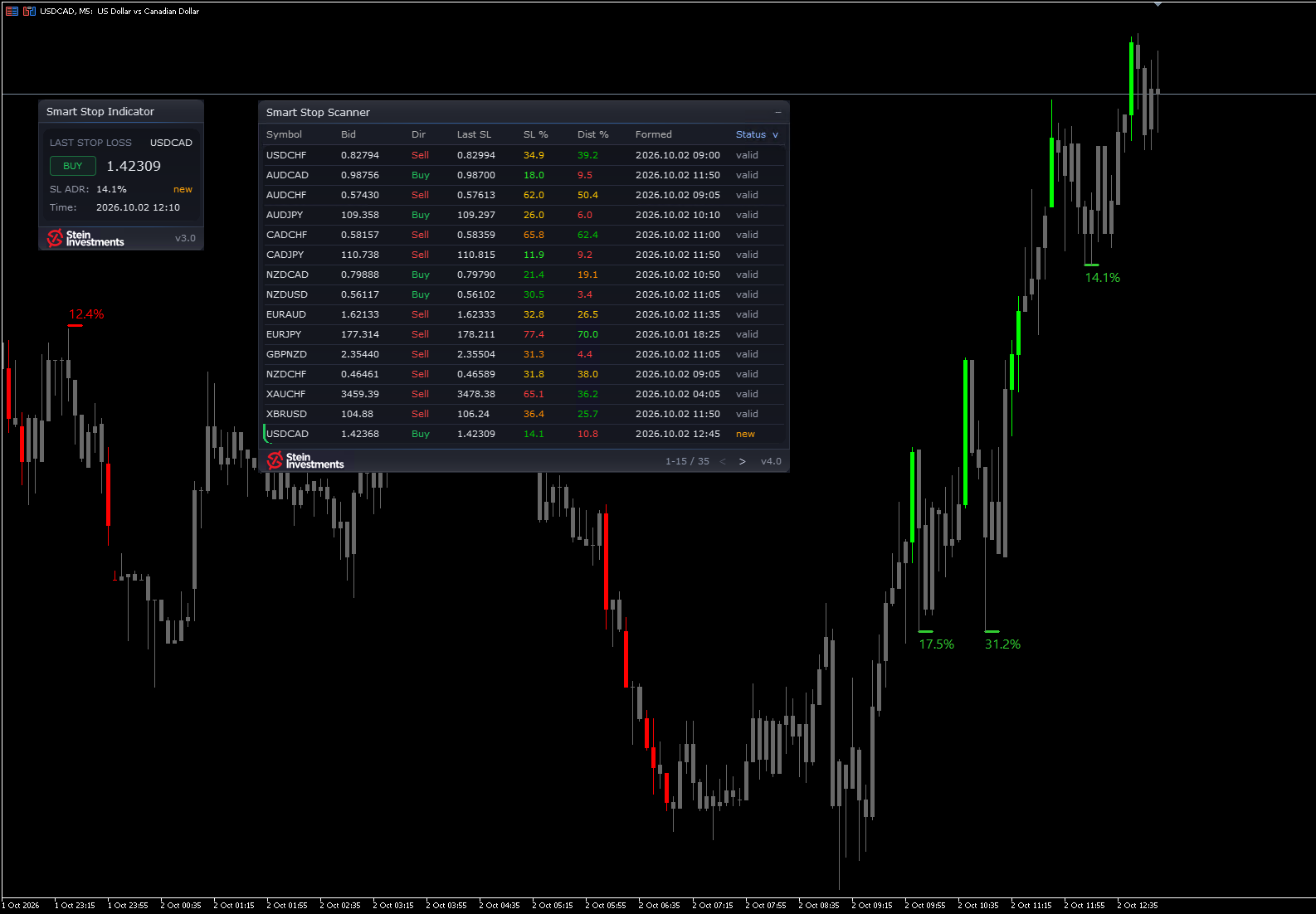
🚀Smart Stop Scanner 4.0 scans your Market Watch, live.

The symbols you trade already sit in your Market Watch. So I made it the scan. And the panel now wears the glass design of the Smart Stop Indicator 3.0.

✅ Change your Market Watch and the scan follows. An Include or Exclude list narrows it down.

✅ Behind the gear sits a settings page: hide broken stops, show only new ones, switch alerts and their channels.

✅ Short stops include the spread, by the same rule as the Smart Stop Indicator since 3.0.

✅ Every alert is one line: symbol, timeframe, event, stop and scanner name.

✅ The panel is there the moment you attach it and fills symbol by symbol.

✅ Click a row and the chart switches to that symbol. With the Smart Stop Indicator on it, you see the level drawn.

If you own the scanner, 4.0 is a free update in the MQL5 Market. New to it? This week it is 79 USD instead of 99, until Sunday 11 October. Have a look.

Daniel

👉 https://stein.investments/products/smart-stop-scanner
Daniel Stein
Daniel Stein
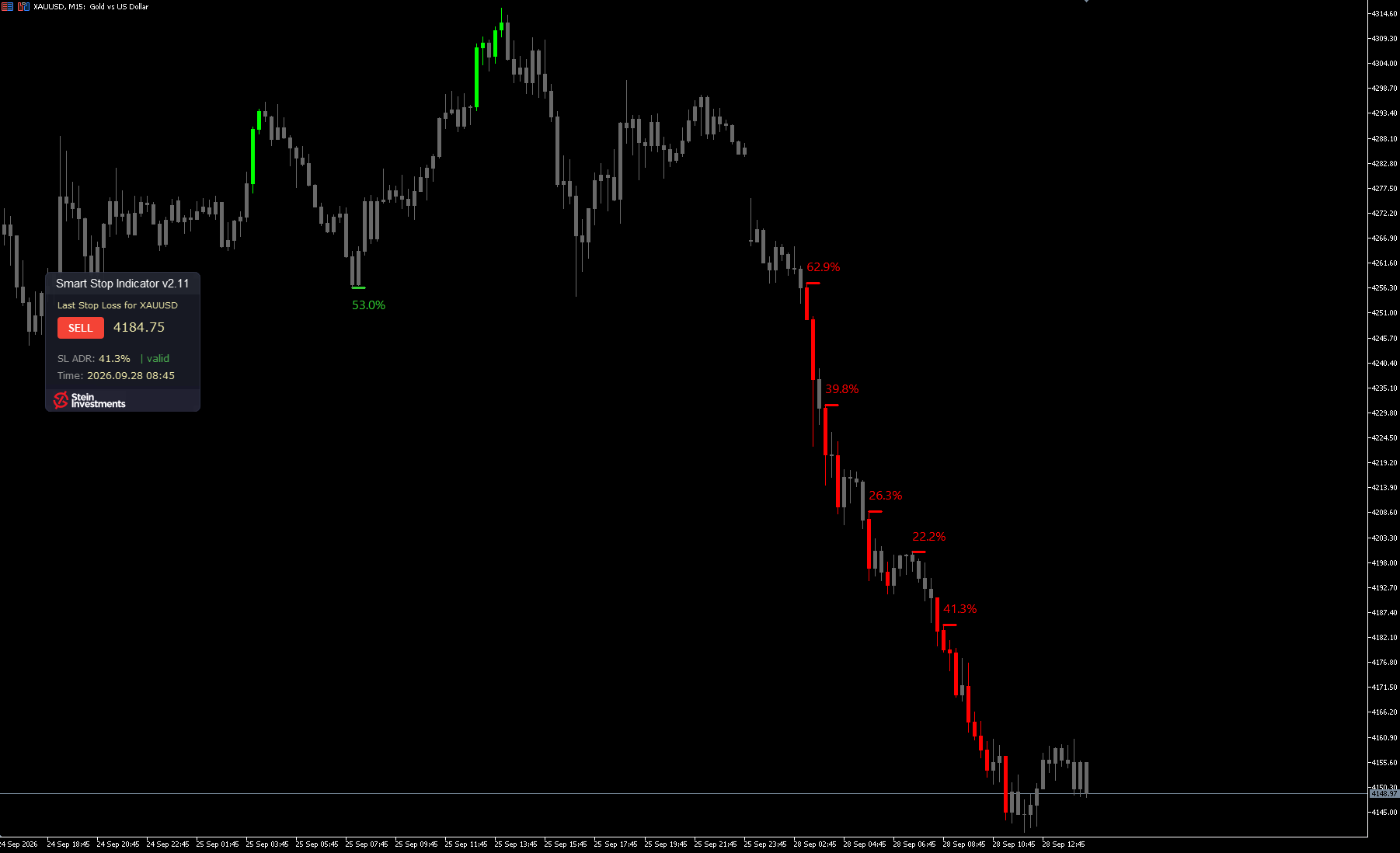
The Smart Stop Indicator got a new panel this week, and short stops now include the spread.

The panel now has the same Glass layout as Power Candles. The stop level is the largest figure on it, in white, with BUY in green or SELL in red beside it, so where your last stop sits is the first thing you read.

A short is stopped out on the Ask. So the sell stop line, the panel level and the alerts now sit the normal spread above the swing high. A trader asked me for this.

The chart stays responsive however many stop levels it shows. Six fixes keep the ADR labels readable, give each status its own colour and let your EA read the levels with the candle colouring hidden.

Version 3.0 is in the MQL5 Market now, free for every owner. And until Sunday, 4 October, 23:59 CEST, the new version comes at the series price: 59 USD instead of 79.

Daniel

👉 https://stein.investments/products/smart-stop-indicator
Daniel Stein
Daniel Stein
Your stop at the level the chart actually gives you.

My stop methods had proven themselves, and still they sometimes took me out too early. So I built a stop that reads the market structure and moves with it.

The Smart Stop Indicator shows the most recent valid stop level on your chart, for BUY or SELL: the exact price, its distance as a share of the daily range, and its status live: new, valid or broken. Alerts tell you when a new level forms and when one breaks, and broken levels turn grey in the panel, so the valid one stands out. I spent a long time on this one aspect of trading, and it became one of my favorite products.

A new structure takes a little longer, and until it forms, the indicator waits. The call on the trade stays yours. It runs in MetaTrader 5, on every timeframe.

This week it is 59 USD instead of 79, until Sunday 4 October. Have a look.

Daniel

👉 https://stein.investments/products/smart-stop-indicator
Daniel Stein
Daniel Stein
Sentiment is live in REVDEN.

Who is on which side of a pair? The answer sits in three places: the regulator's weekly report for the large funds, the futures exchange for the active trades of the last trading day, the spot market for the live positions of retail traders. The new sentiment overview puts all three side by side, one row per pair, for the seven major pairs and gold.

✅ Large funds, exchange flow and retail traders, each from its own source
✅ Funds and retail traders on one scale of seven classes, next to the state of a week ago
✅ When all three sit on the same side, the row shows it at a glance
✅ Its own page in REVDEN, plus the detail on each of the eight symbol pages

Pro and VIP see all three players live, and a free account shows the eight rows with each pair's weekly move.

👉 Sentiment overview: https://revden.io/sentiment
→ The film, from the sentiment scene: https://youtu.be/EAr28q9dAqw?t=54
→ The whole series: https://www.youtube.com/playlist?list=PLKm-ziHHBYxw