Daniel Stein
Daniel Stein
4.7 (720)
  • Informazioni
12+ anni
esperienza
29
prodotti
2351
versioni demo
9
lavori
0
segnali
0
iscritti
Visitate la nostra nuovissima pagina di benvenuto di Stein Investments
per ottenere le ultime informazioni, gli aggiornamenti e le strategie di trading.

Cliccare su https://www.mql5.com/en/blogs/post/755375
Se avete domande, contattateci e saremo lieti di aiutarvi.

Auguri e buon trading
Daniel
Daniel Stein
Daniel Stein
🛠 Five add-ons for the tool you have in mind

You know exactly what your tool should do. The code was the hurdle, and so were the small gaps: a scanner that keeps quiet about why a pair is missing, filters only in the settings dialog, a new entry you spot by chance.

Now you can have it built, and each add-on closes one gap:
• Filter status per row: why a pair is in or out
• Filters you switch in the panel with one click
• Push and email the moment a pair joins the list
• Values your own EA reads with iCustom
• The panel design, free for every tool with a panel

Your prototype suggests the ones that fit. You see the result before you order.

Your tool reads 46 indicators: first the Stein Investments ones you own or rent, such as FX Power and Power Candles, then the 38 in MetaTrader 5. Ichimoku for the trend, the Power Candles arrow as the trigger: one rule. Find yours in the list
👉 https://buildyourtools.net/indicators?utm_source=mql5&utm_medium=post&utm_campaign=byt-features-indikatoren

Just describe your idea in your own words.
👉 Try every add-on on an example scanner: https://buildyourtools.net/add-ons?utm_source=mql5&utm_medium=post&utm_campaign=byt-features-indikatoren
Daniel Stein
Daniel Stein
🔥 Black Week: 20% off all 18 tools, Yukon included

From 24 to 30 November, they cost 20% less in the MQL5 Market. I keep it simple: one number for everything. Whatever you pick, you save 20%.

✅ All indicators and scanners, from FX Power to Smart Stop
✅ Custom Alerts and EasyInsight (each also in the all-in-one version), Premium Trade Manager, Smart Stop Manager and EasyTrade
✅ Yukon, four engines in one EA on gold

If one of these tools has been on your list for a while, this is a good week for it. Every product page shows the week's price next to the list price.

Your first subscription costs less too: Pro or VIP monthly, 20% off for the first three months with the code BLACKWEEK. Max then reads the live market with you.
👉 https://stein.investments/membership?promo=BLACKWEEK&utm_source=forum&utm_medium=post&utm_campaign=black-week-2026&utm_content=forexfactory#promo

The prices hold until Monday 30 November, then the list price is back. Rentals stay as they are, and the REVDEN AI Desk keeps its introductory price until 30 November.

Daniel

👉 https://stein.investments/products
Daniel Stein
Daniel Stein
Londons pre-market overview
Daniel Stein
Daniel Stein
🔥You describe your idea, BuildYourTools codes it.

Last week's most common answer: "I can't code it." That is exactly the gap BuildYourTools closes, the prototype is on your chart within minutes. A trader who built his own scanner this way: "It spares me the time of going through charts for all the pairs that I trade."

🛠 Idea of the week: one candle for all your conditions, plus a push notification. Open it, swap in your own conditions, send it off. Clarification and three prototype rounds are free.
https://buildyourtools.net/?v=condition-alert

📊 Week 46 result: 39% can't code their best idea, for 26% it is already running.

New question: What is missing most in your trading?
1️⃣ Tools
2️⃣ A profitable strategy
3️⃣ Discipline in execution
4️⃣ Market understanding

Also in this issue: REVDEN notifications, MQL5 Market Report.

Daniel

👉 https://stein.investments/innovation-report/2026-w47
Daniel Stein
Daniel Stein
🔍 Every trade your AI takes now tells its whole story.

We keep making the REVDEN AI Desk better. With version 1.2, your Track Record shows at a glance why a position was opened and why it was closed:

✅ Why it opened: your AI's full reasoning

✅ every stop move, with its reason

✅ Why it closed: who ended the trade (your AI, stop, target, you or your broker) and why

Track Record now has its own tab in the header and opens on your last 7 days.

In the picture: USDCAD, closed by my AI, with its reason.

Version 1.2 is now in the MQL5 Market, as a free update.

Daniel

👉 https://stein.investments/products/revden-ai-desk
Daniel Stein
Daniel Stein
🎯 Follow-up on today: Yukon is out, about 10 dollars above the low.

The Breakout position closes at 3745. It went short during the night at 3833, so it caught a good 88 dollars of the move. The low came shortly before, at 3735.

The news protection set the exit. The Fed minutes are due today, and ahead of releases like this Yukon takes its positions off the table and waits out the spike.

During the day the stop locks in the profit, ahead of the release the news protection brings it home.

In the picture: both shorts closed, the day in the panel.

Daniel

👉 https://stein.investments/products/yukon
Daniel Stein
Daniel Stein
🔥 Gold falls, Yukon is short twice. And the stop follows every step.

A day I enjoy looking at the chart. XAUUSD on H1, as of this afternoon:

✅ Pattern Short sells at 3854 last evening and closes at its target at 3790 early this morning.

✅ During the night the Breakout engine goes short at 3833. Since then Yukon has trailed the stop behind price step by step, with enough room for the pullbacks. In the morning it sat at the entry, now it stands at 3798, about 35 dollars below. The position is still running, and the profit down to the stop is already locked in.

In the picture: dotted for the entry, red for the stop.

Two engines, one move, one day. That is what Yukon is built for: four engines in one EA on gold, each one switchable.

Daniel

👉 https://stein.investments/products/yukon
Daniel Stein
Daniel Stein
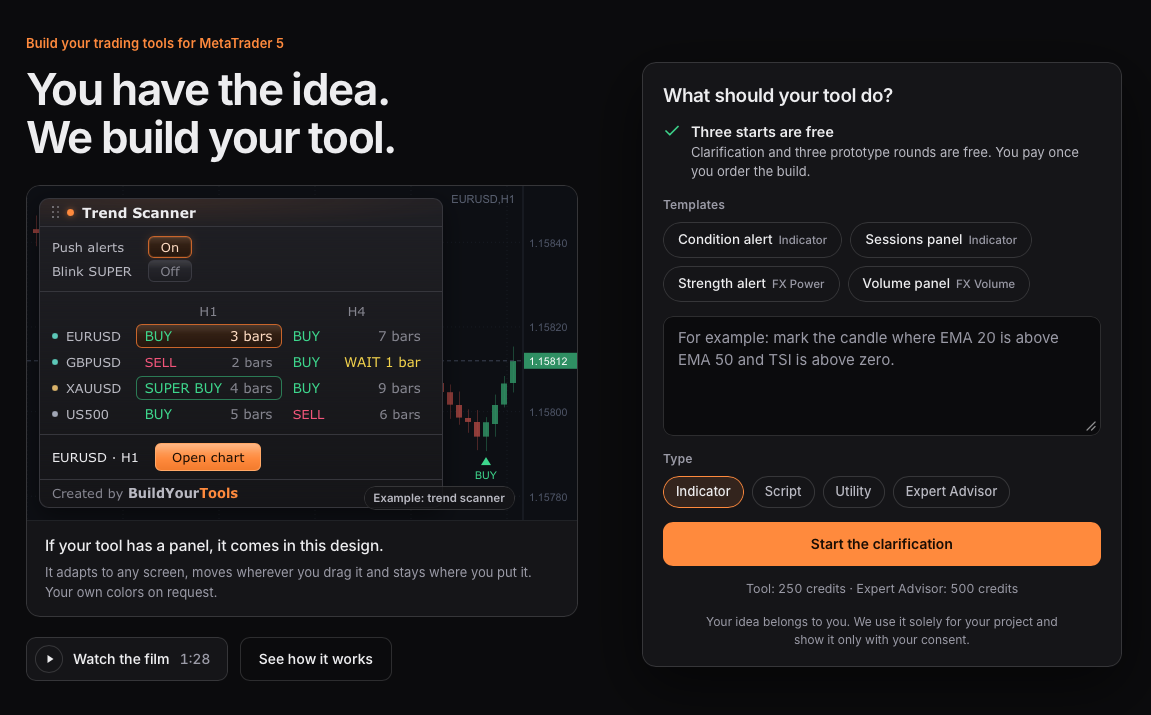
🛠 Your tool now looks like you bought it

Anyone who has had an AI write an indicator knows the result: the logic is right, and on the chart there is grey text in a corner. It does its job, and still you keep it to yourself.

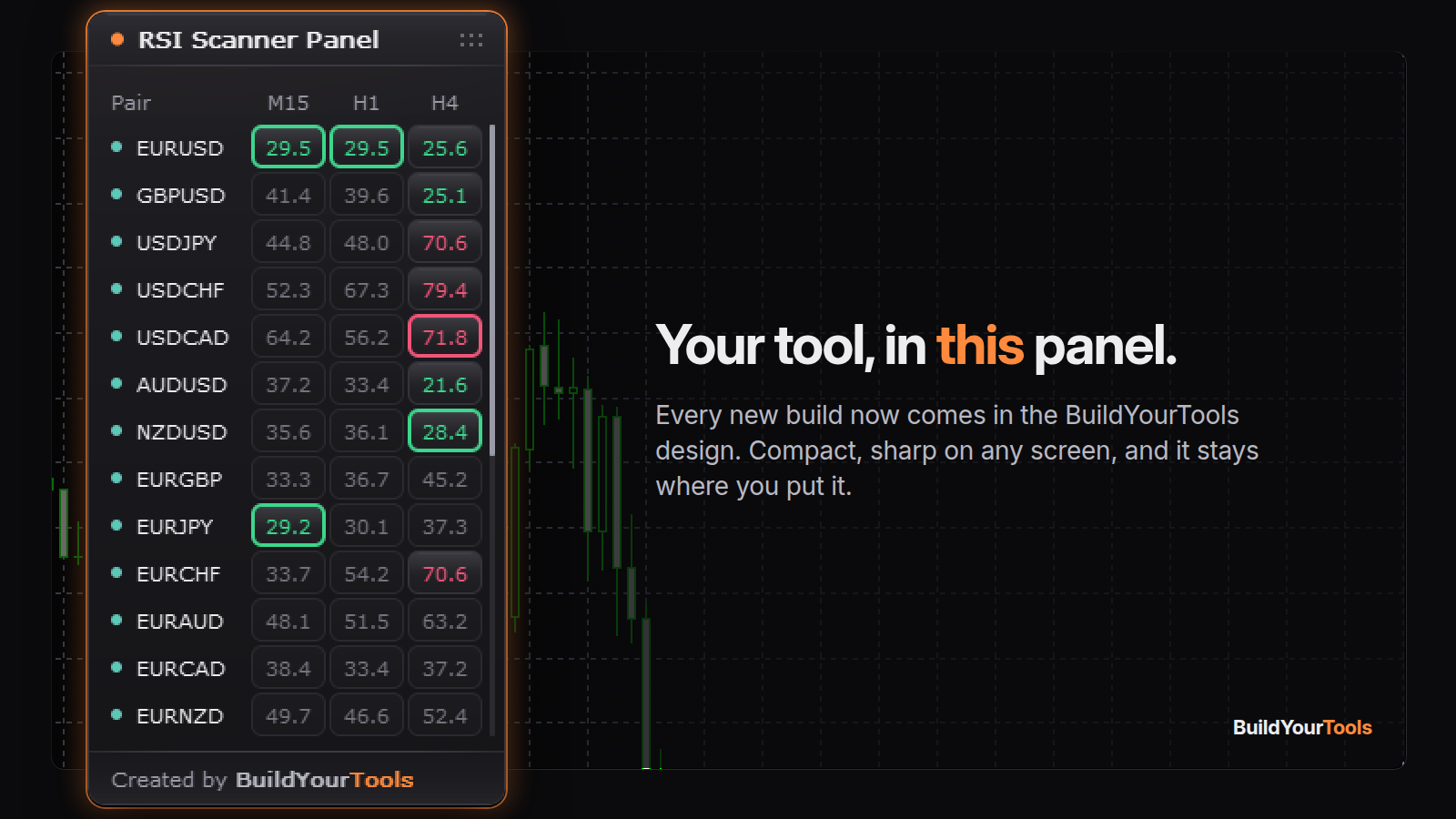
From today, the panel of your tool comes in the BuildYourTools design, built on the same foundation as my own products. You see it in your very first prototype, and it is included in the fixed price.

• Switches you flip with one click on the row
• A window you drag wherever it stays out of your way, and it keeps its place on every chart
• Compact, and sharp on large screens

Prefer your own colours? They are in the fixed price too.

👉 Describe your idea and see what it could look like: https://buildyourtools.net/
Daniel Stein
Daniel Stein
🔥Your idea finally makes it onto the chart

The idea you have carried around for a long time never found a programmer. Now BuildYourTools turns it into your own tool, and the first traders already work with theirs. Clarification and three prototype rounds are free.
🛠 https://buildyourtools.net/

📊 Week 45: for 75%, AI has improved their trading.

New question: What has kept your best trading idea off the chart so far?
1️⃣ I can't code it: https://stein.investments/innovation-report/2026-w46?vote=code#frage
2️⃣ It isn't clear enough yet: https://stein.investments/innovation-report/2026-w46?vote=unclear#frage
3️⃣ A test might prove it wrong: https://stein.investments/innovation-report/2026-w46?vote=test#frage
4️⃣ Nothing, it already runs: https://stein.investments/innovation-report/2026-w46?vote=running#frage

Also in this issue: Power Candles Scanner 2.3, Smart Stop, AI Desk.

Daniel

👉 https://stein.investments/innovation-report/2026-w46
Daniel Stein
Daniel Stein
🛠 This weekend, your idea finally gets its time

During the week the market runs, and the idea that came to you at the chart midweek gets buried between trades. It ends up on a note. On Friday the market closes, and the idea is still waiting.

Today is Saturday. Prices stand still, your head is clear, and that is exactly what your idea needs now.

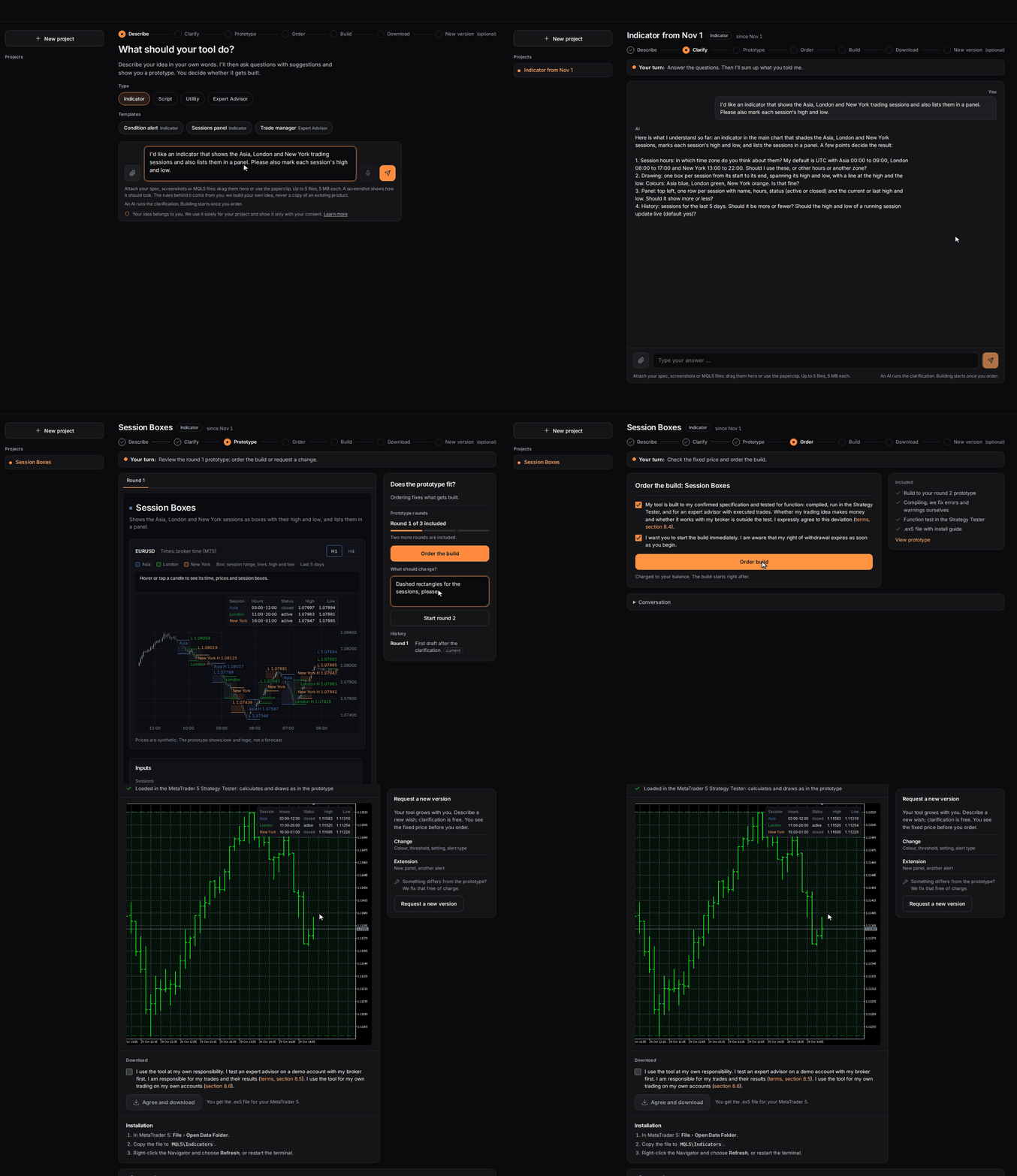
On BuildYourTools you describe it in your own words, ideally with a screenshot of the chart where it came to you. The AI asks about every detail and suggests answers. Then you see your tool as a prototype on the chart. You only pay once you order the build.

When the market opens on Monday, your own tool runs on your chart, as a finished .ex5 file in your MetaTrader 5.

👉 Give your idea the weekend: https://buildyourtools.net/
Daniel Stein
Daniel Stein
🔥 This is the new kind of trading I've been waiting for.

REVDEN classifies the market for every symbol. My AI builds its reasoning on top of that: why this trade, where the stop sits, when the idea is wrong. Measured market data plus an AI that thinks it through, written out for every position. To me, that combination is what makes the AI Desk unique.

The best part: a base model does the job. Sonnet is already very good at a lot of tasks, a top model like Fable would cost far more. My running costs stay small, and the result convinces me.

All week the desk worked in the background, and I had nothing to do. What surprised me is how long the positions stay open, often around a day. I picked H1 on purpose, to keep costs low.

In the picture: one week, every trade with its reasoning.

Daniel

👉 https://stein.investments/products/revden-ai-desk
Daniel Stein
Daniel Stein
🔥 Missed the arrow? On silver, the better entry came after it.

I'm often somewhere else when the arrow prints. Today on silver (M15) that paid off: two sell signals, both hit their target, +7 R in total on 2 R of risk.

✅ Signal 1, MOM Bear Extreme, setup 1 : 1.9. Price ran toward the target first, then came back. Entry at 1 : 1.5, target hit: +1.5 R.

✅ Signal 2, MOM Bear Strong, setup 1 : 1.8. Twenty minutes after the arrow, price sat much closer to the stop. Entry at 1 : 5.5, target hit: +5.6 R.

✅ Stop and target stay where the signal placed them. The closer price comes back toward the stop, the less you risk for the same target.

The Power Candles Scanner shows this for every symbol at a glance, in the SL > TP column. The bar runs from stop to target, the marker shows where price is right now, with the live R value next to it. A marker left of the entry means price sits closer to the stop than at the signal.

Win% and PF in the panel measure the entry at the arrow. The later entry is your call on the chart. Two trades show the process, many show what a setup is worth.

Daniel

👉 https://stein.investments/products/power-candles-scanner
👉 https://stein.investments/products/power-candles
Daniel Stein
Daniel Stein
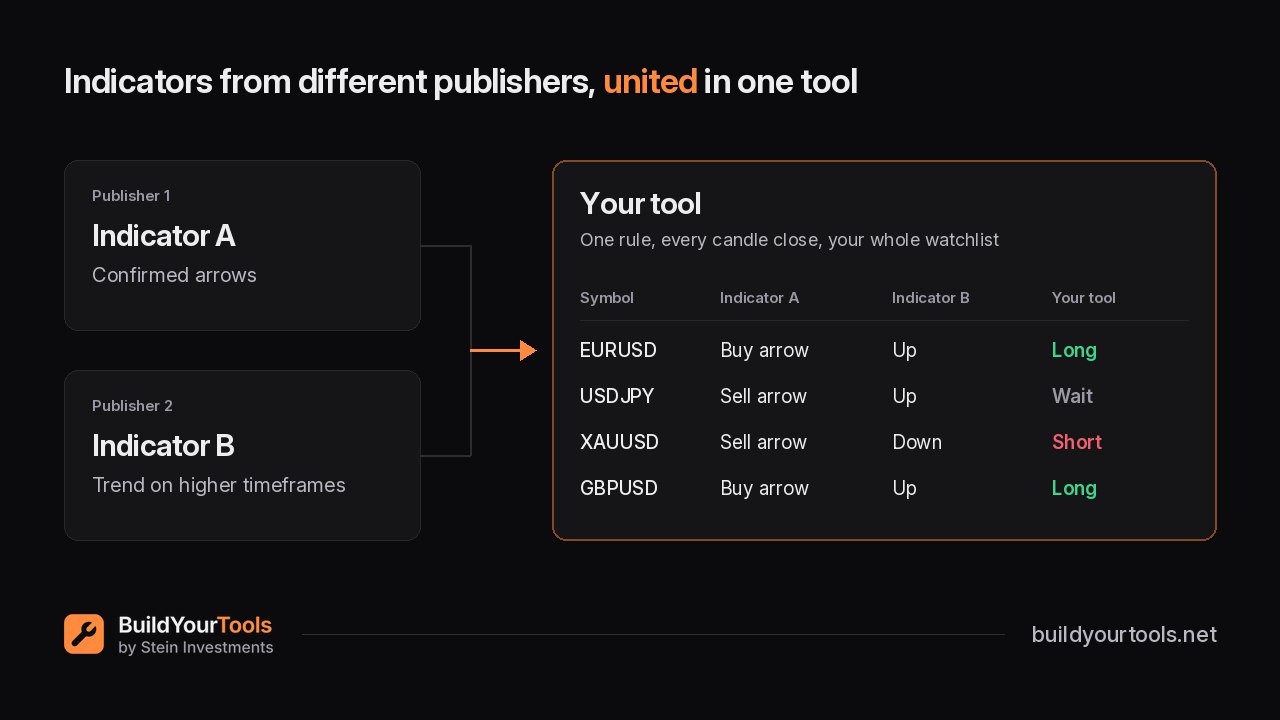
🛠 Indicators from different publishers, united in one tool

Many of you run indicators from other MQL5 publishers next to ours. Each shows its own part of the picture. Putting it together still happens in your head, chart by chart.

On BuildYourTools you bring them together in one tool. What it becomes is up to you:
✅ A scanner that checks them on every candle close across your watchlist and shows where your setup stands

✅ A confirmed arrow that only counts when another publisher's trend view agrees on the higher timeframes

✅ A notification the moment zones from one indicator and signals from another match your rule

And your own strategy? Have an Expert Advisor built that trades it exactly the way you have it in your head, then check in the Strategy Tester whether it holds up.

Your licences stay yours. Reply here with the indicator you use, and we check whether it can be brought in.

👉 Start your own project now: https://buildyourtools.net/
Daniel Stein
Die meisten Trader, mit denen ich spreche, haben mehrere Indikatoren nebeneinander laufen. Einer zeigt die Stärke, einer den Trend, einer die Zonen. Jeder zeigt seinen Teil des Bildes, und zusammengesetzt wird es noch immer im Kopf, Chart für Chart...
Daniel Stein
Most traders I talk to run several indicators side by side. One shows strength, one the trend, one the levels. Each shows its own part of the picture, and putting it together still happens in your head, chart by chart. On BuildYourTools you bring them together in one tool of your own...
Daniel Stein
Daniel Stein
🚀 Power Candles Scanner 2.3: only the setups you would take

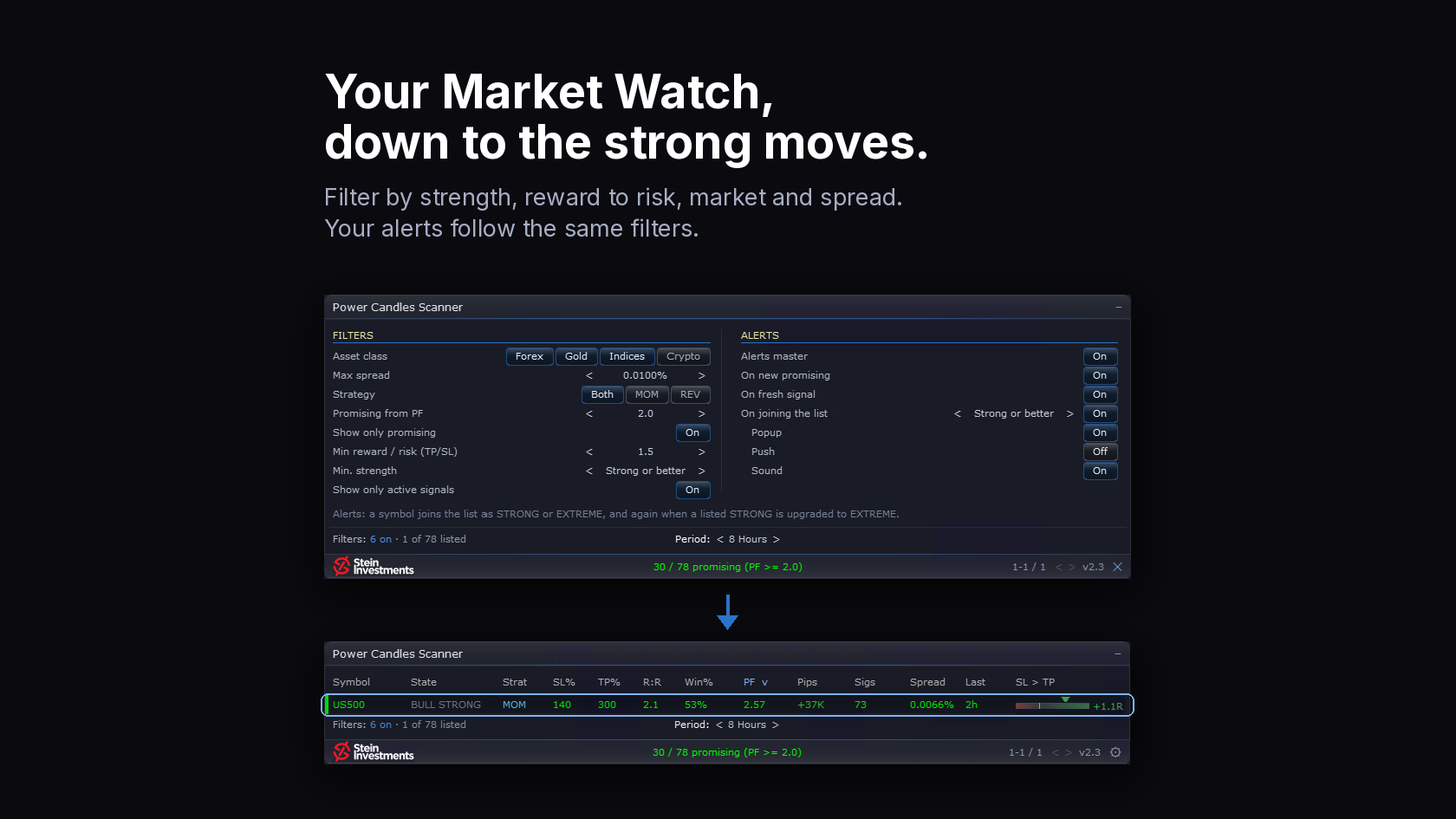
A full Market Watch is a long list. Mine has 78 symbols, and with my filters set, one is left: the setup worth a look. You asked me for strong candles next to the extreme ones. So I built that filter, and a few more around it.

✅ Min. strength: Strong or better, or Extreme only. The new State column shows each symbol's last closed candle, extreme in bold green and red.

✅ A new R:R column next to SL% and TP%, with a minimum of 1.2, 1.5 or 2.

✅ Forex, Gold, Indices and Crypto switch on one by one. Max spread keeps the symbols that are cheap to trade right now.

✅ "On joining the list": your alerts follow your list, newcomers and new extremes right at the candle close.

✅ Every setup, SL and TP stays as the optimizer calculated it. Your filters decide what you see.

If you own or rent the scanner, 2.3 is a free update in the MQL5 Market. New to it? Have a look.

Daniel

👉 https://stein.investments/products/power-candles-scanner
Daniel Stein
Daniel Stein
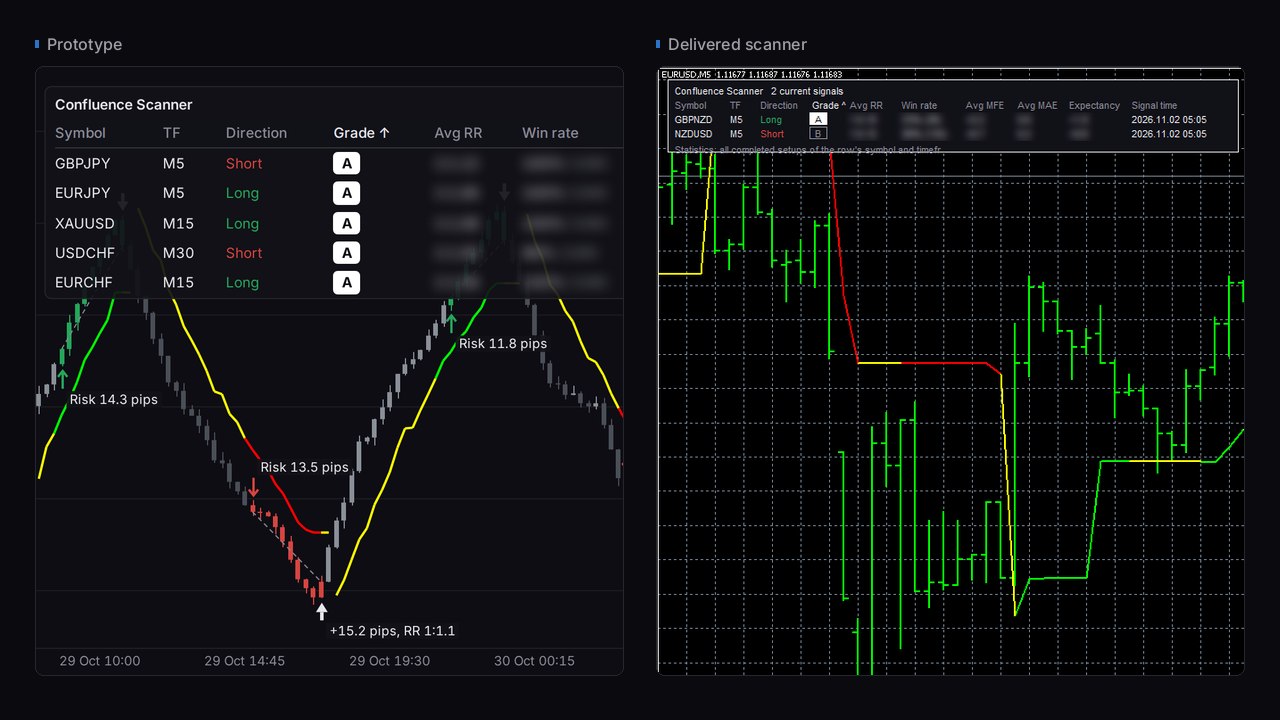
🛠 Built exactly as the prototype showed it

The first customer projects on BuildYourTools are underway. On Sunday we delivered one of them: a scanner a trader shaped round by round in the prototype.

What it does:
✅ Reads FX Power, IX Power and FX Trend together on every candle close, across all forex pairs and gold (XAUUSD)

✅ Lists every current setup in one sortable panel, graded A or B

✅ Marks where each setup starts and ends on the chart, with risk and result in pips

✅ Keeps statistics of past setups for every pair and timeframe

That is what made it demanding: three indicators, several timeframes and every pair, read at the same time and brought together in one view. On the left is the prototype the trader approved, on the right the delivered scanner on the chart. Same panel, same columns, same grading.

He agreed to let us show it here. We wish him every success with it.

Have an idea that brings your indicators together?
👉 Start your own project now: https://buildyourtools.net/
Daniel Stein
Daniel Stein
Your strategy as an EA in minutes.

You have a strategy in your head, maybe you already trade it by hand, and one question stays open: is it profitable? Since 31 October you can find out yourself. You describe it, BuildYourTools builds it into your EA in minutes, and you run it through the MetaTrader 5 Strategy Tester. If it falls short, you change a rule and test the next version.

That is the lead story of this week’s Innovation Report, our weekly letter at Stein Investments. A film shows the whole way in 88 seconds, from the first description to the checked .ex5 file.

Also in this issue: Yukon on gold, which traded the moves around the US election cleanly, short on the way down and long on the way up, and AI agents that query our market data more every week.

Question of the week: has AI improved your trading? Think of every way AI enters your trading: a chat for analysis, an agent on your market data, a tool that AI built for you. I would like to read how developers and traders here see it.

The full issue: https://stein.investments/innovation-report/2026-w45?utm_source=mql5forum&utm_medium=forum&utm_campaign=innovation-report-2026-w45

Daniel, Stein Investments
Daniel Stein
Daniel Stein
🛠 From your idea to a finished tool in minutes

Almost every trader has an idea they would love to try. RSI overbought, MACD agrees, price above the EMA 200. Or FX Power combined with FX Trend.

On BuildYourTools you describe it as precisely as you can, and you are guided to the finished .ex5 file. Load it into the MetaTrader 5 Strategy Tester and see how your rules would have played out on past prices.

See it first. Questions with suggested answers, then a prototype on the chart. Clarification and three rounds are free.

Then order the build. One fixed price per project, with indicators and expert advisors checked in the Strategy Tester before delivery.

Bring in our tools. Your idea can use FX Power, IX Power, FX Dynamic, FX Levels or FX Trend, once the product is installed in your MetaTrader 5.

Your idea belongs to you: we use it solely for your project.

👉 Start with your idea @ https://buildyourtools.net/