Second Chart the Time Frame in Seconds

50 USD
Скачано демо:
740
Опубликован:
3 марта 2016
Текущая версия:
5.1
Не нашли подходящего робота?
Закажите собственного
на бирже фрилансеров
Перейти на биржу
Закажите собственного
на бирже фрилансеров
Как купить торгового робота или индикатор
Запусти робота на
виртуальном хостинге
виртуальном хостинге
Протестируй индикатор/робота перед покупкой
Хочешь зарабатывать в Маркете?
Как подать продукт, чтобы его покупали

Вы упускаете торговые возможности:
- Бесплатные приложения для трейдинга
- 8 000+ сигналов для копирования
- Экономические новости для анализа финансовых рынков
Регистрация
Вход
Вы принимаете политику сайта и условия использования
Если у вас нет учетной записи, зарегистрируйтесь
Does the indicator work? I tried to try the demo and he refused
Hi I just rented this indicator(so not demo version). but cannot seem to make it work.Can someone help please. When I attach it to a 1 min chart and set the period to 30 Seconds nothing happens as it does not let me even click ok.
Apparently it still says I have the demo version?? When I definitely paid for renting it?! ()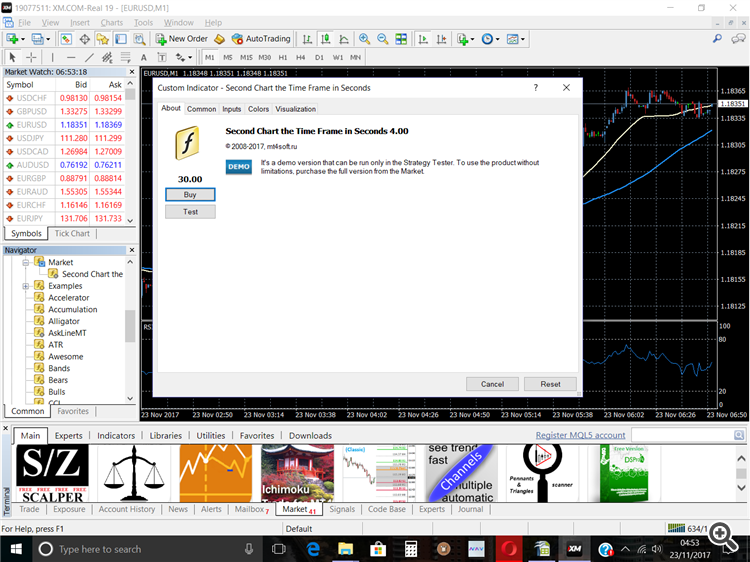
Apparently it still says I have the demo version?? When I definitely paid for renting it?! ()
Hi!
On your screenshot of the visible tab is "Downloads".
Download the file in the terminal.
Hi!
On your screenshot of the visible tab is "Downloads".
Download the file in the terminal.
Thanks. I have installed it but the rest is a bit over my head I am afraid.
Also I have set up a virtual platform but cannot set up the charts to migrate (If my understanding is correct of whether that`s what needs to happen- charts on MT4 first-migrate only then)
I want to set up 30 second charts on several currencies starting with USD JPY. What do I need to do in the inputs once I open the indicator on MT4, i have set the first line in the inputs to 30 sec but what do i put in the second- it gives me M2 as default?!
Please help
The option "Chart" should be used as a marker in order to open several different second periods for one instrument but not more than 12. For example, S5, S15, S30 for EURUSD. For this example, you will use any three of the marker (not the same) as M2, M3, M4, but can any other. Everything is implemented exactly for one reason - for every second period is a separate file and this file should not have a standard chart period (M1, M5, M15, ...), this token can be used only MT4 custom periods (M2, M3, M4, ...).
Hi, I purchased the three month option and applied it to and MT4 CDF account and it worked perfectly.
I then applied it to my MT4 spread Betting Live trading account and it would not work.
I deleted the product from my MT4 platform, bought the product and installed it again and it still would not work.
I opened a 1 min chart GER 30, applied the Seconds Chart Indicator, set the seconds (8) Allow DLL Imports, allow external imports, All Timeframes.
Clicked Open Chart.
The Offline Chart now opens, but while the price moves on the first chart, the price does not move at all on the offline chart.
Any suggestions???
Hi, I purchased the three month option and applied it to and MT4 CDF account and it worked perfectly.
Any suggestions???
Hi!
I wrote you a private message.
The proposed solution can be easily implemented.
Waiting for your answer.
My seconds timeframe is not updated. How do i fix this
Hello!
Describe in more detail what the problem is. I will try to figure out the problem as quickly as possible and find a solution.
I just purchased this and cant use it