MNFM Closure MT5
- Утилиты
-
Khalid Abdullah M Altuwaijri
 I am Khalid Altuwaijri, a former banker and CEO with 30 years of professional and management experience and 11 years of experience in the forex market. Now retired, I dedicate my time to forex trading and developing practical trading tools.
- Версия: 1.39
MNFM Closure lets you review and close existing positions or cancel pending orders from one chart panel. It executes only after you confirm a preview.
Getting started
1. Attach the utility to a chart. Enable automated trading and allow trading for this utility if you want it to execute confirmed closures.
2. Choose a closure action. Review the tickets, direction, lots and estimated net. Use Include to adjust the selection where available.
3. Confirm the displayed plan or cancel. After execution, read the completed and skipped counts and the verified realized result.
Choose the right action
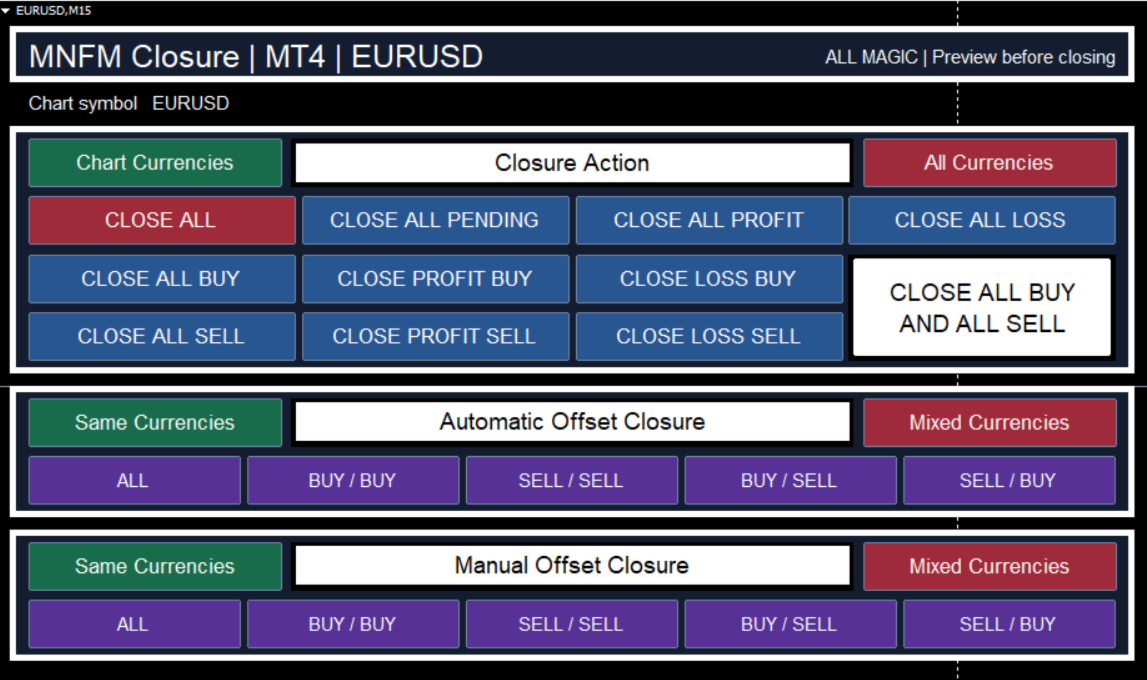
• Closure Action: choose the chart symbol or all symbols on the account. Close positions by side or by profit or loss, or cancel pending orders. Close All includes pending orders. Close All Buy and All Sell covers open positions only.
• Automatic Offset: the panel proposes winning positions to cover one losing position. It can close only part of a winner when the broker's volume rules allow. In Buy / Sell, Buy is the losing side and Sell is the winning side. Same Currencies keeps a group on one symbol. Mixed Currencies allows different symbols.
• Manual Offset: choose the tickets yourself with Include. Each selected position uses its full volume. Same Currencies displays one symbol at a time. Mixed Currencies allows selections across symbols.
Read the result
Floating P/L is for the whole position. Estimated net is for the selected closing volume. A worse estimate can require a fresh confirmation. Quotes, fees and broker responses can change during execution. The utility may stop after closing part of the plan. If the result is unverified, check what remains open before retrying.
Inputs
• Magic Filter: -1 includes all magic numbers. 0 selects magic-zero orders. A magic number does not by itself prove an order was placed manually.
• Slippage Points: requested price deviation where supported by the broker.
• Offset Minimum Net: target for Automatic Offset, in the account currency.
• Offset Currency Mode: initial Same or Mixed Currencies setting. The two offset panels can be changed independently.
This utility manages closures you initiate and does not guarantee profits.
MT5 accounting: The floating preview uses position profit and swap. The verified exit result uses deal profit, swap, commission and fees. On netting accounts, use Mixed Currencies for Automatic Offset and All Magic for aggregate positions. Automatic Offset is unavailable on accounts that require FIFO closing.
Screenshot: MT4 view of the shared Closure Action layout.