Keelmark All In Challenge Ready MT5
- Эксперты
- Версия: 1.1
- Активации: 10

Keelmark All-In Challenge READY - the all-in compounding gold EA, set up for a live account, with manual or automatic lot size.
❗ READ THE WARNINGS BEFORE YOU BUY ❗
- ❗ Use a separate live account, only for this EA, with money you can fully afford to lose. Never run it on your main account, savings or borrowed money.
- ❗ Test it first on a demo account, or on a very small live account, so you see how the EA behaves before you put real money in.
- ❗ Study and watch how the EA works and find the way that fits you (lot size, direction, take profit, when to switch it ON and OFF).
- ❗ This is a very high-risk tool. The author gives no guarantee of profit and takes no responsibility for any loss, including the loss of the whole account.
- ❗ Be as careful as you can.
- ❗ There is no stop loss by default. One losing basket can take the whole account in minutes. Gaps, news and wide spreads can lose more than you planned.
- ❗ The video and screenshots show single sessions, not typical results. On our own live account we ran it 3 times: 1 of the 3 blew the account. As an example of how the EA behaves, we also ran 80 tests in the Strategy Tester (old AUTO-lot all-in mode, XAUUSD real ticks, October 2026, each from $10): every run ended at $0. Past results say nothing about the future.
- ❗ Results depend on your broker: leverage, stop-out level, spread, slippage and execution speed differ, so your results will differ from ours.
- ❗ Do not run other EAs or trailing-stop tools on the same account unless they filter by magic number - they can modify or close this EA's positions.
- ❗ If the terminal, VPS or internet stops, open positions stay open without a stop loss. Turning Algo Trading off stops new baskets but does not close open ones.
- ❗ Not for prop-firm / funded accounts - all-in trading breaks most of their risk rules.
- ❗ Not financial advice. Check that trading leveraged products is legal for you where you live.
- ❗ MQL5 purchases are not refundable. Download the free version (Keelmark All In Challenge MT5) or run the demo in the Strategy Tester first.
WHAT IT DOES
- One basket at a time: several equal market positions in the same direction (default 7).
- The basket closes when gold has moved the take-profit distance (default $0.60). Optional stop loss (0 = none).
- Lot mode FIXED (default): you choose the lot per position (default 0.01) and change it on the panel with - / +.
- Lot mode AUTO: total lots grow with capital (capital x Lots per $1), so every win makes the next basket bigger. It never increases lots after a loss.
- Capital: 0 by default = the EA uses your real account equity. You can set your own capital amount instead; when that capital reaches 0 the EA closes and stops ("BLOWN"). Target: stops opening baskets when the capital reaches your target.
- ❗ Whatever capital you choose - the whole account or the amount you set - can be lost.
- Margin guard (default 100%): if the account margin level falls below this level while a basket is open, the EA closes the basket and stops, before the broker's stop out does it at a worse price. It does not protect against gaps.
- Before every order it checks Algo Trading, EA permission, account and symbol; the reason is shown on the panel when it cannot trade.
THE PANEL
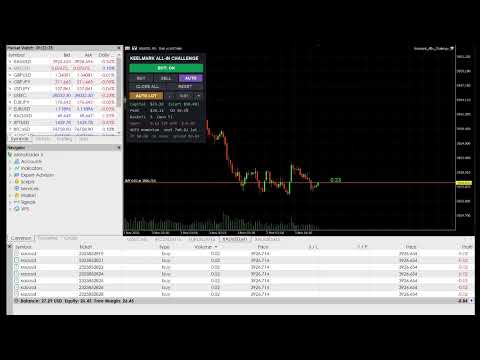
- BOT: ON / OFF - start or stop new baskets. The EA always starts OFF.
- FIXED LOT / AUTO LOT and - / + - switch lot mode and change the fixed lot; the next basket is shown, for example "7x0.01 lot".
- BUY / SELL / AUTO - fixed direction, or automatic (last closed bar, its opposite, or random).
- CLOSE ALL - close the open basket now. RESET - start again from the starting capital.
- Rows: capital, peak, drawdown, baskets and wins, open basket, direction, take profit / stop loss / spread.
MAIN INPUTS
- Start ON, Capital (0 = real equity, default - this amount can be lost), Lot mode, Fixed lot, Lots per $1 (AUTO), Max share of free margin.
- Positions per basket, AUTO direction mode, Take profit ($ move), Stop loss ($ move, 0 = none), Margin guard (%, 0 = off).
- Cooldown after a basket, Max spread for a new basket, Target capital, Panel position, Magic number.
PLEASE NOTE
- Built and tested for XAUUSD (take profit and spread are in price units). Other symbols need other values.
- Support covers installation and settings only. It does not cover trading losses.
DISCLAIMER
- This EA is a software tool only. It is not investment advice, a signal service, account management or a promise of any result. Every decision to buy, install, set up, switch on and keep running the EA is made by you, at your own risk.
- Trading leveraged products such as gold CFDs carries a high risk of losing all of your money. You are fully responsible for your account, your settings and your trades.
- The author, Keelmark, is not liable for any direct or indirect loss, lost profit or damage from using or not being able to use this EA, including losses caused by the broker, the trading platform, the internet, the VPS, software errors, settings or market conditions.
- Tests, videos, screenshots and examples show past behaviour under particular conditions only. They do not guarantee and do not predict future results.
- The EA is provided "as is". The author may change, update or stop updating it at any time.
- By buying or using this EA you confirm that you have read and accepted these warnings and this disclaimer.