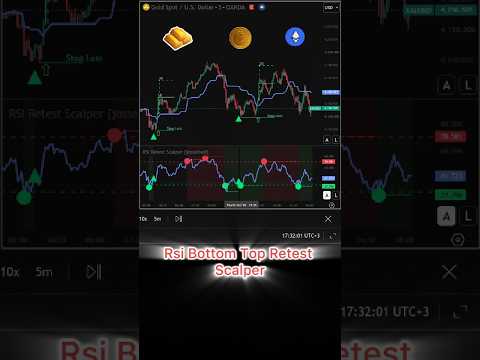
RSI Bottom Top Retest Scalper
- Индикаторы
- Версия: 1.0

RSI Bottom Top Retest Scalper does not trade the first RSI extreme. It waits for the second top or bottom after RSI cools down, confirms it with price, and then marks the entry, Stop Loss, 1R and 2R on the chart.
Indicator for MetaTrader 5. It draws signals and levels only and does not open or manage trades. Signals are calculated on closed bars. Works on any symbol and timeframe.
How it works
- Extreme. RSI goes above 70 (sell side) or below 30 (buy side). A dot marks the first signal and the RSI pane is tinted. This is not an entry yet: price often keeps moving.
- Cooling. RSI pulls back to the cooling level: 65 for sells, 35 for buys.
- Second top or bottom. RSI returns towards the extreme (at least 68 / at most 32) but makes a lower high for sells or a higher low for buys.
- Retest signal. RSI turns away from the second top or bottom. A triangle appears in the RSI pane and on the price chart.
- Price confirmation. The indicator waits for a candle with at least 50% of its body beyond the confirmation line (Kijun 34 by default). Candle colour does not matter.
- Entry and levels. On the next candle a hollow arrow is drawn at its open, together with Stop Loss, 1R and 2R.
Stop Loss goes to the high (sell) or low (buy) of the range since the retest signal. If that level is too close to the entry, the indicator uses 2 x ATR(14) instead. 1R and 2R are one and two times this risk.
A setup is cancelled if RSI reaches the opposite extreme, if the second top or bottom does not form within Max Search Bars, or, optionally, if RSI crosses the midline.
Key features
- Retest logic: extreme, cooling, second top or bottom, then price confirmation
- 13 confirmation lines: EMA, SMA, WMA, RMA/SMMA, VWMA, HMA, DEMA, TEMA, ZLEMA, KAMA, Kalman, ALMA, Kijun
- Automatic markup on every confirmed entry: hollow arrow, Stop Loss, 1R, 2R
- Clear setup state: dot at the extreme, triangle at the retest, tinted background while a setup is in progress
- Alerts: popup, push, email and sound for retest signals and confirmed entries
- All timeframes, from M1 to monthly
Settings explained
The default settings are a good starting point on any timeframe. Change one setting at a time and check the result on history.
Confirmation Line. The line that a candle body must close beyond. Kijun (default) is the midpoint between the highest high and the lowest low over Line Length (34). Moving averages use Line Length and Line Source. ALMA also has its own ALMA Offset (0.85) and ALMA Sigma (6). Kalman does not use Line Length: Kalman Process Noise (0.01) makes it follow price faster when raised, Kalman Measurement Noise (0.10) makes it smoother when raised. If Kijun 34 sits too far from price on M1 or M5, try a shorter EMA.
Body Beyond Line %. How much of the candle body must be beyond the line (default 50). A higher value means stricter confirmation.
Cooling and second top / bottom levels. Upper / Lower Cooling Level (65 / 35) set how far RSI must pull back after the extreme. Second Peak Re-Entry Minimum / Second Bottom Re-Entry Maximum (68 / 32) set how close to the extreme the second top or bottom must come back. Levels closer to the extreme give more setups. Levels further away ask for a deeper pullback and give fewer setups.
Entry Search Window (40 bars). How long after the retest signal the indicator waits for price confirmation. A wider window lets more setups reach an entry, including late ones far from the retest. A narrower window (for example 20) keeps only entries close to the retest impulse.
Setup invalidation. Max Search Bars (40, 0 = off) limits how long a setup can wait for the second top or bottom. Abort on Midline Cross (off by default) cancels a setup when RSI crosses 50.
Signal confirmation. Reversal Confirmation Bars (1–5) and Peak / Bottom Strength (1–3): higher values give later but stricter retest signals.
Display and performance. Signal Display, Highlight From First Extreme, Show Trade Markup and colours control what is drawn. On a slow PC, lower Bars to Analyse (5000) and Bars to Draw Confirmation Line (1500).
Free and Pro versions
This indicator is not a demo. Every setup, the price confirmation, Stop Loss, 1R / 2R and all alerts work without limits. RSI Retest Scalper Pro is a separate paid product built on the same retest logic. It adds:
- Smart Entry and Fast Entry modes
- Markup up to 5R and an ATR buffer for the stop
- A statistics table showing how often each target from 1R to 5R was reached on history
- Two time windows when no new entries are taken
Notes
- With Confirm Signals on Bar Close (default on), signals are decided on closed bars. With Instant Entry on Next Bar Open (default on), the arrow, levels and entry alert appear on the first tick of the next candle, at its open.
- If you turn Confirm Signals on Bar Close off, a signal on the current bar can appear and disappear until the bar closes.
- This is a technical analysis tool, not financial advice. Past signals do not guarantee future results. Test on a demo account and manage your own risk.
- Questions and suggestions are welcome in the Comments tab or via MQL5 private messages.