Pattern Toolkit
- Утилиты
-
Gayakvad Hansaben Sumanbhai
 Разработчик алгоритмических торговых систем | Эксперт по MetaTrader 5
 - Версия: 1.1
- Обновлено: 18 октября 2026
- Активации: 20
Pattern Toolkit
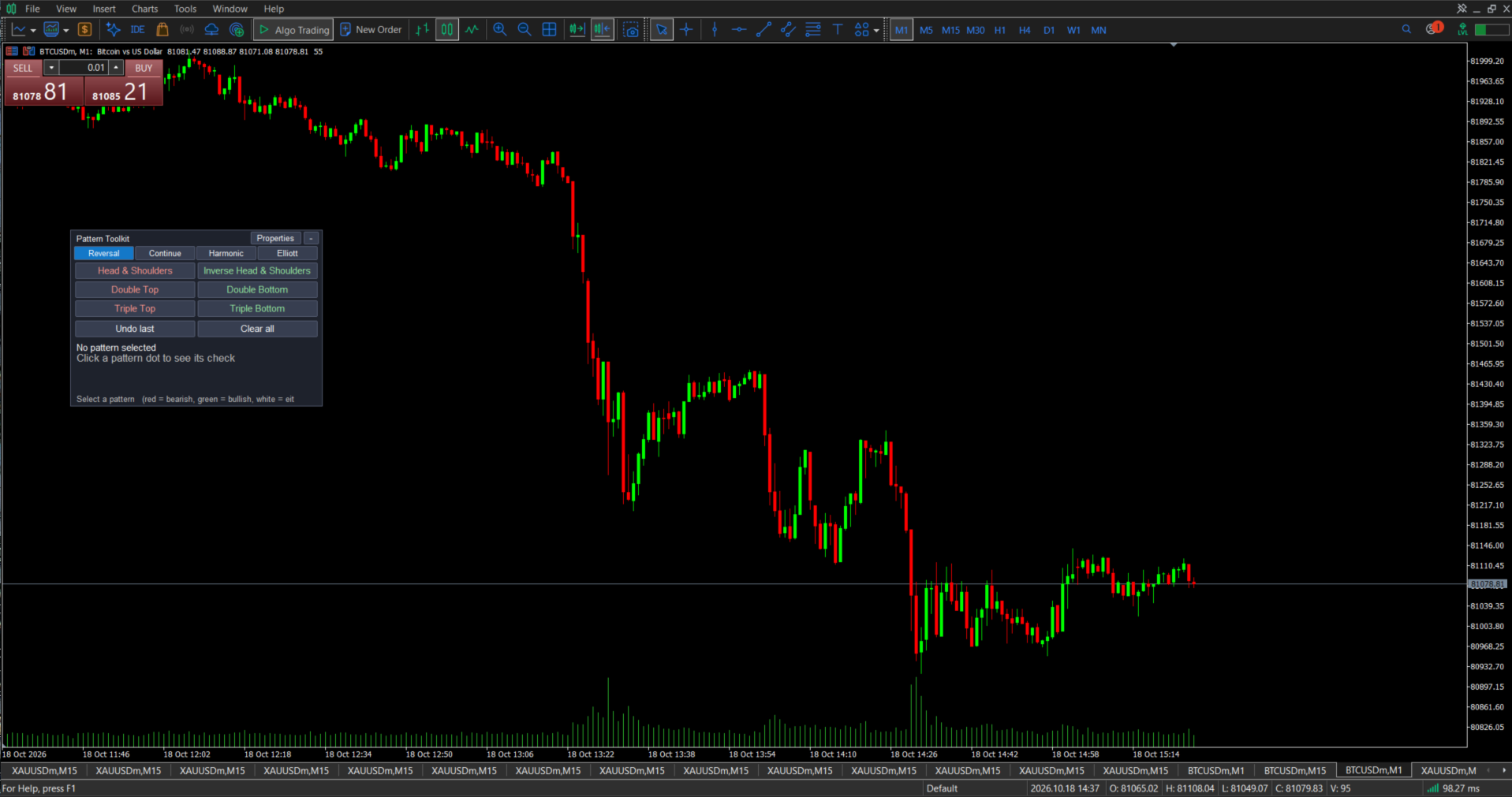
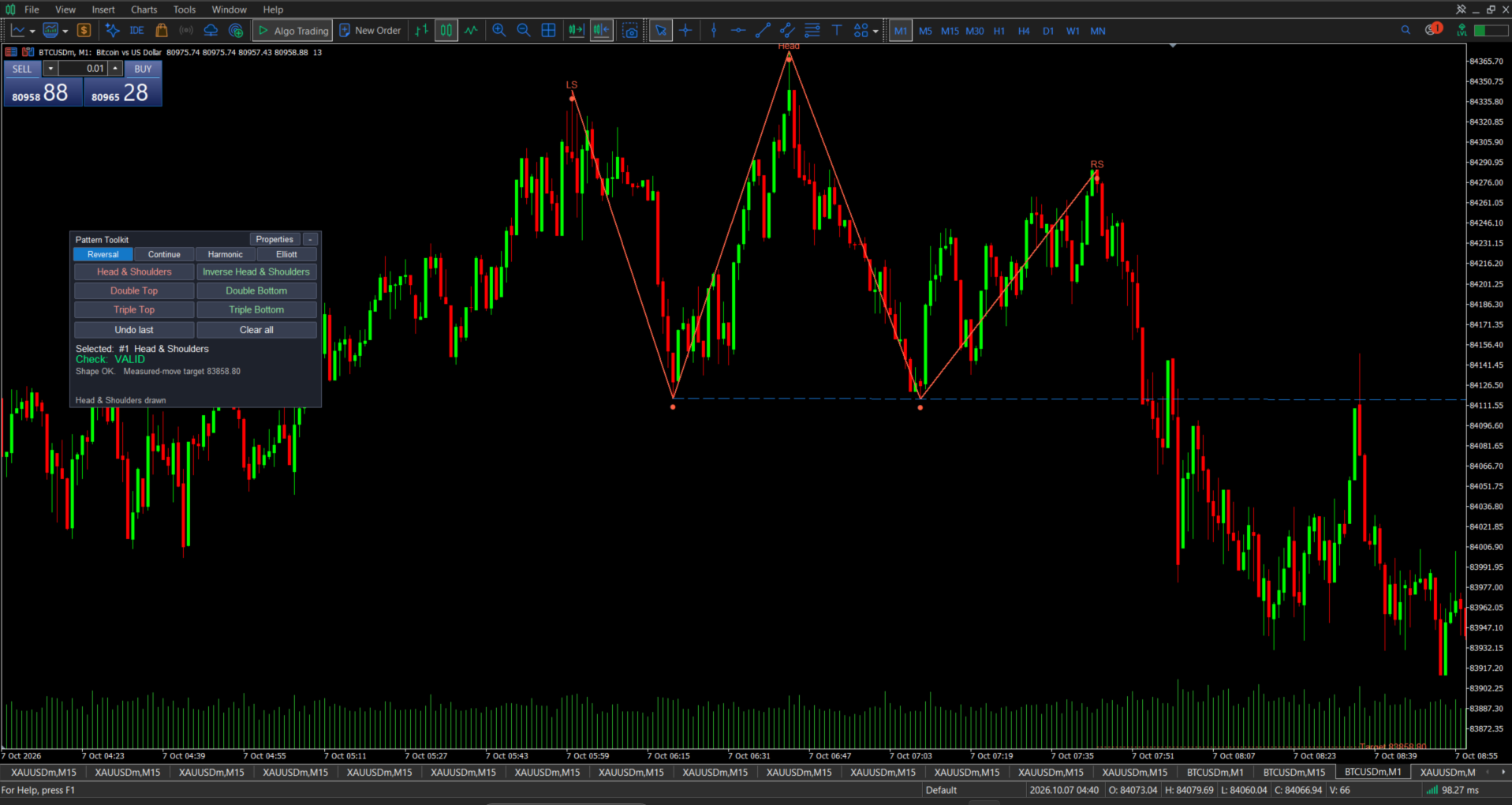
MetaTrader 5 has trendlines and Fibonacci tools, but it has no tools for chart patterns. Chart Pattern Toolkit adds them. You pick a pattern from the dashboard, click its points on the chart, and the tool draws the whole pattern for you, with lines, labels, a neckline, and a target price. If you move a point, everything redraws.
This is a drawing and analysis tool. It does not open trades and does not give buy or sell signals.
Advantages
- Fast. One click picks the pattern, and a few clicks place it. No drawing line by line.
- Easy to understand. The buttons use full pattern names, bullish patterns are green, and bearish patterns are red.
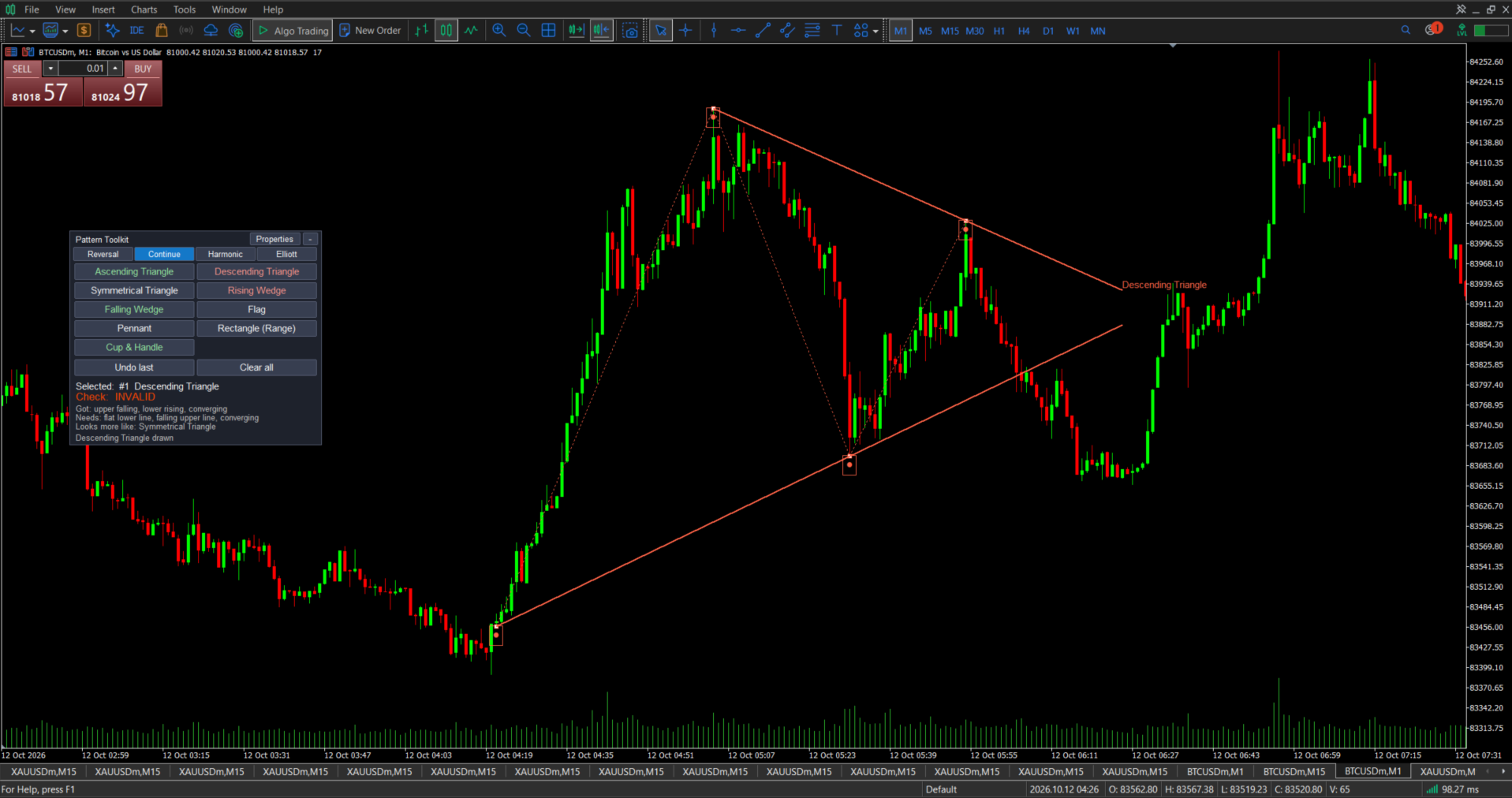
- It checks your work. A check box in the dashboard says VALID or INVALID and gives the reason. For example, it tells you if the head of a Head & Shoulders is not the highest point.
- Clean chart. The result is shown in the dashboard, not as text on your chart.
- Easy to edit. Drag any point and the pattern follows. Delete one point and the whole pattern is removed.
- Alerts. Get a message when price breaks out or reaches a target.
- Light and safe. No trading, no DLL, no external data.
What it includes (28 patterns on 4 tabs)
- Reversal: Head & Shoulders, Inverse Head & Shoulders, Double Top, Double Bottom, Triple Top, Triple Bottom.
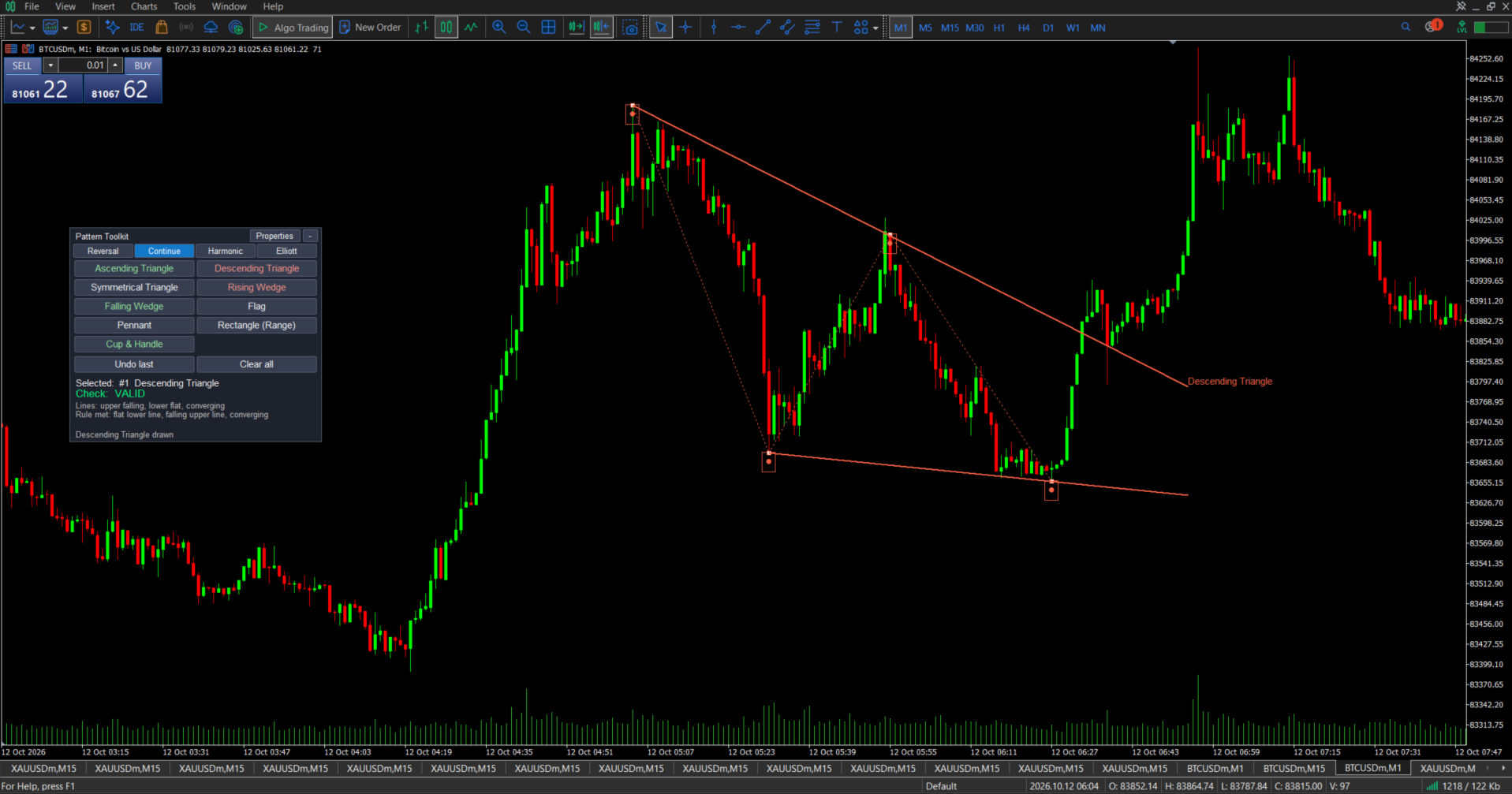
- Continue: Ascending, Descending, and Symmetrical Triangle; Rising and Falling Wedge; Flag; Pennant; Rectangle; Cup & Handle.
- Harmonic: Gartley, Bat, Butterfly, Crab, Cypher, Shark, ABCD, Three Drives. Each shows its Fibonacci ratios, and the check box says whether they are in range.
- Elliott: Impulse Wave (1-2-3-4-5), Correction (A-B-C), Double Combo (W-X-Y), Triangle (A-B-C-D-E), Triple Combo (W-X-Y-X-Z). The standard wave rules are checked for you.
Main features
- Dashboard: drag it by its title bar, collapse it, and it remembers its place.
- Snap to candles: clicks can snap to a candle’s high or low, so your points are exact.
- Neckline and targets: reversal patterns get an automatic neckline and a measured-move target. Harmonic patterns get two target levels.
- Pattern check box: shows the pattern name, VALID or INVALID, the reason or the ratio values.
- Properties for each pattern: choose the timeframes it appears on, the colour, line width, and fill. You can also lock it, duplicate it, or delete it, and save a style to reuse.
- Alerts: each pattern has its own switch.
- Reversal patterns (with a valid shape): neckline break and target reached.
- Triangles, wedges, flag, pennant, and rectangle: breakout up or down.
- Cup & Handle: rim break and target reached.
- Harmonic patterns (except Three Drives): target levels T1 and T2 reached.
- Alerts come as a popup, sound, push notification, or email.
- Stays on the chart: patterns remain when you change timeframe or symbol. If you remove the indicator from the chart, its patterns are removed too.
How to use
- Attach the indicator to a chart.
- Choose a tab, then click a pattern button.
- Click the points on the chart in the order shown at the bottom of the dashboard.
- Click a dot of the pattern to see its check. Open Props to change its look, timeframes, or alerts.
Input parameters
Style
- Bearish pattern colour: colour of bearish patterns. Default: Tomato.
- Bullish pattern colour: colour of bullish patterns. Default: Lime Green.
- Neutral pattern colour: colour of patterns without a direction. Default: Gold.
- Neckline / rim / channel colour: colour of necklines, cup rims, and Elliott channels. Default: Dodger Blue.
- Default pattern line width: line thickness for new patterns, from 1 to 5. Default: 2.
- Label font size: size of the labels on the chart. Default: 9.
- Show point labels: show names such as LS, Head, A, B, C. Default: on.
- Show measured-move / projected targets: draw target lines. Default: on.
- Default fill for triangles / rectangle: fill the shapes for new patterns. Default: off.
- Also show the VALID / INVALID badge on the chart: show the result on the chart as well as in the dashboard. Default: off.
Harmonics
- Show Fibonacci ratio labels: show the ratio numbers on the legs. Default: on.
- Ratio tolerance (%): how far a ratio may be from the ideal value and still count as valid. Default: 8.
Elliott
- Impulse channel (wave 2-4 line + parallel): draw the channel on impulse waves. Default: on.
Alerts
- Alerts ON for newly drawn patterns: new patterns start with alerts switched on. Default: on.
- Popup alert: show a popup message. Default: on.
- Sound alert: play a sound. Default: off.
- Push notification (set up in MT5 options): send a notification to your phone. Default: off.
- Email (set up in MT5 options): send an email. Default: off.
Behaviour
- Snap clicks to candle high/low: move your clicks to the nearest candle high or low. Default: on.
- Dashboard start X / Dashboard start Y: where the dashboard first appears. Defaults: 10 and 30.