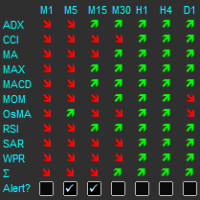
Multiple Indicator Matrix with Alert by RunwiseFX
49 USD
Скачано демо:
926
Опубликован:
19 декабря 2016
Текущая версия:
4.4
Не нашли подходящего робота?
Закажите собственного
на бирже фрилансеров
Перейти на биржу
Закажите собственного
на бирже фрилансеров
Как купить торгового робота или индикатор
Запусти робота на
виртуальном хостинге
виртуальном хостинге
Протестируй индикатор/робота перед покупкой
Хочешь зарабатывать в Маркете?
Как подать продукт, чтобы его покупали

Вы упускаете торговые возможности:
- Бесплатные приложения для трейдинга
- 8 000+ сигналов для копирования
- Экономические новости для анализа финансовых рынков
Регистрация
Вход
Вы принимаете политику сайта и условия использования
Если у вас нет учетной записи, зарегистрируйтесь
как добавить индикатор в матрицу?
A manual for the indicator can be found at: http://runwisefx.com/runwiseFX_Indicator_Matrix_User_Guide.pdf
On the MT5 platform, it is not possible to insert a new indicator. On the training video MT4
In the video they are indeed MetaTrader 4 indicators. However, if you private message us the MetaTrader 5 indicator use wish to configure then we'll send you the settings. Note, the manual has been updated to include a MetaTrader 5 example for Heiken Ashi.
Hello, There is a problem with the MA (price above/below) : it is always up !
We've managed to identify the issue. It concerns MA on different symbols other than chart symbol. It was caused by how the current market price was being obtained from MetaTrader5. We've submitted a fix to Market. It does take a few days to go live, but I've asked the moderator to put live as quickly as possible. Sorry for the inconvenience.
Hellow dear,
I purchased these indicator, with MQL5 account number, I,m trying to open in in my real account (FXCM METATRADER 4) but can not load it, can anybody help me please ?
Hellow dear,
I purchased these indicator, with MQL5 account number, I,m trying to open in in my real account (FXCM METATRADER 4) but can not load it, can anybody help me please ?
MetaQuotes handles installation issues, as we can't do much here on that. However, make sure that your MetaTrader 4 has your mql5.com login details via File | MQL5.community Login and should then see purchase in Market | Purchased tab of the Terminal Frame. You can install from there. If that doesn't help then recommend opening Service Desk ticket via mlq5.com
MetaQuotes handles installation issues, as we can't do much here on that. However, make sure that your MetaTrader 4 has your mql5.com login details via File | MQL5.community Login and should then see purchase in Market | Purchased tab of the Terminal Frame. You can install from there. If that doesn't help then recommend opening Service Desk ticket via mlq5.com
Thanks for the advice but ,, does not work,, i installed everything as per the instruction.. thing is that free indicators can easily be installed ,, but paid indicators does not.. i need solution on this please
Thanks for the advice but ,, does not work,, i installed everything as per the instruction.. thing is that free indicators can easily be installed ,, but paid indicators does not.. i need solution on this please
It's MetaQuotes (mql5.com) that handles purchase/installation/upgrades of products in Market, as they control that mechanism. So, if you raise a support request with them via the Service Desk link on your mql5.com main page then they should be able to help.
We are the developers and can answer questions on using the product itself, once installed.
Nevermind my last post, got it working. Now I have two Warnings that I would like to solve.
1) Unable to setup symbol parsing
2) Unable to workout 'point to pip divider'
What are those, and on the second one, should I manually input every point ot pip divider? Is this the pip spread?
tyvm
Nevermind my last post, got it working. Now I have two Warnings that I would like to solve.
1) Unable to setup symbol parsing
2) Unable to workout 'point to pip divider'
What are those, and on the second one, should I manually input every point ot pip divider? Is this the pip spread?
tyvm
It tries to workout if you have 5 digit or 4 digit broker by seeing how many digits your broker puts for EURUSD. You get those warnings if can't find EURUSD in the list of symbols from your broker. If you right click symbols in Navigator in MetaTrader and click 'Show All' then may fix. However, the fall back is to assume you have 5 digit broker, which is the norm these days. Also, doesn't come into play unless you start to use our EA to open/close trades automatically. In other words, can ignore for now.
Best to email support questions to support@runwisefx.com as we don't always get notified of new comments on our products.
I have it but ;
I can't see the chart, how can I make it transparent, or how can I turn it on and off
thx
I have it but ;
I can't see the chart, how can I make it transparent, or how can I turn it on and off
thx
Set input Main_drawBackground to false
You can also position the Matrix via inputs Box_*
Tip: Can also use MetaTrader's chart shift to move chart to the left to create space on right and then use our Box_corner input to position Matrix in that right space.