JQ TrendFlow Pro
- Индикаторы
- Jeffrey Quiatchon
- Версия: 1.0
- Активации: 5
What Is JQ TrendFlow Pro?
JQ TrendFlow Pro is a professional multi-timeframe trend alignment indicator for MetaTrader 5. It combines a precision entry-level trend signal with a higher-timeframe directional filter — giving you the full picture of market structure on a single chart.
Instead of guessing whether you're trading with or against the dominant trend, JQ TrendFlow Pro shows you both timeframes simultaneously, highlights their alignment, and fires alerts the moment a high-probability setup forms.
The Core Concept — Two Timeframes, One Decision
Every professional trader knows: the trend on your entry timeframe is meaningless without knowing the bigger picture. JQ TrendFlow Pro solves this by layering two independently calculated trend engines on your chart:
-
Entry TF — your trading timeframe for precise buy/sell signals
-
Trend Direction TF — a higher timeframe that defines the dominant directional bias
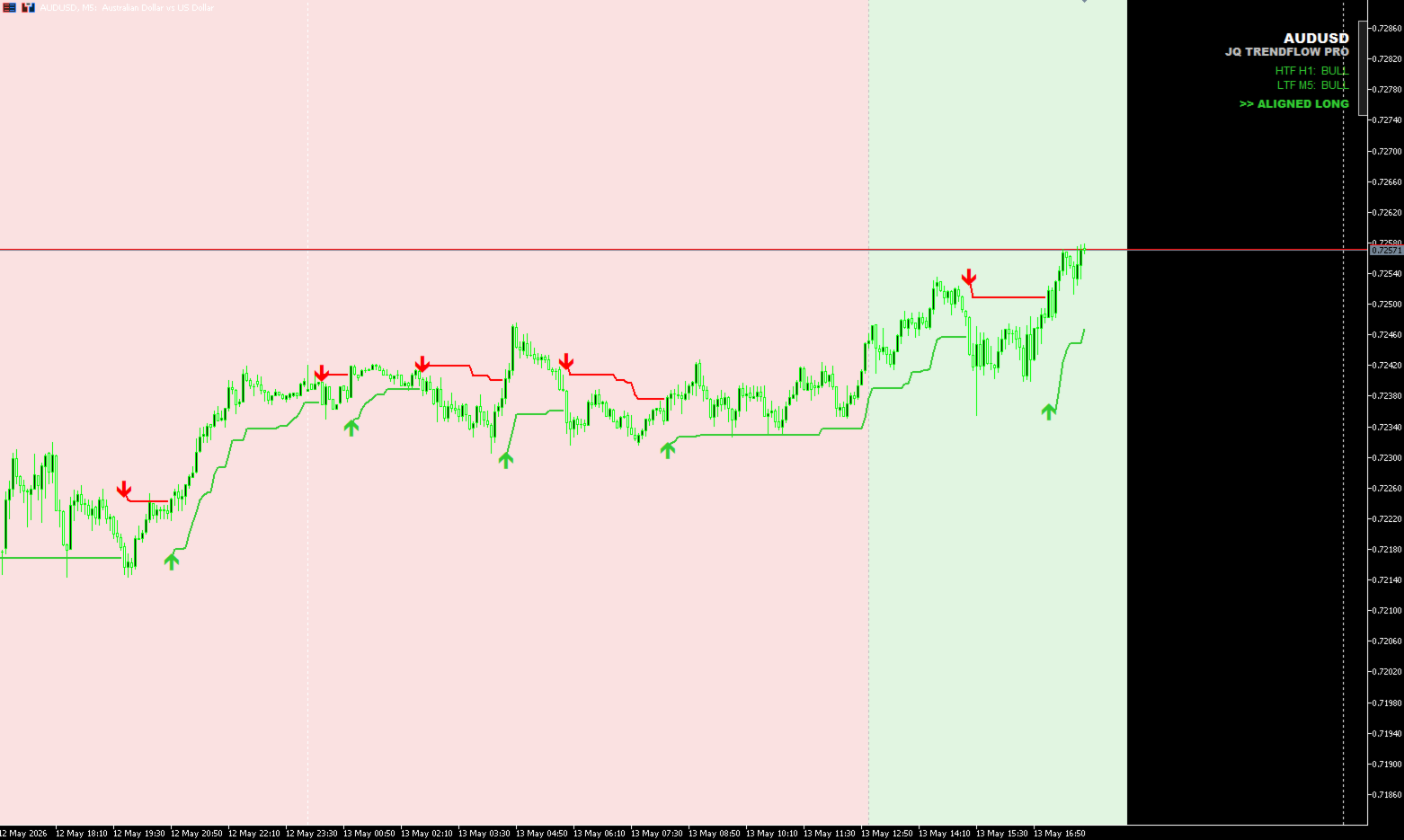
When both are aligned, the HUD panel displays "ALIGNED LONG" or "ALIGNED SHORT" — your clearest signal to act. When they diverge, the panel warns you to stand aside.
Recommended Timeframe Combinations
These pairings are tested and recommended for optimal signal quality. The Entry TF is where you execute; the Trend Direction TF is where you set your HTF input.
| Entry Timeframe | Trend Direction TF | Best For |
|---|---|---|
| M5 (5 Minute) | H1 (Hourly) | Scalpers — fast entries filtered by intraday trend |
| M15 (15 Minute) | H4 (4 Hourly) | Day traders — the most popular and balanced pairing |
| H1 (1 Hour) | D1 (Daily) | Swing traders — smooth signals, fewer false flips |
| H4 (4 Hourly) | W1 (Weekly) | Position traders — high-conviction trend following |
| D1 (Daily) | MN (Monthly) | Long-term investors — macro trend alignment |
Pro tip: The M15 → H4 combination is the most widely used pairing for forex and gold (XAUUSD). The H1 → D1 pairing offers the best balance of signal frequency and reliability for swing traders.
Key Features
✅ Dual-Engine Trend Calculation — Entry TF and Higher TF run independently with their own ATR period and multiplier settings. Fully customize each layer for the pair and timeframe you trade.
✅ 5 HTF Visualization Modes — Choose how the higher-timeframe trend appears on your chart:
-
🟩 Background Zones (recommended) — soft bull/bear color fills the chart background
-
📏 Object Lines — clean horizontal segments at the HTF trend level
-
📊 Buffer Lines — plotted as indicator lines (readable by EAs)
-
🔀 Zones + Lines — full visual overlay
-
🤫 Silent (EA Mode) — no chart objects, trend value available in buffer only
✅ HTF Flip Lines — Vertical lines automatically drawn at every higher-timeframe trend reversal. Instantly see when the macro trend changed direction on your lower-timeframe chart.
✅ On-Chart HUD Panel — A clean corner panel displaying:
-
HTF trend status (BULL / BEAR)
-
LTF trend status (BULL / BEAR)
-
Alignment verdict: ALIGNED LONG, ALIGNED SHORT, or DIVERGENT
✅ Smart Multi-Channel Alerts — Separate alerts for LTF and HTF trend flips. Delivered via:
-
🔔 Popup dialog
-
🔊 Sound file (configurable)
-
📱 MT5 Mobile push notification
-
📧 Email
✅ 10 EA-Ready Buffers — Full buffer exposure for Expert Advisor integration. Buffer 6 ( TrendBuffer ) and Buffer 9 ( HtfTrendBuffer ) provide clean +1 / -1 trend direction values readable via iCustom() .
✅ Wilder ATR or SMA-of-TR — Choose the ATR calculation method for both layers independently.
✅ All Price Sources Supported — Close, Open, High, Low, Median (HL2), Typical (HLC3), Weighted (OHLC4).
✅ Fully Customizable Visuals — All colors, line styles, panel position, font size, and zone colors are configurable. Designed to work cleanly alongside any chart template.
Who Is This For?
-
Manual traders who want clear trend context without cluttering their chart
-
Day traders and scalpers who need fast, filtered entry signals
-
Swing traders using multi-timeframe analysis to improve trade selection
-
EA developers who need a reliable, buffer-accessible trend direction signal
🔷 How To Use
-
Attach JQ TrendFlow Pro to your chart
-
Set the HTF Timeframe to your Trend Direction TF (see recommended pairings above)
-
Wait for the HUD panel to show ALIGNED LONG or ALIGNED SHORT
-
Enter on the next buy/sell arrow in the direction of alignment
-
Manage your trade with the HTF zone as structural context
Technical Specs
-
Platform: MetaTrader 5
-
Indicator Type: Chart window overlay
-
Buffers: 10 total (6 data + 4 calculation)
-
Plots: 6 (Up line, Down line, Buy arrow, Sell arrow, HTF Up, HTF Dn)
-
ATR Methods: Wilder ATR ( iATR ) or SMA of True Range
-
Compatible Symbols: All — Forex, Gold, Indices, Crypto, Commodities
-
Compatible Timeframes: All MT5 timeframes (M1 through MN)
JQ TrendFlow Pro does not repaint. Entry signals are confirmed on bar close. Past performance of any indicator does not guarantee future results. Always use proper risk management .