 MetaTrader 5
 Эксперты
 Индикаторы
 Библиотеки
 Утилиты
 Виджеты
 Правила
Смотри обучающее видео по маркету на YouTube
Как купить торгового робота или индикатор
Запусти робота на
виртуальном хостинге
виртуальном хостинге
Протестируй индикатор/робота перед покупкой
Хочешь зарабатывать в Маркете?
Как подать продукт, чтобы его покупали
Новые торговые утилиты для MetaTrader 5 - 84
 Ниже представлены торговые программы, упрощающие трейдинг в MetaTrader 5. Наведите курсор на товар, чтобы прочесть описание товара и его предназначение.

Right here, is the utility tool to help traders with opening, managing, and closing multiple trading positions at the same time. This Utility tool does not work on strategy tester. To test this utility, follow the blog link below to download the demo version. https://www.mql5.com/en/blogs/post/751097
Specifications. 1) User-friendly - No complications and any trader can find it easy to use. - A simple click on a button is all it takes to perform the desired task. 2) Doe
FREE
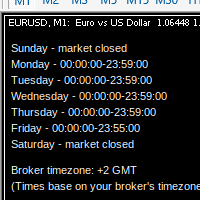
MarketSchedule displays market sessions' open/close time for each day through out the week, also broker's timezone.
It also supports instruments that have more than 1 session per day (maximum of 2 as most instruments don't have more than this)
e.g. crypto market such as BTCUSD which usually has a few hours break mid-day thus it spans into 2 market sessions. You don't have to spend time looking for such information on broker's website. It's an on-demand script that you can drop onto the chart to

Утилита Trade By Time предназначена для автоматизации торговли для списка валютных пар в определённое время, например, во время выхода новостей. Принцип работы будет описан немного ниже. Сама утилита работает только с заранее подготовленным файлом с таймингом и списком инструментов. Сам файл нужно положить в каталоге данных в папку Files , указать название этого файла в настройках утилиты и перезапустить её. Файл должен содержать строки с данными следующей структуры: yyyy.mm.dd hh:mm; <EURUSD|
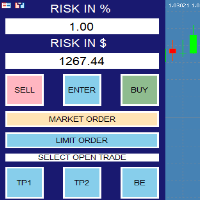
RISK CALCULATOR - TRADING PANEL - CHART OVERLAY with:
PARTIAL TAKE PROFIT ("virtual TP") % RISK LOT SIZE TRAILING STOP LOSS Fast and simple control of your trades Easy lot size calculation with easy SL/TP setting. Your trading will be much more comfortable with this tool!
Works like any EA, add it to selected chart and trade !
(this version is converted from MT4)
Features: start trade with calculated lot based on % of account balance * that you want to risk/ or based on

Drawdown Protector — это служебный инструмент, используемый для управления желаемой максимальной ежедневной просадкой.
В эпоху проп-фирм и проблем очень важно знать о ежедневных лимитах просадки. Это эффективный советник, который легко использовать для управления просадкой капитала и предотвращения торговли из мести. Входные параметры:
Сколько часов нужно заблокировать торговлю? - Здесь вы устанавливаете, сколько часов советник будет блокировать новые сделки после нарушения ежедневно

Этот робот позволяет фиксировать прибыль, закрывая процент позиции и изменяя стоп-лосс, как только цена достигает триггера.
Параметры
процент: процент лотов, которые должны быть закрыты при безубыточности буфер: расстояние между ценой входа и новым стоп-лоссом триггер: расстояние в пунктах для активации безубыточности Lots: объем, который вы используете для открытия позиции. Пожалуйста, оставьте отзыв
FREE

Забудьте про написание кода! Вам больше не нужны советники! Любые индикаторы (и не только) теперь могут торговать сами где угодно чем угодно! GRat_IndiTrade — это уникальный в своем роде конструктор стратегий для автоматической торговли по сигналам ЛЮБЫХ имеющихся на графике индикаторов без ограничений (как стандартных, так и пользовательских), ЛЮБЫХ свечных паттернов, а также ЛЮБЫХ их комбинаций, без необходимости написания, генерации или компиляции какого-либо кода . Вам больше не надо
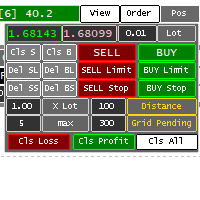
Panel for help Manual Trade if trader take order in multi Symbol/pair this will help more. this is look like hybrid dashboard in multi pair with small display
Panel have function : TP/SL, that also have funtion in Average TP/SL from BreakEvent (this will have for trader with multi trader in singgle pair) in Point can response multi Symbol
Trailing and Average Trailing from BreakEvent in Point can response multi pair. breakEvent in point Take Profit/Stop Loss in $ will detect in multi pair, an

Binance Grid Pro offers an alternative to the built in Grid systems Binance Platform offers.
This utility let you define a grid parameters for interact with your Binance account using an Isolated Margin account. This is, similar to Spot Grid in Binance. This is not for handle with derivatives contracts, is for handle with Spot through Isolated Margin Account. But obviosly this utility offers a different approach than built in Binance Grid to handle the Grid, which I have found useful based on

Hello, Every one
This is "Close All Button" future 2
A script to manage order and close all market positions and/or pending orders.
----------------------------------------------------------------------------------- This is Close All Market positions and/or pending orders button
You can close all or manage orders in 1 second by one click
------------------------------------------------------------------------------------
Download for Demo Account: Demo version: Close 1s manage v1.7 DEMO
F
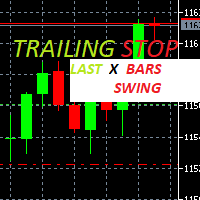
Trailing Stop loss last X candles swing high and low.
X is a value of candles you can set as an input parameter.
This Trailing stop loss moves the SL below the last X candles low(if BUY positions) or high(for SELL positions)
If we are in a trend and we open a position following the trend, the SL will be automatically placed at the low or high of the last X bars.
contact me if you need further assistence

Синхронизированные кросс-индикаторы позволяют связать перекрестия из нескольких окон графиков. Это означает, что перемещение перекрестия на графике автоматически перемещает все другие перекрестия на другом временном интервале, поэтому пользователь может легко определить движение рынка и нацелиться на него в соответствии со временем.
Как использовать перекрестие:
1) Когда вы перетаскиваете все открытые диаграммы
2) любой из графиков нажмите
нажмите A для активного перекрестия и отобразите

Big News Promo 40%! From today we have added the possibility to take partials! Purchase or upgrade your autolot to use this new feature immediately. Introducing Autolot 2.0 Trade Management : The Revolutionary Trading Utility is Now Even MORE POWERFUL and EFFICIENT! We're proud to announce the launch of Autolot 2.0, the upgrade that takes your trading to a whole new level! We've listened to your feedback and improved the utility to make it even more versatile and user-friendly. Here are the key

One Click Close MT5 is an EA which allows you close orders quickly. EA display on chart two buttons. The first button "Close All Positions" is using to close all opened orders. The second button "Close Profit Positions" is using to close only profitable orders. EA is closing orders for all available symbols, not only for chart symbol. In EA params you can set distance from upper chart frame (Y Offset) and from left chart frame (X Offset). For installation EA it is only need to copy One Click Clo
FREE
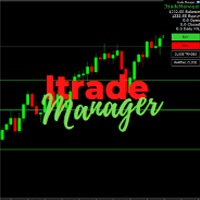
Itrade manager expert advisor (EA) is a type of software that can be programmed to perform a variety of tasks related to managing trades in the financial markets. Some of the ways in which the Itrade manager EA can help you trade better include: Itrade manager EA can automatically modify, and close trades based on predefined rules and conditions, freeing you up to focus on other aspects of your trading strategy. Managing risk: Itrade manager EA can help you manage risk by placing stop-loss and t
FREE

BatchLoader for Mobile Traders: The idea of BatchLoader just as the name implies is to enable traders open a single position through their mobile phone and have it duplicated based on the max position such trader set in the "input settings", we have day traders and scalpers who find it difficult to open several position when trying to scalp, with this BatchLoader, you won't have to worry about poor entry execution.. How to Use it; *install the expert on your desired chart you usually trade on(
FREE

Assistant for all those who forget to set StopLoss, TakeProfit and Trailing Stop in deal parameters, or trade on a very fast market and fail to place them in time. This tool automatically tracks trades without StopLoss, TakeProfit, Trailing Stop and checks what level should be set in accordance with the settings. The tool works both with market and pending orders. The type of orders to work with can be set in the parameters. It can track either trades for the instrument it runs on, or all

!! BLACK FRIDAY !! FOR LIFETIME !! ================== == 35$ ONLY !! == ==================
BOOK YOURS NOW !!
The Position Manager Contains A Lot of Functions such as; (How to Operate) 1. Adjustable Volume per Trade (You could change the volume as you wish per trade). 2. Adjustable Risk : Reward Ratio (1RR means sacrifice 1 Risk : 1 Reward, 1.5RR, 2RR etc. as you wish) 3. Adjustable Stop Loss Points (Calculated Points as Stop Loss and Automatically adjusted the Risk Reward Ratio) 4. Buy Button
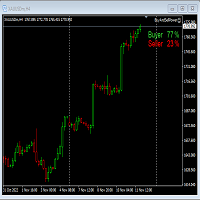
This Expert Advisor will not place any trade.
This Expert Advisor will only show the buyer and the seller power in percentage on the upper right corner of the selected chart. The percentage of the Buyer and Seller is calculated based on the Open, Close, High and Low price of the selected candle.
Candle can be selected using the shift on the Input Tab where 0 means the current candle, 1 means previous 1 candle before the current candle.
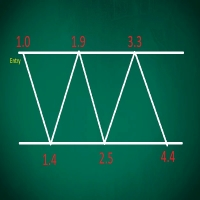
This EA performs with a Hedging strategy by which Buy and Sell signals are from the MACD indicator.... The lot sizes in the input are Custome for you to adjust as you pleased, so you are able to improve your hedging style. Inputs. Close Money- this option is basically the take profit in ($), for example if you set the close money at $20 the EA will automatically close all trades when your overall profit is $20. Nearby Hedge Pips- this basically determine the distance of pips between yo
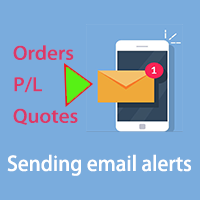
Это инструмент, позволяющий узнавать информацию о счете в режиме реального времени путем отправки оповещений по электронной почте.
Оповещения функционируют следующим образом:
1. Плавающие оповещения о прибыли и убытках: как только установленные вами значения прибыли и убытков будут достигнуты, советник автоматически отправит вам электронное письмо с подробным описанием оповещения.
2. Оповещения об открытии и закрытии ордеров: как только на вашем счете появится открытая или закрытая позиция, с

На ценовом графике индикатор рыночной сессии показывает часы торгов в Нью-Йорке, Лондоне, Токио и Сиднее. Время начала и окончания каждой торговой сессии можно установить вручную.
Функции:
Основные сессии шоу: Сидней, Токио, Лондон и Нью-Йорк. Выделяйте цветными линиями и рисуйте объекты. Вы можете графически определить волатильность сессий для перекрывающихся сессий. Он включает в себя восемнадцать подвижных параметров, в том числе Параметры:
Начало сиднейской сессии - час начала сиднейской

Free TrendLine EA opens trades whenever the price on the chart interacts with or crosses your trend line. You simply draw the trend line manually then let the EA do the trading automatically according to the rules you give it. The settings available in the EA are explained below: Lots : The lot size for trading. RiskPercentage : Set a value other than zero to activate lot sizing by use of percentage of margin. TrendLineName: The name of the line to track. You can either * rename the trend li
FREE

Reward Multiplier is a semi-automatic trade manager based on pyramid trading that opens additional orders with the running profit of your trades to maximize return exponentially without increasing the risk.Unlike other similar EAs, this tool shows potential profit/loss and reward to risk ratio before even entering the first trade! Download full version here ( In the mini version. Starting lot is fixed at 0.01 (or minimum allowed lot size ) Guide + tips here MT4 version here You only open the
FREE

Lumos Lumos is a multifunctional trading assistant. It gives an overview of the current market situation for a better decision making. The strategy tester only provides a visualization of the application. Lumos is highly customizable and gives you information in multiple timeframes about: MAs, price structure, RSI, RSI MA and an overview of the price distance to possible SLs.
FREE

This EA helps to Close all Positions opened. It saves you the time of closing multiple positions manually.
Parameters: Buy: Close Buy Positions Only Sell: Close Sell Positions Only Buy & Sell: Close Buy & Sell Positions Pending: Close Pending Orders
More Advanced MT5 version available at: https://www.mql5.com/en/market/product/93301?source=Unknown%3Ahttps%3A%2F%2Fwww.mql5.com%2Fen%2Fmarket%2Fmy More Advanced MT4 version available at: https://www.mql5.com/en/market/product/93468?source=Unk

The utility displays in a convenient form the historical trades made on the account. You can filter trades by magic or comcent, display only profitable or losing trades, and only buy or sell trades. Using this utility, you can see trade entry and exit points, stop loss and take profit levels, trade profit, magic number and comment, order ticket and order size - you only need to run the utility on the chart of the currency pair you want information on get and customize the input parameters. MT4
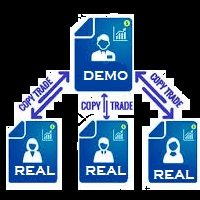
You Can Copy All the Trades from one MT5 terminal to another MT5 terminal hosting two different accounts in the same computer or VPS. It will work with same broker as well as different broker. You can also use it to copy from MT5 to MT4, then you also need to download the MT4 version and set the SEND and RECEIVE accordingly. MT4 version download- https://www.mql5.com/en/market/product/83400 Note: While Testing with demo version, do not use real account, as it will not copy. If your trades are
Multi Symbol ZigZag Breakout Scanner сканирует все символы, выбранные в обзоре рынка.
Это поможет легко найти двойную вершину, двойное дно или любой уровень расширения Фибоначчи, когда цена вот-вот достигнет этих уровней.
Вы можете выбрать Timeframe и несколько Extdepths (до 3) Zigzag. Рекомендуемые зигзаги 21, 34 и 55, которые охватывают все типы зигзага и шум фильтра.
Вы можете настроить получение либо оповещения терминала, либо push-уведомления, либо и того, и другого.
Next Candle Timer Pro отображает оставшееся время до закрытия текущего бара и формирования нового бара. Его можно использовать для тайм-менеджмента с торговлей, чтобы ждать следующих моментов.
Особенности
Отслеживает время сервера, а не локальное время Настраиваемый цвет текста и размер шрифта Дополнительная визуализация дневного изменения символа Оптимизирован для снижения использования ЦП Каждый временной интервал автоматически получает оставшееся время. Входные параметры Цвет как метка Яко
FREE

BETA product Recurring updates, and real-time assistance. Ea Auto is a specialist in inserting TakeProfit and StopLoss of positions, and moving them in favor of operations in an automated way, the user only needs to enter the initial TakeProfit and StopLoss value.
Recommendations on use in any asset In any period Chart So far, this utility only supports Forex
Description of input parameters Theme: set between Light (a lighter theme) and Night (a darker one) Take Profit(points): field where t
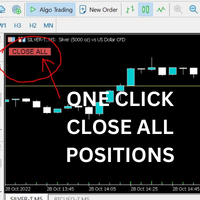
Just Attach to the Chart to be able to Click Button to Close all Open Positions in your Trading Account. Change Horizontal And Vertical Pixel based positioning for Button placement on chart. Appreciate your feedback and reviews. Note: All open positions on your trading account will be closed when button pressed.
If you need help with any simple utility happy to help.
FREE
Smart Stop Manager EA – Maximize Profits, Minimize Risk!
This Expert Advisor (EA) is designed to automatically adjust your stop loss when your trades move into profit. It works on all open trades for the symbol it is attached to, ensuring maximum profit protection while letting your trades run.
How It Works
The EA uses two key inputs to manage your trades efficiently:
Stop Loss Points – The distance from the current price where the stop loss is placed. Stop Loss Trigger Points – The pro
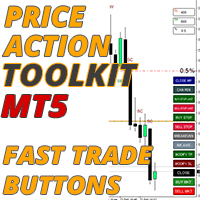
Советник Price Action Toolkit в первую очередь предназначен для скальперов, но может использоваться на всех таймфреймах для быстрого входа в рынок с правильно рассчитанным размером лота на основе уровня стопа. Он позволяет быстро открывать сделки (мгновенно или на максимумах и минимумах свечей с отложенными ордеров), а затем корректировать стопы и фиксировать прибыль по мере движения рынка.
Полный список всех функций, настроек и лучших практик можно найти здесь: https://www.mql5.com/en/blogs

The instructions for use: https://www.mql5.com/zh/blogs/post/754946 The MT4 version: https://www.mql5.com/zh/market/product/88205 The MT5 version: https://www.mql5.com/zh/market/product/88204 ---------------------------------------------- 1. Копировать заказы с 12 мастер-аккаунтов на 100 подчиненных аккаунтов. Количество подчиненных учетных записей может быть настроено от 12 до 100. 2. Поддержка MT4 до MT4, MT4 до MT5, MT5 до MT4, MT5 до MT5. 3. Определите суффиксы разновидностей торговли на ра

Руководство пользователя: Многоканальный копировщик сделок (MT4/MT5) Эта система позволяет автоматически реплицировать сделки между терминалами MetaTrader, выступая в качестве коммуникационного моста для синхронизации портфелей с минимальной задержкой.
1. Введение и назначение Многоканальный копировщик сделок — это инфраструктурный инструмент, предназначенный для управления зеркальными счетами. Его функция заключается в извлечении сигналов из основного счета и их исполнении на подчиненном счет
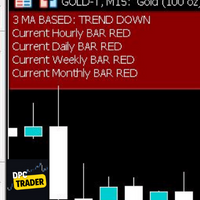
This Utility Bot is for New Traders, that struggle to spot the Trend direction. It also make you conscious about different Timeframes Bar Status. Utility have 3 Moving Averages totally configurable by input parameters. 3MA Based Trend is shown for the current Timeframe selected on the chart. (Line 1) 3MA Based Trend for Daily Timeframe. (Line 2nd) Also provide quick information about the currently Hourly Daily and Weekly Candle Status. Utility work on 1 Min Bar control, so comment section info
FREE

Comprehensive OHLC Data Downloader for MetaTrader 5 This powerful and efficient script allows traders, quantitative analysts, and developers to download the complete OHLC history of any financial instrument available in MetaTrader 5. Whether you need historical data for a specific asset or want to download data for all assets in the Market Watch , this tool simplifies the process with just a few clicks. Key Features: Flexible Data Extraction – Download OHLC data for a single asset or all asse
FREE

This EA is used to close all your open market positions and/or pending orders with a click of a button. The EA is ultra fast and your positions will close within a blink of an eye. It also allows you to close profit trades only or losing trades. You can also choose to close sell/short trades only or buy/long trades only. If your strategy include having many open and pending orders positions, this is a good EA to help you close your positions all at once with one click.
Это утилита для облегчения торговли, позволяющая в один клик или несколько кликов выполнять такие трудоемкие задачи, как управление ордерами и управление рисками.
Особенности
Управление рисками
Автоматически рассчитывает лоты на основе риска, указанного в % или $ в поле риска, и позволяет вам вводить ордера, просто размещая линии для SL TP и т.д., и отображает Risk Reward в реальном времени. TrueRisk включает комиссионные при расчете размера лота только на FX парах, так что вы рискуете 1%
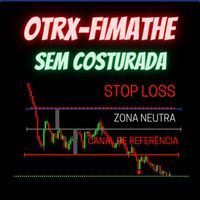
Fimathe Tool for Semi-Automatic Trading.
This tool serves as a support for trading using the Fimathe strategy, the same one used by Trader Marcelo Ferreira in his negotiations.
Features:
Button to set/change Trend chosen by Trader. Adjustment of Buy Zone and Neutral Zone Level Lines. Adjustment of Sell Zone and Neutral Zone Level Lines Subcycle Levels, R1, R2, R3, R4 and S1, S2, S3, S4.
Automatic Trailling Stop for previous level with each new (Subcycle) level reached.
Trading stop at the
EA utility to help you with your Discipline for New Traders. When Balance Drop below set Daily Max Percentage Draw Down Balance. Any new trades open after the DD Threshold reached, Bot will close any new trades instantly and will keep canceling any pending orders placed as well until the Next Daily Candle is formed or EA is removed. Note: 1. Please Attached EA Utility before start trading for the day. 2. Set Timeframe before attaching EA utility to the chart. If timeframe changed after taking a
FREE

Trade management is a system that helps you manage your operations, that is, you perform the analysis, and we manage the operations as follows: Automatic Stop Loss once the trade is opened is a short or long with a maximum risk of 1% of the account. Trailing Stop as the price moves in your favor. Risk management is handled in a 2:1 , once the operation reaches a 1:1 move Stop Loss to break even . Once the trade reaches a 2:1 closes half the lot, securing the profit and allowing the operation
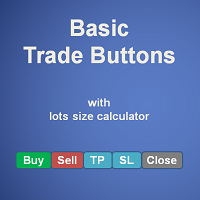
Basic Trade Buttons is a tool to help you to quickly open and close trades, place take profit and stop loss points by clicking on the button of each job that you preferred. Once you attached this tool to mt5 chart, the program will calculate a trade volume(Lots size) automatically to prepare to send to the trade server when you click on 'Buy' or 'Sell' button. Click on 'TP', 'SL' or 'Close' button to place take profit, stop loss based on the predefined levels or to close all open positions respe
As traders, we all know that risk management is the most important aspect of profitable trading. So, we need to determine the lot size, every time we need to open a new trade. The FX lot size calculator is a simple tool that will help you to determine your lot size easily without using any third-party service but you will be able to do that by your MetaTrader terminal. FREE
Inputs:
Maximum_Risk_Prc: To determine your preferred risk%. For example, if your risk 1% per trade, you will need to enter
FREE

Expert Advisor for Automatic Stop Loss and Take profit , calculated by Pips and cover all major pairs . you can activated the EA in your chart then place orders manually and the EA will be place TP and SL automatically for all opened orders , covered Buy market , Sell Market , Buy stop , Sell Stop , Buy limit , Sell limit . it is an easier tool that help you manage your order without effort . 10 Pips = 100 Points Pending orders SL and TP will be placed once order is activated . MT4 Version : ht

This EA helps chart pattern traders to automate thier task of placing trades. All you need to do is to draw your trend lines and name your trendlines to match the object name input in the EA.
The EA is safe to turn off anytime.
The input parameters are as follows: UpperBorderline : Upper border line of chart UpperEnteryLine: For entering trades UpperTPLine: Trendline for Take profit LowerBorder: Lower border line of chart LowerTPLine: Take profit line for lower trend line BorderChannel: F
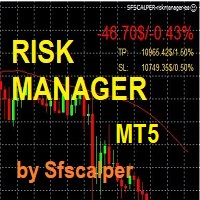
RISK CONTROL MANAGER
Now You can have the same control over risk management as big trading rooms, institutional investors and hedge funds. Managing risk is a fundamental operation for your brokerage. Choose your maximum desired risk exposure in percentage to Your account, set it on the RISK CONTROL MANAGER, the EA will check and make sure that You'll never exceed that. When You ignore the trading risk, and you leave your operations open, that potentially could lead to catastrophic trade expos
Boleta de Operação que funciona para o Mercado B3 feita para Mini Indice e Mini Dollar com Cálculo de Risco e Retorno da Operação. Características e informações: Ao colocar o EA no gráfico inicialmente serão apresentados 1 painel e 3 linhas todos com informações a respeito de operações, saldo e cálculo que facilitam o Trader a ter um operacional mais seguro e menos arriscado. O intuito desta ferramenta é fornecer dados em tempo real para que o Trader (ANTES MESMO DE ABRIR A ORDEM) consiga obter

Good money/risk management is more than just position sizing, it's much more. Successful traders analyze your trading activities and keep an eye on your key figures. With the help of AccountMan you can also do this very conveniently, analyze your trading activities for the purpose of professional money / risk management. Evaluate your trades by trade symbol to see if trading is profitable overall with these. Would you like to keep an eye on your individual strategies? e.g. which strategy works b

Мониторинг нагрузки на счет: потенциальные потери по всем активным и орерам: если уровни SL будут достигнуты (или текущий плавающий убыток, если уровень SL не установлен) Моя #1 многофункциональная утилита: 66+ функций, включая этот индикатор | Свяжитесь со мной по любым вопросам | Версия MT4 В настройках ввода вы можете настроить: Метод расчета : валюта счета / пункты / проценты от баланса Расположение на графике: нижний левый / нижний правый / верхний левый / верхний правый угол

Отслеживайте ваши выбранные символы на одном графике Многофункциональная утилита: 66+ функций, включая этот инструмент | Свяжитесь со мной если у вас есть вопросы | Версия MT4 Этот инструмент открывается в отдельном окне: его можно перемещать (перетаскивайте в любом месте) и сворачивать [v]. Вы можете настроить список наблюдения на панели: Нажмите [edit list], чтобы добавить / удалить символы из списка наблюдения. Рассчитанное значение: оно может быть либо последним [закрытым баром],
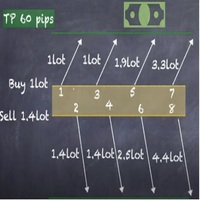
Strategy description can be seen in the attached video( https://www.youtube.com/watch?v=JzN1fEZmc40 ).
This hedging strategy strictly follows what is presented in the video.
The strategy works on any pair of forex, crypto, indices and other derivatives.
Through the settings, you can customize the size of lots, add pairs for operation, and profit and loss points.
The distance between sell and buy orders must be configured according to the number of decimal places of the pairs that will be tra

Stack trades like a pro. Manage them like one trade. User guide and articles Stack Manager user manual How to average into a trade with one stop How to pyramid into a winner and move to breakeven You scale in: averaging at better prices, or stacking into a winner. Three, five, ten entries on the same market. Then the busywork starts: copy the stop to the new trade, fix the take profit, drag ten lines when you move the stop, and guess what the whole stack really risks. Stack Manager does all of i

Full Automated Trading panel . it works on any trading instruments: Forex, Stocks, Futures, Indices, CFD, Bonds, Cryptocurrencies; interface minimization function; flexibility of use;
Join my channel and check video of it ===> https://t.me/Ash_TheTrader/4986
Features :
Auto SL and TP Auto Close partial Auto Trailing Session Time Alert Time of trading Alert Profit and Percentage and etc.
FREE
Trailing Stop toolbox MQL5, better and friendly. Trailing Stop tool box using Moving Average, Parabolic SAR, Ichimoku Kijun-sen, trailing stop normal, trailing stop by candle, trailing stop by targets and trailing stop by lowest, highest candle numbers. Manage orders by currency pairs and comments, trailing one or many orders at same time. Mql4 versition: https://www.mql5.com/en/market/product/68181
Workflow: Set your comment, profit, stoploss, lotsize, t imeframes and chose indicator for begi
This indicator like small script only attach on any chart. It will export All symbol name and property to CSV file. Location at MQL5/File/Data/ Format CSV Pattern like ["Symbol","Category","Sector","Industry","Description"] Example : "USDX","","Indexes","Undefined"","US Dollar Index" "Coffee","","Commodities","Commodities - Agricultural"","Coffee Cash Contract" "Airbnb_Inc_(ABNB.O)","","Communication Services","Internet Content & Information"","Airbnb Inc" "Akamai_Technologies_(AKAM.O)","","Tech
FREE

Trade Dashboard simplifies how you open, manage, and control your trades, with built-in lot size calculation. It allows you to execute trades, manage risk, and control positions directly on the chart, with tools such as partial close, breakeven, and trailing stop. Designed to reduce manual work and help you stay focused on your trading decisions. A demo version is available for testing. Detailed explanations of features are provided within the MQL5 platform. Installation instructions are include
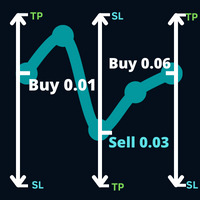
Откройте направление в сделке, за которой рынок намеревается следовать, и сделку, которая произошла в вашей сделке.
Пример: операция покупки с лотом 0,01 по цене 0,03 пункта, покупка с лотом 0,01 по цене 0,01.0930, затем будет принято решение о стоп-приказе на продажу 0,03. выставляется новый стоп-ордер на покупку с лотом 0,06 по цене 1,0930.
Параметры: Громкость -> Громкость первой операции.
Take Profit -> Гарантированная прибыль в количестве пунктов.
Max Hedge -> Контролирует количест
5 EMA Scalping Strategy Multi Symbol Scanner
This EA utility will scan all symbols which are selected in marketwatch and alert when such condition is formed in chart when Candle low is above EMA 5 for Sell alert and Candle high is lower from EMA5 so you can be ready before selling or buying for scalping purpose on 5min chart For more details watch attached video Logic : When a candle closes above 5 EMA in 5 mins chart, Wait for its low to break and Sell when low is broken by wick, Your SL shou
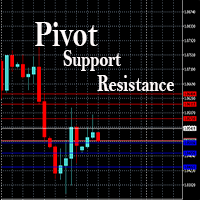
This EA is designed to calculate and draw Pivot Point, Support and Resistance for your selected time frame on the chart.
Works on all currency pair and on any time frames available on MT5.
To make sure the EA works, you need to select the pivot time frame as well as the candle shift that you want to calculate the pivot.
0 = Current candle on chart
1 = Previous 1 candle on the chart

OnBoard stats is a panel that show in a single view a lot of usefull information about working orders and trading account. It has 4 different sub-panels (from left to right): Symbols order statistics : it can be found symbols for which there are orders (market or pendings). Symbol with pendings are colored with "Pendings color". Clicking on a specific symbol row, chart will be changed to that symbol. Current symbol statistics : informations about the "current" symbol, the one which is opened in
FREE

Katana Trading Panel is a tool with many features that help you open and manage your trades more easily. Note: - Click here for Tutorial and Download demo .
- Click here for Katana Trading Panel MT4
- G o to my profile to message me .
- This EA will not work in Tester
The Features: - Line Preview: Show preview on the chart for opening price, take profit and stop loss. It's draggable and contains some valuable information. For market trade and pending trade. - Opening Trade Setting :
Утилита для ручной торговли, для управления открытыми позициями. Встроенный трейлинг стоп имеет три режима и семь инструментов: по пунктам, по экстремумам баров, по MA, по фракталам, по объёмам, по Parabolic SAR и по ATR. С помощью встроенного симулятора торговли, вы можете проверить, как работает советник в тестере стратегий. Руководство к советнику UTrailingMiniMT5 можно найти в разделе "Обсуждение". Преимущества 3 режима трейлинг стопа: обычный, общий и мобильный стоп лосс; 7 инструментов для
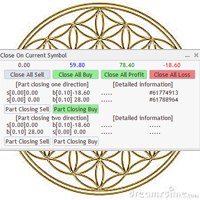
Утилита/EA для упрощения выхода из просадки. Позволяет поэтапно корректно выходить из просадки, уменьшая объемы убыточных сделок. При этом прибыльные сделки, открытые на том же символе, перекрывают убыточные сделки полностью или частично. Объем частичного закрытия убыточной сделки расчитывается автоматически. Поддерживаются сделки, открытые как в одном направлении, так и в обратном. Управление позициями Закрытие позиций только на покупку, только на продажу, только прибыльные, только убыточные. Ч

Deals printscreen это скрипт, предназначенный для автоматизации сохранения картинок со сделками по счёту для дальнейшего их анализа. Панель позволяет существенно сократить время на техническую работу связанную с поиском сделок в истории и сохранением файлов в формате картинки с отображением и прорисовкой всех параметров операции.
Какие задачи решает данный скрипт: Вам не нужно искать нужную сделку в истории операций: вы просто выбираете период и скрипт сам находит все торговые сделки за указан

Утилита Teaching T-INN создана для обучения нейросетей ахитектуры (T-INN) Target-IntelNeuroNet адаптированных под рынок валют. Файл утилиты необходимо разместить в папке скриптов и запускать на том графике и таймфрейме на которых необходимо тренировать нейросеть. Результат тренировки будет зафиксирован в файле, а весь процесс тренировки отображается в консоли на чарте и дополнительном лог файле. Необходимо перед запуском скрипта загрузить всю историю и проверить на графике точно ли она загружен
FREE
Пошаговый «Трейлинг Стоп»
Утилита позволяет задавать шаг перемещения «Стоп Лосса» следующего за ценой при использовании инструмента «Трейлинг Стоп » . В отличии от «штатного» «Трейлинг Стопа», имеющегося в терминале «MetaTrader», и позволяющего настроить движение «Стоп Лосса» с шагом в 1 пункт, данный «Трейлинг Стоп» настраивается с любым шагом. Такая настройка позволяет избежать закрытия позиций при ложных разворотах тренда, когда цена после долгого движения в одном направлении разворачивается,
FREE

T Manager, the ultimate trade management solution designed by traders for traders. If you are searching for a simple and efficient trade panel, trade manager, or trade assistant, you are at the right place. The market contains a diverse number of those tools , but this one is designed by traders for traders . I designed this tool, and I am using it daily.
Take my advice and stop buying tools blended with un-useful features that you will never use, T Manager provides you with the essential y
The product will copy all Discord signal to MT5 ( which you are member ) , also it can work as remote copier. Easy to set up. Work with almost signal formats, support to translate other language to English Work with multi channel, multi MT5. Work with Image signal. Copy order instant, auto detect symbol. Work as remote copier: with signal have ticket number, it will copy exactly via ticket number.
How to setup and guide: Let read all details about setup and download Discord To MetaTrader
Узнайте, как легко и просто купить торгового робота в MetaTrader AppStore - магазине приложений для платформы MetaTrader.
Платежная система MQL5.community позволяет проводить оплату с помощью PayPal, банковских карт и популярных платежных систем. Кроме того, настоятельно рекомендуем протестировать торгового робота перед покупкой, чтобы получить более полное представление о нем.

Вы упускаете торговые возможности:
- Бесплатные приложения для трейдинга
- 8 000+ сигналов для копирования
- Экономические новости для анализа финансовых рынков
Регистрация
Вход
Вы принимаете политику сайта и условия использования
Если у вас нет учетной записи, зарегистрируйтесь