Saeid Soleimani / Perfil
- Informações
|
2 anos
experiência
|
10
produtos
|
679
versão demo
|
|
0
trabalhos
|
1
sinais
|
1
assinantes
|
Sou um especialista em trading algorítmico e pesquisador de IA sediado no Canadá, com um Ph.D. em Inteligência Artificial pela Universidade de Toronto.
Nos últimos 10 anos, tenho desenvolvido sistemas de negociação financeira e assessores especializados. Nos últimos 4 anos, me especializei em integrar inteligência artificial e aprendizado de máquina em soluções de negociação automatizada.
Minha expertise inclui:
• Programação MQL4/MQL5 para plataformas MetaTrader
• IA e Aprendizado de Máquina em sistemas de trading
• Análise quantitativa e estratégias algorítmicas
• Gestão de riscos e otimização de portfólio
Publiquei 10 assessores especializados, cada um rigorosamente testado através de mais de 667 versões demo para garantir desempenho confiável em diferentes condições de mercado.
Dedico-me a ajudar traders a aproveitar a tecnologia de IA para melhorar seu desempenho comercial através de soluções inovadoras baseadas em pesquisa.
Nos últimos 10 anos, tenho desenvolvido sistemas de negociação financeira e assessores especializados. Nos últimos 4 anos, me especializei em integrar inteligência artificial e aprendizado de máquina em soluções de negociação automatizada.
Minha expertise inclui:
• Programação MQL4/MQL5 para plataformas MetaTrader
• IA e Aprendizado de Máquina em sistemas de trading
• Análise quantitativa e estratégias algorítmicas
• Gestão de riscos e otimização de portfólio
Publiquei 10 assessores especializados, cada um rigorosamente testado através de mais de 667 versões demo para garantir desempenho confiável em diferentes condições de mercado.
Dedico-me a ajudar traders a aproveitar a tecnologia de IA para melhorar seu desempenho comercial através de soluções inovadoras baseadas em pesquisa.
Amigos
244
Pedidos
Enviados
Saeid Soleimani
Amber Waves MT5
24 Hours
https://www.mql5.com/en/market/product/102311?source=Site+Market+My+Products+Page#description
49$ Don't Miss out
24 Hours
https://www.mql5.com/en/market/product/102311?source=Site+Market+My+Products+Page#description
49$ Don't Miss out
Saeid Soleimani
24 Hours
https://www.mql5.com/en/market/product/102311?source=Site+Market+My+Products+Page#description
49$ Don't Miss out
https://www.mql5.com/en/market/product/102311?source=Site+Market+My+Products+Page#description
49$ Don't Miss out
Saeid Soleimani
Produto publicado
Amber Waves Scalper Candle Pattern EA (Amber Waves Scalper Padrão de Velas EA) é um sistema automatizado de negociação simples, porém eficiente, para a plataforma MetaTrader 4. Com foco em padrões de velas, o EA identifica potenciais oportunidades de negociação, incorpora stops móveis para proteger os lucros e detecta áreas de rompimento. Este consultor especialista não depende de estratégias de Martingale ou grade e pode ser aplicado em qualquer período de tempo. Não é sensível ao período de
Saeid Soleimani
Publicado o postagem Everything about Tailor EA
Profiting with Tailor: Adjusting Settings and Embracing Patience Introduction Our Tailor Expert Advisor (EA) is designed to help traders achieve consistent profits over time...
Compartilhar nas redes sociais · 4
591
Saeid Soleimani
Publicado o postagem SET File For Tailor EA
New Set file For Tailor Optimize with higher spread and slippage If you want Run on multi Time frame please change MagicNumber Recommend TF : M30 and H1 Pairs : UJ , EU , GU...
Compartilhar nas redes sociais · 4
405
Saeid Soleimani
Publicado o postagem Tailor EA (MT5) Expert Advisor Input Parameters Guide
Tailor EA (MT5) Expert Advisor Input Parameters Guide This guide provides a detailed explanation of the input parameters for the Tailor EA Expert Advisor and how they affect the EA's trading behavior, using pips as the unit of measurement...
Compartilhar nas redes sociais · 1
1083
[Excluído]
2023.06.13
[Excluído]
Saeid Soleimani
Tailor EA (MT5) Expert Advisor Input Parameters Guide
This guide provides a detailed explanation of the input parameters for the Tailor EA Expert Advisor and how they affect the EA's trading behavior, using pips as the unit of measurement.
Input Parameters
N_pips (ushort): The number of pips used for specific calculations in the EA strategy.
Min_Corridor (ushort): The minimum size of the trading corridor in pips.
Max_Corridor (ushort): The maximum size of the trading corridor in pips.
InpLots (double): The fixed volume for trading, in lots. If set to 0, the EA will use the value of the Risk parameter for lot size calculation.
Risk (double): The risk percentage to be used for lot size calculation. If set to 0, the EA will use the value of the InpLots parameter.
STOPLOSSMODE (SLMode): The stop loss mode (fixed or Fibonacci-based).
FixSL (int): The fixed stop loss value in pips, used if STOPLOSSMODE is set to fixed.
TakeProfit (int): The take profit value in pips.
Fibo_StopLoss (ENUM_FIBO): The Fibonacci level used for stop loss calculation if STOPLOSSMODE is set to Fibonacci-based.
Trailing (bool): Enable or disable the trailing stop feature.
InpTrailingStop (double): The trailing stop distance as a percentage of the current profit.
InpTrailingStep (double): The trailing stop step as a percentage of the current profit.
TrailingStart (double): The profit percentage at which trailing stop is activated.
Line (bool): Display additional lines on the chart for trading levels and the trading corridor.
m_magic (ulong): The unique identifier for the Expert Advisor's orders.
MaxSpread (int): The maximum allowable spread in pips.
StartHour (int): The start time for trading, in hours.
StopHour (int): The end time for trading, in hours.
FridayStopTime (int): The time on Friday when trading should be stopped, in hours.
TailorNews (string): A label for news filter settings.
NewsFilterMode (bool): Enable or disable the news filter feature.
MinsAfter (int): The number of minutes after news release during which trading is not allowed.
MinsBefore (int): The number of minutes before news release during which trading is not allowed.
Configuration
To configure the input parameters for the Tailor EA Expert Advisor, follow these steps:
Open the MetaTrader platform and navigate to the "Navigator" panel.
Find the "Expert Advisors" section and expand it.
Locate the "Tailor EA" Expert Advisor in the list and double-click it.
In the "Inputs" tab of the "Properties" window, you will find the input parameters listed above.
Adjust the parameter values according to your preferences and click "OK" to apply the changes.
This guide provides a detailed explanation of the input parameters for the Tailor EA Expert Advisor and how they affect the EA's trading behavior, using pips as the unit of measurement.
Input Parameters
N_pips (ushort): The number of pips used for specific calculations in the EA strategy.
Min_Corridor (ushort): The minimum size of the trading corridor in pips.
Max_Corridor (ushort): The maximum size of the trading corridor in pips.
InpLots (double): The fixed volume for trading, in lots. If set to 0, the EA will use the value of the Risk parameter for lot size calculation.
Risk (double): The risk percentage to be used for lot size calculation. If set to 0, the EA will use the value of the InpLots parameter.
STOPLOSSMODE (SLMode): The stop loss mode (fixed or Fibonacci-based).
FixSL (int): The fixed stop loss value in pips, used if STOPLOSSMODE is set to fixed.
TakeProfit (int): The take profit value in pips.
Fibo_StopLoss (ENUM_FIBO): The Fibonacci level used for stop loss calculation if STOPLOSSMODE is set to Fibonacci-based.
Trailing (bool): Enable or disable the trailing stop feature.
InpTrailingStop (double): The trailing stop distance as a percentage of the current profit.
InpTrailingStep (double): The trailing stop step as a percentage of the current profit.
TrailingStart (double): The profit percentage at which trailing stop is activated.
Line (bool): Display additional lines on the chart for trading levels and the trading corridor.
m_magic (ulong): The unique identifier for the Expert Advisor's orders.
MaxSpread (int): The maximum allowable spread in pips.
StartHour (int): The start time for trading, in hours.
StopHour (int): The end time for trading, in hours.
FridayStopTime (int): The time on Friday when trading should be stopped, in hours.
TailorNews (string): A label for news filter settings.
NewsFilterMode (bool): Enable or disable the news filter feature.
MinsAfter (int): The number of minutes after news release during which trading is not allowed.
MinsBefore (int): The number of minutes before news release during which trading is not allowed.
Configuration
To configure the input parameters for the Tailor EA Expert Advisor, follow these steps:
Open the MetaTrader platform and navigate to the "Navigator" panel.
Find the "Expert Advisors" section and expand it.
Locate the "Tailor EA" Expert Advisor in the list and double-click it.
In the "Inputs" tab of the "Properties" window, you will find the input parameters listed above.
Adjust the parameter values according to your preferences and click "OK" to apply the changes.
Saeid Soleimani
Tailor EA.5 MT4 Expert Advisor Guide (Updated)
This guide provides an overview of the input parameters for the updated Tailor EA.5 Expert Advisor and how to configure them.
Input Parameters
N_pips (ushort): The number of pips for a specific calculation. Default is 1.
Max_Corridor (int): The maximum size of the trading corridor in points. Default is 2000.
Min_Corridor (int): The minimum size of the trading corridor in points. Default is 200.
Risk (RiskOfLot): The risk type for lot size calculation. Default is 3.
Tradingamount (more): The trading amount . Default is 1.
Inp_Lot (double): The fixed volume for trading, in lots. Default is 0.01.
StopLoss (double): The stop loss value in points. Default is 22.
Takeprofit (double): The take profit value in points. Default is 400.
MaxSlippage (int): The maximum allowable slippage in points. Default is 10.
MaxSpread (int): The maximum allowable spread in points. Default is 10.
sleep (int): The sleep time between High Spread Detect. Default is 5.
Magic (int): The unique identifier for the Expert Advisor's orders. Default is 4599.
Timeframe (ENUM_TIMEFRAMES): The time frame for the Expert Advisor. Default is the current time frame.
TrailingMode (TrailHard): The trailing stop mode. Default is 3.
TralStart (double): The trailing stop activation level in points. Default is 2.
TrailingStop (int): The hidden trailing stop distance in points. Default is 3.
TrailingStart (int): The hidden trailing stop activation level in points. Default is 2.
TrailingStep (int): The hidden trailing stop step in points. Default is 1.
TimeStart (double): The start time for trading, in hours. Default is 3.
TimeEnd (double): The end time for trading, in hours. Default is 22.
TAG (string): The tag for the Expert Advisor. Default is "Tailor EA.5".
Info (bool): Display additional information on the chart. Default is true.
Configuration
To configure the input parameters for the updated Tailor EA.5 Expert Advisor, follow these steps:
Open the MetaTrader platform and navigate to the "Navigator" panel.
Find the "Expert Advisors" section and expand it.
Locate the "Tailor EA.5" Expert Advisor in the list and double-click it.
In the "Inputs" tab of the "Properties" window, you will find the input parameters listed above.
Adjust the parameter values according to your preferences and click "OK" to apply the changes.
This guide provides an overview of the input parameters for the updated Tailor EA.5 Expert Advisor and how to configure them.
Input Parameters
N_pips (ushort): The number of pips for a specific calculation. Default is 1.
Max_Corridor (int): The maximum size of the trading corridor in points. Default is 2000.
Min_Corridor (int): The minimum size of the trading corridor in points. Default is 200.
Risk (RiskOfLot): The risk type for lot size calculation. Default is 3.
Tradingamount (more): The trading amount . Default is 1.
Inp_Lot (double): The fixed volume for trading, in lots. Default is 0.01.
StopLoss (double): The stop loss value in points. Default is 22.
Takeprofit (double): The take profit value in points. Default is 400.
MaxSlippage (int): The maximum allowable slippage in points. Default is 10.
MaxSpread (int): The maximum allowable spread in points. Default is 10.
sleep (int): The sleep time between High Spread Detect. Default is 5.
Magic (int): The unique identifier for the Expert Advisor's orders. Default is 4599.
Timeframe (ENUM_TIMEFRAMES): The time frame for the Expert Advisor. Default is the current time frame.
TrailingMode (TrailHard): The trailing stop mode. Default is 3.
TralStart (double): The trailing stop activation level in points. Default is 2.
TrailingStop (int): The hidden trailing stop distance in points. Default is 3.
TrailingStart (int): The hidden trailing stop activation level in points. Default is 2.
TrailingStep (int): The hidden trailing stop step in points. Default is 1.
TimeStart (double): The start time for trading, in hours. Default is 3.
TimeEnd (double): The end time for trading, in hours. Default is 22.
TAG (string): The tag for the Expert Advisor. Default is "Tailor EA.5".
Info (bool): Display additional information on the chart. Default is true.
Configuration
To configure the input parameters for the updated Tailor EA.5 Expert Advisor, follow these steps:
Open the MetaTrader platform and navigate to the "Navigator" panel.
Find the "Expert Advisors" section and expand it.
Locate the "Tailor EA.5" Expert Advisor in the list and double-click it.
In the "Inputs" tab of the "Properties" window, you will find the input parameters listed above.
Adjust the parameter values according to your preferences and click "OK" to apply the changes.
Saeid Soleimani
https://www.mql5.com/en/signals/1932835?source=Site+Signals+My#!tab=account
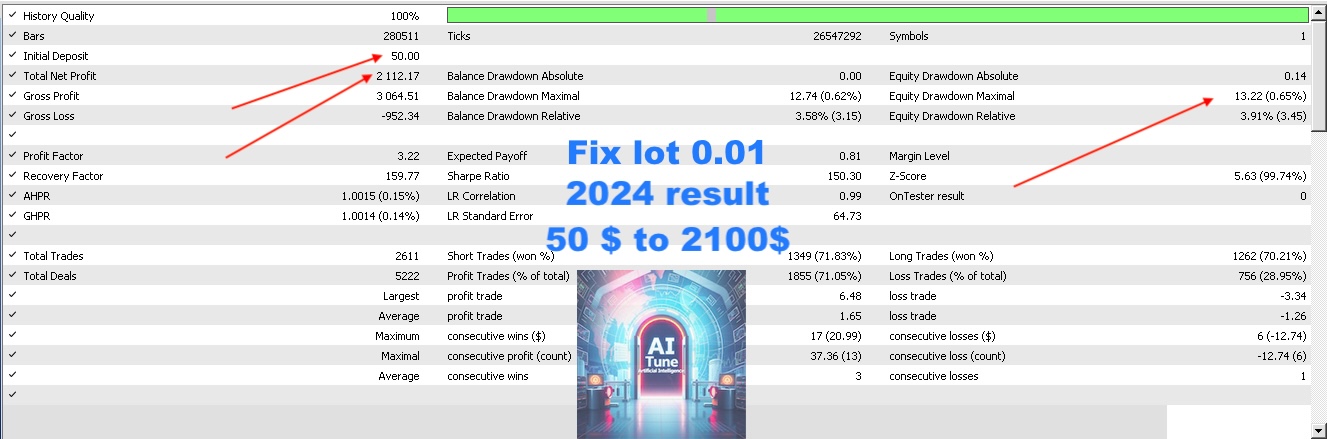
You can refer to the link to see the results of the TAILOR
At the same time as this post was published, the discount was included. Limited time
You can refer to the link to see the results of the TAILOR
At the same time as this post was published, the discount was included. Limited time
: