Arrow indicator to Martingale EA

If you need an advisor on any arrow indicator signals - this utility will definitely help you. 

You will be able, with the help of this utility to form an unlimited number of EAs on YOUR signals, with your set of settings, with your copyright and complete source code. You will be able to use the resulting EAs unlimitedly, including adding them to the Market and other resources.

Free simple version of the generation script to help you understand how it works - here


What does the utility do? 

It creates a EA file with your indicator signals in a few easy steps:
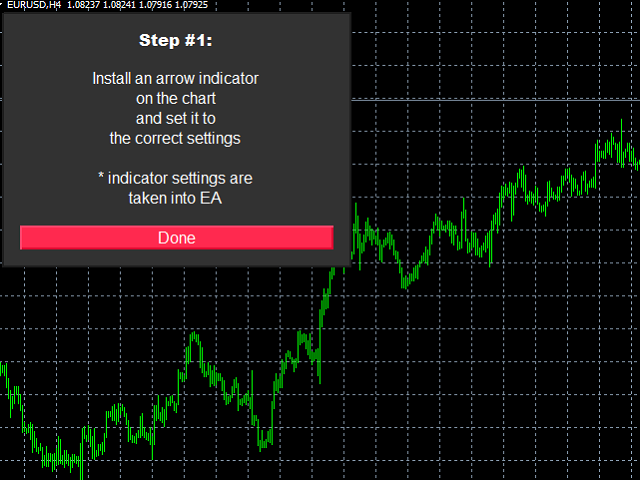
  1. install the indicator with the needed settings on the chart;
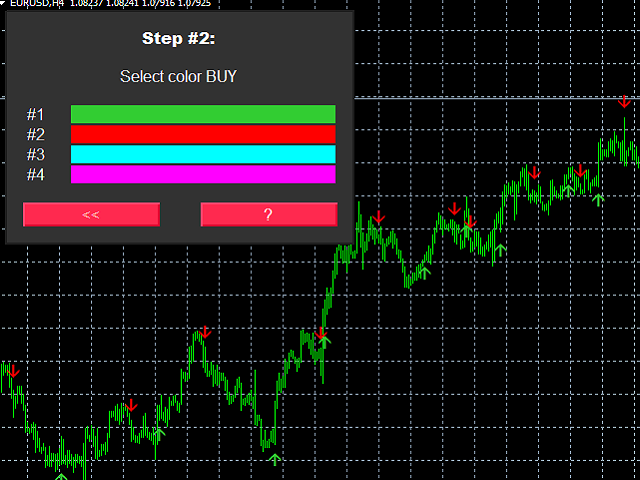
  2. Select a signal for buy; 
  3. Select a signal for sell; 
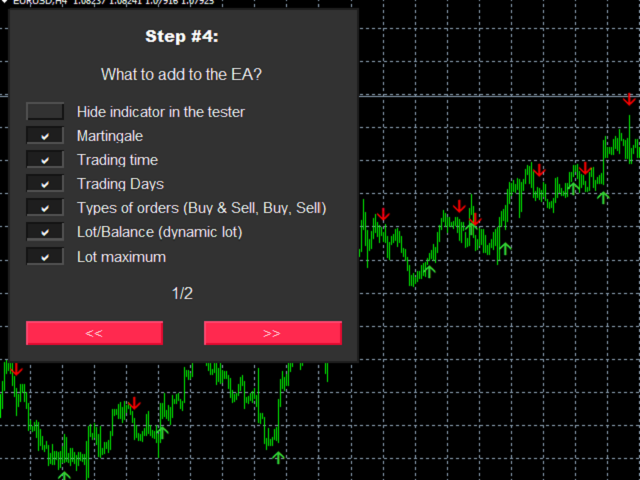
  4. Select the desired options for the EA;
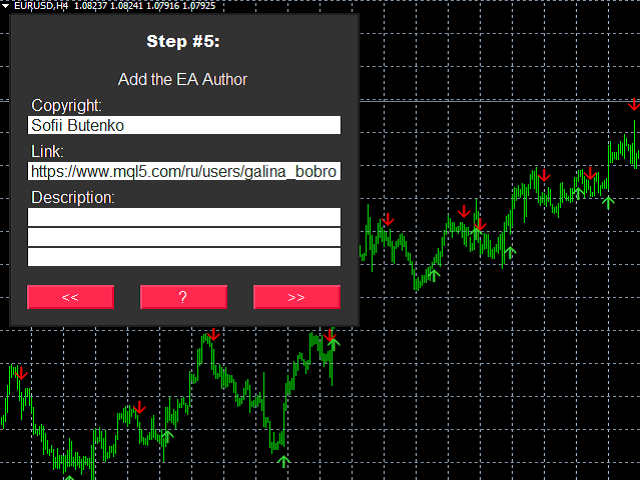
  5. Specify the author of the EA;
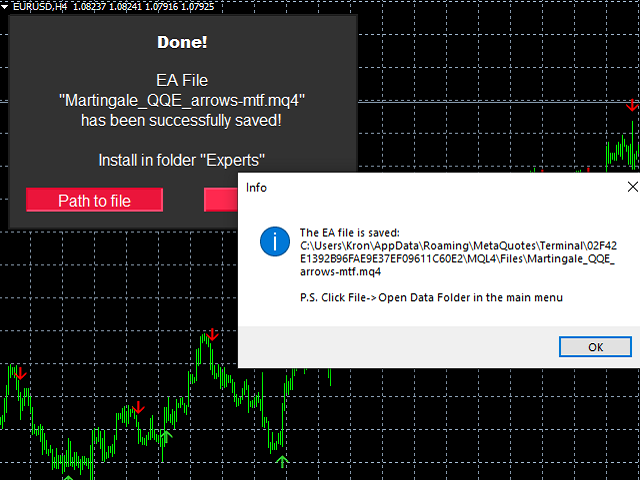
  6. Get the clicker file !

Then you install the file of the EA in the folder Experts and update the terminal. 

Attention! Set the indicator settings as you need and the same settings will be taken into the EA 

Settings of the resulting EA: 
  •  Bar for the signal (open or closed);
  •  Delay (sec) from the bar open time; 
  •  Filter by order type (Buy and Sell, Buy only, Sell only)
  •  Lot fixed, dynamic, maximum lot limit;
  •  Martingale by the number of losing orders and by points of loss;
  •  Control of drawdown at martingale;
  •  SL and TP 
  •  Partial Closing;
  •  Trailing stop on points, on the last bar, Breakeven;
  •  Filter by spread;
  •  Magic, Comment;
  •  Close orders when there is a reversal signal (All/Profitable/OFF); 
  •  Close orders at the end of work time (All/Profitable/OFF); 
  •  Limits on trading days and trading times;
  •  Panel on the chart with handy controls;
Please write in the product discussion what functions you would like to see in the created EA
추천 제품
The arkdc module derives its name from the Ark data collector statement. The main purpose of this module is to instantly save incoming tick data to a csv file. How does this csv file differ from any ready-made csv file found in metatrader or imported from other sites? The data obtained with this module is each tick data that comes to the metatrader program. A lot of tick data can come in per second.But does the module only record tick data raw? The arkdc module saves not only incoming tick data,
Renko Chart with Moving Average. Classic Renko charts idea. It is protted on main chart and Moving Average can be applied. Prices for bars are used from a lower timeframe. Parameters: BarsBack - how many bars of lower timeframe to use. If value is zero than it will use all available bars. LTF - lower timeframe. BrickSize - Renko bar in points. BullishColor - color for bull candle. BearishColor - color for bear candle. HideLineChart - if this value is true the line chart when be hidden when sele
FREE
This indicator is a great utilities tools for Fibonacci Trader that draw their chart manually. This indicator do not draw any Fibonacci Retracement or Fibonacci Expansion. It is a utilities tool for modifying the Fibonacci level for Fibonacci object manually drawn on the chart. Just draw using the Fibonacci Retracement or other Fibonacci tool in MT4 as per normal. The select the Fibonacci you have just drawn. Make sure you have only 1 object selected. Then open up this Fibonacci Level Management
Buffer Scan analyzses your custom indicator buffers with iCustom function on a certain period of history (configurable by the user) and writes buffers’s data to a csv file. The script helps determine buffers’ numbers, through which the indicator transfers any data, for example, the appearance of arrows, a particular color, a certain line and other information.  The utility scans all 512 indicator buffers but it records to a csv file only those of them which have data. If a buffer does not transf
Corporate Report
Pavel Verveyko
5 (1)
The script displays info about the share's corporate reports and dividends. The data is downloaded from   investing.com : Report date Profit per share (EPS) Revenue Market capitalization Amount of dividends Date of payment of dividends Dividend income The product cannot be tested in the tester (since it is not possible to receive data from the Internet). Before launching:  Add 2   URL   https://ru.investing.com/earnings-calendar/Service/getCalendarFilteredData  and   https://ru.investing.com/di
TrendMaestro
Stefano Frisetti
5 (3)
Attention: beware of SCAMS, TRENDMAESTRO is only ditributed throught MQL5.com market place. note: this indicator is for METATRADER4, if you want the version for METATRADER5 this is the link:  https://www.mql5.com/it/market/product/108106 TRENDMAESTRO ver 2.5 TRENDMAESTRO recognizes a new TREND from the start, he never makes mistakes. The certainty of identifying a new TREND is priceless. DESCRIPTION TRENDMAESTRO identifies a new TREND in the bud, this indicator examines the volatility, volumes a
Rira Renko
Vitor Palmeira Abbehusen
RENKO on Time Chart This indicator is an enhanced Renko, so you can watch the Renko bricks on the chart to understand price movement more clearly the other improvement is automated box size according to ATR (Average True Range) period you can set the ATR number as you want and the box size of Renko changes automatically based on price movement Inputs Mode: Box size is the input to specify the size of the Renko box you want to print on the chart. This input lets you choose the fixed box siz
Market Profile 3
Hussien Abdeltwab Hussien Ryad
3 (2)
Market Profile 3 MetaTrader 4 indicator  — is a classic Market Profile implementation that can show the price density over time, outlining the most important price levels, value area, and control value of a given trading session. This indicator can be attached to timeframes between M1 and D1 and will show the Market Profile for daily, weekly, monthly, or even intraday sessions. Lower timeframes offer higher precision. Higher timeframes are recommended for better visibility. It is also possible t
FREE
Volume Bubble
Agus Santoso
블로그: https://www.mql5.com/en/blogs/post/769823 MT4: https://www.mql5.com/en/market/product/176181 MT5: https://www.mql5.com/en/market/product/176182 VOLUME BUBBLE [tambangEA]은 트레이더가 차트에서 비정상적인 시장 활동을 직접 식별할 수 있도록 설계된 프리미엄 시각적 거래량 압력 지표입니다. 이 지표는 비정상적인 델타/거래량 움직임을 감지하여 가격 움직임 주변에 깔끔한 버블 마커로 표시합니다. 각 버블은 거래량 압력 이벤트를 나타내므로 트레이더는 강한 참여, 불균형, 모멘텀 압력 또는 잠재적 흡수가 나타날 수 있는 지점을 빠르게 파악할 수 있습니다. 이 도구는 캔들별 거래량 데이터를 수동으로 분석할 필요 없이 시장 참여를 시각적으로 빠르게 파악하려는 트레이더를 위해 설계되었습니다. 핵심 개념 대부분의 가격 차트는 가격 움직임만 보여줍니다.
MASi Three Screens
Aleksey Terentev
5 (2)
MASi Three Screens is based on the trading strategy by Dr. Alexander Elder. This indicator is a collection of algorithms. Algorithms are based on the analysis of charts of several timeframes. You can apply any of the provided algorithms. List of versions of algorithms:     ThreeScreens v1.0 - A simple implementation, with analysis of the MACD line;     ThreeScreens v1.1 - A simple implementation, with analysis of the MACD histogram;     ThreeScreens v1.2 - Combines the first two algorithms in
FREE
Utility for know all informations and settings of terminal where the utility is loaded. The informations that you can know are for example: - The path of folder where the terminal start - The path of   folder where the terminal store the indicators, experts advisors etc - The path of   common folder - The permission to use DLL, to automated trading etc - The permission to send email, FTP or notifications to smartphone and many other informations
FREE
The CandleStick Scanner is a tool that allow you to perform a   market scan   and search any candlestick pattern that you already created in the current chart, You can perform a quick search in the current chart (500 bars will be scanned),  This is a   lite version   of  CandleStick Factory for MT4   . The   full version   video can be found here :  https://www.youtube.com/watch?v=fq7pLXqVO94 The  full version  can be purchased here:  https://www.mql5.com/en/market/product/75628 How it works Yo
FREE
This script paces itself to zoom into the deepest setting of ZOOM +     You may be in tune to know a few keyboard easter eggs. Pressing the  minus <->  button has the capability to Zoom the Chart Outward! Interesting to see the price reevaluate itself in perspective. This we could see is quite contagiously useful if we wanted to be quick with analyzing, examining through your tools, in your plans and such. So, if you ever wanted to zoom IN and OUT, here is Your play around with the chart poin
FREE
Free automatic fibonacci
Tonny Obare
4.67 (49)
Free automatic Fibonacci is an indicator that automatically plots a Fibonacci retracement based on the number of bars you select on the BarsToScan setting in the indicator. The Fibonacci is automatically updated in real time as new highest and lowest values appears amongst the selected bars. You can select which level values to be displayed in the indicator settings. You can also select the color of the levels thus enabling the trader to be able to attach the indicator several times with differe
FREE
Major Support and Resistance Indicator
Ahmad Ar Abedalaziz Alazaizeh
This indicator filters the Zigzag indicator to calculate the main support and resistance levels. Variables minimum gap between peaks : is the distance (GAP) between the peaks of the Zigzag peaks sensitivity : Minimum number of nearby peaks look back: it means that it has to test the last 50 peaks in the Zigzag object name perfix: a prefix for level’s line name on chart
FREE
Description  Fibo Levels is a color multicurrency/multi-symbol indicator that automatically plots  Fibonacci levels on a candlestick chart in a separate window below the chart of the main financial instrument. It can be used with any broker, regardless of the name of a financial instrument used because the symbol name must be entered manually as an input parameter. If you enter a non-existent or invalid name of a financial instrument, you will receive an error message saying that the specified f
Simply Trailing Stop EA
Joaquin Nicolas Metayer
Simply Trailing Stop is a simple Expert Advisor that automatically trails stop on the chart that has been activated. It can be used as a complement to orders placed manually or through another expert advisor that does not perform a trailing stop, you only have to activate it in a new chart, not in the same one in which you already have your expert advisor but it will not work. You can see more of my products here: www.mql5.com/en/users/joaquinmetayer/seller
FREE
This is an arrow indicator without a future function,developed based on the most advanced profit trading algorithms.It has the most innovative and advanced dual trend analysis module, as well as the latest and highly effective market trend prediction algorithm.Trends are your friends, and following larger trends can earn the maximum profit in foreign exchange. This indicator helps traders identify current trends and track them. Someone once made a profit of 10 times in a week by relying on it.No
ProfPro
Dzintars Ansons
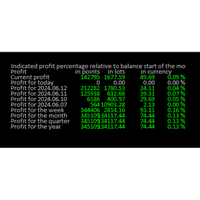
Online  Diary:  This indicator is designed to help traders keep track of profits and losses over various time periods, such as current profit, today’s profit, yesterday’s profit, and so on, up to the profit for the current year. The indicator offers several configuration options, such as the calculation of profit percentage relative to the balance at the beginning of the day, week, month, quarter, or year. It also allows for the customization of text placement and colors to suit the user’s needs
FREE
Trendline indicator
David Muriithi
2 (1)
Are you tired of drawing trendlines every time you're analyzing charts? Or perhaps you would like more consistency in your technical analysis. Then this is for you. This indicator will draw trend lines automatically when dropped on a chart. How it works Works similar to standard deviation channel found on mt4 and mt5. It has 2 parameters: 1. Starting Bar 2. Number of bars for calculation The   starting bar   is the bar which drawing of the trend lines will begin, while the   number of bars for c
FREE
Tract
Andriy Sydoruk
Tract - Channel indicator, by which you can place orders like a classic channel indicator. Trading can be carried out inside the channel when the price reaches its borders and turns in the opposite direction from them. In such cases, reversal strategies are used. The channel indicator is designed to work with support and resistance levels and help traders find opportunities to enter the market. Another way to trade a breakout - assumes a situation when the price, upon reaching one or another cha
TR Basket System
Meshari F M Alkhawaled
TR_BASKET_SYSTEM v3.5 Institutional-Grade Basket Trading System The Problem Most grid systems fail for one reason: They don’t know when to stop. They keep adding positions blindly… Until the account is gone. The Solution TR_BASKET_SYSTEM is built differently. This is not a random grid EA. This is a defensive, structured, multi-layer trading system designed to: Control risk Adapt to market conditions Protect equity And exit intelligently What Makes It Different? This system does NOT rely on entr
Quantized Trend
Oleg Pechenezhskiy
This utility automatically draws the trend channel on the price chart. For the time interval from the specified date to the current bar, the drawn channel is almost optimal. Placing the beginning of the channel at a more distant historical price extremum, you get a visualization of a longer-term trend. Channel slope is not a continuous value, but takes one of discrete values (in AxB format, where A is the number of price points (points), and B is the number of timeframes). This program works ONL
Practice Simulator Sync
Sajiro Yoshizaki
4.5 (2)
이 모듈은 Practice Simulator와 동기화하여 동일한 통화 쌍에 대한 차트 시간 및 위치 정보를 표시할 뿐만 아니라 다양한 시간대 및 다른 통화 쌍에 대해 동기화된 차트를 표시합니다. 참고: 이 모듈은 자체적으로 작동하지 않습니다. "Practice Simulator"가 필요합니다. Practice Simulator https://www.mql5.com/ko/market/product/98348 두 가지 동기화 모드를 사용할 수 있습니다. 단순 동기화 모드: 동기화하려는 차트를 열고 이 도구를 삽입하면 쉽게 동기화된 차트를 만들 수 있습니다. 차트가 지정된 위치로 이동되고 보기에서 부분적으로 숨겨집니다. 따라서 차트 이동, 하위 창 등에서 차트가 표시되는 경우가 있습니다. 활성 동기화 모드: 오프라인 차트를 사용하여 동기화를 위한 차트를 생성합니다. 프로세스는 더 복잡하지만 라이브 차트와 거의 동일하게 작동합니다. 자세한 설정 정보를 보려
FREE
TSInfoKit
Salvatore Labriola
This Utility is a test for creating objects on the graph . Drag it on any graph and follow the instructions! Any questions about work program send me mail : info@tradingsolution.it In future I will add more information with new version for now it provides account information: AccountNumber AccountName AccountCurrency AccountCompany Server Account Leverage Stop Out level Balance Equity Margin Free Margin
Chaos Trader Lite
John Davis
1 (1)
Chaos Trader Lite attempts to use aspects of chaos theory to place trades in the marketplace. This Expert Advisor, in particular, draws upon theories made by Bill Williams. Every version of MetaTrader contains the Bill Williams indicators. I wondered why was he deemed so important as to have his own set of indicators added to MetaTrader with name attribution. Conducting research I found that Bill Williams wrote a book using chaos theory to trade the markets. The Bill Williams indicators are usef
FREE
FRM Half Trend
Noiros Tech
3.5 (2)
YOU CAN NOW DOWNLOAD FREE VERSIONS OF OUR PAID INDICATORS . IT'S OUR WAY OF GIVING BACK TO THE COMMUNITY ! >>>    GO HERE TO DOWNLOAD   The system is a free open source pine script originally published on TradingView by everget   . It was converted to Mt4 by Forex Robot Makers. This system is a  popular trend indicator based on ATR ( Average True Range ) , Moving Averages and the Donchian channel . System BackGround ATR The average true range is an indicator of the price volatility of an asse
FREE
Virtual Exchange Reserve In an environment where exchanges offer increasingly high leverage ratios, it is all the more important for traders to tightly regulate their level of   equity .  This software is designed to be run in the background on any virtual private server that can run Meta Trader 4/5.  It implements basic equity control functions ahead of the broker---allowing users to set their own equity trailing stop, an equity limit to lock-in a certain profit margin, and a universal stop tha
The FX Indicators Alert is a Scanner Tool that allow you to set up alerts for any Indicator, and display or send notifications to your email box and/or mobile device. It will monitor your rules in the selected TimeFrames and Symbols. The tool can manage the standard indicators and the Custom one (7 buffers for the custom indicators). You can create your alerts by combining different indicators. Please note that this tool is not supported in the strategy tester due to multi Symbols, TimeFrames,
FREE
이 프로그램은 트레이더와 투자자를 위해 설계된 간단한 차트 플레이어로, 과거 시장 데이터를 재생하여 시장의 흐름과 가격 움직임을 더 잘 이해할 수 있도록 도와줍니다.   이 플레이어를 사용하면 다양한 전략을 검증하고,   시장 상황에 맞춘 트레이딩 연습도 효율적으로 수행할 수 있습니다.   캔들을 한 개씩 진행하며   시장 흐름을 순서대로 확인할 수 있습니다.   재생 중 언제든지 일시 정지하고   다시 재개할 수 있습니다.   [특징]   과거에서 미래 방향으로 자동 재생   일정 간격으로 1봉씩 진행   재생 중 일시 정지 가능   [ 재생 사양]   재생 방향: 과거 → 미래   재생 속도: 고정   이동 봉 수: 1봉 고정   재생 일시 정지 / 재개   END로 재생 종료   [조작 방법]   Pause / Restart: 재생 일시 정지 / 재개   END: 재생 종료 및 프로그램 중지 본 제품은 'Player' 버전입니다. 보다 고도의 분석과 기능을 원하신다면 제목에
FREE
이 제품의 구매자들이 또한 구매함
Custom Alerts AIO: 다중 시장을 동시에 모니터링 – 설정 없이 즉시 사용 가능 개요 Custom Alerts AIO 는 복잡한 설정 없이 즉시 사용할 수 있는 통합 시장 모니터링 도구입니다. FX Power, FX Volume, FX Dynamic, FX Levels, IX Power 등 필요한 모든 지표가 내장되어 있어 별도의 설치나 구성 없이 알림 기능을 바로 사용할 수 있습니다. 차트 그래픽 없이 작동하며, Forex, 금속, 지수, 암호화폐 등 주요 자산군을 모두 지원합니다. 주식(Symbols)은 별도로 입력하여 추가할 수 있으나, MetaTrader에서는 일반적으로 제한적으로만 사용됩니다. 1. 왜 Custom Alerts AIO를 선택해야 하나요? 추가 라이선스가 필요 없습니다 • 모든 Stein Investments 지표가 내장되어 있어 별도 구매가 필요 없습니다. • 즉시 알림 기능을 시작할 수 있어 빠르고 간편합니다. 모든 시장을 하나의 도구로
The product will copy all telegram signal to MT4   ( which you are member  ) , also it can work as remote copier.  Easy to set up, copy order instant, can work with almost signal formats, image signal, s upport to translate other language to English Work with all type of channel or group, even channel have "Restrict Saving Content", work with  multi channel, multi MT5 Work as remote copier: with signal have ticket number, it will copy exactly via ticket number. Support to backtest signal. How to
Unlimited Trade Copier Pro is a tool to copy trade remotely to multiple MT4, MT5 and cTrader accounts at different computers/locations over internet. This is an ideal solution for you if you are a signal provider and want to copy your trades to other receivers globally on your own rules. One provider can copy trades to multiple receivers and one receiver can get trade from multiple providers as well. The provider can even set the subscription expiry for each receiver, so that receiver will not b
Smart Channel M4
Vahidreza Heidar Gholami
The trend in the market can be predicted using trend lines but the problem is you don’t know where exactly the price is going to touch the trend line where you can put your pending orders on. Smart Channel Expert Advisor makes it possible to put an advanced channel around the price data, which can be configured to handle placing orders, opening and closing positions, managing risk per trade, spread, slippage, and trailing stop-loss and take-profit automatically. Features Money Management (Calcul
Crystal Trade Manager PRO – MT4 고급 리스크 및 트레이드 관리 시스템 무료 버전: https://www.mql5.com/en/market/product/150632 개요 Crystal Trade Manager PRO(CTM)는 MetaTrader 4를 위한 전문급 거래 실행 및 리스크 관리 유틸리티입니다. 엄격한 실행, 견고한 자본 보호, 그리고 똑똑한 자동화를 필요로 하는 트레이더를 위해 설계되었습니다. 본 시스템은 계좌 리스크를 관리하고, 자본(EQ)을 보호하며, 일일 제한을 적용하고, SL/TP를 자동으로 설정하며, 전문급 기능을 갖춘 초고속 원클릭 트레이딩 패널을 제공합니다. Prop Firm 챌린지, 데이트레이딩, 스캘핑, 포트폴리오 매니저에게 최적화되어 있습니다. MT5 버전도 제공됩니다. 주요 기능 1. 고급 리스크 및 드로우다운 보호 기능 하루 드로우다운을 1%~70% 범위에서 설정 가능 설정한 한도를 초과할 경우 모든 포지션 즉시 종료 조건
The product will copy all  Discord  signal   to MT4   ( which you are member  ) , also it can work as remote copier.  Easy to set up. Work with almost signal formats, support to translate other language to English Work with multi channel, multi MT4. Work with Image signal. Copy order instant, auto detect symbol. Work as remote copier: with signal have ticket number, it will copy exactly via ticket number. How to setup and guide: Let read all details about setup and download Discord To MetaTrader
ManHedger MT4
Peter Mueller
5 (2)
THIS EA IS A SEMI-AUTO EA, IT NEEDS USER INPUT. Manual & Test Version Please TEST this product before   BUYING  and watch my video about it. Contact me for user support or bug reports, or if you want the MT5 version! MT5 Version I do not guarantee any profits or financial success using this EA. With this Expert Advisor, you can: Implement your own   Zone Recovery   strategy to capitalize on trending markets. Create   Grid   trading strategies, to profit from ranging markets. Place orders easil
--------------Welcome to use [MQL5 Signal Analyze Master]------------------  Function: Draw order tracks of MQL5 MT4 and MT5 signal on MT4 chart. [Using guide] 1.Use it as Experts. 2.Download history record from MQL5 signal(MT4 signal or MT5 signal).  3.Paste history record file below "MQL4/Files/" 4.Load [Signal Analyze Master] on the symbol chart what you want to analyze. 5.Paste the history record file name to parameter 'FileName' 6.Select  SignalType  match the history you download on MT4
Edge Zone EA
FXsolutions
5 (1)
With this Expert Advisor you will follow the sound trading principle Buy Low and Sell High by default ! And you can do that even with a normal day job . You will be even able to trade on lower timeframes which you could never do without such an Expert Advisor. And the best thing is that you are in control! You can tell the Edge Zone EA where it has to enter and where it has to exit. And you can do that even many hours before the trade will occur . This EA is therefore an excellent assistant for
Dashboard.mq4 - 간단한 거래 관리자 수동 거래를 즐기고 거래를 간편하게 관리할 수 있는 방법을 찾는 트레이더를 위해 설계된 이 강력한 MQL4 유틸리티는 거래 효율성을 향상시켜 실시간 대시보드를 통해 거래를 관리할 수 있도록 도와줍니다. MetaTrader에 원활하게 통합되어 로트 크기 계산과 리스크 지표 추적을 간편하게 수행합니다. 주요 기능: 리스크 및 마진 표시 : 실시간 로트 크기, 마진 요구 사항 및 승률 계산을 통해 정확한 거래 결정을 지원합니다. 거래 관리 버튼 : 매수/매도 주문을 배치하고, 거래(모두, 수익성 있는 거래 또는 손실 거래)를 종료하거나, 이익 실현 및 손절매를 취소하는 버튼을 한 번의 클릭으로 제공합니다. 사용자 정의 가능한 승률 추적 : 현재 월, 최근 거래 또는 전체 히스토리와 같은 다양한 기간에 걸쳐 거래 성과를 분석할 수 있습니다. 인터랙티브하고 직관적인 UI : 빠른 액션을 위한 사용자 정의 가능한 버튼이 있는 명확하고 쉽게 탐색할
The FFx Hidden Manager panel will help you to manage easily your orders directly on the chart. Below all features described: TP, SL and TrailingStop are hidden Each order has its own lines on chart Drag & Drop any line to change the TP/SL as per your need Option to move automatically the SL line at breakeven when TP #1 is reached Option to choose the TP/SL type (by pips or price) Option to choose the TrailingStop type (by pips, MA, Fractals, PSAR or ATR) Define which order(s) you want to manage
FFx Risk Calculator panel will help you to calculate very easily your trades size, SL or the risk directly on the chart. All features are described below: Option to select which parameter to calculate: Risk, Stop Loss or Lot Size The panel will show if the lot size is allowed according to the current account free margin Button to maximize/minimize the panel Drag and Drop the panel anywhere on the chart How to use it? Select the parameter you want to be calculated. It will be based on the 2 other
Trade Copier Pro
Vu Trung Kien
4.57 (14)
Trade Copier Pro is a tool to copy trade remotely to MT4, MT5 and cTrader accounts at different computers/locations over internet. This is an ideal solution for you if you are a signal provider and want to copy your trades to other receivers globally on your own rules. One provider can copy trades to multiple receivers and one receiver can get trade from multiple providers as well. The provider can even set the subscription expiry for each receiver, so that receiver will not be able to receive t
News Trader Pro
Vu Trung Kien
4.38 (16)
News Trader Pro is a unique robot that allows you to trade the news by your predefined strategy. It loads every piece of news from several popular Forex websites. You can choose any news and preset the strategy to trade it, and then News Trader Pro will trade that news by selected strategy automatically when the news comes. News release gives opportunity to have pips since the price usually has big move at that time. Now, with this tool, trading news becomes easier, more flexible and more exciti
FFx Watcher PRO
Eric Venturi-Bloxs
The FFx Watcher PRO is a dashboard displaying on a single chart the current direction of up to 15 standard indicators and up to 9 timeframes. It has 2 different modes: 1. Watcher mode: Multi Indicators User is able to select up to 15 indicators to be displayed User is able to select up to 9 timeframes to be displayed 2. Watcher mode: Multi Pairs User is able to select any number of pairs/symbols User is able to select up to 9 timeframes to be displayed This mode uses one of the standard indicat
Transaction Repeater Full
Alexandr Bryzgalov
5 (4)
Copies transactions between MT4 terminals. Possibilities: quick copy start minimum processor load direct and reverse (reverse) copying. copying Take Profit and Stop Loss levels copying deferred and their changes copy transactions one to many copy trades many to one local copy only Attention: The product is designed for copying trades only within a single computer or VPS with access to the desktop. The product will not work on the built-in Virtual Hosting of the terminal. We will help you set up
The product combines a manual trade panel with the ability to perform actions automatically in a highly configurable way. Actions include capturing indicator values and then based on those values raising alerts, open/close or partially close trades, scale-in, setting up pending orders, adjusting stop loss, take profit and more. On-chart controls can be configured, such as tick boxes and buttons, so can be fully interactive. The EA also handles money management, news events, hidden stop loss, tak
Binary Options Copier Remote is an EA that allows to copy binary options trades between MT4 accounts at different computers. This is an ideal solution for signal provider, who want to share his trade with the others globally on his own rules. Provider can give free bonus license to 10 receivers. That means those 10 receivers can copy from provider by using Binary Options Receiver Free (no cost). From 11th one, receiver have to buy Binary Options Receiver Pro (paid version) in order to copy from
The Price Action Dashboard is an innovative tool to help the trader to control a large number of financial instruments. This tool is designed to automatically suggest signals and price conditions. The Dashboard analyzes all major Time Frame suggesting price action conditions with graphic elements. The Dashboard can suggest you the strength of the trend identifying directional movement, it is an indispensable tool for those who want to open position themselves using market trends identifiers. The
Elliott Wave Counter는 Elliott 파동의 빠르고 사용자 친화적인 수동 마크업을 위한 패널입니다. 색상과 마크 수준을 선택할 수 있습니다. 도구에서 만든 마지막 마크업과 전체 마크업을 제거하는 기능도 있습니다. 한 번의 클릭으로 마크업이 이루어집니다. 5번 클릭 - 5개의 웨이브가 있습니다! Elliott Wave Counter는 Elliott 파동의 초보자와 전문 분석가 모두에게 훌륭한 도구가 될 것입니다. Elliott Wave Counter 설치 및 입력 가이드 당신이 얻고 싶다면       EA 추가 URL(   http://autofxhub.com   ) MT5 터미널에 대한   알림   (스크린샷 참조). MT4 버전   https://www.mql5.com/en/market/product/14016 MT5 버전   https://www.mql5.com/en/market/product/15081 일반 입력: 웨이브 유형 버튼:   이 버튼을 사용하면 차트
If you wish to draw Support and Resistance lines, view: daily market opening, classical pivot levels, Fibonacci pivot levels, trend lines, Fibonacci levels, the remaining time to candle closing, and current spread. If you seek to place your orders with the exact lot that meets your desired stop loss risk. If you wish to do all this and more with just one click, then this is the perfect tool to use. This tool will allow you to feel more relaxed when deciding to open orders, as well as predicting
Partial Close Expert는   여러 기능을 하나의 자동화 시스템으로 결합한 도구입니다. 이 EA는 위험 관리 및 잠재 수익 극대화를 위한 다양한 옵션을 제공하여 트레이더가 포지션을 더욱 효과적으로 관리할 수 있도록 지원합니다. Partial Close Expert를 사용하면 거래자는 다음을 설정할 수 있습니다.       부분 폐쇄       이익을 확보하기 위한 수준       트레일링 스톱       이익을 보호하고 손실을 제한하는 수준       손익분기점       가격이 불리하게 변동하더라도 거래가 손익분기점을 넘지 않도록 보장하는 수준과 여러 가지 다른 기능이 있습니다. 이 올인원 EA를 사용하면 트레이더는 거래를 지속적으로 모니터링할 필요가 없으므로 시간과 노력을 절약할 수 있습니다. EA는 시장 상황에 따라 미리 설정된 지시를 실행하여 트레이더에게 거래에 대한 유연성과 통제력을 제공합니다. 부분 닫기 전문가 첨부,       키보드의 "p"를 누르고  
Master Trend Dashboard is a new generation indicator, compact, light and efficient. Each element of this Dashboard is designed to return specific signals as: Price Action, Breakout, Net Change (performance of the instrument), algorithmic studies, correlations and statistical calculations. This tool will change your way of trading allowing you to receive important information. See the Graphic Signals to understand every single signal below: Graphic Signals Symbol name and arrow color Green = Cur
Trade Copier Agent는 여러 MetaTrader(4/5) 계정/터미널 간에 거래를 복사하도록 설계되었습니다. 이 도구를 사용하면 제공자(소스) 또는 수신자(대상) 역할을 할 수 있습니다. 모든 거래 행위는 지연 없이 제공자에서 수신자로 복사됩니다. 이 도구를 사용하면 0.5초 미만의 매우 빠른 복사 속도로 동일한 컴퓨터의 여러 MetaTrader 터미널 간에 거래를 복사할 수 있습니다. 무역 복사기 에이전트 설치 및 입력 가이드 복사를 시작하기 전이나 주문이 없을 때 공급자 계정의 설정을 적용하십시오! 주문이 있는 동안 모든 변경 사항은 수신자 계정에 영향을 미칩니다. 예: 공급자 계정이 구매 주문을 적용한 다음 구매를 비활성화하면 수신자 계정의 모든 구매 주문이 닫힙니다. EA에 대한 알림을 받으려면 URL(   http://autofxhub.com   ) MT4 터미널을 추가하십시오(스크린샷 참조). MT5 버전   https://www.mql5.com/en/m
Unlimited Binary Options Copier Remote is a powerful tool to copy binary options trades remotely between multiple accounts at different locations over internet. This is an ideal solution for signal provider, who want to share his binary options trades with the others globally on his own rules. One provider can copy trades to unlimited receivers and one receiver can get trade from unlimited providers as well. The provider can set the subscription expiry for each receiver, so that receiver will no
This is an Expert Adviser use for manual trading as a background EA or combine with external EA to open orders. Loss Recovery Trading is one of your options to handle the lose positions instead of using stop loss by setting a zone recovery area and target to exit the turn rounds sequence. How It Work? If the market goes against your first positions direction at the specific of losing points, the EA will open an opposite direction position with calculated larger lot size and also keep the first


Professional and highly customizable utility for automated trading. It can become an indispensable to any trader regardless of the skills. It will help to save the time that would be required for daily routine activities and it will allow to develop custom strategies. The utility can also work manually opened orders and orders opened by any other EAs. This can be applied to attempt to recover the losing trades or even save the trader form losing the deposit. The utility allows to automate the tr
Great for scalper/intraday weapon for your ease daily trading. Scalper weapon will suit's you for any trading condition, whether it's intraday / scalper this tool is important for you which providing the missing function on the native MT4 platform. You have to check Allow Auto Trading by pressing Ctrl+O, going to Expert Advisors tab, and checking " Allow automated trading" . also to ensure the " auto trading " is green. Input Parameters _MINIMIZED_AT_START: to chose whether the panel is minimiz
Market Pressure Dashboard is a new generation utility. Its main function is to assist you and give you operational ideas optimizing your analytical work. Using this utility you could monitor a lots of financial instruments (max 28 symbols FOREX) in a very simple way. The Market Pressure indicator allows you to customize the internal list of the symbols to be monitored. The opening function and position management with this panel will be much more comfortable and navigation charts very powerful.
Contact/message me if you encounter any issue using the product or need extra feature to add on the base version. There is a demo version of this panel Dashboard Trading Made Simple Demo in my product list, please try it out to get familiar with all functionalities free, LINK . This system basically utilizes TDI as the main indicator to generate trading signal mainly on H1 and H4 timeframes. The signal will be further filtered and trimmed. Stochastic; Heiken Ashi candle direction and candle siz
제작자의 제품 더 보기
If you need an advisor on any arrow indicator signals - this utility will definitely help you.  What does the utility do?  It creates a EA file with your indicator signals in a few easy steps: install the indicator with the needed settings on the chart; Select a signal for buy;  Select a signal for sell;  get the clicker file ! Then you install the file of the EA in the folder Experts and update the terminal.  Attention! Set the indicator settings as you need and the same settings will be tak

FREE
Clicker
Sofiia Butenko
If you need a clicker on the signals of any arrow indicator - this utility will definitely help you. And the clicks themselves are no different from clicks made manually. There is even a random delay between clicks to make it even more realistic!  This free product has the same principle of creating an Expert Advisor based on an arrow indicator What does the utility do?  It creates a clicker file with your indicator signals in a few easy steps: install the indicator with the needed settings on
필터:
리뷰 없음
리뷰 답변