AutoLot Trade Executor
- Experts
- 버전: 1.0
- 활성화: 5

Risk Calculator & Trade Executer EA for MT5
(Minimalist Design)
Not Sure Yet? Try the Demo Version Before You Buy!
The Demo version is fully functional and can be used on both demo and real accounts, across different currency pairs and other supported trading instruments.
On a real account, the Demo version is limited to equity of up to $200. If your real account equity exceeds $200, purchase the full version to continue using the EA without this limitation.
Quick Description
Trade with confidence and leave the risk calculations to your EA!
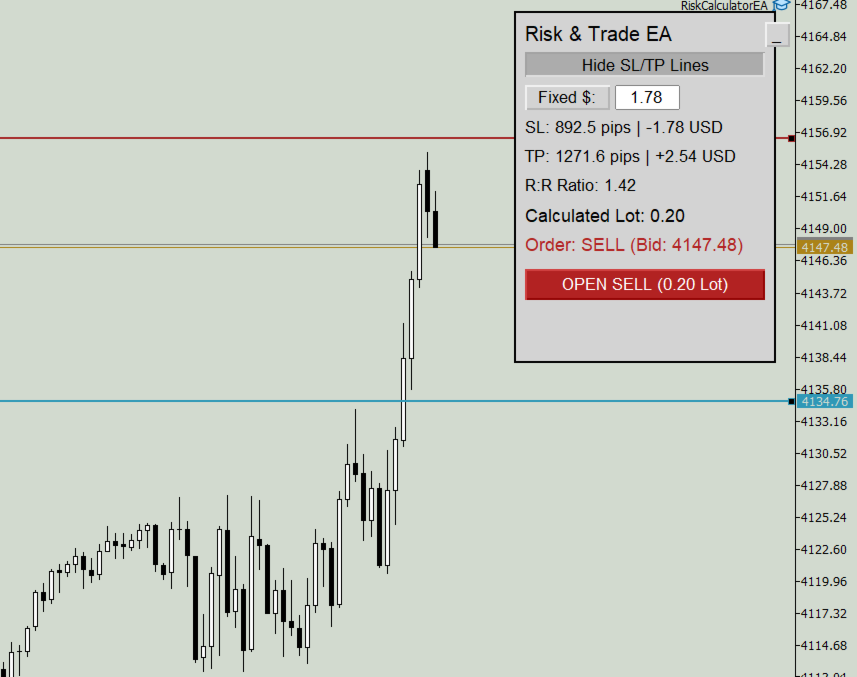
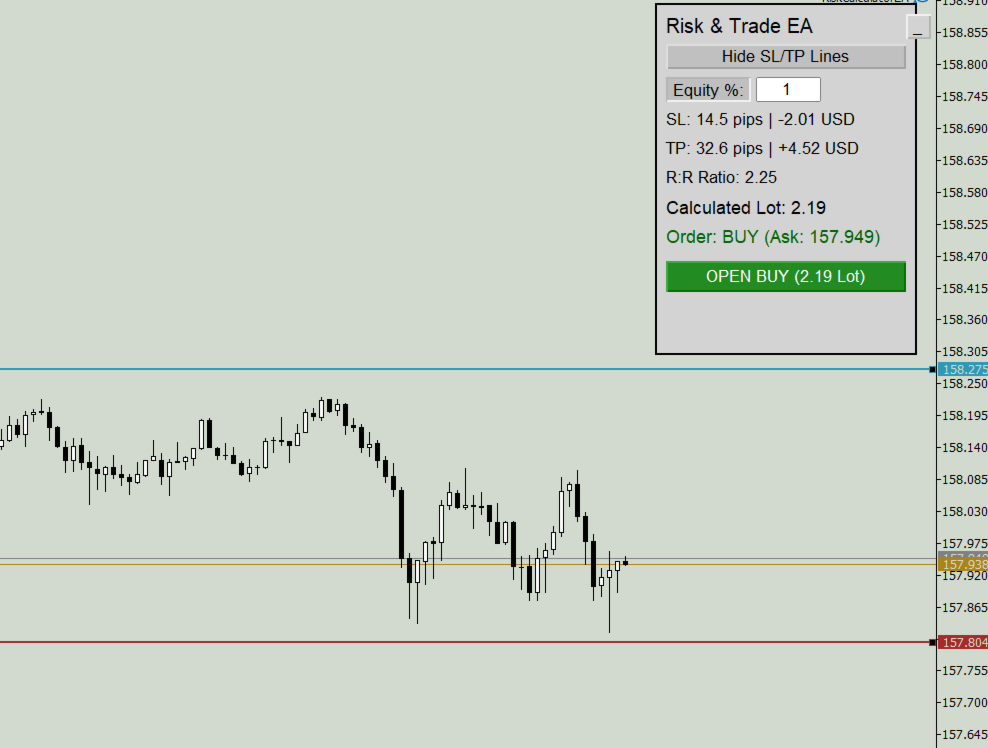
Simply position your Stop Loss (SL) and Take Profit (TP) lines directly on the chart. The EA automatically calculates the appropriate lot size based on your selected risk settings, displays the estimated monetary risk and reward, and lets you execute your trade with a single click.
No manual lot-size calculations. No unnecessary delays. Set your Equity Percentage or Fixed Cash Risk, adjust your trade levels, review the calculated risk, and execute directly from the EA dashboard.
Deep Dive
1. Visual SL & TP Management
- Drag and position your Stop Loss and Take Profit lines directly on the chart.
- Instantly view SL and TP distances in pips and their estimated monetary loss or profit.
- The EA automatically identifies the trade direction based on your SL and TP placement.
- Monitor the Risk-to-Reward ratio before executing your trade.
2. Flexible Risk Calculation
Choose the risk calculation method that suits your trading style:
- Equity Percentage: Risk a specified percentage of your account equity, such as 1%.
- Fixed Cash Risk: Set an exact monetary risk amount, such as $10 or $50.
The EA calculates the lot size according to your selected risk mode and the distance to your Stop Loss.
3. Intelligent Lot Size Calculation & Customizable Threshold
The EA calculates lot sizes according to your broker's available volume steps and includes a customizable Lot-Size Threshold to control how much the actual risk may exceed your target risk.
How Does the Lot-Size Threshold Work?
Suppose your target risk is $100, and your broker allows lot sizes in steps of 0.01. Your calculated lot size is 0.026, but the broker only accepts lot sizes such as 0.02 and 0.03.
Here is how the EA evaluates the available options:
| Option | Lot Size | Estimated Risk | Difference from Target |
| Lower lot | 0.02 | $80 | 20% below |
| Next available lot | 0.03 | $120 | 20% above |
With the threshold set to 10%, the EA selects 0.02 because the next available lot would exceed your target risk by 20%, which is above the permitted threshold.
Now, suppose the next available lot would result in an estimated risk of $108 instead of $120. This is only 8% above your $100 target. With the threshold set to 10%, the EA can select that higher lot because its estimated risk falls within the permitted tolerance.
Why Is This Useful?
- Lower Threshold: Keeps the selected lot size closer to your intended risk and is more restrictive about increasing the lot.
- Higher Threshold: Allows more flexibility when choosing the next available lot size.
- Customizable Control: Adjust the threshold according to your preferred balance between risk control and lot-size flexibility.
The threshold helps you control how much the estimated risk may exceed your target when selecting the next available lot size. It does not eliminate trading risk or guarantee an exact final loss.
4. One-Click Trade Execution
- Execute BUY or SELL orders directly from the chart.
- The EA uses the calculated lot size and your selected SL/TP levels when submitting the order.
- After a successful order placement, the SL and TP lines are automatically hidden to keep your chart clean.
5. Minimize & Restore Dashboard
Collapse the dashboard with a single click when you need more chart space. Restore it whenever you want to review your settings, risk calculations, or trade levels.
6. Customizable Settings
Configure the available EA inputs to suit your trading preferences:
- Risk Mode: Choose Equity Percentage or Fixed Cash Risk.
- Risk Value: Specify your preferred percentage or monetary risk amount.
- Lot-Size Threshold: Set the permitted risk tolerance for selecting the next available lot size.
- SL & TP Levels: Adjust both levels visually on the chart.
7. Minimalist & Simple Design
The EA features a clean, minimalist dashboard with a simple, easy-to-understand layout. No unnecessary colors, cluttered panels, or complicated interface — just the essential trading information and controls you need, presented clearly on your chart.
8. Account & Instrument Compatibility
Designed for traders using standard, mini, and micro accounts, subject to the broker's trading conditions and symbol specifications.
The EA can be used with supported trading instruments available through your MT5 broker, including forex pairs and other markets.
Lot-size and risk calculations depend on the instrument's contract specifications, tick value, minimum volume, volume step, and account currency. Actual execution may also be affected by spread, slippage, commissions, and market conditions.
Take Control of Your Risk
Spend less time calculating lot sizes and more time focusing on your trading decisions.
Position your levels, review your risk, calculate your lot size, and execute your trade — all from one convenient MT5 dashboard.