Goldfortune
- Experts
- 버전: 5.386
- 활성화: 5

SUGGESTED PRODUCT NAME
Gold Fortune Buy Sell Stop
RUN TF5m.
SHORT DESCRIPTION
An XAUUSD Expert Advisor combining adaptive automatic entries, basket recovery, and manual order controls in one chart panel.
FULL PRODUCT DESCRIPTION
Gold Fortune Buy Sell Stop is an Expert Advisor designed for XAUUSD trading on MetaTrader 5. It combines an automatic M1 pattern model, multi-timeframe direction analysis, recovery basket management, and a complete manual trading panel.
The EA operates on the symbol of the chart to which it is attached. Its signal engine always reads closed M1 data, while M5, M15, and H4 market structure is used to refine direction. No external indicator or WebRequest is required.
HOW THE AUTOMATIC STRATEGY WORKS
1. The EA analyzes completed M1 candles and measures price efficiency, turning frequency, velocity, volatility, candle body and wick bias, and the position of price inside its recent range.
2. It compares the current structure with similar historical M1 patterns. The model estimates whether the profit target or the recovery distance is more likely to be reached first.
3. A candidate signal is confirmed by recent M1 price action. The final BUY or SELL side is adjusted using closed M5, M15, and H4 trend information.
4. The first automatic position uses InpStartLot and an initial target defined by InpRewardPoints.
5. If price moves against a single-direction basket by InpRecoveryStepPoints, the EA can add a recovery entry. Recovery entries normally use the basket source volume rather than a progressive lot multiplier, subject to the broker volume rules, the per-order cap, the adaptive basket cap, and InpMaximumOpenEntries.
6. After multiple entries, the EA calculates the volume-weighted average entry price and synchronizes a common basket target at InpRecoveryBasketTargetPoints from that average.
7. When a confirmed market regime invalidates the original basket direction, a hedging account can use regime-directed recovery. This can create a mixed BUY and SELL basket, manage a software-side basket profit target, and rotate a profitable cluster only when the combined closed cluster remains positive.
8. The EA restores its managed basket and pending-order state when it is reattached or MetaTrader is restarted.
MAIN FEATURES
- Automatic XAUUSD entries based on closed M1 market data
- Historical pattern similarity model with probability stabilization
- M1, M5, M15, and H4 direction analysis
- Spread filter and one-bar post-exit cooldown
- Same-direction recovery and recovery-follow entries
- Regime-directed two-way recovery on hedging accounts
- Volume normalization for Standard, Cent, and Micro trading environments
- Weighted-average basket Take Profit synchronization
- Manual BUY and SELL market orders
- Manual BUY LIMIT and SELL LIMIT pending orders
- Manual BUY STOP and SELL STOP pending orders with separate Magic Number
- Adjustable manual order lot from the chart panel
- Optional adoption of Magic Number 0 positions on the current symbol
- Optional Thailand time filter
- Close All confirmation button
- Multiple status-panel layouts
- Strategy Tester acceleration through a virtual basket target
- No expiration or time-limited operation
MANUAL CONTROL PANEL
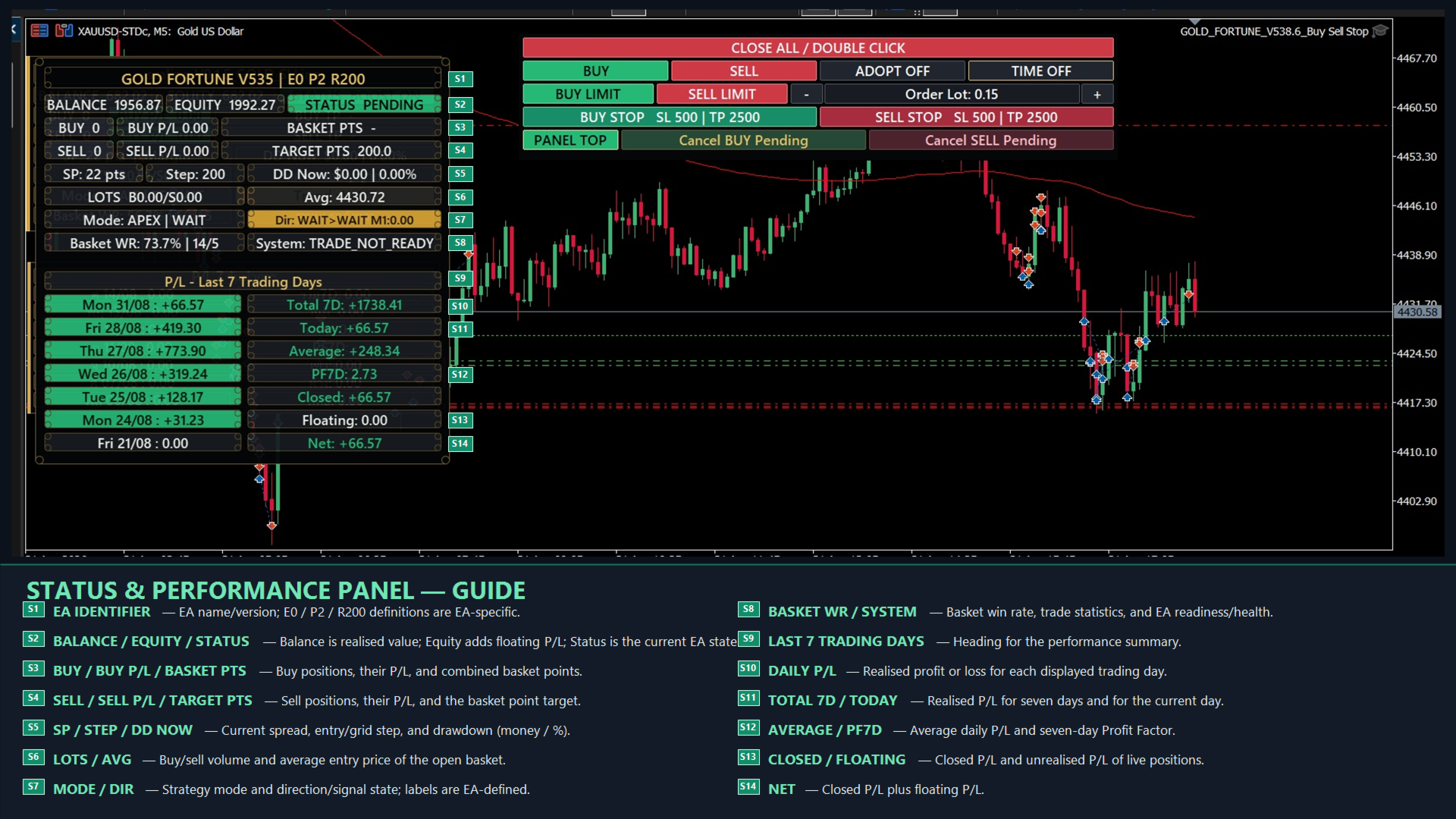
CLOSE ALL / DOUBLE CLICK
The first click activates confirmation for 3.5 seconds. Click again within that period to delete managed pending orders and close all positions controlled by the panel. This includes the separate manual Stop-order Magic Number and adopted positions when ADOPT is enabled.
BUY / SELL
Opens an immediate market position using the displayed Order Lot. A manual market position uses the strategy Magic Number and becomes part of the managed basket. The command is blocked if an opposite or mixed strategy basket already exists.
ADOPT ON / OFF
When enabled, the EA can include current-symbol positions with Magic Number 0 in its basket management. Adoption is blocked when the applicable positions contain mixed BUY and SELL sides. Use this function carefully because adopted positions can receive the basket Take Profit. A user-defined Stop Loss on an adopted Magic Number 0 position is preserved.
TIME ON / OFF
Enables or disables the built-in Thailand time filter based on UTC+7. The fixed blocked windows are 07:45-09:00, 12:30-14:00, and 18:00-22:30. During a blocked window, new automatic entries are suspended and managed pending orders are removed. Existing baskets continue to be managed.
BUY LIMIT / SELL LIMIT
Places a Good-Till-Cancelled Limit order using the displayed Order Lot. The fixed default distance is 2,000 points from the current market price. Limit orders are placed without Stop Loss and Take Profit. A filled Limit order uses the strategy Magic Number and becomes part of the managed basket.
ORDER LOT - / +
Decreases or increases the lot used by manual market, Limit, and Stop orders. The value is normalized to the minimum, maximum, and volume step allowed by the broker.
BUY STOP / SELL STOP
Places a Good-Till-Cancelled Stop order using the displayed Order Lot and the separate InpManualStopMagicNumber. The entry distance is controlled by InpStopOrderDistancePoints. The built-in Stop Loss is 500 points and the built-in Take Profit is 2,500 points. These Stop positions remain independent from the automatic recovery basket.
CANCEL BUY PENDING / CANCEL SELL PENDING
Deletes both Limit and Stop pending orders for the selected side on the current symbol.
PANEL STYLE
Cycles through the available status-panel layouts. The selected layout and manual Order Lot are saved for the next session.
INPUT PARAMETERS
InpRewardPoints = 200
Initial automatic Take Profit distance in symbol points.
InpStartLot = 0.01
Starting lot for automatic entries. It is also the initial Order Lot shown on the manual control panel.
InpMaximumOpenEntries = 80
Maximum number of managed basket entries. On a netting account, entry deals are counted even when the broker displays one aggregate position.
InpRecoveryStepPoints = 200
Distance in symbol points between recovery grid events.
InpRecoveryBasketTargetPoints = 100
Target distance in symbol points from the volume-weighted basket average after recovery entries exist.
InpMagicNumber = 26065380
Magic Number used by the automatic strategy, manual market orders, and manual Limit orders.
InpTPModifyMinIntervalMs = 1000
Compatibility parameter retained for older configurations. V538.3 synchronizes the live basket target immediately.
InpTPModifyMinChangePoints = 5
Compatibility parameter retained for older configurations. V538.3 uses the symbol point as its live TP synchronization tolerance.
InpFastTesterBasketTarget = true
Uses a virtual basket target in the Strategy Tester to reduce repeated position modifications and speed up testing. Live trading continues to use broker-side Take Profit synchronization for a single-direction basket.
InpStopOrderDistancePoints = 2000
Distance from the current price for manual BUY STOP and SELL STOP orders.
InpManualStopMagicNumber = 26065381
Separate Magic Number for manual Stop orders. It must not equal InpMagicNumber or the reserved Gold Fortune strategy Magic Numbers.
INSTALLATION AND USE
1. Install the EA in MetaTrader 5 and attach it to an XAUUSD chart. An M1 chart is recommended because the signal engine is based on M1 data, although the model uses its fixed internal timeframes regardless of the visible chart timeframe.
2. Enable Algo Trading in MetaTrader and allow algorithmic trading in the EA settings.
3. Use only one instance on the same symbol and account unless every instance has been specifically configured and tested to avoid overlapping management.
4. Set InpStartLot according to account size, leverage, symbol contract size, and acceptable risk. Confirm the broker minimum lot and volume step before live use.
5. Keep InpMagicNumber unique from unrelated Expert Advisors. Keep InpManualStopMagicNumber separate from the strategy Magic Number.
6. Allow MetaTrader to download sufficient M1 history. The panel can show MODEL_WARMING until enough closed-bar data is available.
7. Verify the value of one point for the broker symbol. All distances are symbol points, not a fixed dollar amount. For example, 2,000 points equals 20.00 in price when _Point is 0.01, but it equals 2.000 in price when _Point is 0.001.
8. Test the EA with Every tick based on real ticks and confirm behavior on the intended broker before live trading.
9. A hedging account is recommended for the complete two-way regime-recovery feature. Netting accounts can use the automatic model and same-direction basket recovery, but cannot hold simultaneous BUY and SELL positions on the same symbol.
10. Keep MetaTrader or a VPS running continuously while positions are open. A mixed basket can depend on the EA's software-side profit exit rather than individual broker Take Profit levels.
IMPORTANT RISK INFORMATION
The automatic strategy does not use a broker-side Stop Loss on its own managed basket positions. It can add recovery positions when price moves against the basket, up to the configured entry limit and available volume and margin caps. This approach can produce substantial floating drawdown and margin usage during a strong or prolonged market move.
Manual BUY STOP and SELL STOP positions use their own fixed Stop Loss and Take Profit, but they are still exposed to gaps, slippage, spread expansion, and broker execution conditions.
Reducing InpStartLot lowers the volume of the first and subsequent source-sized entries. Reducing InpMaximumOpenEntries limits the number of basket entries, but it can also stop the recovery sequence before the basket reaches its planned exit.
Always test on a demo account and in the Strategy Tester before using real funds. Trading results depend on market conditions, spread, commission, swap, execution, symbol specifications, leverage, and user settings. No trading system can guarantee profit or eliminate the risk of loss.