PropControl Trade Manager MT4

  • 유틸리티
  • Andrei Strashko
    Andrei Strashko
    제 이름은 안드레이입니다. 저는 전문 트레이더이자 MetaTrader 4 및 MetaTrader 5용 트레이딩 솔루션 개발자입니다. 10년 이상 트레이딩 로봇, 인디케이터, 스크립트 및 전략을 개발해 왔으며, 실제 트레이딩 경험과 깊은 프로그래밍 지식을 결합하고 있습니다.
  • 버전: 1.30
  • 활성화: 5
PropControl Trade Manager

PropControl Trade Manager is a professional trading panel for MetaTrader, built for traders who need speed, risk control, and strict discipline in every trade.

Manual trading can quickly become chaotic: oversized lots, delayed stop-loss placement, broken daily limits, entries during high spread, unmanaged drawdown, or a single mistake that violates a prop-firm rule. This utility is designed to reduce those risks and bring structure to your trading process.

PropControl Trade Manager does not trade instead of you and does not promise profit. It gives you something more important for manual trading: control before entry, during trade management, and before the trade is closed.

One-click trading

Open trades directly from the panel:

  • one-click BUY

  • one-click SELL

  • pending order support

  • quick access to position management

  • close current symbol

  • close all trades

  • close winning trades

  • close losing trades

The panel is built for manual traders, scalpers, intraday traders, and prop-firm traders who need fast execution without losing control over risk.

Automatic lot calculation

No more manual position-size calculations.

The utility calculates lot size based on:

  • account risk percentage

  • fixed money risk

  • fixed lot size

  • Stop Loss distance

  • balance or equity

  • symbol specifications

  • tick value

  • minimum and maximum lot

  • lot step

  • available margin

Before opening a trade, you can see the risk you are about to take.

Live Entry, Stop Loss, and Take Profit lines

The panel displays active trading levels directly on the chart:

  • Entry line

  • Stop Loss line

  • Take Profit line

  • additional targets for partial closing

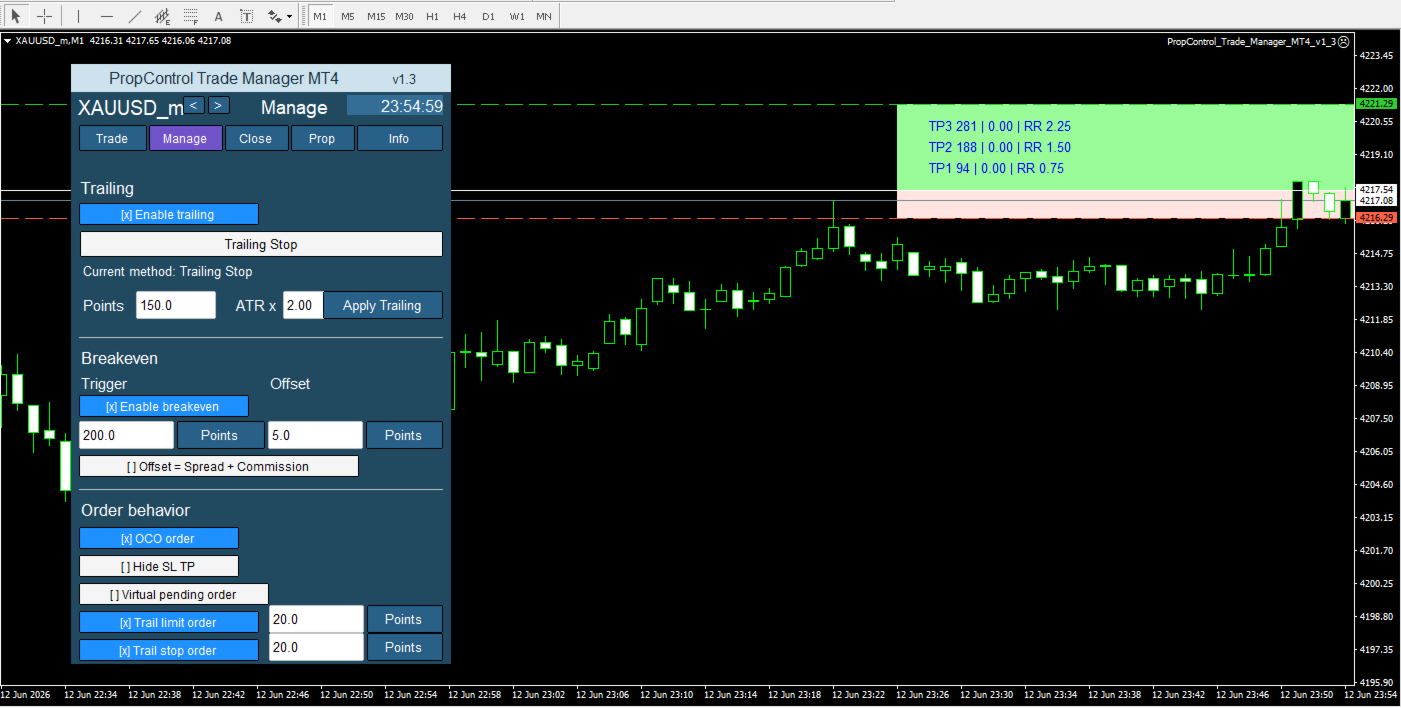
You can drag the levels on the chart, and the panel instantly recalculates risk, potential profit, Stop Loss distance, and Risk/Reward ratio.

This helps you plan the trade before execution instead of correcting mistakes after entry.

Up to four partial Take Profit levels

PropControl Trade Manager supports partial position closing with multiple targets.

You can use up to four Take Profit levels with automatic volume scaling.

This allows you to:

  • secure part of the profit earlier

  • keep part of the position running

  • reduce emotional pressure

  • manage several targets within one trade

TP-RR-Lock

The TP-RR-Lock function helps preserve your selected Risk/Reward structure.

When you move the Stop Loss, Take Profit targets can automatically adjust to keep the same R:R ratio. Each target can also be manually overridden if needed.

This is useful when you plan trades around models such as 1:2, 1:3, or your own custom risk/reward structure.

Smart Stop

Smart Stop helps you place Stop Loss levels based on market logic instead of random distance.

Available Stop Loss sources include:

  • market structure

  • pivot levels

  • ATR

  • trend direction

  • manual chart level

  • fixed distance in points

If one source is unavailable, the utility can use a backup method. The panel shows the Stop Loss source so you know exactly where the level comes from.

Trade management tools

After entry, the utility helps manage open positions.

Available management modes include:

  • Break-Even

  • Classic trailing

  • Step trailing

  • ATR trailing

  • PSAR trailing

  • Smart Stop trailing

You can move trades to break-even, trail the stop, protect floating profit, and manage positions with less manual routine.

PROP-FIRM COMPLIANCE

One of the core features of PropControl Trade Manager is the prop-firm rules control module.

The panel monitors:

  • Profit Target

  • Daily Loss Limit

  • Max Drawdown

  • Trading Days

  • current Floating P/L

  • Daily P/L

  • total drawdown

  • limit status

Progress bars display the key restrictions: profit target, daily loss limit, maximum drawdown, and trading days.

You can immediately see how close you are to your limits.

Prop-firm presets

Inside the panel, you can select:

  • Firm

  • Program

  • Account

  • Eval mode

  • Funded mode

This makes setup faster and helps reduce manual input mistakes.

The utility supports prop-firm style logic for daily loss, maximum drawdown, profit target, and trading days.

Dangerous trade blocking

When prop limits are enabled, the utility can block trades that may violate your rules.

For example, if a new trade could push the account beyond the daily loss limit or maximum drawdown limit, the trading button can be blocked.

This is especially important for traders who lose prop accounts not because of their strategy, but because of one unnecessary trade.

Auto-close on breach

When a critical limit is reached, you can enable automatic position closing.

This function is designed to protect the account when a limit is already being reached or is close to being violated.

You decide whether to use warnings and new-trade blocking only, or to activate stricter protection.

Spread filter

PropControl Trade Manager monitors the current spread.

If the spread is higher than your allowed limit, trade opening can be blocked.

This helps avoid poor entries:

  • during spread expansion

  • in thin market conditions

  • before news

  • during sharp volatility

  • on unstable symbols

The panel shows both the current spread and your maximum allowed spread.

News awareness

The utility can display upcoming economic events and help you avoid trading during high-risk periods.

This is useful when the market may expand spread, move aggressively, or become unstable around important news releases.

Daily trading control

The panel displays key trading-day information:

  • Time

  • Spread

  • Float

  • Day P/L

  • Drawdown

You do not only see the current trade. You also see the condition of the trading day.

This helps you stop on time, avoid overtrading, and prevent one mistake from turning into a series of violations.

Mass actions

For faster trade management, the utility includes mass-action commands:

  • close all trades

  • close winning trades

  • close losing trades

  • move positions to break-even

  • set common Stop Loss

  • set common target

These tools save time and are especially useful for active manual trading.

Multi-symbol workflow

The utility can be used on different charts and symbols.

Each chart can have its own settings, and the panel can save parameters separately. This is useful when trading multiple instruments and you do not want to configure everything again each time.

Practical interface

The panel is divided into clear tabs:

  • Trade

  • Manage

  • Close

  • Prop

  • Info

  • Settings

Inside the panel, you can configure trading, trade management, filters, prop-firm protection, and system settings.

The interface is designed to keep the most important actions close and the most important limits always visible.

Themes and scaling

The utility supports:

  • dark theme

  • light theme

  • panel scaling

  • chart-specific settings

You can adapt the panel to your terminal layout and personal workflow.

Who is this utility for?

PropControl Trade Manager is designed for:

  • manual traders

  • scalpers

  • intraday traders

  • prop-firm traders

  • traders who need strict risk control

  • traders who often break rules because of emotion

  • traders who want faster order execution

  • traders who want to see risk before entering the market

The main advantage

PropControl Trade Manager does not try to replace the trader.

It helps the trader act faster, more accurately, and with more discipline.

You make the trading decision.
The utility helps you check the risk, calculate the lot, place the levels, monitor the limits, and avoid technical mistakes that can cost you the account.

PropControl Trade Manager is a trading panel for traders who want to control the trade before entry, during management, and until the final close.

제작자의 제품 더 보기
내 제품 Trade Assistant MT4 Standard 는 MetaTrader 4용 트레이딩 패널입니다. 빠른 리스크 계산, 랏 계산, 시각적인 거래 계획, 그리고 차트에서 직접 기본 주문 실행이 필요한 수동 트레이더를 위해 제작되었습니다. 이 제품은 무료 리스크 계산기 Risk Calculator Panel MT4 와 전체 버전 Trade Assistant MT4 PRO 사이에 있는 중간 버전입니다. Standard 버전은 거래 준비와 진입에 필요한 주요 기능은 필요하지만, 고급 자동 포지션 관리는 필요하지 않은 트레이더에게 적합합니다. 이 패널은 리스크를 기준으로 포지션 크기를 미리 계산하고, Entry / Stop Loss / Take Profit 레벨을 구성하며, 리스크/수익 비율을 확인하고, 거래를 열고, 기본적인 포지션 관리를 수행하는 데 도움을 줍니다. 사용 설명서: Trade Assistant MT4/MT5 Standard User Guide 주요 기능 리스크 계
내 제품 Trade Assistant MT5 Standard 는 MetaTrader 5용 트레이딩 패널입니다. 빠른 리스크 계산, 랏 계산, 시각적인 거래 계획, 그리고 차트에서 직접 기본 주문 실행이 필요한 수동 트레이더를 위해 제작되었습니다. 이 제품은 무료 리스크 계산기 Risk Calculator Panel MT5 와 전체 버전 Trade Assistant MT5 PRO 사이에 있는 중간 버전입니다. Standard 버전은 거래 준비와 진입에 필요한 주요 기능은 필요하지만, 고급 자동 포지션 관리는 필요하지 않은 트레이더에게 적합합니다. 이 패널은 리스크를 기준으로 포지션 크기를 미리 계산하고, Entry / Stop Loss / Take Profit 레벨을 구성하며, 리스크/수익 비율을 확인하고, 거래를 열고, 기본적인 포지션 관리를 수행하는 데 도움을 줍니다. 사용 설명서: Trade Assistant MT4/MT5 Standard User Guide 주요 기능 리스크 계
내 제품 제품 라인 Trade Assistant MT5 Standard Trade Assistant MT5 PRO Risk Calculator Panel MT5 는 MetaTrader 5용 무료 패널입니다. 이 도구는 차트에서 직접 리스크 계산, 포지션 크기 계산, 시각적인 거래 계획을 할 수 있도록 설계되었습니다. 이 패널은 트레이더가 설정한 리스크를 기준으로 사전에 랏을 계산하고, Entry / Stop Loss / Take Profit 레벨을 구성하며, 리스크/수익 비율을 확인하고, 시장에 진입하기 전에 거래 구조를 볼 수 있도록 도와줍니다. 이 도구는 거래를 열지 않으며, 포지션을 닫지 않고, 주문을 전송하지 않습니다. 계산, 시각화, 거래 시나리오 준비만을 위한 도구입니다. 사용 설명서: Risk Calculator Panel MT4/MT5 User Guide 주요 기능 리스크 계산 Risk Calculator Panel MT5 는 시장에 진입하기 전에 거래의 잠재 리스크
FREE
사용 설명: Trade Assistant MT4/MT5 PRO 사용 설명 열기 Trade Assistant MT4/MT5 PRO 사용 설명 Trade Assistant MT4/MT5 PRO는 MetaTrader 4/5용 전문 트레이딩 패널입니다. 빠르고 편리하며 시각적으로 명확하게 거래를 제어하고 싶은 트레이더를 위해 제작되었습니다. 이 제품은 반복적인 수동 작업을 줄이고, 주문 실행과 관리 속도를 높이며, 리스크 관리를 표준화하고, 수동 트레이딩을 더 규율 있게 만들어 줍니다. 이 도구는 트레이더 대신 매매 신호를 찾지 않으며, 마법 같은 결과를 약속하지도 않습니다. 역할은 훨씬 더 실용적입니다. 차트 위에서 바로 사용할 수 있는 편리한 트레이딩 인프라를 제공하는 것입니다. 진입 지점, 거래 아이디어, 시장 논리는 트레이더가 직접 선택합니다. Trade Assistant MT4/MT5 PRO는 그 아이디어를 명확한 리스크, 포지션 크기, Stop Loss, Take Profit,
Golden Wolf SMC Trendline is a professional market structure and Smart Money Concepts indicator for MetaTrader 5. Golden Wolf SMC Trendline also works together with Golden Wolf SMC Trendline Alerts:  https://www.mql5.com/ru/market/product/179163 Golden Wolf SMC Trendline is the main visual indicator. It analyzes the chart and displays market structure, zones, signals and the current market condition. Golden Wolf SMC Trendline Alerts is a companion notification indicator. It reads information fro
FREE
내 제품 제품 라인 Trade Assistant MT4 Standard Trade Assistant MT4 PRO Risk Calculator Panel MT4 는 MetaTrader 4 터미널용 전문 리스크 계산 패널입니다. 이 도구는 트레이더가 거래 전에 주요 매개변수인 랏 크기, 금액 기준 리스크, 잠재 수익, Risk/Reward 비율, 포지션 가치 및 예상 마진을 미리 계산할 수 있도록 도와줍니다. 패널은 차트에서 직접 작동합니다. 트레이더는 외부 계산기를 사용하거나 포지션 크기를 수동으로 계산할 필요가 없습니다. 거래 방향을 선택하고, 리스크를 설정한 뒤, Entry, Stop Loss, Take Profit 레벨을 지정하면 Expert Advisor가 핵심 매개변수를 자동으로 계산합니다. 사용 설명서: Risk Calculator Panel MT4/MT5 User Guide 주요 기능 설정한 리스크 기준 랏 크기 계산 트레이더는 리스크를 Balance, Equity 또는
FREE
Golden Wolf SMC Trendline is a professional market structure and Smart Money Concepts indicator for MetaTrader 4.   Golden Wolf SMC Trendline also works together with Golden Wolf SMC Trendline Alerts:  https://www.mql5.com/ru/market/product/179256 Golden Wolf SMC Trendline is the main visual indicator. It analyzes the chart and displays market structure, zones, signals and the current market condition. Golden Wolf SMC Trendline Alerts is a companion notification indicator. It reads information f
FREE
My products   Important:   Quantum SuperTrend AI Alerts MT5 works in combination with the main   Quantum SuperTrend AI   indicator. Quantum SuperTrend AI Alerts MT5- user guid   Quantum SuperTrend AI Alerts MT5 is a notification indicator and on-chart dashboard for MetaTrader 5. It is designed to work together with the main Quantum SuperTrend AI indicator and provide clear alerts when trading signals appear. This product does not generate independent trading signals. It reads the signal buffe
FREE
My products   In the product line: Candlestick Pattern Detector   — a free basic version. Candlestick Patterns Standard   — a paid single-chart version with extended patterns and filters Japanese Candlestick Patterns Pro MT5   — a professional single-chart version with a summary table Multi-Currency Candlestick Pattern Scanner   — the ultimate version: a multi-currency and multi-timeframe scanner with a dashboard panel  Every buyer of this indicator additionally receives a Bonus Package: The Ca
FREE
My products: https: // www.mql5.com/ru/users/astra077/seller In the product line: Candlestick Pattern Detector   — a free basic version. Candlestick Patterns Standard   — a paid single-chart version with extended patterns and filters  https://www.mql5.com/ru/market/product/174659 Japanese Candlestick Patterns Pro MT4   — a professional single-chart version with a summary table  https://www.mql5.com/ru/market/product/174681 Multi-Currency Candlestick Pattern Scanner   — the ultimate version: a mu
FREE
My products   Important:   Quantum SuperTrend AI Alerts MT4 works together with   Quantum SuperTrend AI MT4 . Quantum SuperTrend AI Alerts MT4 Quantum SuperTrend AI Alerts MT4 is a notification and dashboard add-on for Quantum SuperTrend AI MT4 . It reads the signals from the main Quantum SuperTrend AI MT4 indicator and sends alerts when a new trade signal or exit signal appears. This tool is designed for traders who already use Quantum SuperTrend AI MT4 and want to receive clear notification
FREE
My products Product Line Trade Assistant MT4 Standard Trade Assistant MT4 PRO Risk Calculator Panel MT4   is a professional risk calculation panel for the MetaTrader 4 terminal. The tool helps traders calculate trade parameters in advance: lot size, monetary risk, potential profit, Risk/Reward ratio, position value and estimated margin. The panel works directly on the chart. The trader does not need to use third-party calculators or calculate position size manually. It is enough to select the tr
FREE
Universal Trade Copier MT4  is a professional local trade copying utility designed to copy trades between MetaTrader 4 and MetaTrader 5 terminals on the same computer or VPS. The product supports multiple copying directions: MT4 → MT4 MT5 → MT5 MT4 → MT5 MT5 → MT4 To copy trades in MT5, you need to purchase  Universal Trade Copier MT5   The copier is suitable for traders who manage multiple accounts, use different MetaTrader terminals, work with different brokers, or need to copy trades betwe
My products: https: // www.mql5.com/ru/users/astra077/seller In the product line: Candlestick Pattern Detector   — a free basic version. Candlestick Patterns Standard   — a paid single-chart version with extended patterns and filters  https://www.mql5.com/ru/market/product/174659 Japanese Candlestick Patterns Pro MT4   — a professional single-chart version with a summary table  https://www.mql5.com/ru/market/product/174681 Multi-Currency Candlestick Pattern Scanner   — the ultimate version: a mu
My products: https: // www.mql5.com/ru/users/astra077/seller In the product line: Candlestick Pattern Detector   — a free basic version. Candlestick Patterns Standard   — a paid single-chart version with extended patterns and filters  https://www.mql5.com/ru/market/product/174659 Japanese Candlestick Patterns Pro MT4   — a professional single-chart version with a summary table  https://www.mql5.com/ru/market/product/174681 Multi-Currency Candlestick Pattern Scanner   — the ultimate version: a m
My products: https: // www.mql5.com/ru/users/astra077/seller In the product line: Candlestick Pattern Detector   — a free basic version. Candlestick Patterns Standard   — a paid single-chart version with extended patterns and filters  https://www.mql5.com/ru/market/product/174659 Japanese Candlestick Patterns Pro MT4   — a professional single-chart version with a summary table  https://www.mql5.com/ru/market/product/174681 Multi-Currency Candlestick Pattern Scanner   — the ultimate version: a mu
사용 설명:   Trade Assistant MT4/MT5 PRO 사용 설명 열기 Trade Assistant MT4/MT5 PRO 사용 설명 Trade Assistant MT4/MT5 PRO는 MetaTrader 4/5용 전문 트레이딩 패널입니다. 빠르고 편리하며 시각적으로 명확하게 거래를 제어하고 싶은 트레이더를 위해 제작되었습니다. 이 제품은 반복적인 수동 작업을 줄이고, 주문 실행과 관리 속도를 높이며, 리스크 관리를 표준화하고, 수동 트레이딩을 더 규율 있게 만들어 줍니다. 이 도구는 트레이더 대신 매매 신호를 찾지 않으며, 마법 같은 결과를 약속하지도 않습니다. 역할은 훨씬 더 실용적입니다. 차트 위에서 바로 사용할 수 있는 편리한 트레이딩 인프라를 제공하는 것입니다. 진입 지점, 거래 아이디어, 시장 논리는 트레이더가 직접 선택합니다. Trade Assistant MT4/MT5 PRO는 그 아이디어를 명확한 리스크, 포지션 크기, Stop Loss, Take Profit
My products   Important:   Quantum SuperTrend AI MT4 works together with   Quantum SuperTrend AI Alerts MT4 Quantum SuperTrend AI MT4 is a visual SuperTrend-based indicator for MetaTrader 4, designed to identify trend entries, filter weak signals, and display trade statistics directly on the chart. The indicator shows trend direction, Buy/Sell signals, ATR Take Profit levels, ATR TP exits, reverse SuperTrend exits, and optional AI Exit signals. A built-in statistics panel displays total trades,
PatternGuard VWAP Trader — a Smart Expert Advisor for Market Structure-Based Trading PatternGuard VWAP Trader is an advanced trading Expert Advisor designed to identify high-quality entry points after price exits a zone of market uncertainty. The strategy is based on a combination of VWAP logic, a NO TRADE zone, candlestick pattern confirmation, trend filtering, and flexible trade management. The EA does not open trades randomly. It analyzes market structure, waits for price to leave a consolida
Gold Wolf EA MT4
Andrei Strashko
Gold Wolf EA — Automated Gold Trading Expert Advisor for MT4 / MT5 Gold Wolf EA is an automated trading Expert Advisor for MetaTrader 4 and MetaTrader 5, developed for trading XAUUSD based on trend-following logic, market condition filtering, and controlled risk management. The EA is not designed for aggressive high-frequency trading. Its main objective is to identify suitable market conditions, avoid unnecessary entries, and trade only when the internal strategy conditions are met. Gold Wolf EA
Dream of the Golden Wolf EA The gold market moves fast, but not every movement is suitable for trading. Dream of the Golden Wolf EA is an automated trading Expert Advisor designed for XAUUSD and optimized for the M5 timeframe . The EA analyzes market structure, trend direction, momentum, price activity, and additional confirmation signals before opening a trade. The main goal of the EA is not to open as many trades as possible, but to identify higher-quality trading conditions where several fact
Golden Wolf Grid PRO is an Expert Advisor for MetaTrader 4 , designed for automated trading on Gold / XAUUSD using the M15 timeframe . The EA is based on a grid trading strategy and is created to work with market fluctuations, opening and managing trades automatically according to the selected parameters. Golden Wolf Grid PRO comes with optimized settings for XAUUSD M15 , so you can use the prepared configuration or perform your own optimization and forward testing according to your broker, acco
Golden Wolf Investors Dream is designed for traders who want fast, clear, and practical market analysis directly on the chart. The indicator combines the key elements of Bill Williams’ methodology and presents them in a clean visual format. Its main purpose is to help traders quickly identify market direction, read momentum, track fractals, monitor the Alligator, and receive clear BUY and SELL signals. Golden Wolf Investors Dream is especially useful when you need to understand whether the marke
MPA Trend Dashboard — Multi-Symbol Market Scanner for MetaTrader 4 MPA Trend Dashboard is a multi-symbol technical analysis indicator for MetaTrader 4. It is designed to help traders monitor several trading instruments from one chart and quickly evaluate market direction using a combination of popular technical indicators. The indicator displays a compact signal dashboard directly on the chart. For each selected symbol, it shows BUY, SELL or WAIT signals based on multiple market analysis tools.
Golden Wolf SMC Trendline Alerts is a companion notification indicator for MetaTrader 4, designed to work together with the main indicator Golden Wolf SMC Trendline MT4:  https://www.mql5.com/ru/market/product/179255 This indicator is not a replacement for the main dashboard system. It is an additional monitoring and alert module that expands the functionality of  Golden Wolf SMC Trendline MT4  by displaying a clean information panel on the chart and sending notifications when important market s
보너스: Golden Wolf GameChanger 구매 시 Trade Assistant MT5 PRO 를 선물로 드립니다. 구매 후 MQL을 통해 저에게 메시지를 보내 주세요. 본 혜택은 한정 기간 동안 제공됩니다. Golden Wolf GameChanger는 MetaTrader 5용 강력한 트레이딩 EA로, Game Changer 인디케이터의 신호를 유연한 주문 관리, 리스크 관리, 거래 시리즈 관리 및 보호 알고리즘을 갖춘 자동매매 시스템으로 전환하고자 하는 사용자를 위해 제작되었습니다. 이 EA는 XAUUSD / GOLD 골드 거래를 위해 제작 및 최적화되었으며, 권장 타임프레임은 M15입니다. 골드는 높은 변동성, 강한 움직임, 빠른 반전으로 잘 알려져 있습니다. 따라서 Golden Wolf GameChanger EA는 빠른 반응 속도, 규율, 정확한 트레이딩 알고리즘 실행이 중요한 액티브 트레이딩에 맞춰 설계되었습니다. EA의 개념 Golden Wolf GameChang
Golden Wolf GameChanger is a powerful visual signal indicator for MetaTrader 4, created for traders who want to see the market direction faster, cleaner, and with more confidence. The market is full of noise. Candles move fast. Price changes direction without warning. Many traders enter too late, exit too early, or miss the real movement because they do not have a clear visual structure on the chart. Golden Wolf GameChanger was designed to solve this problem. This indicator combines trend logic,
My products Trade Assistant MT4 Standard   is a trading panel for MetaTrader 4, created for manual traders who need fast risk calculation, lot size calculation, visual trade planning and basic order execution directly from the chart. It is an intermediate version between the free risk calculator   Risk Calculator Panel MT4   and the full version   Trade Assistant MT4 PRO . The Standard version is suitable for traders who need the main tools for preparing and opening trades, but do not require ad
Universal Trade Copier MT4    is a professional local trade copying utility designed to copy trades between MetaTrader 4 and MetaTrader 5 terminals on the same computer or VPS. The product supports multiple copying directions: MT4 → MT4 MT5 → MT5 MT4 → MT5 MT5 → MT4 To copy trades in MT5, you need to purchase   Universal Trade Copier MT5  The copier is suitable for traders who manage multiple accounts, use different MetaTrader terminals, work with different brokers, or need to copy trades bet
Second and Custom Timeframe Charts See the market between standard timeframes. Second and Custom Timeframe Charts is a professional chart utility for MetaTrader 4 that creates synthetic candles for non-standard timeframes directly from market data. It is designed for traders who need more flexibility than the default MT4 timeframe set can provide. Standard charts show only fixed periods. But the market does not always move in standard blocks. Sometimes the most important structure is visible on
필터:
Андрей
37
Андрей 2026.06.14 17:04 
 

사용자가 평가에 대한 코멘트를 남기지 않았습니다

리뷰 답변