Inflection
- Experts
- 버전: 1.30
- 업데이트됨: 12 6월 2026
- 활성화: 5

🚀 LAUNCH PRICING — Price increases $25 after every 5 sales.
Current price reflects early-adopter pricing. The 1-month rental ($30) is the smartest way to test Inflection on your own broker before committing.
Inflection EA - Trade The Moments Where Direction Changes
Inflection automatically detects support and resistance levels on your chart, draws them in real time, and trades them with disciplined risk management. Three detection algorithms. Adaptive market-condition switching. Built-in prop firm protection. No manual analysis required.
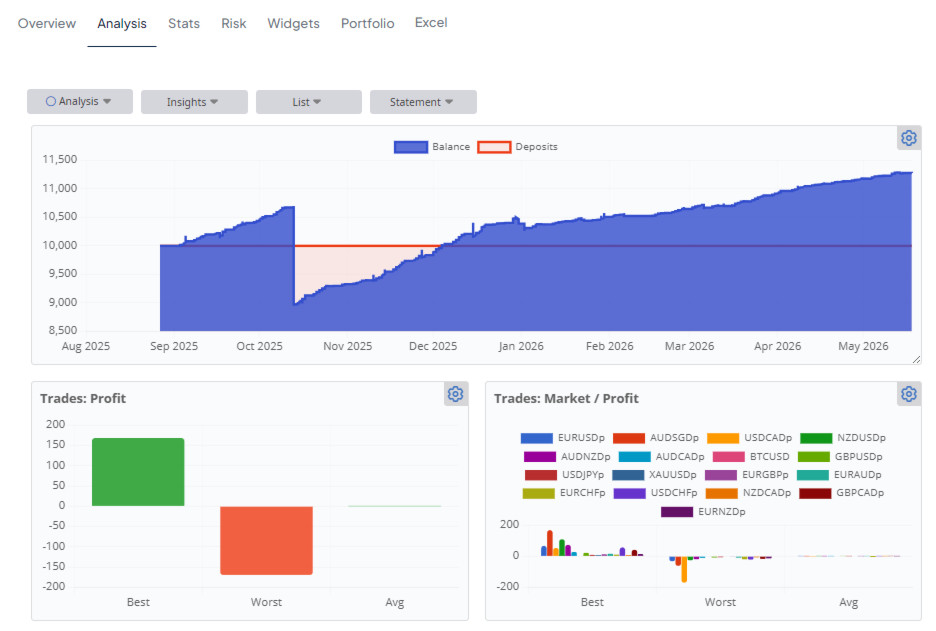
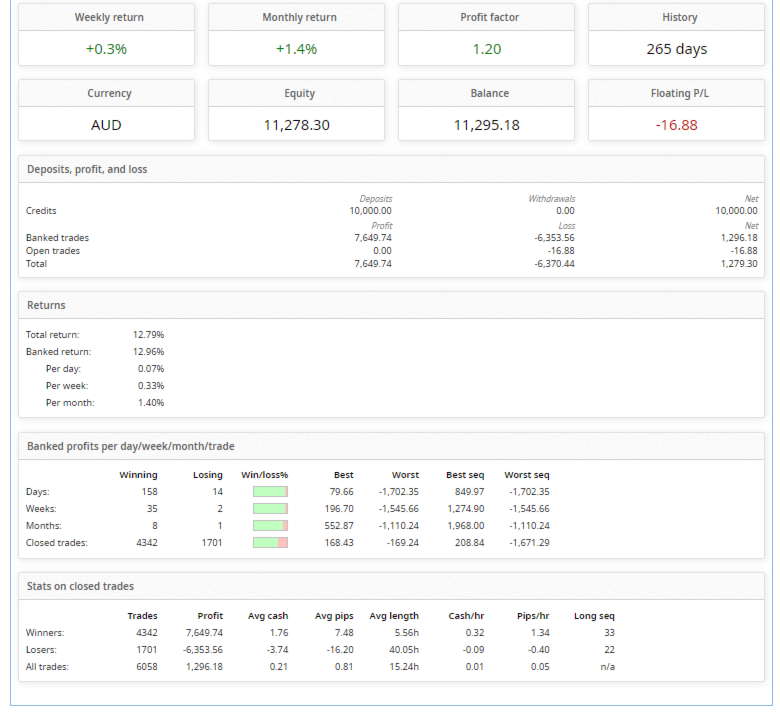
Live demo since January 20, 2026: five consecutive profitable months, 71.5% win rate across 2,300+ trades, maximum single-trade loss only 0.2% of account balance.
Verify the live demo at: www.fxblue.com/users/Public-stats (filter by magic numbers 200001-200010 to isolate Inflection's attributed trades).
Proven Performance
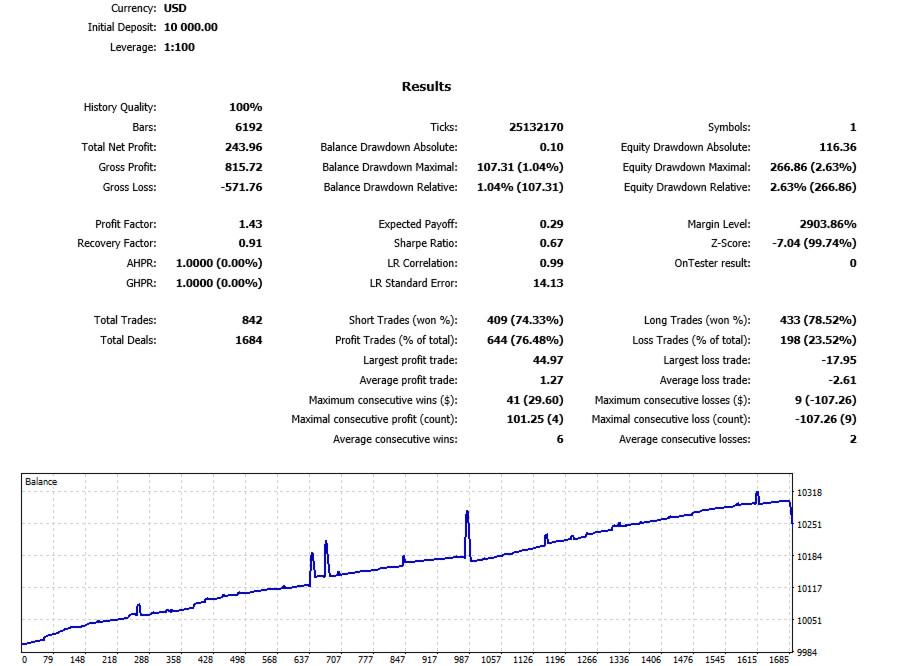
12-Month Backtest - The NZDCAD Standout
NZDCAD H1 backtested on MetaTrader 5 Strategy Tester with 100% modeling quality, using conservative default settings - no aggressive tuning, no curve fitting:
| Metric | NZDCAD (Conservative Defaults) |
|---|---|
| Test Period | 12 months (H1) |
| Win Rate | 76% |
| Maximum Equity Drawdown | 2.63% |
| Total Trades | 842 |
| Profit Factor | 1.43 |
| Recovery Factor | 0.91 (near gold-standard) |
| Equity Curve Linearity | 0.99 (almost perfectly straight) |
| Modeling Quality | 100% |
2.63% maximum equity drawdown across an entire year of trading. That's well below every major prop firm's loss limit. Combined with a 76% win rate and a near-perfectly linear equity curve (0.99 LR correlation), NZDCAD shows what Inflection delivers when paired with conservative default settings on the right pair.
This is the result you should expect on minor crosses. No promotional cherry-picking - just default settings, real history, full year of data.
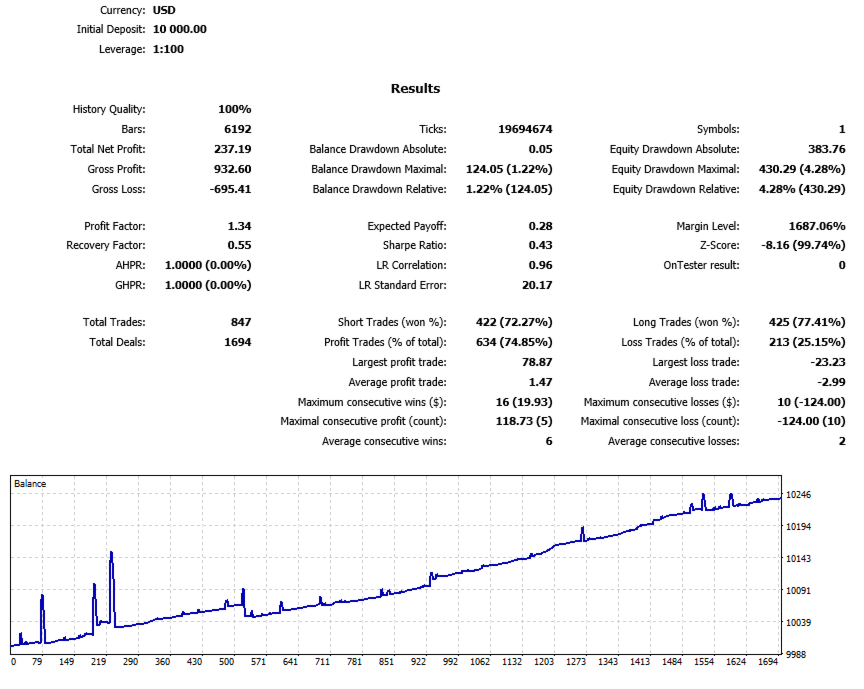
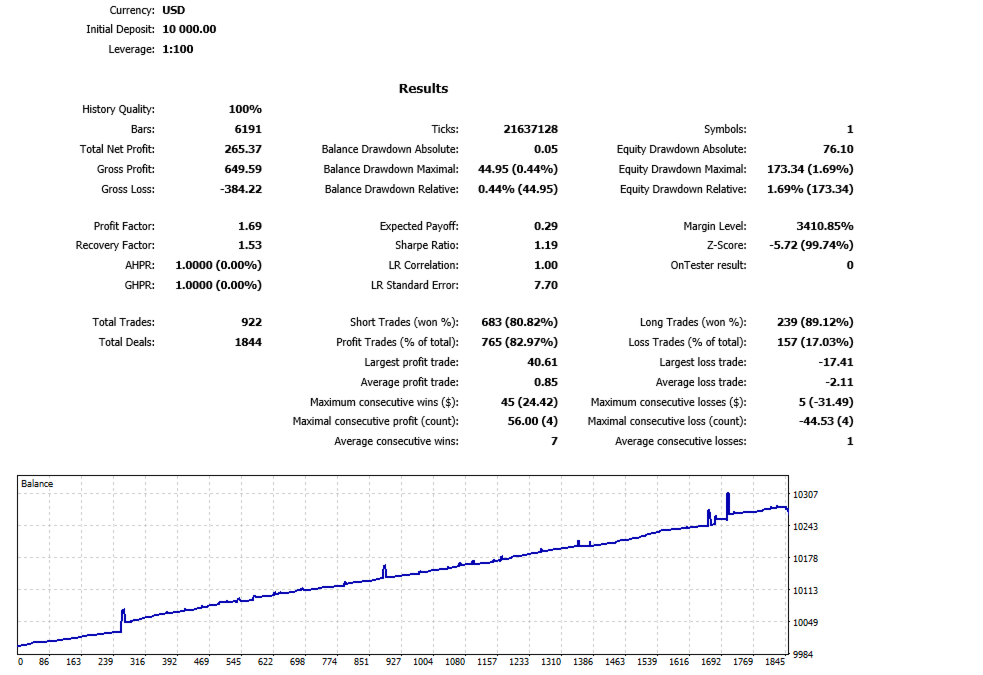
Additional 12-Month Backtests
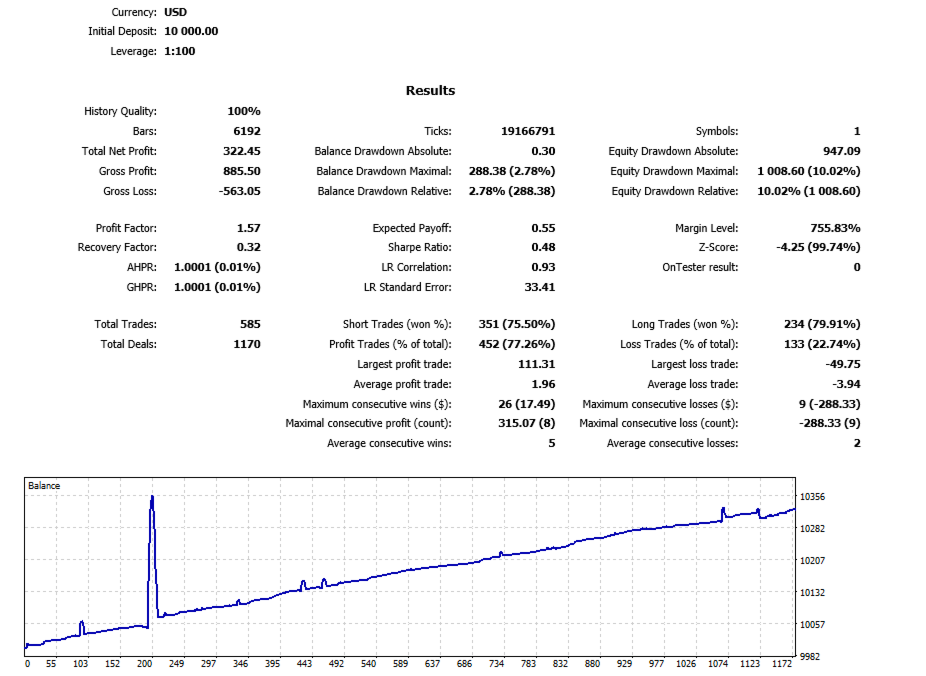
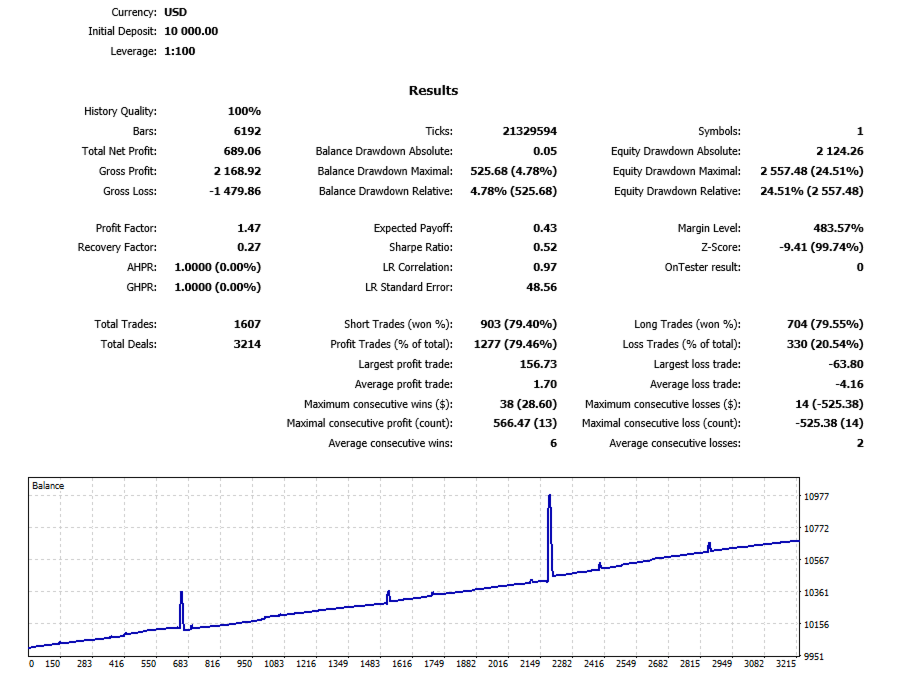
| Pair (H1) | Win Rate | Max Equity DD | Trades | Profit Factor |
|---|---|---|---|---|
| USDCAD | 75% | 4.28% | 847 | 1.34 |
| EURGBP | 77% | 10.02% | 585 | 1.57 |
All three backtests use the same conservative parameter set and pass FTMO Challenge maximum drawdown requirements. Full HTML reports available on request.
Live Demo Track Record
Inflection took over execution on a live AUD demo account on January 20, 2026 and has produced five consecutive profitable months:
- January 2026 (from the 20th): +$45.38
- February 2026: +$138.18
- March 2026: +$270.31
- April 2026: +$265.45
- May 2026 (partial): +$113.61
2,306 closed trades. 71.5% win rate. 1.55 profit factor. Maximum single trade loss only $21 on a $10,000 account (0.21% of balance).
FX Blue verification: www.fxblue.com/users/Public-stats (filter by magic numbers 200001-200010 for Inflection-attributed trades). Detailed trade-by-trade CSV available on request.
Why Inflection Wins
- Three S/R detection algorithms - Standard (fractal + hit-count), Volume-Weighted, and Composite. Switch per pair, per session, per strategy. No recompiling.
- Adaptive Trading Mode auto-classifies the market (ranging, trending up, trending down, volatile) and auto-adjusts entry logic. You don't have to babysit your charts.
- 14-parameter prop firm protection with Static AND Trailing drawdown, equity-based calculation, safety buffer, breach actions. Built for FTMO, MyForexFunds, The Funded Trader.
- Cross-EA coordination monitors positions across multiple EAs by magic number. Prevents direction conflicts. Most EAs don't have this.
- Cross-pair currency exposure protection across 8 currencies. Prevents accidental over-concentration when running multiple instances.
- Four operating modes from full automation to indicator-only. Match your workflow.
- 120+ configurable parameters with conservative defaults that work out of the box.
How Inflection Trades
Inflection scans price history using your chosen detection algorithm and identifies the strongest support and resistance levels. These levels are drawn on your chart in real time and updated as new price data arrives.
When price approaches one of these levels, Inflection waits for confirmation and places a position in the direction of the level's edge. If the market moves against the first entry, the EA opens a calculated basket using grid logic - but only inside a pre-defined safe zone, and only with your configured lot progression. When the basket reaches its target, it closes as a coordinated unit.
The result: trades placed at high-probability reversal zones with a structured recovery plan if the first entry misfires. Not a random grid that opens on every tick. Not a martingale that doubles forever. A measured S/R-based system that respects your equity.
Three S/R Detection Algorithms
| Algorithm | How It Works | Best For |
|---|---|---|
| Standard | Fractal pivots weighted by historical hit count. Stronger levels = more confirmations. | Trending markets with clear pivot structure |
| Volume-Weighted | Levels weighted by volume traded at that price. High-volume zones become high-conviction S/R. | Liquid major pairs and indices |
| Composite | Combines all methods plus round-number bonuses and moving-average confluence. Scored on strength scale 1-10. | All conditions - the most sophisticated option |
Each algorithm has its own dedicated parameter set: fractal lookback, hit-count threshold, volume averaging period, round number interval, configurable moving averages, and minimum composite strength.
Adaptive Strategy Engine
Most EAs trade the same way regardless of market conditions. Inflection's Adaptive Trading mode continuously analyses the market and classifies it as:
- Ranging - sideways consolidation between clear levels
- Trending Up - sustained directional move higher
- Trending Down - sustained directional move lower
- Volatile - elevated movement without clear direction
Based on the classification, the entry logic auto-adjusts. Reassessment runs every 15 minutes by default. You don't have to manually retune as conditions evolve - Inflection handles the adjustment.
Four Operating Modes
Mode 1: Auto S/R (Default) - Fully automated. Inflection detects S/R levels, opens positions when price interacts, manages baskets, runs recovery logic, closes trades to your targets. Set parameters once, monitor occasionally. The recommended mode for most traders.
Mode 2: Manual - On-chart BUY, SELL, HEDGE BUY, HEDGE SELL buttons. You click to open. EA manages exits, trailing stops, basket logic. Or skip the buttons entirely and use Inflection as a pure S/R indicator while you trade manually.
Mode 3: Semi-Auto S/R - For discretionary traders. Draw a horizontal line where you want to enter, type "buy" or "sell" in the line description, and Inflection executes at your level with full risk management active.
Mode 4: Semi-Auto ATR - Same manual line trigger, but grid spacing uses ATR-based intervals instead of S/R levels.
All four modes share the same risk management framework. The choice is purely how much execution control you delegate.
Prop Firm Protection Suite (14 Parameters)
If you trade a funded account, this section alone justifies the rental:
- Daily and Maximum Drawdown Guards with percentage limits and configurable reset time
- Static OR Trailing max drawdown (Trailing is what FTMO uses)
- Balance-based OR Equity-based calculation (Equity includes floating P/L - safer)
- Margin Level Emergency Closure at 150% - hard floor against broker stop-out
- Warning threshold (default 80% of limit)
- Safety buffer that stops trading before the real limit
- Five breach actions - close all, disable trading, resume next day, alert, or combinations
- Profit target lock - optional auto-stop when your firm's target is reached
Built in, not bolted on. Designed with FTMO, MyForexFunds, The Funded Trader, and similar challenge structures in mind.
Risk Management Stack
- Triple-layer basket exit - three profit targets ($, points, %) and three loss limits running simultaneously. First to fire closes the basket.
- Configurable trailing stop with activation threshold, step size, and step distance.
- Three lot progression modes - Fixed (no scaling), Multiply (geometric), Sum (linear - safer).
- Four risk calculation methods - Fixed Lot, % of Balance, Fixed Dollar Amount, Points Value.
- Three stop distance methods - Fixed Points, ATR Multiplier, % of Entry Price.
- Cross-pair currency exposure protection across 8 currencies (USD, EUR, GBP, JPY, AUD, NZD, CAD, CHF).
- Cross-EA coordination - monitor other bots' positions and respect global order limits.
Time And News Filters
- Per-day trading hours - independent Monday through Friday schedules
- Friday auto-close at configurable time before weekend
- Three-tier news filter - high, medium, low impact (each with independent before/after windows)
- Custom news keywords for specific events (FOMC, NFP, CPI, etc.)
- Per-currency filtering - block only relevant currency news for each pair
- Two news providers - MQL5 Economic Calendar and Investing.com
Inflection vs Typical Marketplace EAs
| Typical EA | Inflection EA |
|---|---|
| One detection method | Three S/R algorithms (Standard, Volume, Composite) |
| Single mode (full automation only) | Four operating modes for any workflow |
| Random grid or martingale | Real S/R detection with strength scoring |
| Fixed strategy regardless of market | Adaptive mode auto-switches based on conditions |
| One profit target | Three simultaneous ($, points, %) |
| No prop firm safeguards | 14-parameter protection suite including Trailing DD |
| Balance-only DD calculation | Choice of Balance or Equity-based |
| No coordination with other EAs | Multi-EA magic monitoring |
| Treats pairs in isolation | Cross-pair exposure protection on 8 currencies |
| One time filter for the whole week | Five independent per-day schedules |
| 20-40 parameters | 120+ configurable settings |
What's Included With Your Rental
- Inflection EA - Full version with every feature unlocked. Same product as the lifetime purchase, just time-limited.
- Three Optimized Setfiles - Conservative Crosses (NZDCAD, USDCAD, AUDCAD), Major Pairs (EURUSD, GBPUSD, USDJPY), and FTMO Challenge-Ready (sub-10% drawdown enforced). Load one and trade in 60 seconds.
- Priority Support - Direct private message support via MQL5. Typical response within 24 hours.
- Future Feature Updates - Any new modes or features added in v1.1 and beyond included free with active rental.
To receive your setfile package, send me a private message after purchase or rental activates. I will send all three setfiles directly to you with brief setup guidance for your account size and pair preferences.
Recommended Setup
- Platform: MetaTrader 5 (Hedging account type required)
- Pairs: Any liquid major or minor cross. NZDCAD is the standout based on backtests; USDCAD and AUDCAD also perform well on conservative defaults.
- Timeframe: H1 recommended
- Minimum capital: $1,000 per pair (or your prop firm's minimum)
- VPS: Recommended for 24/5 operation
- Broker: ECN/STP preferred for tighter spreads. Works on any MT5 broker.
Frequently Asked Questions
Will Inflection work on my broker?
Yes. Inflection is broker-agnostic and supports any MT5 hedging-type account. The SymbolPrefix/SymbolSuffix parameters handle brokers using non-standard symbol naming (EURUSDm, EURUSD.fx, iEURUSD, etc.).
Is it suitable for prop firm challenges?
Yes. The 14-parameter protection suite was built for this. Static AND Trailing drawdown supported (FTMO uses Trailing). Equity-based calculation includes floating P/L. Configurable warning thresholds and safety buffers stop trading before you breach. The NZDCAD 12-month backtest came in at 2.63% max equity drawdown - well below any major prop firm's limit.
Do I need to draw the S/R lines myself?
No. In Auto mode (default), Inflection detects and draws S/R levels automatically using your chosen algorithm. The Semi-Auto modes are optional for discretionary traders who want to specify their own entry levels.
Which pair should I start with?
NZDCAD H1 is the strongest backtest result and the recommended starting pair for conservative settings. USDCAD and AUDCAD also perform well on the same defaults. Majors like EURUSD work but show higher drawdown variance.
How many pairs can I run simultaneously?
No hard limit. Most users run 4-12 pairs. Cross-pair exposure protection automatically prevents over-concentration in any one currency.
Can it coordinate with my other EAs?
Yes. Configure the magic numbers of your other EAs and Inflection monitors them - respects global order limits, prevents direction conflicts on the same symbol, coordinates exposure across all systems.
Can I use it as a pure S/R indicator (no auto-trading)?
Yes. Set TradingMode to Manual and don't click any buttons. The EA draws S/R levels on your chart but won't open positions. Place trades manually through MT5's standard interface - the EA leaves manual trades alone.
Support
Direct private message via MQL5 Market messaging. Typical response within 24 hours.
For technical issues, enable the built-in Diagnostics logging (EnableTroubleshootingLog = true) and attach the generated log file with your message. Coded diagnostic entries allow rapid issue diagnosis.
A Note From The Developer
I built Inflection because the EAs I tried before either traded recklessly or under-traded out of fear. Inflection sits in the middle - disciplined entries at real S/R levels, controlled recovery when trades go offside, real risk protection at the account level. I trade it on my own accounts.
The one-month rental is the smart way to start. Test on your broker, validate on demo, try all four modes, configure for your prop firm if you trade one. Upgrade to lifetime only when you're sure.
Send me a message anytime if you need help.
Risk Disclosure
Forex and CFD trading carries significant risk and is not suitable for all investors. Past performance is not indicative of future results. Inflection EA assists with order management and risk control - it is not a guarantee of profitability. Use only on accounts where you can afford the level of risk involved. Always test on a demo account before live deployment.
Inflection EA - designed for the trader who wants structure, discipline, and protection built into every trade.