Valkyrie Quantum Adaptive
- Experts
- 버전: 1.9
- 업데이트됨: 8 8월 2026
- 활성화: 5

VALKYRIE QUANTUM ADAPTIVE
The Intelligent OOS Grid Engine
Powered by the OneChart Triad Architecture, Valkyrie handles EURUSD, GBPUSD, and XAUUSD (Gold) simultaneously from a single chart, while the Ghost Protocol V2 keeps your Basket Take Profits 100% hidden from your broker.
=== WHY VALKYRIE QUANTUM ADAPTIVE? ===
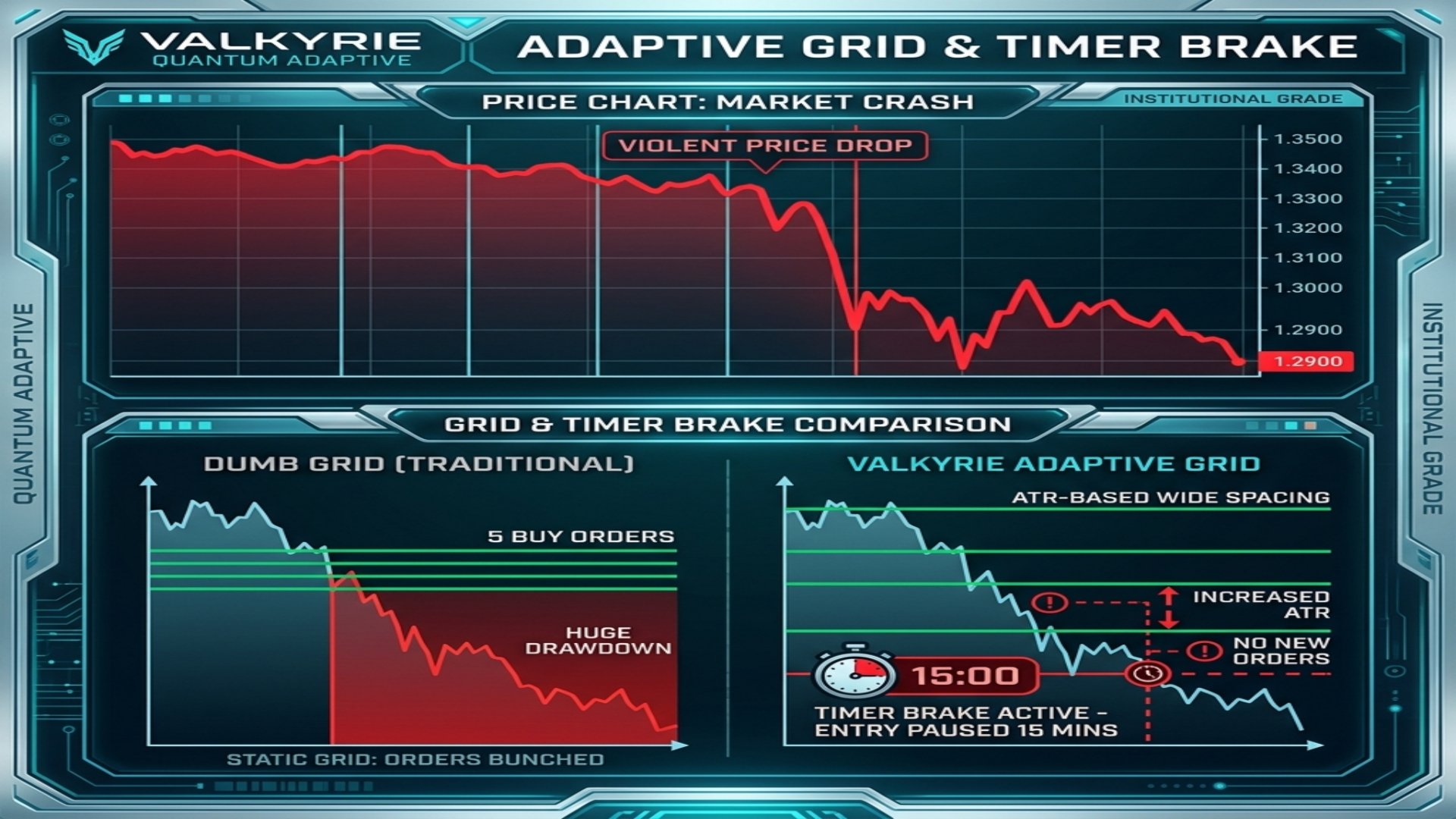
1. ADAPTIVE GRID EXPANSION: If the market is calm, Valkyrie uses a tight grid to scalp quick profits. If news hits and volatility spikes, the EA automatically calculates the new ATR and stretches the grid distance to absorb the momentum safely.
2. TIMER BRAKE (ANTI-STACKING): A revolutionary safety feature. If the market crashes violently, traditional EAs will open 5 grid levels in a minute, draining margin. Valkyrie's Timer Brake forces a minimum time delay (e.g., 15 minutes) between grid levels, ensuring entries are spread out over time, not just price.
3. GHOST PROTOCOL V2: Your Basket Take Profit is managed virtually in USD. The broker cannot see where you plan to exit, making stop-hunting impossible.
4. ONECHART TRIAD: Attach the EA to a single M15 chart and it will trade your three chosen pairs simultaneously (Default: EURUSD, GBPUSD, XAUUSD). You must type the exact symbol name used by your broker in the Inputs.
5. PROPFIRM READY: Features the Aegis Shield (Max Daily Drawdown limiter) and Phantom Randomizer (execution delay) to pass strict Prop Firm evaluations.
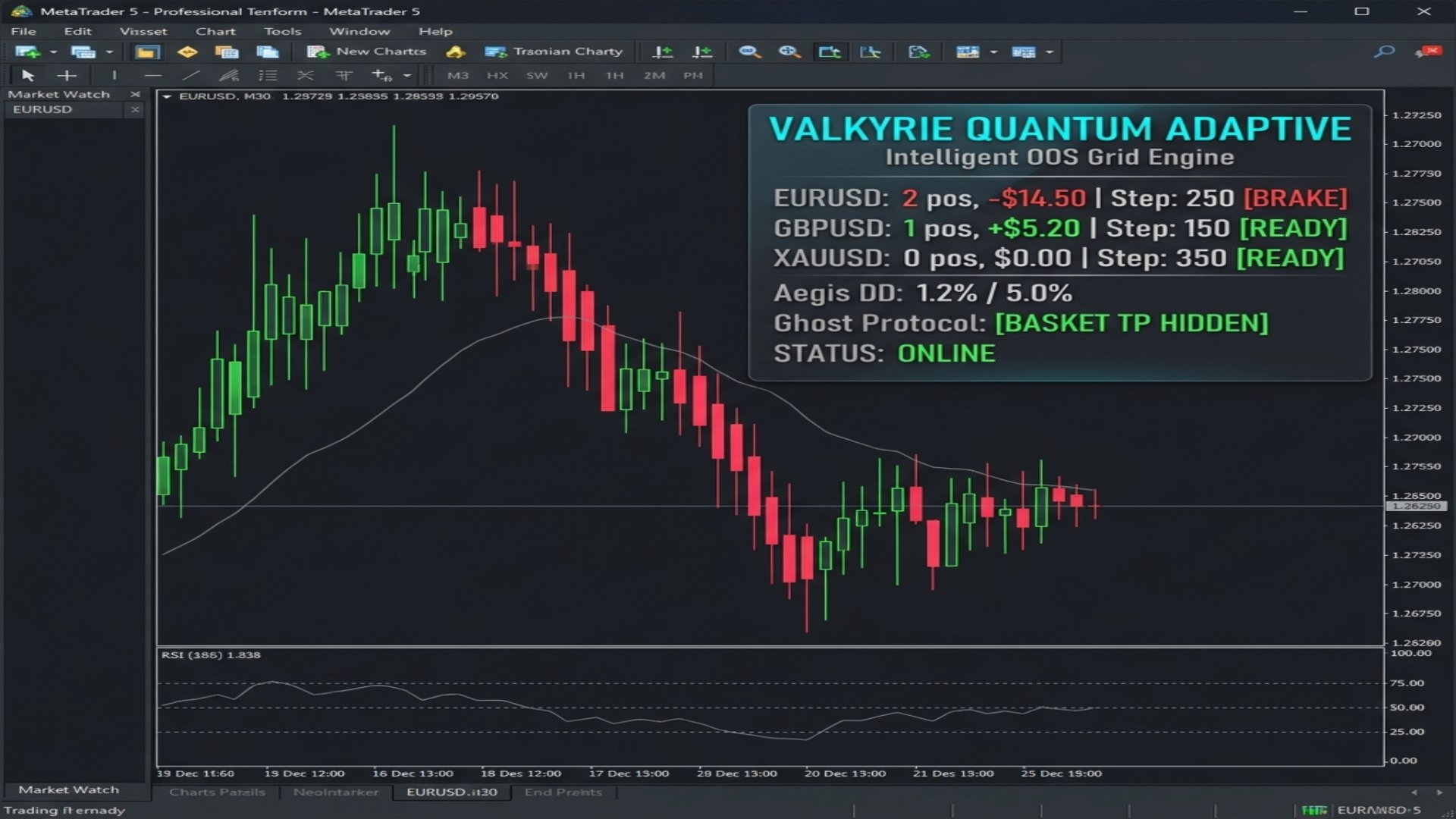
6. QUANTUM HUD: A stunning on-chart dashboard displaying live Grid Steps, Timer Brake status (READY/BRAKE), and hidden Basket TP progress.
=== GOD-TIER PRESETS ===
[SETUP 1] VALKYRIE GOLD (XAUUSD Focus)
Optimized for the high volatility of Gold.
- Sym1: XAUUSD / Sym2: (Blank) / Sym3: (Blank)
- StartLot: 0.01 / LotMultiplier: 1.5 / MaxGridLevels: 7
- BaseGridPts: 300 / AtrMultiplier: 2.0 (Massive expansion during news)
- TimerBrakeMins: 30 (Forces 30 mins between grid trades)
- BasketTargetUSD: 10.0
- GhostMode: true / MaxDailyDD: 4.0
[SETUP 2] TRIAD BALANCED (EURUSD, GBPUSD, XAUUSD)
The ultimate portfolio diversifier.
- Sym1: EURUSD / Sym2: GBPUSD / Sym3: XAUUSD
- StartLot: 0.01 / LotMultiplier: 1.3 / MaxGridLevels: 5
- BaseGridPts: 150 / AtrMultiplier: 1.5
- TimerBrakeMins: 15
- BasketTargetUSD: 5.0
- GhostMode: true / MaxDailyDD: 5.0
[SETUP 3] PROP FIRM SURVIVOR
Extremely conservative settings to pass FTMO/MFF.
- Sym1: EURUSD
- StartLot: 0.01 / LotMultiplier: 1.2 / MaxGridLevels: 4
- BaseGridPts: 200 / AtrMultiplier: 1.8
- TimerBrakeMins: 60 (Only 1 grid level per hour maximum)
- BasketTargetUSD: 3.0
- UseRandomizer: true / MaxDailyDD: 3.0
=== INSTALLATION & SETUP ===
1. Open any chart in MetaTrader 5 on the M15 timeframe (e.g., EURUSD).
2. Drag and drop Valkyrie Quantum Adaptive onto the chart.
3. In the Inputs tab, enter the exact symbol names your broker uses (e.g., "XAUUSD" or "GOLD" or "XAUUSD.m"). Leave fields blank to disable them.
4. Set your Risk parameters and Timer Brake settings.
5. Ensure all specified symbols are visible in your Market Watch window.
6. Enable "Allow Algo Trading".
7. Run on a VPS 24/5. The terminal must remain open for Ghost Protocol to function.
For support, custom presets, and institutional deployment inquiries, please contact
The Intelligent OOS Grid Engine
Powered by the OneChart Triad Architecture, Valkyrie handles EURUSD, GBPUSD, and XAUUSD (Gold) simultaneously from a single chart, while the Ghost Protocol V2 keeps your Basket Take Profits 100% hidden from your broker.
=== WHY VALKYRIE QUANTUM ADAPTIVE? ===
1. ADAPTIVE GRID EXPANSION: If the market is calm, Valkyrie uses a tight grid to scalp quick profits. If news hits and volatility spikes, the EA automatically calculates the new ATR and stretches the grid distance to absorb the momentum safely.
2. TIMER BRAKE (ANTI-STACKING): A revolutionary safety feature. If the market crashes violently, traditional EAs will open 5 grid levels in a minute, draining margin. Valkyrie's Timer Brake forces a minimum time delay (e.g., 15 minutes) between grid levels, ensuring entries are spread out over time, not just price.
3. GHOST PROTOCOL V2: Your Basket Take Profit is managed virtually in USD. The broker cannot see where you plan to exit, making stop-hunting impossible.
4. ONECHART TRIAD: Attach the EA to a single M15 chart and it will trade your three chosen pairs simultaneously (Default: EURUSD, GBPUSD, XAUUSD). You must type the exact symbol name used by your broker in the Inputs.
5. PROPFIRM READY: Features the Aegis Shield (Max Daily Drawdown limiter) and Phantom Randomizer (execution delay) to pass strict Prop Firm evaluations.
6. QUANTUM HUD: A stunning on-chart dashboard displaying live Grid Steps, Timer Brake status (READY/BRAKE), and hidden Basket TP progress.
=== GOD-TIER PRESETS ===
[SETUP 1] VALKYRIE GOLD (XAUUSD Focus)
Optimized for the high volatility of Gold.
- Sym1: XAUUSD / Sym2: (Blank) / Sym3: (Blank)
- StartLot: 0.01 / LotMultiplier: 1.5 / MaxGridLevels: 7
- BaseGridPts: 300 / AtrMultiplier: 2.0 (Massive expansion during news)
- TimerBrakeMins: 30 (Forces 30 mins between grid trades)
- BasketTargetUSD: 10.0
- GhostMode: true / MaxDailyDD: 4.0
[SETUP 2] TRIAD BALANCED (EURUSD, GBPUSD, XAUUSD)
The ultimate portfolio diversifier.
- Sym1: EURUSD / Sym2: GBPUSD / Sym3: XAUUSD
- StartLot: 0.01 / LotMultiplier: 1.3 / MaxGridLevels: 5
- BaseGridPts: 150 / AtrMultiplier: 1.5
- TimerBrakeMins: 15
- BasketTargetUSD: 5.0
- GhostMode: true / MaxDailyDD: 5.0
[SETUP 3] PROP FIRM SURVIVOR
Extremely conservative settings to pass FTMO/MFF.
- Sym1: EURUSD
- StartLot: 0.01 / LotMultiplier: 1.2 / MaxGridLevels: 4
- BaseGridPts: 200 / AtrMultiplier: 1.8
- TimerBrakeMins: 60 (Only 1 grid level per hour maximum)
- BasketTargetUSD: 3.0
- UseRandomizer: true / MaxDailyDD: 3.0
=== INSTALLATION & SETUP ===
1. Open any chart in MetaTrader 5 on the M15 timeframe (e.g., EURUSD).
2. Drag and drop Valkyrie Quantum Adaptive onto the chart.
3. In the Inputs tab, enter the exact symbol names your broker uses (e.g., "XAUUSD" or "GOLD" or "XAUUSD.m"). Leave fields blank to disable them.
4. Set your Risk parameters and Timer Brake settings.
5. Ensure all specified symbols are visible in your Market Watch window.
6. Enable "Allow Algo Trading".
7. Run on a VPS 24/5. The terminal must remain open for Ghost Protocol to function.
For support, custom presets, and institutional deployment inquiries, please contact