 MetaTrader 5
 Experts
 지표
지표 스크립트
스크립트 라이브러리
라이브러리 보관함
보관함당사 팬 페이지에 가입하십시오

ShowTradeLines Service - service for MetaTrader 5

New:
- 조회수:
- 160
- 평가:
- 게시됨:
- 업데이트됨:
-
 이 코드를 기반으로 한 로봇이나 지표가 필요하신가요? 프리랜스로 주문하세요
프리랜스로 이동
이 코드를 기반으로 한 로봇이나 지표가 필요하신가요? 프리랜스로 주문하세요
프리랜스로 이동

이 서비스는 기본적으로 터미널에서 제공하는 것보다 차트에 개설된 포지션과 관련 거래를 더 상세하고 직관적으로 표시합니다. 특히 거래 개시 시간과 가격을 확인할 수 있으며, 부분 청산 또는 포지션에 거래량 추가와 같은 기타 거래도 선택적으로 확인할 수 있습니다.
이 서비스는 오픈 포지션에 대한 계좌 상태를 모니터링하고 해당 심볼이 기존 포지션 중 하나 이상에 해당하는 경우 활성 차트(상단에 표시되거나 최대화)에 그래픽 개체를 생성합니다.
입력
- 시간 간격(초) - 기본값은 5입니다;
- LinePrefix - 차트 개체의 공통 접두사(예: "TradeTag");
- LineColorProfit - 수익이 발생한 포지션의 선 색상(clrDodgerBlue);
- LineColorLoss - 손실 포지션 라인의 색상(clrCoral);
- 선스타일 - 선 그리기 스타일(스타일_다스닷);
- LineWidth - 선의 너비 (1);
- LineType - 선 유형 - OBJ_TREND (기본값) 또는 OBJ_VLINE;
- ShowDeals - 거래에 대한 화살표를 표시하는 옵션(true);
- KeepLinesOnCharts - 포지션이 닫힌 후 차트에 그래픽 개체를 유지하는 옵션 (거짓);
- 로깅 - 주요 이벤트를 기록할지 여부(참);
서비스는 차트에 추가된 모든 개체를 전역 변수 목록에 등록합니다. 이렇게 하면 프로그램이 포지션이 청산되고 KeepLinesOnCharts가 거짓일 때 제거할 개체를 감지하는 데 도움이 됩니다. KeepLinesOnCharts가 참이면 서비스는 해당 개체를 차트에 유지하지만(사용자가 수동으로 제어할 수 있음), 어떤 경우에도 관련 글로벌 변수(청산된 포지션과 해당 거래를 설명하는)는 포지션 청산 시 제거됩니다.
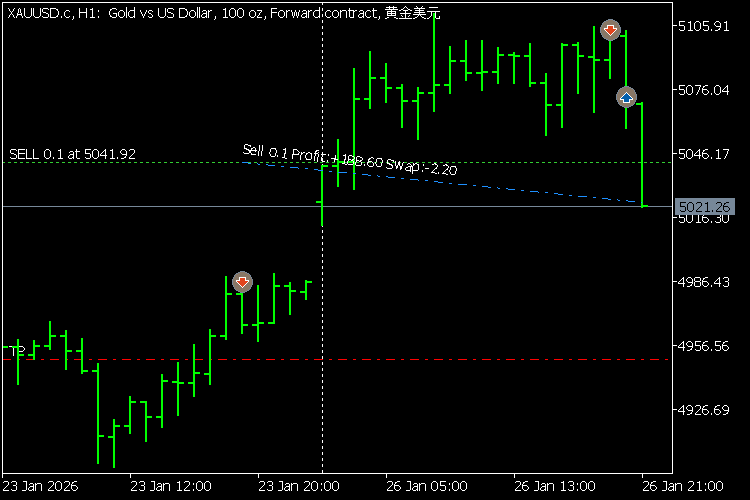
모든 개체는 포지션과 거래의 가장 중요한 속성이 포함된 텍스트 설명을 받으며, 이는 도구 설명(마우스 커서)과 차트에서 바로 볼 수 있습니다(차트 설정에서 해당 옵션이 활성화된 경우).
MetaQuotes Ltd에서 영어로 번역함.
원본 코드: https://www.mql5.com/en/code/68713
 Binary tradng based on candle colors
캔들 색상을 계산하는 간단한 바이너리 트레이딩 전략입니다.
 잔액 및 지분 차트를 기록하고 추가 최적화 기준을 계산하는 코드
Expert Advisor 코드에 액세스할 수 있는 경우 이 라이브러리에서 코드를 추가하여 잔고 및 주식 차트를 저장하고 최적화 기준을 추가로 계산할 수 있습니다.
CLatencyMonitor - Inter-Tick Latency Tracker with ATR Volatility Gate and GlobalVariable IPC for MQL5 EAs
Include-file class that measures inter-tick latency, filters false alarms via a self-normalising ATR volatility gate, and broadcasts persistent lag alerts to other EAs via GlobalVariable IPC.
 ExMachina SafeScalping
ExMachina Safe Scalping is a professional-grade Expert Advisor built for conservative breakout scalping on Gold (XAUUSD), Silver (XAGUSD), and Forex majors.