 MetaTrader 5
 Experts
 Indicateurs
 Scripts
 Bibliothèque
 Stockage
Rejoignez notre page de fans

ShowTradeLines Service - service for MetaTrader 5

New:
- Vues:
- 293
- Note:
- Publié:
- Mise à jour:
-
 Vous manquez des opportunités de trading :
- Applications de trading gratuites
- Plus de 8 000 signaux à copier
- Actualités économiques pour explorer les marchés financiers
Inscription Se connecterVous acceptez la politique du site Web et les conditions d'utilisation
Si vous n'avez pas de compte, veuillez vous inscrire -
 Besoin d'un robot ou d'un indicateur basé sur ce code ? Commandez-le sur Freelance
Aller sur Freelance
Besoin d'un robot ou d'un indicateur basé sur ce code ? Commandez-le sur Freelance
Aller sur Freelance
Le service fournit une représentation plus descriptive et intuitive des positions ouvertes et des opérations connexes sur les graphiques que celle offerte par défaut par le terminal. Plus précisément, vous pouvez voir l'heure et le prix de la transaction d'ouverture et éventuellement d'autres transactions, telles qu'une clôture partielle ou l'ajout de volume à une position dans un compte de compensation.
Le service surveille l'état du compte pour les positions ouvertes et crée des objets graphiques sur un graphique actif (affiché en haut ou maximisé) si son symbole correspond à au moins une des positions existantes.
Entrées
- TimeInterval (secondes) - 5 par défaut ;
- LinePrefix - préfixe commun pour les objets graphiques, tel que "TradeTag" ;
- LineColorProfit - couleur pour les lignes des positions profitables (clrDodgerBlue) ;
- LineColorLoss - couleur pour les lignes des positions déficitaires (clrCoral) ;
- LineStyle - style de dessin des lignes (STYLE_DASHDOT) ;
- LineWidth - largeur des lignes (1) ;
- LineType - type de lignes - OBJ_TREND (par défaut) ou OBJ_VLINE ;
- ShowDeals - option permettant d'afficher des flèches pour les offres (true) ;
- KeepLinesOnCharts - option permettant de conserver les objets graphiques sur le graphique après la fermeture de la position (false) ;
- Logging - permet d'enregistrer ou non les événements principaux (true) ;
Le service enregistre tous les objets ajoutés sur la carte dans la liste des variables globales. Cela aide le programme à détecter les objets à supprimer lorsqu'une position est fermée et que KeepLinesOnCharts est faux. Si KeepLinesOnCharts est vrai, le service conserve les objets correspondants sur les graphiques (ils sont laissés au contrôle manuel de l'utilisateur), mais dans tous les cas, les variables globales pertinentes (décrivant les positions fermées et leurs transactions) sont supprimées lors de la fermeture de la position.
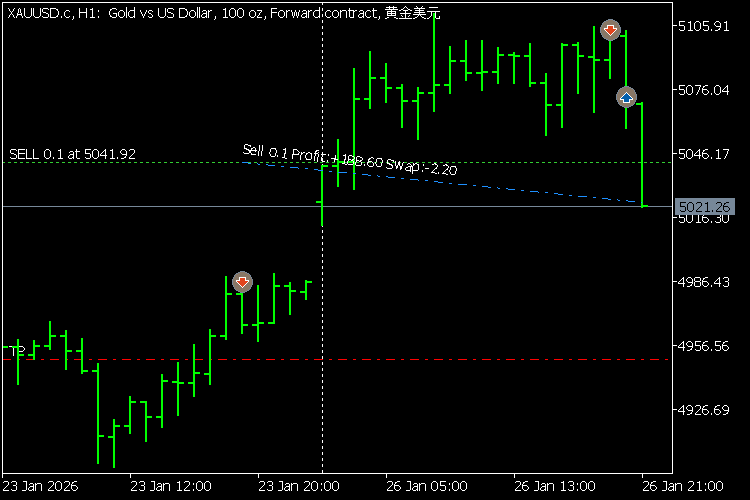
Tous les objets reçoivent des descriptions textuelles avec les propriétés les plus importantes des positions et des transactions, qui peuvent être vues dans des infobulles (au survol de la souris) et à droite sur le graphique (si l'option correspondante est activée dans les paramètres du graphique).
Traduit de l’anglais par MetaQuotes Ltd.
Code original : https://www.mql5.com/en/code/68713
 Binary tradng based on candle colors
Une stratégie simple de trading binaire qui compte les couleurs des bougies.
 Сode d'enregistrement des graphiques d'équilibre et d'équité et de calcul de critères d'optimisation supplémentaires.
Si vous avez accès au code du conseiller expert, vous pouvez enregistrer des graphiques de solde et d'équité et calculer des critères d'optimisation supplémentaires en ajoutant du code additionnel à partir de cette bibliothèque.
CLatencyMonitor - Inter-Tick Latency Tracker with ATR Volatility Gate and GlobalVariable IPC for MQL5 EAs
Include-file class that measures inter-tick latency, filters false alarms via a self-normalising ATR volatility gate, and broadcasts persistent lag alerts to other EAs via GlobalVariable IPC.
 ExMachina SafeScalping
ExMachina Safe Scalping is a professional-grade Expert Advisor built for conservative breakout scalping on Gold (XAUUSD), Silver (XAGUSD), and Forex majors.