Oguzhan Senturk
Oguzhan Senturk
  • 情報
no
経験
8
製品
6
デモバージョン
0
ジョブ
0
シグナル
0
購読者
Algorithmic Trading Systems Developer

I develop automated trading systems and risk-control tools for MetaTrader 5. I do not see a trading system as a strategy alone. Research, order execution, position management, account protection and the user interface all need to work as one coherent system.

A good backtest, by itself, does not convince me. What the system does when market structure changes, broker conditions differ, an order is rejected or the terminal restarts matters just as much as the final performance table.

Every idea starts as a hypothesis to be tested. I treat data quality, trading costs, execution assumptions and risk limits as part of the test, and I keep failed experiments in the record. This may sound cautious. It is. In trading software, knowing what should not be released is just as valuable as finding something that looks promising.

I regard backtest results as research evidence obtained under specific conditions, not as a promise of future performance. I therefore try to explain each product's operating conditions, requirements, risks and known limitations in plain language.

Behind my work is AURON, a private research and validation environment that I have built over time. I use it for strategy research, blind replay, holdout evaluation, execution scenarios, position management, risk controls and paper/forward observation. New ideas are challenged there from several directions before they can become products. Approaches that do not pass are discarded.

AURON is an internal R&D environment. The products I publish on the MQL5 Market do not depend on AURON or an external service. I keep the internal architecture of my research platform and algorithms private, but I do not hide the behavior, requirements or limitations that matter to the user.

My portfolio includes fully automated Expert Advisors, multi-asset systems and account-level risk-control tools. Each product is built for a defined purpose; I do not claim that any one product is suitable for every trader or every market condition.

You can contact me through MQL5 private messages if you have questions about installation, settings or product behavior. If a product is not a good fit for your needs, I would rather tell you before you buy it.
Oguzhan Senturk
Oguzhan Senturk
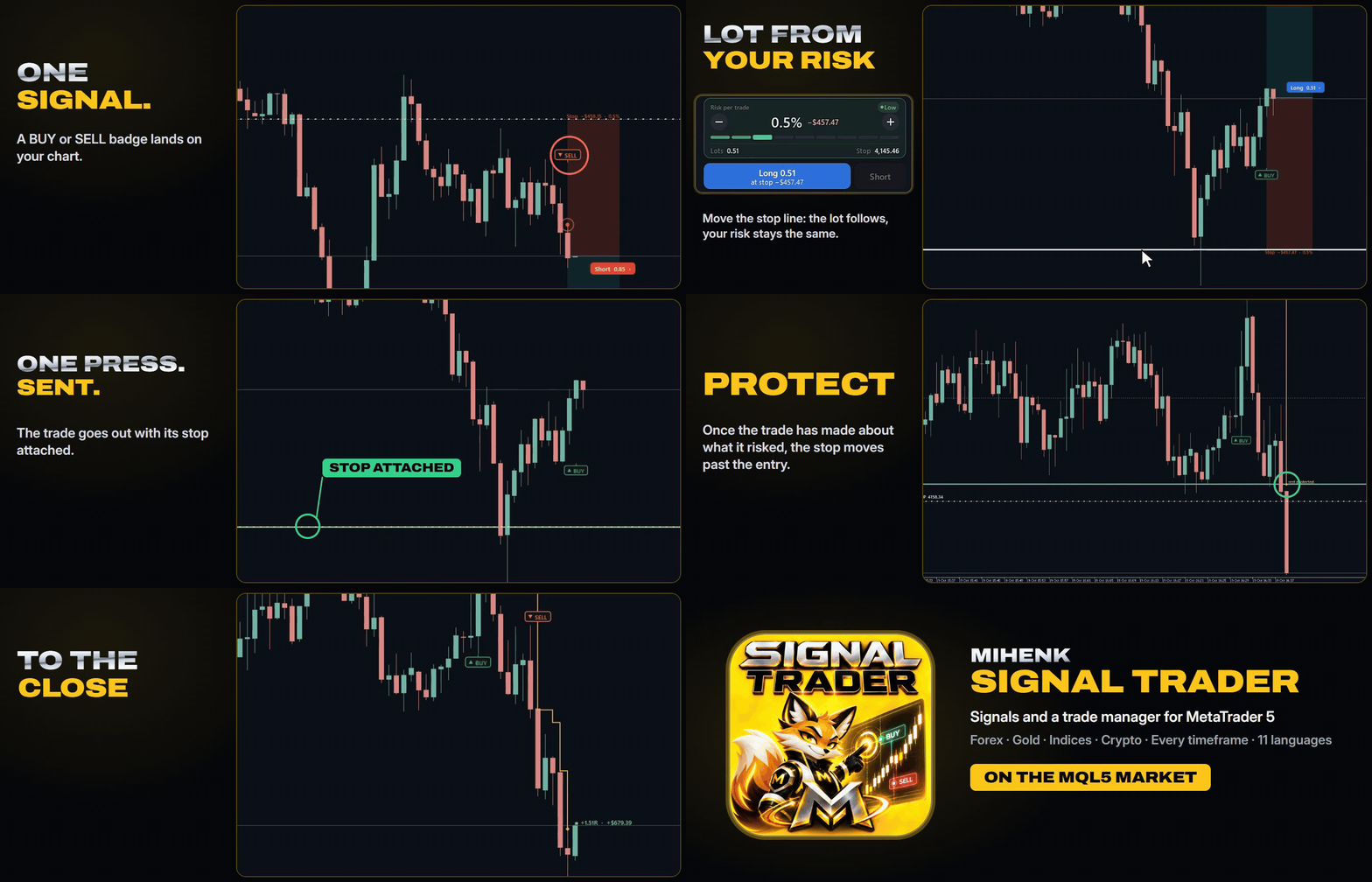
A short look at how Mihenk Signal Trader handles a trade from the first signal to the close, recorded on a live XAUUSD M1 chart.

• The signal: a BUY or SELL badge lands on the chart, and the panel has the trade ready: the stop just beyond the last swing, the lot worked out from your risk.
• Your stop: drag the stop line and the lot follows, while the risk stays at the percentage you chose.
• One press: the trade goes out with its stop attached.
• The manager: once the trade has made about what it risked, the stop moves past the entry, then follows the move step by step until the trade closes at the stop.

The management is not a fixed number of pips. Every step is measured from the trade's own stop, which comes from the swing structure of that chart, and the trailing distance respects that market's own volatility. Gold on M1, a currency pair on H1 or an index on M30 each get management sized to their own movement. Once it starts, the stop only moves forward, never back, and there are no levels to set by hand: the manager does it on the chart while MetaTrader 5 runs.

Forex, gold, indices and crypto, on every timeframe, with the panel in 11 languages.

Product page: https://www.mql5.com/en/market/product/202299
Full walkthrough on YouTube: https://www.youtube.com/watch?v=oPNgzJPsWQw
Oguzhan Senturk パブリッシュされたプロダクト

Mihenk Signal Traderは、シグナルやご自身のトレードアイデアを適切なロットのポジションに変え、そのポジションをあなたに代わって管理します。ストップを守り、利益を確保し、トレードが終わるまで値動きを追いかけます。エントリーを決めるのはあなた、その後はすべてパネルが引き受けます。 発売記念価格:49 USD 2つのエントリー方法、ワンクリック シグナルを使う。 チャートに新しい BUY または SELL のラベルが出ると、パネルがトレードを準備します。直近のスイングの外側に置いたストップ案と、リスク設定から計算したロットです。確認して買いまたは売りを押してください。 自分のアイデアで取引する。 白い破線のストップラインを狙った価格までドラッグします。動かしている間、ロットはリスク設定に合わせて再計算されます。買いまたは売りを押してください。 その瞬間からトレードはマネージャーが引き継ぎます。あなたが押さない限り、何も発注されません。 あなたのために働き続けるポジション管理

Oguzhan Senturk
Oguzhan Senturk
**ATMACA Trade Manager MT5 — Four Positions, Four Independent Management Processes**

Four BTCUSD sell positions. One market, but not necessarily the same management decisions.

⚙️ **What happens after the entry?**

Once a position is opened, ATMACA manages it according to its own conditions rather than applying the same fixed trailing distance to every trade.

Each position is evaluated with its initial risk, stop distance, trading timeframe, volatility, price development and profit giveback taken into account.

A position that still needs room to develop may be managed differently from one that has already moved far enough to justify tighter protection.

This applies even when several positions are opened on the same symbol and in the same direction.

🔒 **Protecting profit as the market moves**

In this recording, four BTCUSD sell positions are open while ATMACA manages their protective stops.

As the market moves, the stop levels are adjusted individually. The protection follows the progress of each trade rather than a single trailing rule shared by all four positions.

ATMACA also keeps track of the overall risk and protected result across its managed positions.

The panel includes three particularly useful figures:

🔹 **AT RISK** — The amount currently exposed to potential loss.

🔹 **LOCKED** — Profit already protected by the current stop levels.

🔹 **IF ALL STOPS HIT** — The combined outcome if all managed positions were closed at their current protective stops.

As the stops advance, the last figure can move from a potential loss into protected profit.

📊 **Individual decisions, one account-wide view**

The MT5 Toolbox and ATMACA panel are shown together in this recording, so the individual stop adjustments and their combined effect on the account can be followed from the same screen.

ATMACA's management includes break-even protection, profit locking, adaptive trailing and exit decisions based on the conditions of each trade.

Protective stops are tightened as protection develops; normal management does not move them backwards to increase the original risk.

**The entry is your decision. What happens to each position afterwards is where ATMACA takes over.**

That is the main reason I built ATMACA: to manage open trades individually, without forcing different positions into identical stop-management rules.

📌 **ATMACA Trade Manager MT5**

Product details, settings, Strategy Tester demo and the full-length trade management video are available on MQL5 Market:

https://www.mql5.com/tr/market/product/197872
Oguzhan Senturk
Oguzhan Senturk
**PUSULA MT5 — Not Every Pattern Becomes a Trade Plan**

One of the most important things I wanted PUSULA to do was explain not only where a trading setup exists, but also why a potential setup may not qualify for a trade plan.

This recording focuses on Range Manipulation, the chart layers and the multi-symbol Radar.

🎯 **Recognizing a manipulation doesn't always mean taking a trade**

The first example shows a defined trading range, marked by a purple rectangle, with a manipulation area highlighted above the Range High.

PUSULA identifies the upthrust but does not create a trade plan.

Instead, it explains why:

**"Manipulation upthrust — No plan: under 2R to target."**

The available distance to the target does not meet the required 2R threshold.

Price subsequently moves in the anticipated bearish direction, but the setup remains filtered out.

That distinction matters to me. A market idea can develop in the expected direction without satisfying the conditions required for a trade plan.

PUSULA keeps the detected structure visible and provides the reason for not proceeding.

⚙️ **Control what appears on your chart**

Using the toolbar at the bottom of the chart, I enable and disable different analysis layers:

🔹 **Strategies** — Show or hide the Range Manipulation setup and its related information.

🔹 **Sessions** — Display or hide the trading session areas.

🔹 **Zones** — Control the visibility of fair value gaps and other marked zones.

🔹 **Liquidity** — Show or hide liquidity levels.

The analysis stays organized while I choose which information to display.

🌐 **Radar — From one symbol to another**

Next, I open the Radar card.

The panel provides an overview of monitored symbols, directional readings and setup status.

BTCUSD is shown as **Waiting**, while EURJPY displays a recently completed ORB setup with a **+1R** result at the 16:00 exit.

I select EURJPY directly from the Radar.

PUSULA switches to the EURJPY chart, where its market structure, liquidity levels, session areas, FVGs and historical setups are available for examination.

📈 **Reviewing completed trade plans**

On EURJPY, I first examine the completed BUY ORB setup.

The blue signal arrow identifies the entry candle, while the chart shows the entry, stop and exit information. Its recorded result is:

**BUY · ORB · 16:00 EXIT · +1R**

I then move to an earlier Range Manipulation setup.

The chart displays the trading range, its upper and lower boundaries, and the manipulation area below the Range Low.

This completed setup has a recorded result of **+2.4R**.

The Range Manipulation layer can also be switched off and back on through the Strategies menu, keeping the chart as detailed or as clean as needed.

🧭 **Analysis with context**

PUSULA brings market structure, liquidity, setup conditions and historical trade plans into the same environment.

For me, the important distinction is that it doesn't simply mark a pattern and leave the trader guessing. It also provides context for the setup, including cases where the conditions are not sufficient to create a plan.

**A detected pattern, a rejected opportunity and a completed trade plan are different things — and PUSULA keeps that distinction visible.**

📌 **PUSULA Premium SMC Structure and Liquidity — MetaTrader 5**

Explore the complete feature set, screenshots, free Strategy Tester demo and longer product video on MQL5 Market:

https://www.mql5.com/en/market/product/199476
Oguzhan Senturk
Oguzhan Senturk
**PUSULA MT5 — Market Structure, Liquidity and Trade Planning in One Workspace**

I developed PUSULA to bring market analysis and trade planning into one chart, while giving traders control over how they want to work.

The attached recording covers the first steps of using PUSULA, its interface controls and an Opening Range Breakout (ORB) example.

🌍 **7 Languages — One Interface**

PUSULA supports English, Turkish, Russian, Chinese, Spanish, Portuguese and German.

I start by opening the Language setting, show the available languages and select English before loading the indicator.

🧩 **A Workspace Built Around Your Preferences**

The Cards menu gives you access to five panels:

**Chart Reading** — Explains the current market direction, what price is doing and which conditions are still needed for a setup.

**Plan** — Displays the active setup, its progression and the relevant trade levels.

**Liquidity Ladder** — Organizes nearby liquidity levels above and below the current price.

**Radar** — Follows multiple symbols and shows where setups are developing.

**Timeframes** — Provides market structure readings across eight timeframes, from M1 to W1.

Each card can be opened, collapsed or hidden independently. You decide which information stays visible.

🖱️ **Free Chart — Move Beyond the Standard MT5 Chart**

With Free Chart enabled, PUSULA draws its own interactive chart.

You can drag the chart horizontally and vertically, zoom with the mouse wheel or Ctrl + wheel, adjust the view around the area you're studying and position price action where you want it.

When Free Chart is disabled, your original chart drawings are restored.

🎯 **From an ORB Setup to Its Final Result**

In the final part of the recording, I open the Strategies menu and enable the Opening Range Breakout setup.

PUSULA marks the New York 09:30–10:00 opening range, the entry signal, the stop level and the scheduled New York 16:00 exit.

The blue BUY arrow identifies the signal candle. The completed example shown in the recording closes at **+1.5R**, with its result displayed on the chart:

**BUY · ORB · 16:00 EXIT · +1.5R**

The entry, stop, exit and outcome remain connected to the actual setup rather than being separate drawings.

⚙️ **More Than What Is Shown in This Recording**

🔹 **Three setup models:** Reversal, Range Manipulation and Opening Range Breakout, individually selectable from the Strategies menu.

🔹 **Confirmed market structure:** BOS, CHoCH, liquidity sweeps, fair value gaps and order blocks, with structure decisions based on closed candles.

🔹 **Trade plans with risk information:** Entry, stop, applicable targets and estimated lot size calculated from your selected risk.

🔹 **Setup transparency:** Follow the conditions as they develop, review completed historical plans and optionally display filtered setups with the reason they were rejected.

🔹 **Additional analysis tools:** Flow Trail, automatic Fibonacci, Asia/London session levels, multi-timeframe readings and multi-symbol Radar.

🔹 **Alerts and guidance:** Pop-up, sound, mobile push and email notifications, plus an integrated guide explaining the chart elements and their meaning.

PUSULA is an indicator rather than an automated trading EA. It organizes the analysis and prepares the trade plan, while the decision to trade remains yours.

**What matters to me is that the structure, the reasoning behind a setup and the resulting plan can all be examined from the same chart.**

📌 **PUSULA Premium SMC Structure and Liquidity — MetaTrader 5**

Explore the full feature description, screenshots, free Strategy Tester demo and longer product video on MQL5 Market:

[https://www.mql5.com/en/market/product/199476](https://www.mql5.com/en/market/product/199476)
Oguzhan Senturk
Oguzhan Senturk
*ATMACA Trade Manager MT5 — Risk Control Across Multiple Markets*

One of the things I wanted from ATMACA was the freedom to work on different charts without interrupting the management of trades already open.

🎯 **It starts with the stop.**

On BTCUSD, I position the NEW TRADE STOP line manually before entering. Some trades are opened with tight stops, others with much wider ones.

ATMACA provides three position-sizing modes: Automatic, Loss Target and Leveraged. Each offers a different way to define the size of a new trade, while positions already open continue under their existing management rules.

⚙️ **The management continues after entry.**

Each trade has its own initial risk, market context and management horizon. ATMACA uses these conditions to manage stop protection, trailing and exits individually, rather than applying an identical trailing distance to every position.

🌐 **Then I move to another market.**

With one BTCUSD position still open and being managed by ATMACA, I switch to USDJPY and attach ATMACA to that chart as well.

Here, I set **Account Capital to $1,000**.

This setting lets ATMACA work with a defined trading capital amount for account-level sizing and risk limits, without changing the actual broker account balance.

I open new USDJPY trades, and ATMACA manages them while the BTCUSD trade continues running in the background.

Different symbols, different stop distances and different trading conditions — with each position managed according to its own characteristics.

**I stay in control of the entries and initial risk. ATMACA takes responsibility for the ongoing management.**

📌 **ATMACA Trade Manager MT5**

Product details, settings, demo and the full-length trade management video are available on MQL5 Market:

👉 https://www.mql5.com/tr/market/product/197872?source=Site+Search
Oguzhan Senturk
Oguzhan Senturk
**ATMACA Trade Manager MT5 — Every Trade Has Its Own Management**

A recording of ATMACA handling trade entries and managing positions across two different markets.

🎯 **Trade setup and risk**

I start by dragging the NEW TRADE STOP line to the level I want on the chart. From there, I can open trades using three different position-sizing modes:

- **Automatic:** ATMACA calculates the position size based on the selected risk profile.
- **Loss Target:** I specify the percentage of capital I'm prepared to risk at the stop.
- **Leveraged:** I choose a minimum and maximum position value.

Throughout the recording, I open multiple BTCUSD trades, sometimes with tight stops and sometimes with much wider ones.

⚙️ **Individual trade management**

This is the main reason I developed ATMACA.

Once a trade is open, ATMACA takes over its management. Each position has its own trading horizon, determined from the conditions at entry, including stop distance, timeframe, volatility and market structure.

The management isn't based on a fixed trailing distance applied to every position.

ATMACA handles stop adjustments, profit protection, trailing and exit decisions according to each trade's own conditions.

A short-term trade and a longer-term trade don't necessarily need the same treatment, even when they're opened on the same symbol.

🌐 **Managing different markets at the same time**

Later in the recording, I switch to USDJPY, attach another instance of ATMACA and set Account Capital to $1,000.

I then open trades on USDJPY while ATMACA continues managing an existing BTCUSD position in the background.

Each symbol has its own chart and management process. Switching between them doesn't interrupt the management of the other trade.

**ATMACA was developed to manage what happens after entry, with each position handled according to its own trading horizon, market conditions and risk characteristics. Rather than forcing different trades into the same fixed management rules, it adapts its decisions to the individual position.**

You choose the entry, initial stop and risk. ATMACA handles the ongoing trade management.

📌 **ATMACA Trade Manager MT5**

Product details, settings, demo and the full-length demonstration video are available on MQL5 Market:

https://www.mql5.com/tr/market/product/197872?source=Site+Search
Oguzhan Senturk
Oguzhan Senturk
**ATMACA — Managing Every Trade on Its Own Terms**

Here's a short, sped-up recording of ATMACA managing four BTCUSD sell positions.

I developed ATMACA mainly for what happens after a trade is opened.

You decide where and when to enter, choose the direction, set your initial stop and define your risk. ATMACA calculates the position size and margin before entry. Once the order is filled, it takes over the management.

This is where ATMACA differs from a conventional trailing stop.

It doesn't simply move every stop to breakeven at a fixed profit level or follow the price by a fixed number of pips.

Each position is evaluated separately. ATMACA considers its initial risk, trading timeframe, volatility, how far the trade has travelled and how much of that move has been given back.

One trade might need more room to develop. Another might already need tighter protection. Even positions on the same symbol can receive different management decisions.

ATMACA handles stop protection, profit locking, adaptive trailing and exits as the conditions of each trade change. During normal management, protective stops are only tightened, never moved back to increase the original risk.

**Watch the GIF closely.**

Four sell positions are open. As the price moves, ATMACA adjusts their stops individually. The account-wide "IF ALL STOPS HIT" figure gradually moves from a potential loss into protected profit.

That's the part of trading I built ATMACA to handle: managing open positions without treating every trade as if it were the same.

The recording demonstrates how the management works, not a guarantee of trading results.

The full demonstration video, detailed explanation and Strategy Tester demo are available on the MQL5 product page.

**ATMACA Trade Manager MT5:**
https://www.mql5.com/tr/market/product/197872

**Full video on YouTube:**
https://www.youtube.com/watch?v=Igot-DntW4I
Oguzhan Senturk パブリッシュされたプロダクト

How does your entry idea perform on your chosen market and timeframe? Mihenk is a free MetaTrader 5 indicator that brings signal testing, chart analysis and multi-symbol scanning into one panel. Adapt predefined entry rules to your strategy, compare their historical behaviour and follow your chosen signal live. Choose, adjust and test your entry idea Signal test offers 19 configurable entry rules in four groups: indicators, candlestick patterns, breakout and trend, and liquidity sweeps. Use RSI

Oguzhan Senturk パブリッシュされたプロダクト

See the structure and liquidity. Read the trade plan on your chart. Pusula brings market structure, liquidity and SMC setups into one workspace for MetaTrader 5. BOS and CHoCH, liquidity sweeps, FVGs and order block zones are drawn on the chart. The Chart reading card explains in plain words what the market has done and which condition the setup is waiting for. When the conditions of one of three strategies are complete, entry, stop, targets and lot size based on your risk appear in one plan;

Oguzhan Senturk パブリッシュされたプロダクト

Set your stop. See your risk. Let ATMACA manage the trade. ATMACA combines trade preparation and open-position management in one MetaTrader 5 panel. Set your stop on the chart; see the lot size, estimated loss at the stop and required margin before entry. Choose the direction and open the trade using LONG or SHORT on the ATMACA panel. Trades are not all trailed at the same distance. ATMACA manages stop protection, profit locking, trailing and exit with regard to the position's risk (R)

Oguzhan Senturk パブリッシュされたプロダクト

99.00 USD

DRAKOR is a dual-market MetaTrader 5 Expert Advisor for BTCUSD and USDJPY. It runs two independent engines from one chart, using completed H1 data and broker-side stop losses. The engines share no signal, position or risk budget, so the product combines two different markets rather than duplicating one strategy. DRAKOR uses no grid, martingale, averaging down or recovery sizing. It contains no DLL, news feed or external data file. Position size is calculated separately for each engine from the

Oguzhan Senturk パブリッシュされたプロダクト

CUPELLA GOLD TRIAD is an Expert Advisor for XAUUSD that combines three independent trading engines in one account. Each engine works on a different timeframe and follows its own entry conditions. The purpose of combining them is not to increase the number of simultaneous trades, but to reduce dependence on a single type of gold market. Every position is opened with a hard stop loss. Position size is calculated from account equity and stop distance, so a wider stop produces a smaller position

Oguzhan Senturk パブリッシュされたプロダクト

LUSIDA is a MetaTrader 5 Expert Advisor built for prop firm challenge, funded and personal-account use. It trades EURUSD, XAUUSD and USDJPY from one chart while tracking the active account rules. Challenge mode works toward the target, Funded mode lowers position risk, and Personal account mode runs the same trading engine without prop firm targets. The user remains in control: LUSIDA sends no order until START is pressed, and reaching a target does not automatically declare an account approved

Oguzhan Senturk パブリッシュされたプロダクト

PropGuard is a MetaTrader 5 utility that watches a prop firm account against the firm's own rules and acts before a limit is breached. It does not open trades and contains no trading strategy. It reads your account, shows how much room is left, and can close positions and block further trading when a limit you configured is reached. A prop firm account is lost on a rule, not on a bad trade. The daily loss limit, the maximum loss limit and the trailing reference are arithmetic that runs whether

Oguzhan Senturk
MQL5.communityに登録されました