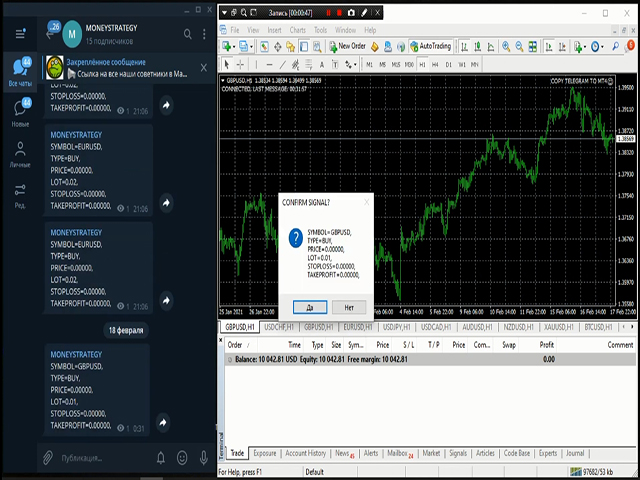
Copy Telegram to MT4

TelegramチャネルからMetaTraderへのトレーディングシグナルのコピー。

このユーティリティは、Telegramチャネルからトランザクションを簡単かつ簡単にコピーしたり、MetaTraderトレーディングターミナルにチャットしたりするのにほぼ瞬時に役立ちます

MT5バージョン-https://www.mql5.com/en/market/product/62382

 テレグラムチャットの運用サポート:https://t.me/forex4up_chat


テレグラムチャネル、チャットの信号のテンプレート(パラメータで変更可能)

記号= EURUSD、
TYPE = SELL、
価格= 0.00000、
LOT = 0.01、
STOPLOSS = 0.00000、
TAKEPROFIT = 0.00000、

ユーティリティは使いやすく、誰でもカスタマイズでき、同時に優れた機能を備えています。

成行注文のコピー
保留中の注文のコピー
ストップロスをコピーして利益を得る
あなた自身のストップロスを設定し、利益を得る
たとえば、EURUSDの代わりにシンボルを置き換える場合は、GBPUSDで開きます。
たとえば、買いの代わりに売りを開くなど、取引の取り消し
取引の手動確認
取引ロットの変更と設定


カスタマイズ

[サービス]-> [設定]-> [エキスパートアドバイザー]-> [次のURLのWebリクエストを許可する]:https://api.telegram.org
Telegramで、@ BotFatherにアクセスし、ボットを作成します
ボットのトークンをコピーして、アドバイザーのパラメーターに入力します
チャンネルを作成して公開する
作成したボットをチャンネルに追加し、管理者にします
リンクをたどってください:https://api.telegram.org/bot [TOKEN_BOTA] / sendMessage?chat_id = @ [USERNAME_KANALA]&text = TEST。角かっこ[]を独自の値に置き換えます。私の場合https://api.telegram.org/bot1285429093:AAERdfBAsdy5Vq8FotJWQZxLejXR8rRiZJ4/sendMessage?chat_id=@moneystrategy_mql&text=TEST
リンクをクリックすると、チャネルIDが表示されます。次のようになります。-1001459355041(13桁の「-」記号)
アドバイザ設定にチャネルIDを入力します
準備。これで、Telegramチャネルからシグナルを受信したり、MetaTraderでチャットしたりできます

デモ版は次のリンクから入手できます:https://www.mql5.com/en/market/product/62451

オプション:

BOT_TOKEN-ボットトークン;
CHANNEL_ID-チャネルID;
NAME_SYMBOL-変数名の記号
NAME_ORDER_TYPE-可変オーダータイプの名前
NAME_OOP-変動する始値の名前
NAME_LOT-可変取引ロットの名前
NAME_STOP_LOSS-ストップロス変数の名前
NAME_TAKE_PROFIT-テイクプロフィット変数の名前
VALUE_SPLIT-値間の区切り文字
PARAMETER_SPLIT-パラメーター間の区切り文字
PREFIX_SYMBOL-シンボルプレフィックス(ある場合)。
SYMBOL_SUFFIX-文字の接尾辞(ある場合)。
CHANGE_SYMBOL_NAME-シンボル名を置き換えます。たとえば、GOLD = XAUUSDまたはEURUSD = GBPUSD、区切り文字は「、」です。
SAME_LOT-同じロットを使用します
LOT_MULTIPLIER-ロット乗数
PLUS_LOT-追加ロット
FIXED_LOT-固定ロット
MAXIMUM_LOT-最大ロット
SYNCHRONIZE_SL_TP-ストップロスを同期して利益を得る
DEFINED_SL-ピップでの独自のストップロス
DEFINED_TP-自分の利益をピップで取る
REVERSE_COPY-注文の取り消し、取引の取り消し
MANUAL_CONFIRMATION-手動確認
MAGIC_NUMBER-取引のマジックナンバー
ORDERS_COMMENT-注文へのコメント
おすすめのプロダクト

SMT Trade Plannerは、MetaTrader用のプロフェッショナルなチャート上リスク計算機・取引実行パネルです。リスク設定に基づいてロットサイズを計算し、チャート上で直接ドラッグ可能なエントリー、ストップロス、テイクプロフィットラインを表示し、設定可能なリスクルールに照らして取引を検証し、ワンクリックで取引を実行できます。   動作原理 Trade Plannerを任意のチャートにアタッチします。パネルにアカウント情報とリスク選択ボタンが表示されます。チャート上にエントリー価格(青)、ストップロス(赤)、テイクプロフィット(緑)の3本の水平線が表示されます。ラインをドラッグして取引設定を調整します。すべての計算がリアルタイムで更新されます。方向はSLの位置から自動検出されます。BUYまたはSELLをクリックして実行します。   パネルセクション アカウント:残高、証拠金維持率、余剰証拠金のリアルタイム表示。リスク設定:4つのクイック選択ボタン。取引計画:方向、エントリー価格、SLとTPのピップス距離。LINKモードでSL/TP比率を維持。ロットサイズ:リスク%に基づく最適
Online Accounts Manager MT4
Kyra Nickaline Watson-gordon
5 (1)
OneClick Online Account Manager is a powerful utility that helps you to manage all your accounts from a centralized panel. It is suitable for all single account traders and specially for multiple accounts traders. The utility help you to : Monitor status of all accounts on a private web page. Some information such as account connection status, account profit, DD, Balance, Equity, Margin Level, Number of positions and orders, Daily and Weekly profit/loss and also overall summation of all these p
1 つのチャートで完全な制御を実現。 各チャートのオブジェクト、色、設定を個別に管理する時間を無駄にする必要はありません。     チャート同期マネージャーを 使用すると、     すべてのMetaTraderチャートを同期、コピー、制御します   たった 1 つのパネルといくつかのショートカットを使用して、瞬時に実行できます。 一度描いたら、どこでも更新。チャートをワンクリックで開閉。ワークスペースを整理整頓。     シンボルベースのオブジェクト管理 。重要な詳細を見逃すことはありません。     スプレッド表示、カウントダウンタイマー、ローソク足クローズアラートなど。 時間を節約し、エラーを減らし、よりスマートに取引します。 Chart Sync Manager インストールと入力ガイド EA に関する通知を受け取りたい場合は、URL (   http://www.betasoft.dev   ) MT4/MT5 ターミナル (スクリーンショットを参照) を追加します。 MT4バージョン https://www.mql5.com/en/market/product/1484
不採算注文のバスケットを「解決」するためのシステム、ニュースフィルター、他の取引商品のオープンポジションのフィルター、および取引シグナルをテレグラムチャネルに送信する機能を備えたグリッドアドバイザー。 エキスパートアドバイザーは、手または他のエキスパートアドバイザーで開いた取引を損益分岐点にするユーティリティとして、アカウントの不採算ポジションを復元するために使用できます。 線形回帰チャネル内で機能し、いくつかの条件で入力します。信号は、線形回帰チャネルの方向、チャネル幅、指数移動平均の交点、1日の平均ボラティリティ、次数平均を使用します。 主な機能: 戦略に含まれるシグナルの取引 ボタンでの取引 ニュースフィルター 他のトレーディング商品のオープンポジションでフィルタリング アカウントの不採算ポジションの決済 位置平均 ポジションのトレーリングストップ利益 損益分岐点に転送 電報にトレードシグナルを送る 電報にニュースを送る グリッドステップが構成され、価格が私たちに反する場合、一定数の注文の後、アカウント回復機能(ドローダウン削減)がアクティブになり、最も遠い不採算注
革新的な Trades Time Manager を使用して、取引ルーチンを簡単に管理できます。この強力なツールは、指定された時間に注文執行を自動化し、取引アプローチを変革します。 購入から注文の設定まで、すべて手動介入なしで、さまざまな取引アクションのためのパーソナライズされたタスク リストを作成します。 Trades Time Manager のインストールと入力ガイド EA に関する通知を受け取りたい場合は、MT4/MT5 ターミナルに URL を追加してください (スクリーンショットを参照)。 MT4のバージョン     https://www.mql5.com/en/market/product/103716 MT5のバージョン     https://www.mql5.com/en/market/product/103715 手動監視に別れを告げ、合理化された効率を採用します。直感的なインターフェイスにより、シンボル、約定時間、価格、ストップロス (SL)、テイクプロフィット (TP) ポイント、ロットサイズなどの正確なパラメーターを設定できます。 このツールの柔軟性は、市
CANADIAN TAIGAは、ボラティリティーブレイクアウトとサポート/レジスタンスレベルのブレイクアウトの原則に基づいたトレンドフォロー型の取引システムを使用したプロフェッショナルポートフォリオEAです。すべてのカナダドルのペアで動作します。カナディアン・タイガの中核となる原理は、洗練されたヘッジモジュールを使用して、すべてのCADペアで取引機会を捉えることです。 CANADIAN TAIGAをダウンロードして、推奨されているようにすべてのカナダドルペアでテストしてみて、説明されているように意図されていることができない場合は、購入しないでください。主に最低時間枠(M5)で動作するため、モデリングの質の高さはあまり気にしないでください。 自動売買ボタンを無効にした状態でEAをチャート上で起動し、初期化後に自動売買を再度有効にするか、市場の時間外、できれば週末にチャート上で自動売買を有効にすることが非常に重要であり、強く推奨されます。なぜならば、EAは高速実行品質テストを行うために、初期化時に1回の迅速な単一取引(即時のオープンおよびクローズポジション)を実行する可能性があり、おそ
Grid MT4
Volodymyr Hrybachov
半自動取引のユーティリティである注文管理を使用して、アカウントの不採算ポジションを復元することもできます。不採算の注文を重ねることで、アカウントのドローダウンを減らす機能があります。手動注文、パネルから開かれた注文、または別のエキスパートアドバイザーによって開かれた注文で機能します。最小限のパラメーターがあり、構成が簡単で、任意の数の注文で機能します。テストには、ストラテジーテスターのビジュアルモードを使用します。 MT5バージョン https://www.mql5.com/ru/market/product/56493 オプション: START_LOT-初期ロット; LOT_MULTIPLIER-注文グリッドのロット乗数。 MAX_LOT-最大ロット; STEP_ORDERS-グリッドステップを注文します。 STEP_MULTIPLIER-次数ステップ乗算係数。=-1の場合、使用されません。 MAX_STEP-最大次数グリッドステップ。 OVERLAP_ORDERS-オーダーオーバーラップ機能を有効にするオーダー。 OVERLAP_PIPS-不採算注文を閉じるためのピップ単
This utility automatically draws the trend channel on the price chart. For the time interval from the specified date to the current bar, the drawn channel is almost optimal. Placing the beginning of the channel at a more distant historical price extremum, you get a visualization of a longer-term trend. Channel slope is not a continuous value, but takes one of discrete values (in AxB format, where A is the number of price points (points), and B is the number of timeframes). This program works ONL
Why choose Trading Pal EA: This is a EA utility that auto-manage your   positions ' Stop-Loss (SL) and Take-Profits (TP) dynamically. When opening a single   position , it is easy to set the SL and TP manually. But when dealing with multiple   positions , it can be very tedious or   overwhelming   to fill in so many SL and TP values consistently, especially in a short span of time, like in scalping. Over time and after many such trades, trading itself can become a chore. That is where this EA c
Working Bot
Dmitry Shutov
1 (1)
This Expert Advisor is based on advanced neural networks. Main EA features After training, the EA remembers the patterns of each currency pair . Therefore, re-training the currency pair is not required when changing a currency pair. Fixed Take Profit and Stop Loss levels are set in the inputs. Multi-currency trading . ‌Monitoring of my accounts: https://www.mql5.com/en/signals/author/mizrael Preparing for trade and training It is recommended to train the EA. For better understanding, we posted
Divo MT4
Anton Kondratev
5 (2)
DIVO EA     です   複数通貨 、     フレキシブル 、     完全に自動化   そして   多面   識別するためのツール   脆弱性   の中に   市場 Only 7 Copies of 10 Left  for 590 $ Next Price 1475 $ 設定 よくある質問 最適化 設定について リアルモニタリング インストールする方法 Not    Grid   , Not    Martingale   , Not     AI     , Not     Neural Network. Default Settings for One chart    GBPUSD M15     (Supports 1OHLC mode for weak PCs)  EA を購入した後は、必ずプライベート メッセージで私に連絡してください。あなたを EA に追加します。     プライベートグループには 、設定ファイルと追加の詳細な手順を送信します。 私は各購入者がアドバイザのインストールと構成を支援する準備ができています。 これまでEAを使用したことがない場合
Endless Grid is a grid type trading robot. It uses grid and averaging to send orders and does not use martingale. This robot works by continuously sending order without indicator according to grid distance. It can be a handy tool as a rebate hunter. This EA can be used in all time frame and all trading pairs.    Setting Parameters: Expert Name - EA name and trades comment. Magic Number - EA identification number to identify trades.  Lotsize - Lot size. Trailing - Trailing order. if this set to
Ziwoxファンダメンタルトレーダー Ziwox Fundamental Traderは、金融市場のトレーダーがEA情報データに基づいて賢明な意思決定を行うのを支援するトレーディングアシスタントです。 このEAは、オンラインソースを使用して、通貨の基本的なバイアス、ペアでのリアルタイム小売業者比率の感情、銀行と機関の予測、COTレポートデータ、および複雑なEAパネル内の他のデータなどの必要なすべての情報を取得します。 簡単に言えば、それは統合された外国為替データソースと情報であり、手動トレーダーがより良い意思決定を行うのに役立ちます。 これに加えて、これは完全な基本的なロボット取引であり、通貨の基本的なバイアスと技術データに基づいて、これらのデータを使用してペアで自動的に取引します EAコンポーネント: 取引に必要なすべての情報は、データパネルに統合された一連の外国為替データストリームコンポーネントとしてここに収集されます。 各コンポーネントは、トレーダーが意思決定を行うのに役立つトレーディングエイドインジケーターまたは説明的な市場レポートとして個別に機能します。 これらのコ
EAsy ClickTrade is the easiest way in the Forex market to: Execute trades instantly as a function of selected Equity Risk and your desired StopLoss Level for ANY CURRENCY PAIR . Calculate the risk exposure to the market in terms of equity at risk per currency and direction. Calculate how attractive a potential trade is in terms of Risk and Spread Cost (excellent for scalpers and short-term traders). Inputs Select Risk for Lots Calculation [% Equity]. By default 1%. This is the initial value for
Telegram Broadcast
Volodymyr Hrybachov
4.67 (3)
TELEGRAM BROADCASTユーティリティは、取引をTelegramチャネルに即座に公開するのに役立ちます。あなたが長い間FOREX信号であなた自身のテレグラムチャンネルを作りたいと思っていたなら、これはあなたが必要とするものです。 TELEGRAM BROADCASTはメッセージを送信できます: 取引の開始と終了。 保留中の注文の配置と削除。 ストップロスとテイクプロビジョニングの変更(ラストオーダー); 損失を止め、provをトリガーします。 保留中の注文のアクティブ化と削除: 取引レポートの送信; 入金と出金のメッセージを送信する。 ドローダウンまたは利益がN値に達したときにメッセージを送信します。 アカウントの監視-N分ごとに統計を送信します。 独自のテキストを追加して、各メッセージに分単位で遅延を投稿できます。すべてのメッセージは柔軟です。ユーティリティは1つのチャートにのみインストールされますが、すべてのシンボルからメッセージを送信します。設定で任意の記号を非表示にできます。 ユーティリティ構成: [サービス]-> [設定]-> [エキスパートアドバイザ
Expert Advisorは、トレンドに従ったポジションの反転に基づいて動作します。 Expert Advisorの設定は直感的です。 このExpert Advisorは、以前にテストを使用して設定を選択した任意の通貨ペアで使用できます。 Expert Advisorの設定、説明: (月曜日、火曜日、水曜日、木曜日、金曜日、土曜日、日曜日)-あなたが取引できるまで、取引の曜日、またはこの日の時間を選択します。 マジックは、オープン取引のユニークな数です。 ボリューム-最初の取引の取引量。 選択された係数でロットを増加させるための記号-ロットとこのロットが増加する係数との間のアクション記号の選択。 損失の場合、次の取引日への取引の転送–現在のポジションが損失で閉じられた場合、このパラメータが有効になっていると、次のポジションは次の取引日 前の注文ロットが乗算または加算される係数-係数自体の値の選択。  閉鎖された不採算取引とオープン収益性の高い取引との間の割合差-不採算クローズド注文とオープン収益性の高い注文との間の割合差を設定します。 P.S-市場でのその後の出版物とこのExp
The script allows you to quickly and easily open trades (place orders) on the market. Features Buy and sell at a market price; Place pending orders: Buy/Sell Limit and Buy/Sell Stop; Open a trade with a custom volume; Calculate and set TakeProfit; Calculate and set StopLoss; Auto defining the number of decimal places; Auto defining a symbol the script has been applied to. What you get with the script Ability to calculate each trade instantly; Ability not to enter all calculated values manually
Ultimate Trend-Driven Expert Advisor: Precision Trading with Dynamic Hedging Elevate your trading game with our state-of-the-art MQL4 trading algorithm, engineered for precision and adaptability. This algorithm integrates advanced technical analysis tools and a flexible hedging strategy to help you maximize your trading potential, no matter the market conditions. Key Features: Adaptive Trend Detection : Stay aligned with the market's pulse using trend analysis across multiple timeframes—Weekly,
Telegram Ultimate Manager MT4 Use Cases: Manager Order (open, close, modify order) Publish open and close order to Telegram Channel Open trade based on Forex Factory News Requirement: Telegram Chat ID Telegram Bot API Token Telegram Channel ID Please read the guide This tools can not be backtested Free n8n workflow template to : 1. Import Forex Factory news to Google Calendar 2. Send chat to Telegram bot about news release. Is it good or bad for the currency Inputs: Telegram Bot Token : your T
Is your trade at a loss? Does not matter ! You can use this Extra martingale tool.  In the set loss of your trade or your EA's trade , this tool will open another trade at a better price. It can also open multiple trades at different distances and with different lot sizes. Each trade will be assigned a TakeProfit. This tool has a lot of settings. You can set variable lot sizes, variable trade distances, variable TakeProfit sizes, maximum total profit or loss in money. You can also close trades
OwlGrid01
Angel Perez Sanchez
この専門家アドバイザーは単純なものを効果的にします。調整可能なロットの合計システムを介して、プロフィールと資本に応じてリスクレベルをカスタマイズできます。正確に投資を管理します。コントロールされた安定した利益を得るために、さまざまな保守的な操作のセットを組み合わせるのに最適です。画像セクションでは、いくつかのバックテストと、異なるインストゥルメントでの8つのセットの動作(1つの画像には集計が表示され、次の画像には各セットの曲線が個別に表示されます)をリアルタイムで確認できます。適切な研究が常に必要であることを覚えておいてください。ボタンを押すことほど簡単なものはありません。さらに情報が必要ですか?お気軽にお問い合わせください。 _____________________________________________
Automatically trading advisor for the MT4 terminal. Any trading instruments. Minimum settings. Detailed display of style and trading conditions on the screen of your terminal. It starts working immediately after installation and connection to your MT4 account. Any timeframe below H4. Recommended timeframe for displaying trading sessions H1. You choose the optimal working time for a trading robot. Best wishes and a passing trend.
Telegramチャネルを介したトランザクションのコピー機。取引をTelegramチャネルに即座に公開したり、Telegramチャネルからトランザクションをコピーしたりするのに役立ちます。このユーティリティは、MT4で信号を受信することと、Telegramに信号を送信することの2つの方向で機能します。 これ以上の逃した取引はありません もうパニックはありません 資本管理 使いやすさ デモ https://www.mql5.com/ru/market/product/54082 あなたはそれの用途を見つけることができます: Telegramチャネル(インターネット経由)を介して独自のトランザクションをコピーする。 MT4からMT5へ、またはその逆にトレードをコピーします。 MT5バージョン https://www.mql5.com/ru/market/product/56143 クライアントのテレグラムチャネルを介した信号の配信。 使い方: ユーティリティがどのように機能するかは、テストチャネル https://t.me/moneystrategy_mqlで確認できます 。 P
Various Trailing Manager EA Various Trailing Manager EA is a professional trader's tool that provides protection of floating profit on open trades. This EA Utility allows you to manage (with advanced filtering) unlimited open orders (manual or EA) with trailing stops based on 7 methods: percent, ATR, Moving Average, Candle, Parabolic, Fractal. The trailing stop can be either real or virtual, and you can exit fully or with a partial close percent on touch or bar close. Visualize all orders and t
クイックラインツール:トレンドラインと長方形をプロットするための便利な指標 クイックラインツールは、テクニカル分析のための迅速かつ効果的なツールを必要とするトレーダーのために設計されたMetaTrader4のための強力で直感的な指標 この指標を使用すると、トレンドライン、サポート/抵抗レベル(AP/DW)、および長方形を簡単に作成して、チャートレイアウトプロセスを最適化できます。 この指標は、分析の精度と速度を向上させようとしている初心者とプロのトレーダーの両方にとって理想的です。 主な利点 直感的なインターフェイス:"ショー"機能をサポートするユーザーフレンドリーなボタンパネルを介してすべての機能を制御します。|気を散らすものを最小限に抑えるために「非表示にします。 設定の柔軟性:カスタマイズ可能な色、ラインスタイルと太さだけでなく、あなたの取引スタイルに適応するためのボタンのサイズと位置。 マルチタイムフレームのサポート:トレンドラインと長方形は現在の時間枠と下の時間枠に表示され、AP/DWラインとキーボタンはすべての時間枠に表示さ 安定した配置:
InfinityBreak v3.0 – 賢くトレード、無理せず! 最新の自動取引ブレイクスルーで市場をコントロール。InfinityBreak v3.0は重要なブレイクアウトを自動で検出し、TP、SL、部分TP、ロットサイズを管理し、プロのようにXAU/USDを取引できます。 M1タイムフレームに最適化 – 高速、正確、信頼性抜群。 賢いリスク管理 – マーチンゲールなし、リスクの高い戦略なし。 初心者~中級者向け – 完全自動、シンプルかつ強力。 市場のブレイクアウトをストレスなく、常時監視することなく取引チャンスに変える。   MT5 Version:  Infinity Gold Break 3 | Buy Trading Robot (Expert Advisor) for MetaTrader 5     Infinity EAs Channel:  Private Messages - Evan Pierre Clement - KurukoPro - Trader's profile Pricing Info: 購入10件ごと
This Expert provides a panel to manage all positions you have on different pairs or any instruments. not only you can close your positions just by clicking the amount of profit or loss shown on the related cell, but also you can customize whatever you see on the panel from font size  to lines and background colors. Remember ,  auto trading on MT4 panel must be active, but in our Expert we have provided a key on the panel to activate or deactivate the panel to avoid closing by accident. Any qu
The Effective Decision bot (for EURUSD) works on the Metatrader trading platform, which is widespread on the Forex market. The basis of the bot is a complex algorithm for controlling transactions. Many indicators are used as the main entry signal (Envelopes, ADX, Bands, MA, RSI, AD, Alligator, BearsPower, Fractals, Momentum). Bot environment: Currency pair - EURUSD. TimeFrame - H1. The maximum spread is 20 pips. Required deposit - $10,000 (or equivalent). The maximum drawdown is 12%. Peculiari
The UltimateX Expert Advisor is a trend trading expert based on the simplest indicator strategy of following the market towards global price movements. The robot uses several moving averages with different periods for price analysis (Delta Channel indicator). Therefore, in theory, a robot can effectively trade on almost any trading asset or currency pair, but subject to proper optimization. It is recommended to use the robot on the hourly chart of the Euro / Dollar currency pair. The UltimateX
このプロダクトを購入した人は以下も購入しています
Crystal Trade Manager PRO – MT4向け 高度リスク管理・トレードコントロールシステム 無料版: https://www.mql5.com/en/market/product/150632 概要 Crystal Trade Manager PRO(CTM)は、MetaTrader 4 のために設計された、プロフェッショナル向けのリスク管理および取引管理ユーティリティです。 厳密な執行、強力な資金保護、高度な自動化を必要とするトレーダーのために構築されています。 本システムは、リスク管理、エクイティ保護、日次制限、SL/TP の自動設定を行い、プロレベルの高速ワンクリック取引パネルを提供します。 Prop Firm チャレンジ、デイトレード、スキャルピング、資金運用者に最適です。 MT5版も利用可能です。 主な特徴 1. 高度なリスク・ドローダウン保護 日次ドローダウン上限を 1%〜70% の範囲で設定可能。 上限超過時、 全てのポジションを即時クローズ 。 オプションで 全ての保留注文(Pending Orders)を自動削除 。 日次ロックアウトモード:翌日
With this Expert Advisor, you can seamlessly integrate various channel, arrow, and reversal indicators. It offers the flexibility to use all popular channel trading strategies, while also providing powerful tools to customize your trading conditions and risk management system.   The Expert Advisor opens orders when the price crosses the channel boundaries. Multiple crossing conditions are available for customization: Price touches boundary on re-entry into the channel Price touches boundary on
Unlimited Trade Copier Pro is a tool to copy trade remotely to multiple MT4, MT5 and cTrader accounts at different computers/locations over internet. This is an ideal solution for you if you are a signal provider and want to copy your trades to other receivers globally on your own rules. One provider can copy trades to multiple receivers and one receiver can get trade from multiple providers as well. The provider can even set the subscription expiry for each receiver, so that receiver will not b
--------------Welcome to use [MQL5 Signal Analyze Master]------------------  Function: Draw order tracks of MQL5 MT4 and MT5 signal on MT4 chart. [Using guide] 1.Use it as Experts. 2.Download history record from MQL5 signal(MT4 signal or MT5 signal).  3.Paste history record file below "MQL4/Files/" 4.Load [Signal Analyze Master] on the symbol chart what you want to analyze. 5.Paste the history record file name to parameter 'FileName' 6.Select  SignalType  match the history you download on MT4
Trade Copier for MT4   Supports multiple master and slave terminals   Local operation without DLL usage   Optional slow monitoring mode   Compatible with prop firm and personal accounts Trade Copier MT4 To MT4 Advanced Multi-Account Trade Copier for MT4/MT5 – Master & Slave Synchronization This Expert Advisor is a fully automated multi-account trade copying system designed for professional traders who require fast, stable, and flexible synchronization between MT4/MT5 accounts. It supports
The FFx Hidden Manager panel will help you to manage easily your orders directly on the chart. Below all features described: TP, SL and TrailingStop are hidden Each order has its own lines on chart Drag & Drop any line to change the TP/SL as per your need Option to move automatically the SL line at breakeven when TP #1 is reached Option to choose the TP/SL type (by pips or price) Option to choose the TrailingStop type (by pips, MA, Fractals, PSAR or ATR) Define which order(s) you want to manage
FFx Risk Calculator panel will help you to calculate very easily your trades size, SL or the risk directly on the chart. All features are described below: Option to select which parameter to calculate: Risk, Stop Loss or Lot Size The panel will show if the lot size is allowed according to the current account free margin Button to maximize/minimize the panel Drag and Drop the panel anywhere on the chart How to use it? Select the parameter you want to be calculated. It will be based on the 2 other
News Trader Pro is a unique robot that allows you to trade the news by your predefined strategy. It loads every piece of news from several popular Forex websites. You can choose any news and preset the strategy to trade it, and then News Trader Pro will trade that news by selected strategy automatically when the news comes. News release gives opportunity to have pips since the price usually has big move at that time. Now, with this tool, trading news becomes easier, more flexible and more exciti
The FFx Watcher PRO is a dashboard displaying on a single chart the current direction of up to 15 standard indicators and up to 9 timeframes. It has 2 different modes: 1. Watcher mode: Multi Indicators User is able to select up to 15 indicators to be displayed User is able to select up to 9 timeframes to be displayed 2. Watcher mode: Multi Pairs User is able to select any number of pairs/symbols User is able to select up to 9 timeframes to be displayed This mode uses one of the standard indicat
Copies transactions between MT4 terminals. Possibilities: quick copy start minimum processor load direct and reverse (reverse) copying. copying Take Profit and Stop Loss levels copying deferred and their changes copy transactions one to many copy trades many to one local copy only Attention: The product is designed for copying trades only within a single computer or VPS with access to the desktop. The product will not work on the built-in Virtual Hosting of the terminal. We will help you set up
If you wish to draw Support and Resistance lines, view: daily market opening, classical pivot levels, Fibonacci pivot levels, trend lines, Fibonacci levels, the remaining time to candle closing, and current spread. If you seek to place your orders with the exact lot that meets your desired stop loss risk. If you wish to do all this and more with just one click, then this is the perfect tool to use. This tool will allow you to feel more relaxed when deciding to open orders, as well as predicting
Unlimited Binary Options Copier Remote is a powerful tool to copy binary options trades remotely between multiple accounts at different locations over internet. This is an ideal solution for signal provider, who want to share his binary options trades with the others globally on his own rules. One provider can copy trades to unlimited receivers and one receiver can get trade from unlimited providers as well. The provider can set the subscription expiry for each receiver, so that receiver will no
The Pairs Trade indicator is a utility for semi-automatic pair trading. It allows combining the charts of two arbitrary instruments, even if the schedules of their trading sessions are different. It displays a spread chart in the form of a histogram with an overlaying moving average. It calculates the swap that will be charged for the synthetic position (in the deposit currency). It is possible to set a level for automatic opening of a synthetic position on the spread chart (analogous to the 'se
The script displays info about the share's corporate reports and dividends. The data is downloaded from   investing.com : Report date Profit per share (EPS) Revenue Market capitalization Amount of dividends Date of payment of dividends Dividend income The product cannot be tested in the tester (since it is not possible to receive data from the Internet). Before launching:  Add 2   URL   https://ru.investing.com/earnings-calendar/Service/getCalendarFilteredData  and   https://ru.investing.com/di
This Stacker EA will: Automatically set Stop loss on a new order Automatically set Take profit on a new order Stack (or open up to 4 additional orders at the same time) when a new order is placed, the SL/TP can be preset individually for each order. Provides a transparent replacement for the standard 1-click trading buttons in MetaTrader 4 (1 click still works and SL/TP will automatically be set as well as Stacking). Automatically calculate lot order size according to preset risk management perc
FXFledgling Exit Tool is a complete risk management tool that analyzes both the open trades and the direction of the pair of open trades. As long as the suggested entry and lotsizing management presented here is followed strictly, you will have a high chance (but no guarantee) of surviving the trade. What It Does It is used as an exit tool. It helps the trader to manage any manual trade that he transacted. It does the following: Trail Stop Dynamic Stop Loss - a calculated stop-loss that changes
New opportunities for analyzing cryptocurrency in the usual MetaTrader 4. For example : We select the symbol of the cryptocurrency and attach any indicators, Expert Advisors or scripts. Startup Mode View cryptocurrency; Data collection. Capabilities Work as with a standard currency chart; Automatic update of open charts; Selection of individual cryptocurrency for updating; Selection of individual timeframes for updating; Work on the desired timeframes; Open charts do not affect the work of Cry
Notify Telegram is a utility that bridge your MetaTrader4 trading activities to your Telegram chat/channel. It will help you to monitor your MetaTrader4 actions such as placing trade, modifying order's TP/SL, closing trades etc and send a notification message to your dedicated Telegram chat/channel. It does not execute any trade on your MetaTrader4 account. It can be useful for monitoring EA performance or providing signal to your Telegram channel/group subscribed. Parameters Token ="" - enter
The  Easy Strategy Builder (ESB)  is a " Do It Yourself " solution that allows you to create a wide range of the automated trading strategies without any line of codes. This is the world’s easiest method to automate your strategies that can be used in STP, ECN and FIFO brokers. No drag and drop is needed. Just by set conditions of your trading strategy and change settings on desired values and let it work in your account. ESB has hundreds of modules to define unlimited possibilities of strategi
Telegram ChartSnap is an utility tool to bridge your MetaTrader 4 activities to your Telegram chat/group/channel. It will screen shot your MetaTrader 4 chart and send it to your dedicated Telegram chat/group/channel through a Telegram bot. The whole process will keep repeating based on a time cycle that predetermined by the user. It is a convenient tool for those who like to get access to their favorite system/dashboard that only available at MetaTrader Desktop. Beside that, trader can easily s
フィボナッチリトレースと拡張ラインツール DiNapoliポイント取引方法とゴールデンセクション取引を使用するトレーダーにとって理想的なMT4プラットフォームのフィボナッチリトレースと拡張ラインツール 主な特長: あなたはフィボナッチリトレースメントの複数のセットを直接描くことができ、重要なリターンポイント間の関係は一目瞭然です。 2.フィボナッチ拡張を描画することができます。 3.フィボナッチフォールドバックとラインの延長は、簡単な観察と数値表示のために左右に動かすことができます。 4.チャートは非常に爽やかな 5.数字キーでサイクルを切り替えることができます。 ファンクションキー: 1。 [戻るを押す、要求に応じて描画する、最大8つのグループにする 2。拡張]を描くには[押す] 3。 \を押すと、現在のサイクルの下にあるすべての拡張機能と折り畳みが削除されます 4。フォールドバックを移動して削除して展開する (1)最初のフォールドバックセットのF5行をクリックします。 一度クリックすると(黄色に変わります)、キーボードのDeleteキーを押すと、フォーカ
Советник риск-менеджер с огромным арсеналом возможностей защиты вашего депозита. Для инвесторов, которые решили передать капитал в доверительное управление. Когда у трейдера нет доступа к настройкам - нивелирует торговые риски. А также для трейдеров, которые осознали необходимость стороннего контроля за их торговлей для улучшения торговых результатов.  Для максимальных результатов - должен стоять на отдельном VPS сервере и у трейдера не должно быть возможности менять настройки в торговый период.
半自動取引のためのユーティリティ。ストップオーダー、ストップロス、テイクプロフィット、トレーリングストップをブローカーに見えないように設定するための動的レベルを適用します。 FIFO要件のある米国のブローカーを含むあらゆるブローカーとの連携に適しています。 アドバイザリンクのMT5バージョン 取引はボタンまたは線を使用して開くことができます。アドバイザが線に沿ってポジションを開くには、チャートに線を引き、名前を変更します。価格がそれを超えると、EAは対応するコマンドを実行します。 OPEN_SELL-売り注文を開きます CLOSE_SELL-すべての売り注文を閉じます OPEN_BUY-オープンバイオーダー CLOSE_BUY-すべての購入注文を閉じる コマンドが実行された後、コメント「OK」が書き込まれ、行はコマンドを1回だけ実行します。 チャートには、受け取った利益、現在のオープンポジション(注文数、ロット数、利益)、オープニング注文のボタン、実行速度、スリッページに関する情報が表示されます。 「i」ボタンをクリックすると、取引履歴が視覚的に表示されます。 オプシ
Grid Hero War Pad is a  GRAPHICAL MANUAL TRADER version of the original Grid Hero EA, designed and created for ADVANCED TRADERS who are experienced in plotting their own market entries. It is coded using ADVANCED GRAPHICAL INTERFACE programming, that combines the power of discretionary trading with Grid Hero algorithm in the form of a graphical console with button-click easy execution. It allows you to execute trades manually using Market Orders and Pending Orders, and then automatically uses th
The advantage of using this EA This EA directly updates takeprofit and stop losses that are still empty in a manual order Parameters Multiplier: Multiplier value of the previous transaction Distance: Distance hedging from the previous order Takeprofit: take profit taken from the last price + the value of this column We recommend that you do not add more than one manual transaction in the same pair martingale hedging | manual hedging | hedging manual | hedging lot | best robot | best ea
The new version of  MirrorSoftware 2021  has been completely rewriten and optimized.  This version requires to be loaded only on a single chart because  it can detect all actions on every symbol and not only the actions of symbol where it is loaded. Even the  graphics and the configuration mode  have been completely redesigned. The MirrorSoftware is composed of two components (all components are required to work):  MirrorController  (free indicator): This component must be loaded into the MASTER
Скрипт открывает графики по всем инструментам находящимся в окне "Обзор рынка" и по желанию может задать для всех графиков один шаблон. Так-же можно удалить все графике открытые в терминале Мт4. В скрипте имеются следующие настройки: "Таймфрейм" по умолчанию M30;             (Можно поставить свой: M1, M5, M15, M30, H1, H4, D1, W1, MN.) "Задержка" по умолчанию "0";                  (Задержка перед открытием следующего графика в миллисекундах.) "Шаблон" по умолчанию "True";                (True=пр
(8th Feb 2019 Launch Promo: $97/lifetime just for 1 day! Price goes to $180/lifetime in 24 hours!) The TFA Trade Manager helps you easily manage your trades with an intelligent vertical "bars" system. You easily now easily click + drag your entry, stop loss, take profit, breakeven, partial profit and trailing stop with a few simple mouse clicks. You can also easily calculate the risk you wish to allocate to each trade by telling the trade manager your desired risk %, lot size or $dollars to risk
Forex copier
Alexandr Bryzgalov
4.5 (2)
We offer simple and reliable software that can  copy trades  between any MT4 accounts. Easy to use MetaTrader copier which saves valuable time Reliable, so you are protected from technical issues Powerful, with a lot of features available Who can use this MT4 copier? Forex Copier is a solution for individual traders or account managers who need to execute trade signals from external sources or who need to  manage several MetaTrader 4 accounts  at the same time. We do not offer you “yet another
Forex Market View Dashboard and CSM
Opengates Success International
5 (1)
FFXMV Dashboard + CSM is a custom indicator combined with Currency Strength Meter . It is created to give the Traders a full view of what is going on in the market. It uses a real time data to access the market and display every bit of information needed to make a successful trading. Before attaching this Indicator to your window chart, go to your MT4's Market Watch panel and HIDE all the Currency pairs you don't need or trade and leave the rest there. The reason is that FFMV Dashboard will DISP
作者のその他のプロダクト
Telegram Broadcast MT5
Volodymyr Hrybachov
3.67 (3)
TELEGRAM BROADCASTユーティリティは、取引をTelegramチャネルに即座に公開するのに役立ちます。あなたが長い間FOREX信号であなた自身のテレグラムチャンネルを作りたいと思っていたなら、これはあなたが必要とするものです。 TELEGRAM BROADCASTはメッセージを送信できます: 取引の開始と終了。 保留中の注文の配置と削除。 ストップロスとテイクプロビジョニングの変更(ラストオーダー); 損失を止め、provをトリガーします。 保留中の注文のアクティブ化と削除: 取引レポートの送信; 入金と出金のメッセージを送信する。 ドローダウンまたは利益がN値に達したときにメッセージを送信します。 アカウントの監視-N分ごとに統計を送信します。 独自のテキストを追加して、各メッセージに分単位で遅延を投稿できます。すべてのメッセージは柔軟です。ユーティリティは1つのチャートにのみインストールされますが、すべてのシンボルからメッセージを送信します。設定で任意の記号を非表示にできます。 ユーティリティ構成: [サービス]-> [設定]-> [エキスパートアドバイザ
スキャルピングスキルは、静かな時間のための安全なスキャルピングエキスパートアドバイザーです。経験豊富なトレーダーと初心者の両方に適しています。 FIFO要件のあるアメリカのブローカーを含むすべてのブローカーと連携します-まず第一に、以前に開かれた取引を成立させます。 EAはマーチンゲールや注文グリッドを使用しません。すべての注文には、実質的なストップロスが伴い、1ポイントからピップで利益を得るだけでなく、損益分岐点とトレーリングストップ機能も伴います。チャートには、注文の実行速度とスリッページに関する情報が表示されます。計算の時間枠はEA設定で設定されます。 MT4バージョン:https:// www.mql5.com/en/market/product/36925 推奨事項 リアルマネーで使用する前に、セント取引口座で最小限のリスクでアドバイザーをテストします。 最低保証金-0.01ロットで300ドル。 アドバイザーはあなたの預金を保護します: EAは、連続した不採算注文の数が指定された値を超えると、不採算取引を停止します。 ブローカーがプラグインを使用し、意図的
Hamster MT5
Volodymyr Hrybachov
5 (3)
革新的なグリッドアドバイザー。価格のボラティリティに基づいた戦略を適用します。取引は、現在のバーの始値からN分、前のバーの終値からNポイント上昇したときに開始されます。割り当てられた時間内に価格が平均価格ボラティリティ(ATR)のN値(%/ポイント)を超えていない場合、新しいバーが開始されるまで取引は中断されます。 アドバイザリンクのMT4バージョン ブローカーには見えない動的レベルのストップオーダー、ストップロス、テイクプロフィット、トレーリングストップ、損益分岐点を適用します。値は、ピップで、または平均価格ボラティリティ(ATR)のパーセンテージとして指定できます。 チャートには、注文実行の品質、受け取った利益、現在のオープンポジション(注文数、ロット数、利益)に関する情報が表示されます。 FIFO要件(以前に開いたトランザクションを最初に閉じる要件)を持つ米国のブローカーを含む、あらゆるブローカーとの連携に適しています。 Expert Advisorを初めて知る場合は、ストラテジーテスターでビジュアルモードをオンにすることをお勧めします。トレーダーがその仕事の原則を理解
Copier of transactions through       Telegram           channel. Will help you instantly publish your trade in       Telegram       channel or copy trades from       Telegram           channel. The utility can work in two directions by receiving signals in MT5 and transmitting signals to       Telegram   . Telegram chat for questions and discussion: https://t.me/forex4up_chat No more missed deals No more panic Capital Management Ease of use PAY version: https://www.mql5.com/en/market/product/
FREE
The TELEGRAM BROADCAST utility helps to instantly publish your trading in the Telegram channel. If you have long wanted to create your Telegram channel with FOREX signals, then this is what you need. ATTENTION. This is a DEMO version, it has limitations - sending messages no more than 1 time in 300 seconds PAID version:  https://www.mql5.com/en/market/product/46865 https://t.me/moneystrategy_mql TELEGRAM BROADCAST can send messages: Opening and closing deals; Placing and deleting pending o
FREE
This is a DEMO version of the copier with a restriction - copies only BUY orders. Paid version:  https://www.mql5.com/en/market/product/45792 Copier MT5  is the fastest and most reliable copier of transactions between several MetaTrader 4 (MT4) and MetaTrader 5 (MT5) accounts installed on one computer or VPS server. Transactions are copied from the MASTER account to the SLAVE account, copying occurs due to the exchange of information through a text file with a speed of less than 0.5 sec., The p
FREE
Phantom
Volodymyr Hrybachov
This is a fully automated multi-currency Expert Advisor. Does not use Martingale and grid trading. Uses stop loss to protect funds. It trades pending orders at acceptable time. Unengaged pending orders are deleted after the EA stops trading. Сделки совершаются по рынку (Market Execution) — Market Execution is applied — take profit and stop loss are placed after the order is executed and modified by the EA's settings. The EA is meant for trading EURUSD, GBPUSD, AUDUSD, USDJPY, USDCHF, USDCAD, NZD
Serpent
Volodymyr Hrybachov
The strategy is based on the MACD and Moving Average indicators. It buys when the fast MA is above the slow MA and the MACD histogram is above the signal line. It sells when the fast MA is below the slow MA and the MACD histogram is below the signal line. Designed for 4 and 5-digit quotes, use it on a VPS hosting. Launching the EA It is recommended to launch the EA on several adjacent currency pairs with the same magical numbers. For example: GBP USD , EUR USD , AUD USD , NZD USD ; or USD CAD, U
This scalping Expert Advisor does not use any indicators. Martingale is not used as well. The product displays a channel, two lines from Ask and Bid. If the channel is touched or broken by the price, the timer is enabled. Upon its expiration, the channel is modified based on new prices. Pending BuyStop and SellStop orders are placed at the specified distance from the channel levels, pending orders are modified following the channel. As soon as a pending order becomes a market one, an opposite or
Gryphon
Volodymyr Hrybachov
The strategy is based on entries according to the Fibonacci levels and the Stochastic indicator. Buys when the Stochastic indicator line is above the specified level and the price is above or equal to the opening level of Fibonacci. Sells at the opposite conditions, when the indicator line and price are located below the specified levels. Designed for 4 and 5-digit quotes, use it on a VPS hosting. Launching the EA It is recommended to launch the EA on several adjacent currency pairs with the sam
The strategy is based on Bill Williams' indicators and my universal template. It uses Alligator, Fractals, AO and AC indicators. Buy entries: the Alligator mouth points upwards, AO and AC are in a green zone, the price is higher or equal to the last "upper" fractal. The product is designed for 4 and 5-digit quotes and should be launched on a VPS server. Expert Advisor Installation It is recommended to launch the EA on several adjacent currency pairs with the same magical numbers. For example: GB
Forex Bot
Volodymyr Hrybachov
The Expert Advisor does not use any indicators. It has a virtual trailing stop function and designed for 4-5-digit quotes. The EA opens deals in Market Execution mode. Take Profit and Stop Loss are placed after order execution and modified in accordance with the EA settings. Parameters TimeFrame – timeframe for defining the largest bar's Close price within n time period; StartBar – bar, from which the search for the largest bar starts; FinishBar – bar, at which the search for the largest bar is
Super Martingale
Volodymyr Hrybachov
1 (1)
This Expert Advisor uses martingale and order grid. An initial deal is opened when the price touches or breaks a price channel. The price channel is modified by timer in seconds. The following deals are opened by specified parameters. The EA flexibly configures step and volume, multiplier factor, amount of market orders to start increasing a step or a volume to open new orders. The EA has been adapted for 4-5-digit quotes. The EA is recommended for use on EURUSD, GBPUSD, AUDUSD, USDJPY, USDCHF,
Champion PRO
Volodymyr Hrybachov
5 (1)
A multifunctional trading robot for MetaTrader 4. The EA's basic strategy applies the range of price deviation from the average high/low values for a specified period. It has a minimum of configurable parameters, but has great functionality - the Expert Advisor can be configured for any trading style, which makes it not just a trading robot but a multi-functional flexible constructor. The EA applies order levels, stop loss, take profit and trailing stop levels invisible for brokers. The entire t
DarkForest
Volodymyr Hrybachov
3 (2)
The strategy is based on the price channel breakout. VPS is required for flawless operation, the recommended minimum deposit is 1000 units of the base currency. The EA is to be used on M5-H1 of highly liquid currency pairs with a small spread/commission (for example, EURUSD, GBPUSD, AUDUSD, USDJPY, USDCHF, USDCAD, NZDUSD, EURJPY, EURGBP and EURCHF). Features The EA features a predictive algorithm based on price patterns, as well as stop loss and take profit levels; Customizable pyramiding, hedgi
This is an automated Forex Expert Advisor. The strategy is based on the assumption that the market bounces in the opposite direction several times before the big bids are satisfied. It has a built-in algorithm for predicting the price movement, which allows the EA to make decisions on opening averaging orders or increasing positions. It works using pending (Stop, Limit) or market orders depending on the parameters specified. To diversify the risks, the EA works with short and long positions simu
WooHoo
Volodymyr Hrybachov
The entry signals are based on steady price movement for a certain distance within a specified time interval. VSP is required for flawless operation, the recommended minimum deposit is 1000 units of the base currency. The EA is to be used on highly liquid currency pairs with a small spread/commission (for example, EURUSD, GBPUSD, AUDUSD, USDJPY, USDCHF, USDCAD, NZDUSD, EURJPY, EURGBP and EURCHF). Features Customizable pyramiding, hedging and order grid functions; Position tracking can be one of
Candle Closing
Volodymyr Hrybachov
2 (1)
Strategy: based on candle closure, entry in the movement direction. Features The template features an adaptive forecast algorithm based on history data of price action; It has multiple filters for opening new orders; Compatible with any trading strategy, both manual or automatic (Expert Advisors); It has the maximum possible and compatible functionality: adaptive order grid, locking, averaging, rebuying. Expert Advisor Installation The quotes history must be predownloaded for all currency pairs
Joker System
Volodymyr Hrybachov
4.75 (4)
This multicurrency Expert Advisor uses an advanced adaptive trading strategy based on a position averaging. Stop loss can be calculated in currency or by drawdown in % of the balance. I recommend that you withdraw your profit regularly! The product is designed for 4 and 5-digit quotes. VPS server is recommended. Timeframes: M30-H4. Recommended minimum deposit – 1 000 units of the base currency. Setup The EA is launched on several low spread symbols simultaneously (for example, EURUSD, GBPUSD, AU
This is an automated Forex Expert Advisor. The trading system is based on the breakout of channel of the Moving Averages and my adaptive template. It uses a completely different approach to trading. The EA template is developed so that the signals are not followed literally, instead they provide a reason to a certain action since the signal may turn out to be false, while the price may go in the opposite direction. Depending on the basic settings, the EA may use pending (Stop and Limit) or marke
Trade System
Volodymyr Hrybachov
1 (1)
This is an adaptive grid Expert Advisor that applies Fractals and Fibo levels and is based on the price behavior. An Average weighted stop loss can be used to limit losses. Average volatility, speed and direction are also applied by the strategy. The Expert Advisor is designed for maximum effective real trading in today's market conditions. It does not require special conditions, does not depend on the trading account type, the broker, or the financial instrument. It works well with small and la
News Auto Trading
Volodymyr Hrybachov
3 (2)
This is a news Expert Advisor trading by the economic calendar. It features the following working modes: Manual – trader sets the news time on its own Automatic – the EA takes the news release time and its importance from the news website Several modes of customizable parameters allow the EA to conveniently adjust the EA to your trading strategy. The trading robot automatically determines the time zone, the news importance, the currency affected by the news release, displaying the news on a char
This is a non-indicator Expert Advisor based on steady (no roll-backs) price movement. When the price moves a defined distance without changing a direction, one point goes to bulls or bears depending on the price movement direction. When a predefined amount of points is reached, a position is opened. The Expert Advisor uses average weighted stop loss, take profit, breakeven and trailing stop levels. Parameters PriceMove – amount of points to be passed by the price without changing direction; Win
Butterfly Platinum
Volodymyr Hrybachov
1 (2)
This Expert Advisor is designed for effective investment management and medium-term trading. Unlike the usual version of Butterfly , it starts working when the minimum required number of High/Low bars are within the specified price range. The strategy is based on the assumption that the market bounces in the opposite direction several times before the big bids are satisfied. Do not use martingale, grid and other high-risk trading strategies similar to overstaying drawdown by keeping unprofitable
Snop
Volodymyr Hrybachov
The Expert Advisor strategy is based on the moving average channel breakthrough. VSP is required for flawless operation, the recommended minimum deposit is 1000 units of the base currency. The EA is to be used on M5-H1 of highly liquid currency pairs with a small spread/commission (for example, EURUSD, GBPUSD, AUDUSD, USDJPY, USDCHF, USDCAD, NZDUSD, EURJPY, EURGBP and EURCHF). Features The EA features a predictive algorithm based on price patterns, as well as stop loss and take profit levels; Cu
Fully automated adviser using an advanced grid algorithm and a function to protect against increased volatility during news releases. The Advisor looks for anticipated levels of reversal / continuation in a narrow price range (the proposed new level of support / resistance) based on previous movements. Applies invisible for the broker dynamic levels of setting new orders, stop-loss, take-profit and trailing stop. If you set MagicNumber = 0, then the expert can be used in semi-automatic trading.
Arbitrage-news trading EA. Works at a user-defined deviation from the price during the news release (optional). The trade is opened when the fast broker gets ahead of the slow one by the specified amount of points. The trades are opened by the direction of the fast broker price movement, works both during the news release and without the news filter. The news filter automatically determines the time zone and the currency the news is released on. To enable the news filter you need to do the follo
Joker System Stable
Volodymyr Hrybachov
5 (1)
New version of the semi-scalper multicurrency Expert Advisor that uses an advanced adaptive trading strategy based on a position averaging. It uses a completely different strategy for market entries. The new version features a new function – total trailing stop of the opened positions by equity in the deposit currency or as a percentage of profit. A virtual trailing stop can be applied to the first opened trade. A stop loss can be used to protect the capital. The product is designed for 4 and 5-
This scalper Expert Advisor uses instant execution pending orders. No grid and martingale. Each trade is protected by a tight stop loss. It is designed for 4-5-digit quotes. The EA is recommended for use on EURUSD, GBPUSD, AUDUSD, USDJPY, USDCHF, USDCAD, NZDUSD, EURJPY, EURGBP, and EURCHF. VPS is required for flawless operation, minimum deposit is 100 units of the base currency. Timeframe – from M15 to H4. Optimization tip! Only several parameters should be optimized for the period of the last f
Mower
Volodymyr Hrybachov
The strategy is based on my own template, it utilizes the Stochastic indicator. It buys when the lines are below a predetermined level, and the signal line crosses the main one upwards; it sells when the lines are above a predetermined level and the signal line crosses the main downwards. The EA has been adapted for four- and five-digit quotes. VPS server is recommended. Before launching the EA on a real trading account, I recommend checking its parameters in the strategy tester using 99.90% qua
フィルタ:
レビューなし
レビューに返信