NNFX Trade Panel
FREE
パブリッシュ済み:
4 2月 2021
現在のバージョン:
1.4
Didn't find a suitable robot?
Order your own one
on Freelance
フリーランスにアクセス
Order your own one
on Freelance

取引の機会を逃しています。
- 無料取引アプリ
- 8千を超えるシグナルをコピー
- 金融ニュースで金融マーケットを探索
Pressing the buttons doesn't do anything.
Hi, make sure automated trading is not disabled (in the expert AND in the terminal). That usually happens to me when I switch accounts and the terminal disables auto trading in general (the shortcut to the terminal filter is ctrl+e, and the expert one appears in its properties).
If the problems still persist, I would appreciate if you checked the log (Experts tab) to find more info about the error (the disabled auto trading would appear too).
I think some bugs can appear because of low slippage tolerance by the expert, but I cannot confirm this yet. Will update the expert if I find anything.
Hello Manuel, I hope you are doing well. Can you compile a version where we could set the lot size, stop loss and take profits manually?
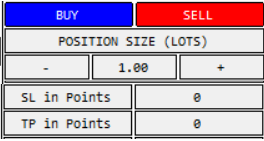
Something like this, very simple, so we could have a bracket order quickly:
Regarding the trailing stop method, I think that the PSAR method milks more pips from a trade when we are away from the computer, more than the ATR.
Hello Manuel, I hope you are doing well. Can you compile a version where we could set the lot size, stop loss and take profits manually?
Something like this, very simple, so we could have a bracket order quickly:
Regarding the trailing stop method, I think that the PSAR method milks more pips from a trade when we are away from the computer, more than the ATR.
Hi @beto_gauer, this trade panel was intended to follow the NNFX method specifically (which doesn't leave room for much customization, but makes it easier to mantain/use).
I once did a more generic panel similar to the one of your image when I was starting in MQL4 actually (but it was much worse than this one), so definitely I could "craft" something when I find some free time (maybe I'll put it on a different product, just to avoid over-complicating this one). If I do, I'll notify you if you want to
Hi @beto_gauer, this trade panel was intended to follow the NNFX method specifically (which doesn't leave room for much customization, but makes it easier to mantain/use).
I once did a more generic panel similar to the one of your image when I was starting in MQL4 actually (but it was much worse than this one), so definitely I could "craft" something when I find some free time (maybe I'll put it on a different product, just to avoid over-complicating this one). If I do, I'll notify you if you want to
Thanks so much for replying. Yes I would love to, please notify me.
The only "advanced" parameter of this simple one click bracket order would be a trailing stop based on PSAR parameters, but better to adjust those parameters in indicator settings instead of the trading panel, to avoid clutter and so the panel can be very small in the corner of the screen.
Best regards!
Hi, make sure automated trading is not disabled (in the expert AND in the terminal). That usually happens to me when I switch accounts and the terminal disables auto trading in general (the shortcut to the terminal filter is ctrl+e, and the expert one appears in its properties).
If the problems still persist, I would appreciate if you checked the log (Experts tab) to find more info about the error (the disabled auto trading would appear too).
I think some bugs can appear because of low slippage tolerance by the expert, but I cannot confirm this yet. Will update the expert if I find anything.
Hey Manuel,
Algo trading is on. In the log it says symbol error, pair is not visible but i have show all in market watch, it also says risk is too small but i have tried with 10% risk trades and still same error.
Hey Manuel,
Algo trading is on. In the log it says symbol error, pair is not visible but i have show all in market watch, it also says risk is too small but i have tried with 10% risk trades and still same erro
Apologies Manuel,
Figured it out. It was because i was using pairs with .pro at the end. Works like a charm on regular pairs. Thanks so much!
Apologies Manuel,
Figured it out. It was because i was using pairs with .pro at the end. Works like a charm on regular pairs. Thanks so much!
No worries, glad you liked it!
Yes, I think it can only work properly in regular pairs (never heard about .pro pais before)
Hello great panel, does this work only for fx pairs only, no metals, indices?
Hi, it was designed (and tested) for forex symbols. In theory it should work in metals and indices too (also depends on the currency of the index, and your broker's available symbols). In any case if I were you I would test in demo, just in case (even though if there are errors in the calculations it shouldn't open any trade, check the Experts log for more info).
The ATR for TP and SL can be changed in the input settings, in case you want it at 1.25 (or any other value).
Hi, it was designed (and tested) for forex symbols. In theory it should work in metals and indices too (also depends on the currency of the index, and your broker's available symbols). In any case if I were you I would test in demo, just in case (even though if there are errors in the calculations it shouldn't open any trade, check the Experts log for more info).
The ATR for TP and SL can be changed in the input settings, in case you want it at 1.25 (or any other value).
Thanks for the info very valuable tool do you offer an mt4 version without a news filter
Not yet, I made this panel entirely on MT5 so I would need to translate it to MT4. However, I published a similar panel in the code base long ago when I was starting (if you use this "primitive" version, take into account that there may be some bugs since I haven't updated it for a very long time).
Not yet, I made this panel entirely on MT5 so I would need to translate it to MT4. However, I published a similar panel in the code base long ago when I was starting (if you use this "primitive" version, take into account that there may be some bugs since I haven't updated it for a very long time).
Great tool
can you fix to round the numbers when close partial as it gives error if it odd numbers like 3
thanks for the great effort and it could be fixed sl and tp not based on ATR will be highly appreciated
Great tool
can you fix to round the numbers when close partial as it gives error if it odd numbers like 3
thanks for the great effort and it could be fixed sl and tp not based on ATR will be highly appreciated
sorry about that comment it was for old one
Great tool
can you fix to round the numbers when close partial as it gives error if it odd numbers like 3
thanks for the great effort and it could be fixed sl and tp not based on ATR will be highly appreciated
Hi, thanks for the feedback
For a more general/flexible functionality check out the simple trade panel, which works similarly but allows to put custom sl/tp: https://www.mql5.com/en/market/product/65338
I'm sorry but I didn't quite understand the error, I've never tried to close partial, where is that odd number?
Hi Manuel,
The EA works like a charm, thanks for your work. Is it supported in backtesting as well? Tried it to no joy...
Hi Manuel,
The EA works like a charm, thanks for your work. Is it supported in backtesting as well? Tried it to no joy...
Simple Order Panel - expert for MetaTrader 5
Source code of simple order panel which you can customize at your will.
The code compiles both for MT5 and MT4 (the mq4 needed would look the same as the mq5 included here). I recommend compiling the MT4 version using the Controls library from MT5 though.
Some fixes when dealing with templates will require a few simple modifications in the standard Controls library, but those haven't been included here. The original program icon is also not included.
![]()
Hola, quisiera descargarme éste Expert, no puedo acceder al mismo. Saludos