Decision Zone
ダウンロードされたデモ:
556
パブリッシュ済み:
22 8月 2019
現在のバージョン:
1.20
Didn't find a suitable robot?
Order your own one
on Freelance
フリーランスにアクセス
Order your own one
on Freelance

取引の機会を逃しています。
- 無料取引アプリ
- 8千を超えるシグナルをコピー
- 金融ニュースで金融マーケットを探索
This Indicator Decision Zone is not appearing on
my chart after installed.Please do something to
fix it or you send me another one.
Waiting for your response asap.
Temitayo King.
This Indicator Decision Zone is not appearing on
my chart after installed.Please do something to
fix it or you send me another one.
Waiting for your response asap.
Temitayo King.
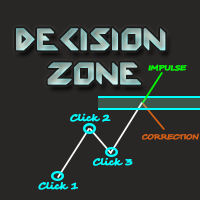
Hello Temitayo King, You need to identify a high or low point, press "A" (if it is high) or "B" (if it is low) and then follow 3 clicks on the pivot points ... Watch this video
https://youtu.be/oKcufBatglE
Oi Flávio, no meu gráfico não está aparecendo nada, não acho a linha verde, não aparace nada mesmo depois de pressionar T, H, A OU B.
Olá John, você precisa apertar a tecla 'A' e em seguida realizar os cliques no pivô de alta. No caso da tecla 'B' é para os pivôs de baixa.
A tecla 'T' ativa todos os níveis, então se você quer que apareça todos os níveis na hora de plotar a zona de decisão, faça o seguinte:
Aperta a tecla 'T' e todos os níveis serão ativado, após isso basta utilizar a tecla 'A' ou 'B' e realizar os três cliques no pivô para plotar a zona de alta ou de baixo
O vídeo abaixo pode ficar mais claro pra você:
https://youtu.be/oKcufBatglE
This Indicator Decision Zone is not appearing on
my chart after installed.Please do something to
fix it or you send me another one.
Waiting for your response asap.
Temitayo King.
Hello Temitayo, you need to drag the indicator to the chart you want to trade and follow the instructions in the description to use it.