RBR Prop Check
- インディケータ
- バージョン: 1.0
- アクティベーション: 10

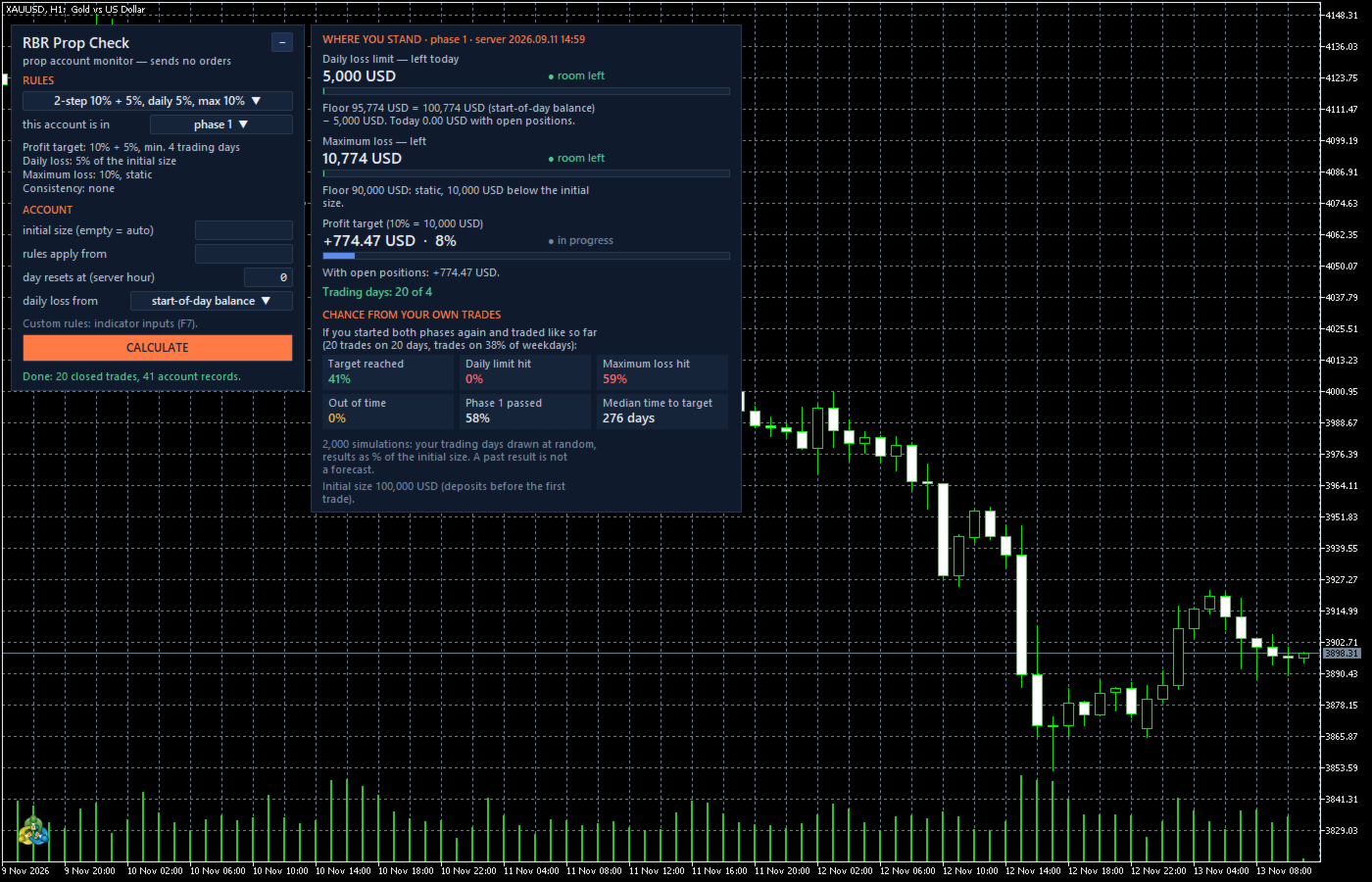
RBR Prop Check shows where your prop account stands against the rules you trade under: how much you can still lose today and in total, how far the profit target is, how many trading days you have, whether the consistency rule is met, and what chance of reaching the target your own trades give, estimated with 2,000 simulations. It is an indicator, so it runs next to your Expert Advisor on the same chart. It sends no orders and does not connect to the internet.
What it shows
- Daily loss limit: the money left until today's limit, open positions included. It is measured from the start-of-day balance, or from the higher of balance and equity when the indicator was running as the day began. The limit can be a % of the initial size or of the start-of-day balance.
- Maximum loss: the money left until the floor. The floor can be static, trailing the highest end-of-day balance, trailing the highest intraday equity, or trailing until it reaches the initial size.
- Profit target: the closed result and the result with open positions against the target of the current phase.
- Trading days: days with at least one new trade against the required minimum, counted by the hour at which your day resets.
- Consistency rule: your best day as a share of the profit, how much more profit is needed to meet the rule, and the most a single day can bring without breaking it. Three variants: share of the net profit, share of the profitable days, daily profit cap.
- Chance from your own trades: your closed trades are grouped into trading days, and 2,000 simulated runs draw those days at random under the same rules. The panel shows how often the target comes first, how often the daily or the maximum loss limit ends the run, how often time runs out, and the median number of days. On a funded account it shows how often a limit is hit within 12 months.
Rules
- Presets with common rule shapes: 2-step 10% + 5%, 2-step 8% + 5%, 1-step 10% with a trailing maximum loss, and a funded account. Your own values go into the indicator inputs.
- The indicator does not know the rules of any firm. Always enter the rules of your own account.
- Colours: green while more than half of a limit is left, orange below half, red below a quarter or when the limit is reached.
How to use it
- Attach RBR Prop Check to any chart of the prop account.
- Choose the rules preset or enter your own rules in the inputs, then the stage of the account (phase 1, phase 2, funded) and the hour at which your day resets.
- If the account history starts with the deposit of the account size, the initial size is found automatically. Otherwise type it in the panel. If the account was used before, set the date from which the rules apply.
Notes
- The start-of-day equity and the highest intraday equity are known only while the indicator is running. Until then the balance is used, and the panel says so.
- The chance is estimated from your past trades and is not a forecast. Below 10 closed trades it is not shown.
- The panel follows the terminal language (English, Polish, German) or the language chosen in the inputs.
- The values come from the terminal's own data. The dashboard of your firm is the final reference.