SHORT DESCRIPTION
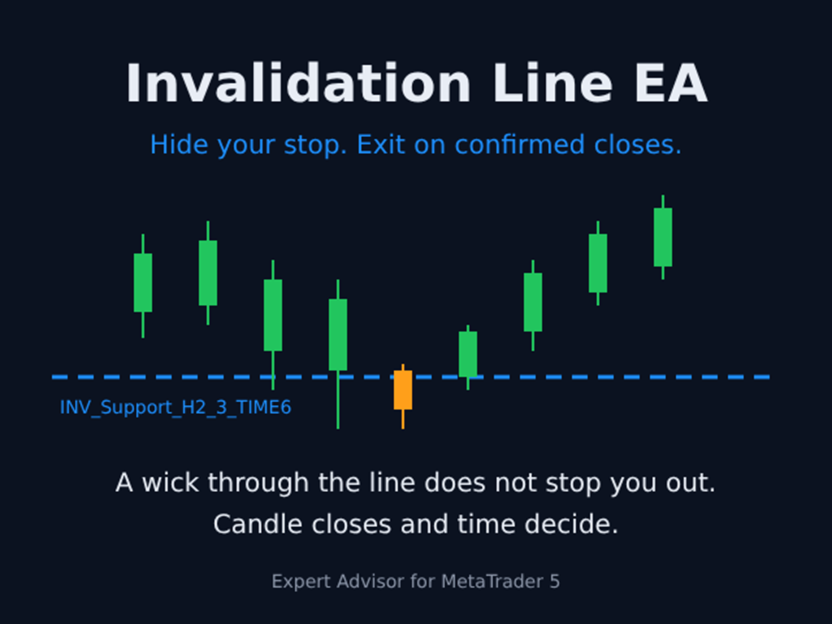
Hide your stop loss on the chart. The EA closes only after confirmed candle closes, not wicks.
FULL DESCRIPTION
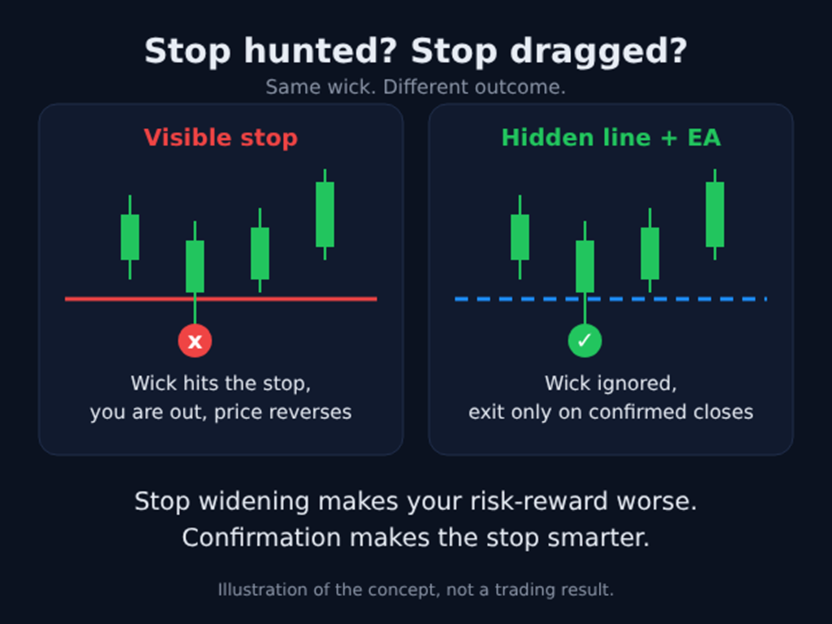
Have you ever widened your stop to give a trade more room, only to be stopped out and watch price reverse? Most traders have. Widening a stop makes your risk-reward worse, and a stop that sits at an obvious level is easy to wick through.
Invalidation Line EA takes a different approach. Instead of a hard stop at the level, you draw a line where your trade idea is invalid. The EA watches that line and exits only when the breach is confirmed by candle closes, a time delay, or both. A quick wick through the line does not take you out.
HOW IT WORKS
1. Draw a horizontal line or trend line on the chart.
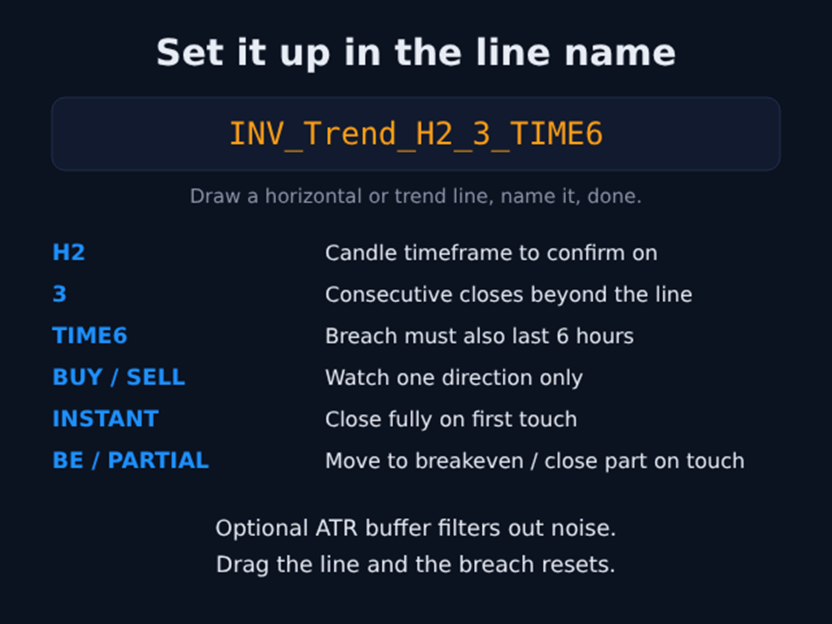
2. Name it with the prefix INV_ and add tokens to set the rules. Example: INV_Trend_H2_3_TIME6
- H2 = confirm on H2 candles
- 3 = three consecutive closes beyond the line
- TIME6 = the breach must also last 6 hours
3. The EA monitors the line. If the confirmation rules are met, it closes the position. If price returns first, the breach resets.
KEY FEATURES
- Confirmation by candle closes, by time, or both, set separately for every line
- Supported timeframes: M1 to monthly (M1, M5, M15, M20, M30, H1, H2, H4, H6, H8, H12, D1, W1, MN)
- Works with horizontal lines and sloping trend lines
- Optional ATR buffer zone to filter out noise
- Direction filter per line (BUY or SELL tokens)
- Optional on-touch actions: INSTANT full close, move to breakeven (BE), or partial close (PARTIAL)
- Multi-chart mode: one EA instance can watch lines on all open charts
- Optional session filter
- Alerts: pop-up and push notification
- On-chart dashboard showing every line, its settings and its state
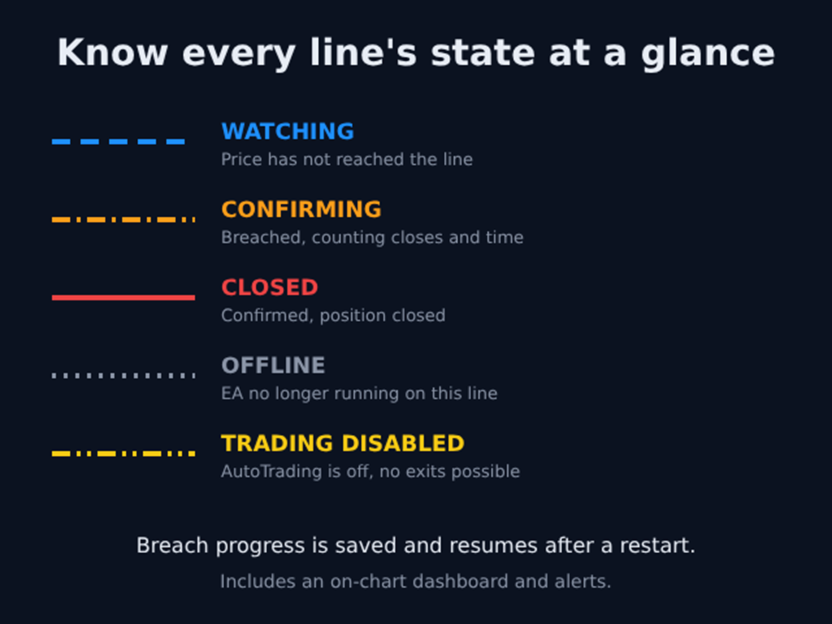
- Color-coded lines: watching, confirming, closed, offline, trading disabled
- Drag a line and its breach state resets automatically
- Breach progress is saved, so a terminal restart does not lose it. If price crossed the line while MT5 was closed, the EA reconstructs the breach from price history when it reopens
- Rename-aware: renaming a line keeps its age and progress when its confirmation rules are unchanged
- Retries a failed close with an alternative order filling mode
- Optional alert if price returns after a position is closed
IMPORTANT TO KNOW
- This EA manages exits only. It does not open trades and it does not predict price.
- The line is not a server-side stop. The EA must be running, connected and allowed to trade for it to act. If your PC, VPS or internet connection goes down, or AutoTrading is turned off, nothing is protecting the position. Many traders keep a wide emergency stop at the broker as a backup.
- Waiting for confirmation means the exit can happen at a worse price than the line, and in a fast move the loss can be larger than a hard stop would have allowed. Confirmation trades a smaller chance of being wicked out for a larger loss when a breach is real. Choose the settings with your own risk in mind.
- It acts on the open positions of the chart symbol. With no direction token, a line applies to any open position on that symbol.
- Results depend on your lines, your settings and the market. Nothing here is a profit promise or a guarantee of fewer stop-outs.
SETTINGS (all act as defaults for lines that have no tokens in their name)
- Confirmation: use candle closes, timeframe, number of closes, use time, hours to wait
- On-touch action, breakeven fallback, partial close percentage
- ATR buffer: on/off, timeframe, multiplier, period
- Session filter: on/off, start and end time (server time)
- Downtime recovery: late on-touch action if a line was touched while MT5 was closed
- Re-entry alert, pop-up and push alerts
- Dashboard: show/hide, corner, sort order
- Multi-chart mode
TOKEN NOTES (USAGE)
//| NAME SYNTAX: |
//| INV_[label]_[tokens...] |
//| |
//| TOKENS (order-independent, case-insensitive): |
//| INSTANT → Full close on touch, no confirmation |
//| BE → Move to Breakeven on touch |
//| PARTIAL → Partial close on touch |
//| BUY → Only watches BUY positions |
//| SELL → Only watches SELL positions |
//| M1/M5/M15/M20/M30 → UsePeriod=true, ConfirmPeriod=that TF |
//| H1/H2/H3/H4/H6/H8/H12 → UsePeriod=true, ConfirmPeriod=that TF |
//| D1/W1/MN → UsePeriod=true, ConfirmPeriod=that TF |
//| [1-9] → RequiredCloses=that number |
//| TIME[n] → UseTime=true, WaitHours=n |
//| |
//| EXAMPLES: |
//| INV_Soft_H4_2 wait 2xH4 closes (global touch action) |
//| INV_Hard_INSTANT full close immediately on touch |
//| INV_Trend_H1_TIME4 1xH1 close AND 4h sustained breach |
//| INV_Entry_BE_D1 move to BE on touch, wait D1 confirm |
//| INV_Structure uses all global EA input defaults |
//| |
//| Prefix: INV_ or inv_ |
//| Single-chart or multi-chart mode |
//| Naming conflicts resolved via ChartID::ObjectName key |
//| |
//| LINE STYLES: |
//| WATCHING : DodgerBlue, dashed |
//| CONFIRMING : Orange, dash-dot |
//| CLOSED : Red, solid |
//| OFFLINE (EA gone) : Gray, dotted |
//| TRADING DISABLED : Yellow, dash-dot-dot |
//+------------------------------------------------------------------+
RECOMMENDATIONS
- Works on any symbol and any timeframe you can draw a line on.
- Run it on a VPS so it stays connected.
- Test on a demo account first and watch how the dashboard moves through WATCHING and CONFIRMING.
- Pick the confirmation timeframe from the structure you trade, for example H2 or H4 closes for swing trades.
Author: Ebuka Obiakor is an AI Product Manager and Business Analyst based in Calgary, Alberta, Canada. He holds an MBA, A-CSPO, and CBAP certifications. He is an independent retail trader with handson experience in MQL5 indicator and EA development.