Opening Range Breakout Master

58 USD
ダウンロードされたデモ:
192
パブリッシュ済み:
23 5月 2025
現在のバージョン:
1.5
Didn't find a suitable robot?
Order your own one
on Freelance
フリーランスにアクセス
Order your own one
on Freelance

取引の機会を逃しています。
- 無料取引アプリ
- 8千を超えるシグナルをコピー
- 金融ニュースで金融マーケットを探索
$700 Pure Profit , Keep up the awesome work Bro!
Boom! $700 pure profit! love to see it! Thanks for sharing the win, bro. Keep riding those setups and stacking gains. Let me know if you need any tweaks or want to explore more strategies. Appreciate you!
Hey everyone, version 1.1 is now live and ready to use! This update brings some major improvements.
First off, the EA is now fully optimized for 1-pip instruments like Gold, BTC, ETH, US30, NAS100, and SPX500. You can easily add your preferred instrument in the inputs, and it’ll handle order execution with much better precision across all market types.
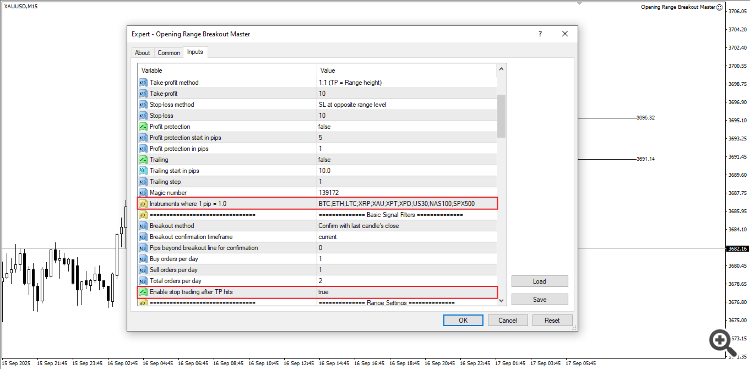
We’ve also added session based profit protection, meaning the EA will automatically stop trading once it hits the take profit target for each session. This helps prevent overtrading and locks in your gains. Even if the daily order limits aren’t reached yet, it’ll stop after the latest trade hits TP.
Another big upgrade is the new trend confirmation filter. It only allows trades when the breakout direction matches the overall market trend, which really improves trade quality and success rates. You can enable or disable this in the inputs, choose higher timeframes for trend direction, and even set how many candles to use for trend calculation.
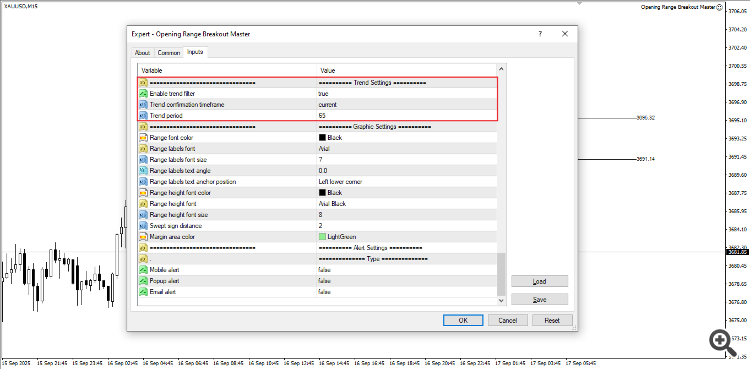
I’ve backtested this on Gold over the last six months, and the results look interesting. I’ll share those results and some setfiles here soon.
I strongly recommend running this new version in demo first to get familiar with how it works. Once you’re comfortable, you can switch to live. Hope you enjoy the update!
The A_2025_1_68% Strategy Tester Report for XAUUSD was based on six months of historical data using a $5000 initial deposit. The total net profit for this period was $6207.46 with a win rate of 68.11%. To maximize returns, I used automatic lot sizing that adjusts based on account balance, which resulted in a maximal drawdown of $1190.75 (12.19%). If you're trading with a smaller account, I'd recommend disabling the lot management feature to better control risk. Keep in mind these are backtesting results for evaluation purposes only, actual trading performance may vary due to market conditions and other factors.
The Opening Range Breakout Master EA’s A_2025_2_78% Strategy Tester Report for XAUUSD used six months of historical data with a $5000 starting balance. During this test, the EA generated $8268.59 in net profit with a 78.42% win rate. To improve performance, the stop loss was widened to 30 pips, though this also increased the maximal drawdown to $2024.86, or 21.11% of the account. These results are based on past data for testing purposes only, and real trading outcomes can differ due to market conditions and other variables.
Hi, I purchased your EA. I live in the UK. How do I set it to open sessions? Do you have a .set file?
Ciao, grazie per aver acquistato l'EA! La posizione non ha importanza, ciò che conta è il fuso orario del server del tuo broker. Le impostazioni predefinite dell'EA sono impostate su GMT+3 e la descrizione del prodotto elenca gli orari delle sessioni in GMT+0 come riferimento. Ho condiviso due file di configurazione per XAUUSD nei commenti qui sopra, anch'essi basati su GMT+3. Quale fuso orario utilizza il tuo broker? Una volta che lo saprò, potrò aiutarti a modificare facilmente gli orari delle sessioni.
Hi, my broker is fpmarket and in the UK they use GTM+2, which becomes GTM+3 with daylight saving time. I also wanted to ask if it was possible to set the EA to use 15-minute candles instead of one-hour ones, so that it bases its logic on the highs and lows of that candle. Thanks.
Hey, that's perfect... since your broker uses GMT+2 (which becomes GMT+3 with daylight saving), you can just use the EA's default time range settings as they are.
And yes, you can definitely set the EA to use 15 minute candles instead of 1 hour ones. The EA will calculate the high and low of whatever timeframe you choose. Just be careful using lower timeframes like 15 minutes for breakout confirmation can sometimes give more false signals because the ranges are smaller and more sensitive to price noise. That's why I personally used the 1 hour timeframe for my backtesting set files.
Let me know how it goes with the 15 minute charts! Would be great to hear your results.
Answer: You can control how many trades the EA attempts per session using the "Buy orders per session" and "Sell orders per session" inputs, plus the "Total orders per session" setting. In the upcoming v1.2 update, I’ve also added a new option called "Enable stop trading after take-profit hits" to give even more control over these limits.
Keep in mind, if the first trade fails or hits stop loss, the EA will only open another trade if all conditions line up again, meaning there has to be a clear new breakout confirmed by candle close. It won’t just re-enter because price is hovering near the level. And once the daily session limits are reached, it stops trading until the next session. The new version is still in testing, but it’s designed to offer more flexibility while keeping things controlled.
Answer: Right now, the EA includes a lot size management feature that adjusts position sizes based on your account balance and a set risk percentage. However, it's designed to reduce the lot size after a losing trade to help manage risk, not increase it to recover losses. That said, I can definitely add an option in a future update to allow increasing the lot size after a loss, similar to a recovery or martingale approach, if that’s something you’d find useful.
Answer: Yes, I can also look into adding a hedging mode in a later version. It’s technically possible and something I can build into the EA.
Answer: While the EA can be tuned for different strategies, I haven’t personally tested it under prop firm conditions. It’s important to carefully review and align the EA’s behavior with the specific rules of the challenge (like avoiding over trading, respecting drawdown limits, etc.). If used wisely, it may help, but always test it thoroughly in demo under those rule sets first.
Opening Range Breakout Master v1.2 is now available!
A big thank you to everyone who shared ideas, this update includes several key improvements based on your feedback.
What’s New:
Important Before Updating:
Happy trading, and thank you for your continued support.
$700 Pure Profit , Keep up the awesome work Bro!
Hello, did you use the default settings?
Thanks
Hello, did you use the default settings?
Thanks
Hey Walter,
Just wanted to share a few tips that have helped traders consistently profit with the EA.
If you have a solid account balance and can handle higher risk, enable "Risk based position sizing" and adjust the "Maximum risk percentage" to what you're comfortable with per trade, this automatically tailors your lot size to your balance.
Stick to timeframes like the 15 minute chart or H1 for breakout confirmation. Lower timeframes like M1 or M5 can give false signals. For take profit, set manual but realistic targets for each pair, smaller goals get hit more frequently.
If you're aiming for a daily target like $700, spread it across multiple pairs using the "Enable daily basket TP/SL" feature. Once your total profit across all pairs reaches the set percentage based on your account, the EA closes all trades and stops for the day.
The v1.2 default settings are tuned for Gold, but you're ultimately the one who decides the best settings based on your testing. Never trade live until you're fully comfortable with the EA’s behavior in demo. Test, tweak, and tailor everything to your style, your experience is what will make the strategy truly work for you.
Let me know how it goes!
Answer: In version 1.2, I added a new loss recovery feature that lets you choose to increase or decrease lot sizes after a losing trade. Take a look at the screenshot I attached, it shows where to find the setting.
Answer: This EA uses your broker's server time to plot each trading session, but the strategy itself is described in GMT+0 for universal reference. To set it up correctly, you'll first need to check your broker's server time offset.
For example, if your server runs on GMT+2, you'd adjust the London session from 07:00–08:00 GMT to 09:00–10:00 server time.
if your server is GMT+3, that same London session would become 10:00–11:00 your local server time.
If your server is GMT+7, that same London session would become 14:00–15:00 your local server time.
An online time zone converter can help make this easier. Always test these settings in demo first to make sure everything lines up as expected with your broker’s time.
Answer: The EA doesn’t have a built in hedging feature. However, if a previous trade hasn’t hit its take-profit and the next session also shows a signal, it may open another trade, which could be in the opposite direction. You’ll need to adjust the settings to prevent this from happening.