 すべての注文
 ルール
ルール
指定
MT4 EA MINIMAL OPERATIONAL PANEL - V03
This is an operational panel to send orders and make some calculations, but inside some specifications.
The panel has to be minimalist and small compact with good visibility of the text. Use the disposition and colors of the picture. Please, reduce all boxes and panel size at the maximum.
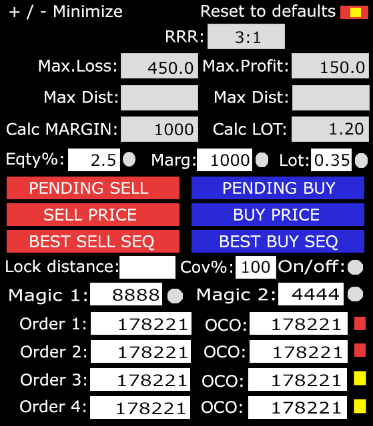
FUNCTIONS--------------------- ----------------------------
"+/- Minimize": to minimize de panel to show only a "+";
"Reset to defaults": is to reset to defaults stated in F/ configurations;
"RRR": is to calculate the relation between "Max.Loss" ans "Max.Profit" (3:1), where the profit is always "1";
500 to 500 is 1:1, 1000 to 500 is 2:1, 500 to 1000 is 0.5:1;
"Max.Loss": Is the maximum value that the orders can loss in one pair, opened, pending and SLs. If one direction has no protection for negative risk, it has to be and horizontal "8", infinite. The EA has to make all calcs with all orders and give the maximum value that it can lose;
"Max.Profit": Is the maximum value that the orders can profit in one pair, opened, pending and TPs. If one direction has no protection for positive risk, it has to be and horizontal "8", infinite. The EA has to make all calcs with all orders and give the maximum value that it can profit;
"Eqty%": is X % of the total equity in margin, lots, etc...
"Marg": if about the selection below, "Equity %", "Marg" or "Lot" can represent in margin value for this pair; How is the cost of one lot of this pair in margin... If I select "Eqty%" with a value of 2.5%, is 2.5% of the equity. If I select in lots, it has to calc the margin of X lot in this pair, etc.. Such we select one of the radio option, it have to show the conversion in margin cost;
"The "Lot", is the same, the cost in margin for X lot in this pair. Such we select one option, it has to calc the correspondence in real-time;
Button "PENDING SELL": Is to open an order pending for SELL with the distances stated below and with the selection above of lot, by margin or %...;
Button "PENDING BUY": Is to open and order pending for BUY with the distances stated below and with the selection above of lot, by margin or %...;
Button "SELL PRICE": Is to open an order SELL at the price with the value stated by the options above;
Button "BUY PRICE": Is to open an order BUY at the price with the value stated by the options below;
Note:
if buy, the sell order is "above" the price X distance;
if sell, the buy order is "below" the price X distance...
"Magic #1": is to open orders with this magic;
"Magic #2": is to open orders with this magic.
SETTINGS---------------------- ----------------------------
Default values for the panel
Arred calculated lots for orders: "below or above" NEW!
NOTEs:
- You can clean the front boxes of the pending distances and keep them inside F7 Settings. NEW!
- You can put two gray boxes with the calculated distances below "Max.Loss" and "Max.Profit" with the names "Max.Dist" in the two boxes, Loss and Profit... NEW!
Equity %: "2.5" (default selected radio button)
Margin value: "500"
Lot: 0.15
Default selected radio button: "1" (1, 2 or 3)
Distance above direction: "250" (I need to move them by hand without EA position control, only with the value calculations)
Distance below direction: "250"
Invert position "Distance": "false/true"
TP Pending orders ON/OF: "false/true" NEW!
TP Distance points: "XXXX" NEW!
SL Pending orders ON/OF: "false/true" NEW!
SL Distance points:"XXXX" NEW!
Magic #1: "8888" (default selected radio button)
Comment #1: "XXXXXXXX" NEW!
Magic #2: "9999"
Comment #2: "XXXXXXXX" NEW!
Lock --------------------- NEW!
Lock Default ON/OFF: "True/False"
Lock % opposite position: "100"
Lock SL distance points: "X" (0, no SL)
Lock Slipage points: "X" (the minimum space to re-open the lock after SL close)
Lock SL cycles: "X" (how many tiles rearm the lock after an SL close. After the end of cycle, maintain the lock without SL)
Lock TP points: "X" (0, without TP)
Lock Trailing Stop TRIGGER points: "X" (0, no trailing)
Lock Trailing Stop Start points: "X"
Lock Step points: "X"
Lock Trailing Start move multiplier: "1.5" (if the price move 1 pip, the trailing move 1.5)
NOTE: Some times, I need to move the lock, but I need that the EA can be in control with the new distance...
Box position ------------
Position Y: "XXXX" (default upper left corner)
Position Z: "XXXX" (default upper left corner)
------------------------------ ------------------------------ ----
Button Start SEQ SELL & BUY (OCO BEST BUY) NEW!
STEPS
Number of STEPS: "1", "2" till "5"
NOTE:
if 5 STEPs, divide the attributed lot, from the selected Equity%, marg or lot.. by 5 STEPS and use it in all STEPS, If 4... divide the attributed/selected Equity%, marg or lot.. by the 4 STEPS... till 1 STEP.) We can put a general configuration for the ARRED, if we arred the lot below or above.
Distance Positive STEP#5: "250"
Distance Positive STEP#4: "200"
Distance Positive STEP#3: "150"
Distance Positive STEP#2: "100"
Distance Positive STEP#1: "50"
Price ---
Distance Negative STEP#1: "25"
Distance Negative STEP#2: "50"
Distance Negative STEP#3: "75"
Distance Negative STEP#4: "100"
Distance Negative STEP#4: "125"
Lights in front of OCO Boxes: when the orders is valid is yellow and if is in fault one of them, is in red.
NOTES:
When we click on the button SELL or BUY, the EA open this 10 STEPS, 5 above the price and 5 below the price;
The order is, when the button SELL, the Positive STEPS has to be below the price and the Negative STEPS has do be above the price, all with the distances stated for each STEP, to BUY, the Positive are above and the negative, below the price.
About the OCO logic, one order cancels the other: When you reach the "Positive STEP#1" you have to close the "NegativeSTEP#5", Positive STEP#2, close Negative STEP #4... always you reach an order Positive or Negative, you have to close the opposite more distant order, for one side or for the other. At the end, if ten steps, 5 above and 5 below, we only reach maximum 5, for 4, maximum, 4 for each side, 3...etc...
------------------------------ ------------------------------ -----
OCO NEW!
NOTE:
The boxes "Order 1", "Order 2", "Order 3" and "Order 4" is to insert the ID of the order (pending or opened).
The boxes OCO, are to put the ID of the orders to cancel.
Example, when you reach "Order 1" (TP, SL in an opened order or open a pending) you cancel or close the order on OCO 1, etc..
The orders can be anyone, pending or opened.
***** IMPORTANT *****
100% Full Ownership of the Intelectual piece, Full distribution Right and Unlimited License for all effects - All rights and ownership are exclusive and the source code has to be supplied to me as my own and total property. The source code has to be supplied fully compliant with the rules of the MQL5 market for the Metatrader 4