記事「Candlestick Trend Constraintモデルの構築(第8回):エキスパートアドバイザーの開発 (I)」についてのディスカッション
2024.08.15 00:47:15:123
2024.08.15 00:47:15.123 2024.08.01 00:00:00 cannot loadcustom indicator'Trend Constraint V1.09' [4802]カスタムインジケータを ロードできません。
2024.08.15 00:47:15.123 2024.08.01 00:00:00 インジケータ作成エラー 'Trend_Constraint_Expert.mq5' (1,1)
argatafx28 custom indicator'Trend Constraint V1.09' [4802]カスタムインジケータを ロードできません。
2024.08.15 00:47:15.123 2024.08.01 00:00:00 インジケータ作成エラー 'Trend_Constraint_Expert.mq5' (1,1)
こんにちは、@argatafx28 です。
- EAが機能するために、インジケータTrend Constraint V1.09がインストールされていることを確認してください。
- Trend Constraint V1.09は電文を統合するためにShellExecuteを 使用しますが、インジケーターを起動する際に依存関係のDLLを許可するようにしてください。
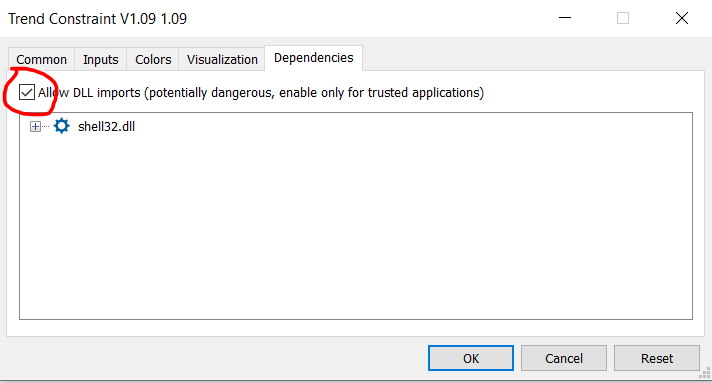
ちなみにどのOSをお使いですか?

Building A Candlestick Trend Constraint Model (Part 5): Notification System (Part II)
- www.mql5.com
Today, we are discussing a working Telegram integration for MetaTrader 5 Indicator notifications using the power of MQL5, in partnership with Python and the Telegram Bot API. We will explain everything in detail so that no one misses any point. By the end of this project, you will have gained valuable insights to apply in your projects.

取引の機会を逃しています。
- 無料取引アプリ
- 8千を超えるシグナルをコピー
- 金融ニュースで金融マーケットを探索
新しい記事「Candlestick Trend Constraintモデルの構築(第8回):エキスパートアドバイザーの開発 (I)」はパブリッシュされました:
今回は、前回の記事で作成した指標を元に、MQL5で最初のエキスパートアドバイザー(EA)を作成します。リスク管理を含め、取引プロセスを自動化するために必要な全機能を紹介します。これにより、手動の取引執行から自動化されたシステムへとスムーズに移行できるメリットがあります。
作者: Clemence Benjamin