Anatoli Kazharski / Profilo
- Informazioni
|
14+ anni
esperienza
|
2
prodotti
|
2806
versioni demo
|
|
28
lavori
|
0
segnali
|
0
iscritti
|
When developing trading algorithms, we often encounter a problem: how to determine where a trend/flat begins and ends? In this article, we try to create a universal indicator, in which we try to combine signals for different types of strategies. We will try to simplify the process of obtaining trade signals in an expert as much as possible. An example of combining several indicators in one will be given.
This is the second part of the article showing the development of a multi-symbol signal Expert Advisor for manual trading. We have already created the graphical interface. It is now time to connect it with the program's functionality.
And the ON_END_CREATE_GUI event is not being triggered, could you give your latest version of EasyAndFastGUI? Thanks!
Despite the fact that many traders still prefer manual trading, it is hardly possible to completely avoid the automation of routine operations. The article shows an example of developing a multi-symbol signal Expert Advisor for manual trading.
In the article, we continue to develop the MQL application for working with optimization results. This time, we will show how to form the table of the best results after optimizing the parameters by specifying another criterion via the graphical interface.
This is a continuation of the idea of processing and analysis of optimization results. This time, our purpose is to select the 100 best optimization results and display them in a GUI table. The user will be able to select a row in the optimization results table and receive a multi-symbol balance and drawdown graph on separate charts.
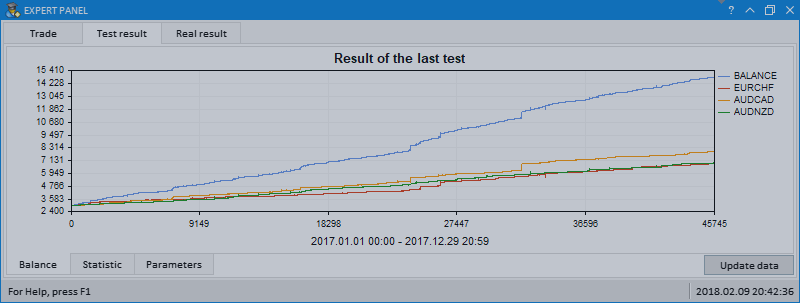
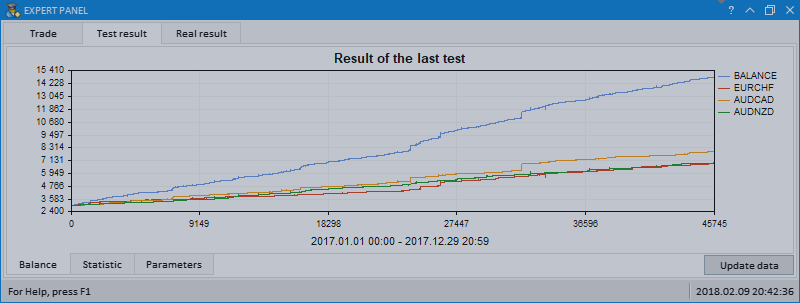
The article provides an example of an MQL application with its graphical interface featuring multi-symbol balance and deposit drawdown graphs based on the last test results.
The article implements an MQL application with a graphical interface for extended visualization of the optimization process. The graphical interface applies the last version of EasyAndFast library. Many users may ask why they need graphical interfaces in MQL applications. This article demonstrates one of multiple cases where they can be useful for traders.
A new version of the graphics library for creating scientific charts (the CGraphic class) has been presented recently. This update of the developed library for creating graphical interfaces will introduce a version with a new control for creating charts. Now it is even easier to visualize data of different types.
In this update of the library, the Table control (the CTable class) will be supplemented with new options. The lineup of controls in the table cells is expanded, this time adding text edit boxes and combo boxes. As an addition, this update also introduces the ability to resize the window of an MQL application during its runtime.
In the new version of the library, all controls will be drawn on separate graphical objects of the OBJ_BITMAP_LABEL type. We will also continue to describe the optimization of code: changes in the core classes of the library will be discussed.
As the library grows, its code must be optimized again in order to reduce its size. The version of the library described in this article has become even more object-oriented. This made the code easier to learn. A detailed description of the latest changes will allow the readers to develop the library independently based on their own needs.
This article will implement the ability to select text using various key combinations and deletion of the selected text, similar to the way it is done in any other text editor. In addition, we will continue to optimize the code and prepare the classes to move on to the final process of the second stage of the library's evolution, where all controls will be rendered as separate images (canvases).
We continue to develop the Multiline Text box control. This time our task is to implement an automatic word wrapping in case a text box width overflow occurs, or a reverse word wrapping of the text to the previous line if the opportunity arises.
We continue to add new features to the rendered table: data sorting, managing the number of columns and rows, setting the table cell types to place controls into them.